

Top
Author
Published
7 Oct 2026Form Number
LP2512PDF size
15 pages, 1.8 MBSubscribed to LP2512.
Thank you for your feedback.
Table of Contents
Executive Summary
This document demonstrates how Lenovo ThinkSystem storage can provide a reliable foundation for Veeam-powered backup and recovery across VMware, Windows, and Linux environments.
The validation uses Lenovo ThinkSystem servers, Fibre Channel SAN connectivity, ThinkSystem DM, DG, and DS primary storage, and ThinkSystem DM and DE backup repositories to show how virtual machine and file-level workloads can be protected and restored using Veeam Backup & Replication.
The storage families are included to represent different enterprise requirements. ThinkSystem DM provides unified block and file storage with advanced ONTAP data-management and protection capabilities. ThinkSystem DG extends the ONTAP-based architecture with NVMe-accelerated performance for demanding workloads.
ThinkSystem DS provides flexible, high-performance block storage for primary application and virtual machine workloads. ThinkSystem DE provides scalable, performance-oriented block storage suitable for backup repositories and rapid recovery. Together, these platforms demonstrate how organizations can align primary and backup storage with workload, performance, capacity, and data-protection requirements.
Scope
The proposed solution uses Lenovo ThinkSystem servers with ThinkSystem DM, DG, DS, and DE storage systems to support VMware, Windows, and Linux environments. ThinkSystem DM, DG, and DS systems represent primary storage options, while ThinkSystem DM and DE systems are validated as Veeam backup repositories.
The selected storage platforms illustrate how organizations can match primary and backup infrastructure to specific workload, performance, capacity, and recovery requirements.
As part of the validation process, the solution must demonstrate the ability to perform full and incremental backups of virtual machines as well as host system files. It must also be shown that, in the event of a system failure, all backed up data can be successfully restored without errors.
Architecture and Configuration
The following figure shows a common backup and recovery architecture that is used within a single location but uses different type of Lenovo DE/DM/DG/DS series storage systems and Veeam platform.
The diagram below provides a conceptual view of the design and solution flow.
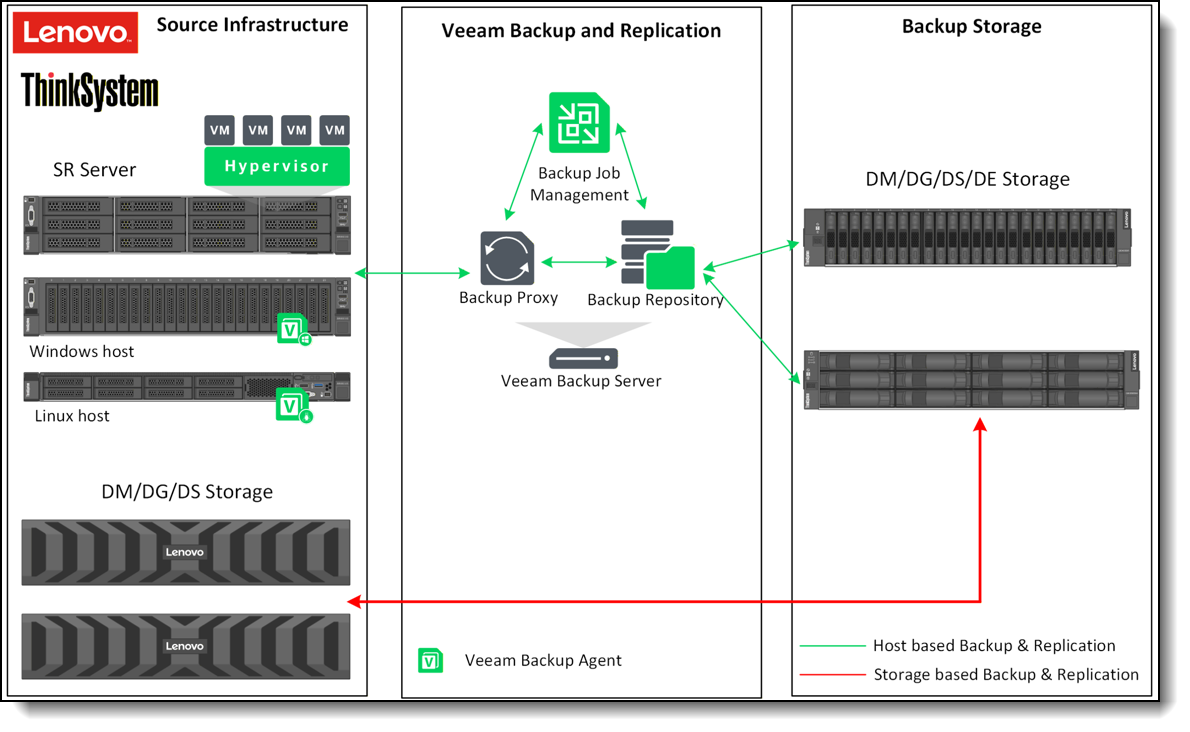
Figure 1. Architecture and Configuration flow.
A robust backup strategy follows the principle of maintaining multiple, independent copies of critical data to ensure reliable recovery during routine failover scenarios as well as full disaster recovery events.
The established 3-2-1 data protection model recommends retaining three copies of the data - the original copy plus two additional backup copies, with at least one copy located off site to safeguard against site level failures.
The ideal backup storage architecture typically uses a mix of media types - such as all flash storage or traditional hard disk drives—to provide flexible, cost efficient options without compromising recovery point (RPO) or recovery time (RTO) objectives.
Depending on application performance requirements, the backup design can use storage array–based replication, host based replication, or a combination of both to meet varying backup and recovery needs.
The configuration implemented for this environment required the integration of multiple backup technologies to meet a broad range of data protection needs. Veeam Backup & Replication was utilized to support both virtual machine backups and traditional file system backup scenarios, ensuring that each workload type could be captured, stored, and restored in alignment with its specific operational and performance requirements.
The table below outlines the backup technologies employed to support this configuration.
Backup Methods
A variety of backup methods are available to ensure robust data protection and facilitate reliable recovery in the event of an incident. The table below summarizes the backup approaches utilized in this environment and provides an evaluation of their overall effectiveness.
Veeam Backup and Recovery Components
The Veeam Data Platform comprises an integrated suite of products and services designed to deliver a comprehensive, enterprise grade solution for data protection, recovery, and management.
There are three core components in the Veeam Backup and Replication software: the backup server, backup proxy and backup repository.
Veeam Backup and Replication Process
Veeam Backup & Replication performs image level backups at the block level, capturing the full virtual machine—including configuration data, virtual disks, and system state—and enabling complete VM restoration from these protected images. This block level approach allows Veeam to efficiently process only changed data, reducing backup windows and minimizing impact on production workloads.
In addition to virtual machine protection, Veeam can also back up discrete physical systems using the Veeam Agents for Windows and Linux. These agents support both volume level and file level backup operations, leveraging application aware processing and OS consistent snapshots to ensure reliable recovery points. Volume level backups protect entire disks or partitions, while file level backups provide granular protection for individual directories and files.
Together, these capabilities allow Veeam to deliver comprehensive data protection across virtualized environments and standalone physical systems, ensuring flexible and consistent recovery options across the entire infrastructure.
The figure below shows a Veeam backup workflow for a VM environment.
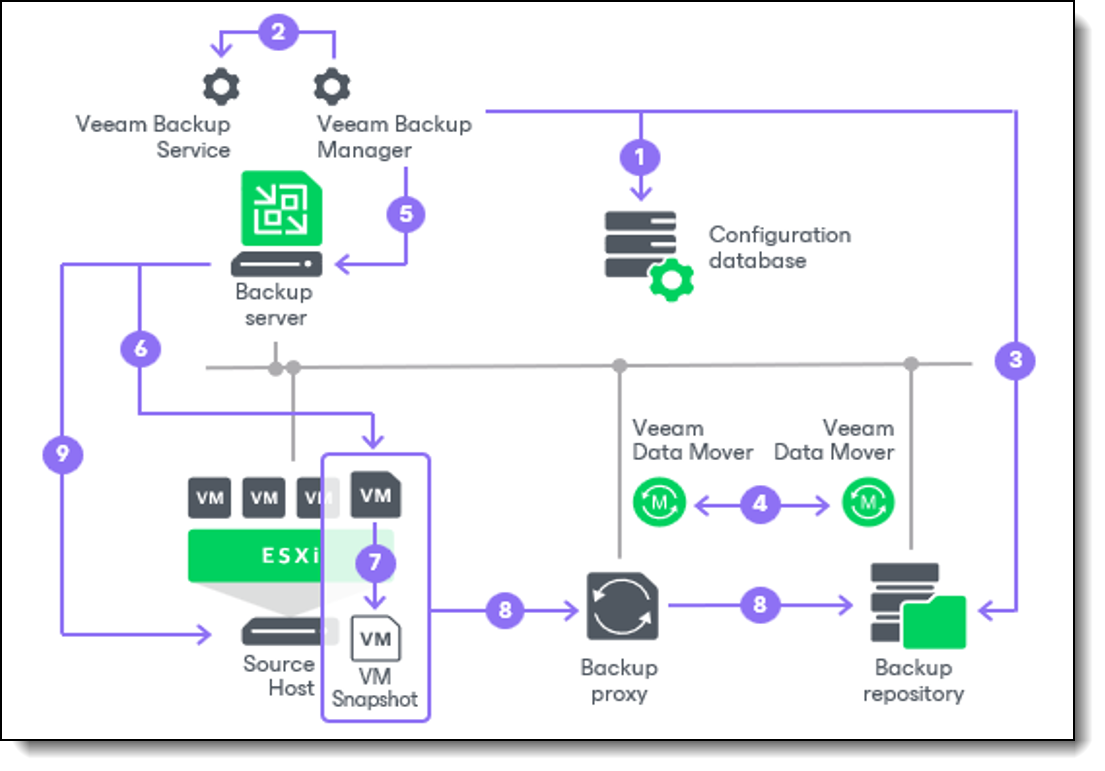
Figure 2. Veeam backup workflow.
Veeam Backup & Replication performs VM backup in the following way:
- When a new backup job session starts, Veeam Backup & Replication starts the Veeam Backup Manager process on the backup server. Veeam Backup Manager reads job settings from the configuration database and creates a list of VM tasks to process. For every disk of VMs added to the job, Veeam Backup & Replication creates a new task.
- Veeam Backup Manager connects to the Veeam Backup Service. The Veeam Backup Service includes a resource scheduling component that manages all tasks and resources in the backup infrastructure. The resource scheduler checks what backup infrastructure resources are available and assigns backup proxies and backup repositories to process job tasks.
- Veeam Backup Manager establishes a connection with Veeam Data Movers on the target backup repository and backup proxy and sets a number of rules for data transfer, such as network traffic throttling rules, and so on.
- Veeam Data Movers on the backup proxy and backup repository establish a connection with each other for data transfer.
- Veeam Backup Manager queries information about VMs and virtualization hosts from the Veeam Broker Service.
- If application-aware image processing is enabled for the job, Veeam Backup & Replication connects to VM guest OSes, deploys non-persistent runtime components or, if necessary, persistent agent components on VM guest OSes and performs in-guest processing tasks.
- Veeam Backup & Replication requests vCenter Server or ESXi host to create a VM snapshot. VM disks are put into the read-only state, and every virtual disk receives a delta file. All changes the user makes to the VM during backup are written to delta files.
- The source Veeam Data Mover reads the VM data from the read-only VM disk and transfers the data to the backup repository in one of the transport modes. During incremental job sessions, the source Veeam Data Mover uses CBT to retrieve only those data blocks that have changed since the previous job session. If CBT is not available, the source Veeam Data Mover interacts with the target Veeam Data Mover on the backup repository to obtain backup metadata and uses this metadata to detect blocks that have changed since the previous job session. While transporting VM data, the source Veeam Data Mover performs additional processing. It filters out zero data blocks, blocks of swap files and blocks of excluded VM guest OS files. The source Veeam Data Mover compresses VM data and transports it to the target Veeam Data Mover.
- After the backup proxy finishes reading VM data, Veeam Backup & Replication requests the vCenter Server or ESXi host to commit the VM snapshot.
Backup System Design
In the following sections, we take a deeper dive into the Backup System Design process:
Configuration Layout
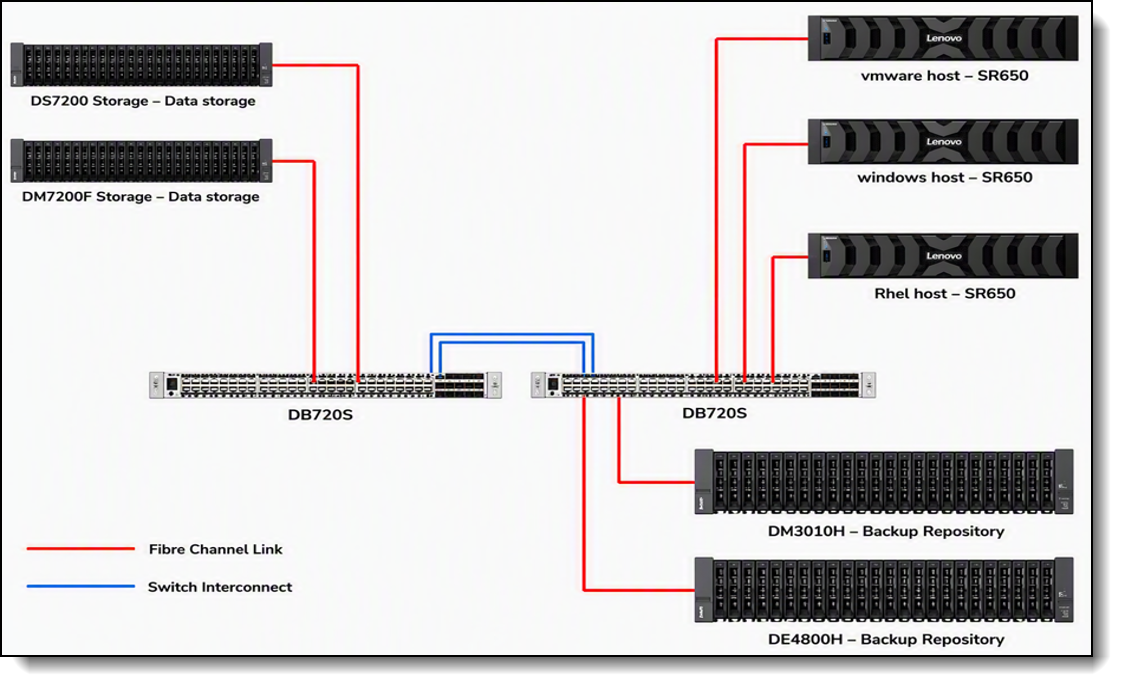
The proof of concept architecture was composed of three primary elements: Lenovo ThinkSystem servers hosting the required operating system environments, DM and DS storage systems supplying primary data storage for the ThinkSystem hosts, and DM and DE storage arrays designated for use as the Veeam backup repository. All components were interconnected through a Fibre Channel–based Storage Area Network (SAN), providing high bandwidth, low latency access between the compute and storage layers.
The image below provides a representation of the configuration layout.
Veeam Backup and Replication Server
Veeam supports two primary deployment models:
- The All‑in‑One deployment
- The Custom deployment.
The All‑in‑One model is designed to consolidate all product functionality onto a single server, making it an optimal choice for small to medium‑sized environments where simplicity and ease of management are priorities.
In contrast, the Custom deployment model is intended for larger, scale‑out environments that require distributing Veeam components across multiple servers to support higher performance, scalability, and workload separation.
Given the relatively small scope of our environment, we implemented the Veeam All‑in‑One deployment model.
In an All in One deployment model, the recommended minimum server specifications are:
- CPU: 8 core x86 64 processor (minimum)
- Memory: 16 GB RAM
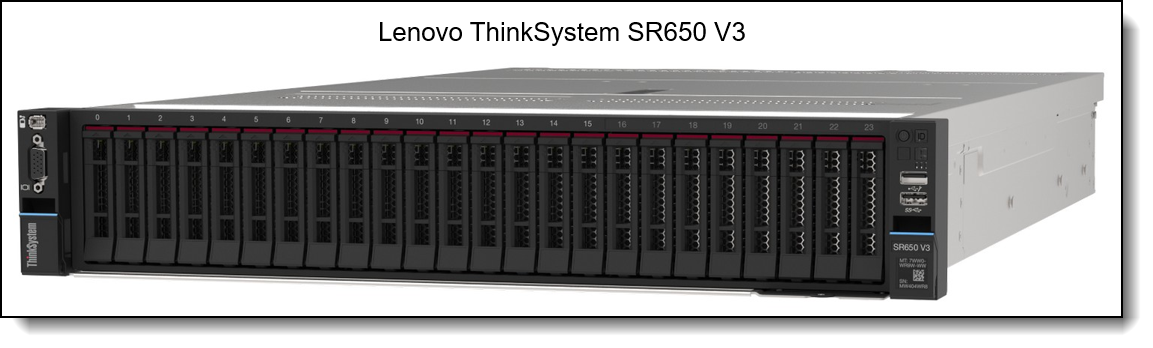
For our implementation, we used a Lenovo ThinkSystem SR650 V3 configured as the Veeam Backup & Replication host. The virtual machine hosting the Veeam Backup & Replication installation was provisioned with 12 vCPUs and 48 GB of memory.
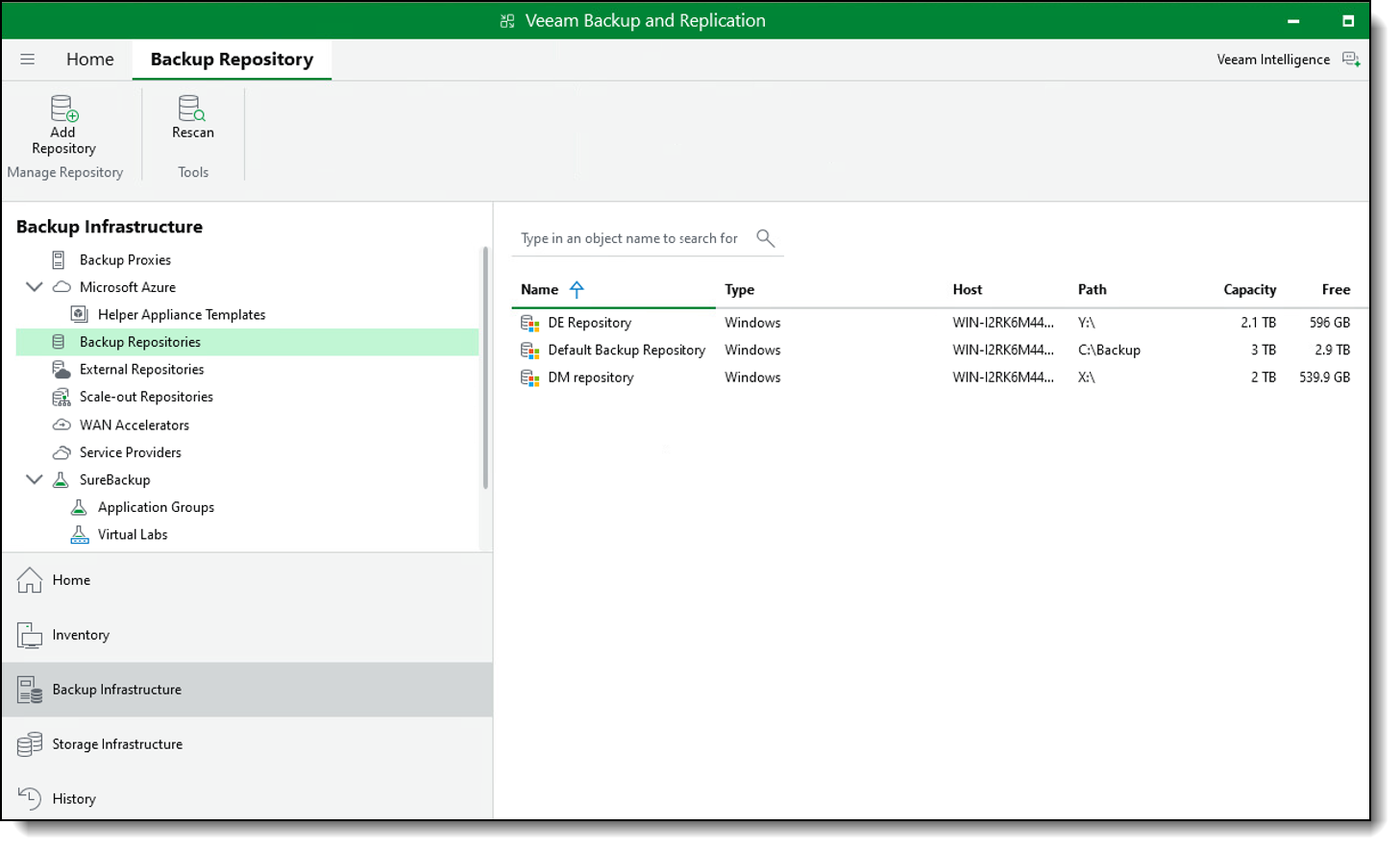
Veeam Backup Repository The Veeam backup repository is provisioned with 2 TB of storage presented to the Veeam Windows server from both the DM3010H and DE4800F storage systems.
The directly attached DM and DE storage volumes are exposed to the Veeam server as block level devices and are formatted using the ReFS (Resilient File System) file system to support fast cloning and optimized backup performance.
The figure below illustrates the detailed configuration of the backup repository and associated storage mappings.
Storage Data Configuration
A DM7200F and a DS7200 storage system were deployed to provide primary data storage for the host environments.
Both arrays were configured with NVMe based SSDs and utilized Fibre Channel host connectivity to deliver high performance, low latency access to the host servers.
The image below provides a representation of the Lenovo DM7200F and DS7200 ThinkSystem Storage Arrays.
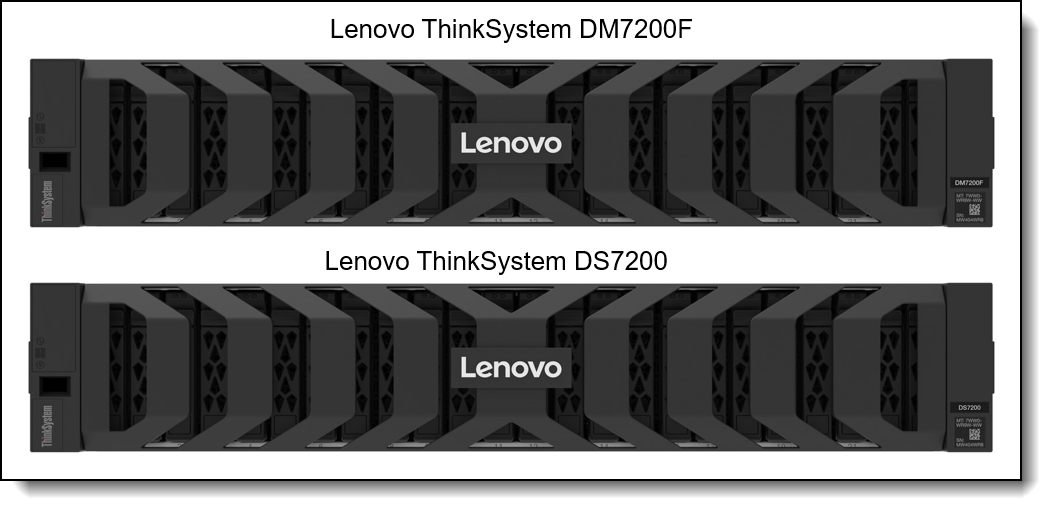
Figure 5. Lenovo ThinkSystem DM7200F Storage Array and Lenovo ThinkSystem DS7200 Storage Array.
Host Server Configuration
For this configuration, three ThinkSystem SR650 V3 servers were deployed as host systems to validate multiple backup scenarios.
The first ThinkSystem SR650 V3 was configured with VMware virtualization software. Storage volumes from the DS7200 and DM7200F arrays were provisioned to the host through Fibre Channel and used as datastores for the virtual machine workloads.
A second ThinkSystem SR650 V3 was configured with Windows Server. Storage volumes from the DS7200 and DM7200F arrays were similarly provisioned over Fibre Channel and served as the underlying storage for both file level and volume level backup operations. To support this configuration, the Veeam Windows Agent was installed to ensure consistent backup and recovery workflows..
The third ThinkSystem SR650 V3 was configured with a Linux operating system. As with the other hosts, storage volumes from the DS7200 and DM7200F arrays were presented over Fibre Channel and used as the primary storage for file level and volume level backup operations. The Veeam Linux Agent was deployed to enable reliable backup and recovery processes.
Collectively, these configurations enabled Veeam to perform array to array backups, leveraging direct storage integration to improve performance, reduce host overhead, and streamline data protection operations.
The image below provides a representation of the ThinkSystem SR650 V3.
Results
Backup operations for VMware virtual machine (VM) images are completed successfully. To validate the integrity of the block level backup, the original VM image is removed from the VMware environment and subsequently restored from the backup repository. Powering on the restored VM confirms that the recovery process completed successfully and that the VM image is fully functional.
For the Windows and Linux host systems, file and folder level backups are executed without errors. To verify restore accuracy, selected files and folders are intentionally deleted. Using the Veeam restore functionality, the deleted items are recovered. To ensure data integrity, CRC values are captured prior to deletion and compared against the CRC values of the restored files. Matching values confirm that the restored data is identical to the original.
For reference, the table below summarizes key performance metrics observed during the Veeam virtual machine backup process.
These results demonstrate that Lenovo ThinkSystem storage platforms can provide consistent throughput and dependable data integrity required for modern backup repositories. Combined with Commvault, the solution helps customers move beyond simply storing backup data to building a recovery-ready infrastructure designed to support rapid restoration, service continuity, and evolving business demands.
Conclusion
The validation demonstrated successful backup and recovery across VMware virtual machines, Windows hosts, and Linux hosts using Lenovo ThinkSystem storage as both primary storage and backup repository infrastructure. Virtual machine images were restored successfully, deleted files and folders were recovered without errors, and CRC comparisons confirmed data integrity for restored content.
Together, these results show that Lenovo ThinkSystem DM, DG, DS, and DE storage can provide a dependable foundation for Veeam-based backup and recovery workflows across mixed enterprise environments. The portfolio gives organizations flexibility to match storage capabilities to workload requirements: DM and DG for ONTAP-based data management and protection, DS for high-performance block storage, and DE for scalable backup-repository capacity and recovery performance.
Related publications and links
For more information, see these resources:
- Lenovo ThinkSystem SR650 V3 Server:
https://lenovopress.lenovo.com/lp1601-thinksystem-sr650-v3-server - Lenovo ThinkSystem DM3200F, DM5200F and DM7200F Unified Storage Arrays:
https://lenovopress.lenovo.com/lp2075-lenovo-thinksystem-dm3200f-dm5200f-and-dm7200f-unified-storage-arrays - Lenovo ThinkSystem DS3200, DS5200, DS7200 and DS5200C Flash Storage Array:
https://lenovopress.lenovo.com/lp2296-lenovo-thinksystem-ds3200-ds5200-ds7200-and-ds5200c-flash-storage-array - Lenovo ThinkSystem DE4800H and DE4800F Storage Arrays:
https://lenovopress.lenovo.com/lp2072-lenovo-thinksystem-de4800h-and-de4800f-storage-arrays - Lenovo ThinkSystem DG5200 and DG7200 Unified Storage Arrays:
https://lenovopress.lenovo.com/lp2074-lenovo-thinksystem-dg5200-and-dg7200-unified-storage-arrays
Authors
Sufian Ahmad is a Product Manager for Storage Enablement at Lenovo, focused on enterprise storage solutions, data protection, AI infrastructure, and technical enablement. He works closely with engineering, product management, and field teams to develop solution demonstrations, technical content, and proof-of-concept initiatives that help customers realize the value of Lenovo's storage portfolio.
Trademarks
Lenovo and the Lenovo logo are trademarks or registered trademarks of Lenovo in the United States, other countries, or both. A current list of Lenovo trademarks is available on the Web at https://www.lenovo.com/us/en/legal/copytrade/.
The following terms are trademarks of Lenovo in the United States, other countries, or both:
Lenovo®
ThinkSystem®
The following terms are trademarks of other companies:
Linux® is the trademark of Linus Torvalds in the U.S. and other countries.
PowerShell®, Windows Server®, and Windows® are trademarks of Microsoft Corporation in the United States, other countries, or both.
Other company, product, or service names may be trademarks or service marks of others.
Configure and Buy
Please select a locale
Full Change History
Course Detail
Employees Only Content
The content in this document with a is only visible to employees who are logged in. Logon using your Lenovo ITcode and password via Lenovo single-signon (SSO).
The author of the document has determined that this content is classified as Lenovo Internal and should not be normally be made available to people who are not employees or contractors. This includes partners, customers, and competitors. The reasons may vary and you should reach out to the authors of the document for clarification, if needed. Be cautious about sharing this content with others as it may contain sensitive information.
Any visitor to the Lenovo Press web site who is not logged on will not be able to see this employee-only content. This content is excluded from search engine indexes and will not appear in any search results.
For all users, including logged-in employees, this employee-only content does not appear in the PDF version of this document.
This functionality is cookie based. The web site will normally remember your login state between browser sessions, however, if you clear cookies at the end of a session or work in an Incognito/Private browser window, then you will need to log in each time.
If you have any questions about this feature of the Lenovo Press web, please email David Watts at dwatts@lenovo.com.


