

Top
Author
Published
31 Aug 2026Form Number
LP2491PDF size
13 pages, 680 KBSubscribed to LP2491.
Thank you for your feedback.
Executive Summary
Recover business-critical workloads with confidence, validate, cleanse, and restore inside an isolated recovery "clean room" that keeps your data on infrastructure you control.
The solution with VMware Cloud Foundation on Lenovo ThinkAgile VX powered by Intel Xeon 6 and AMD EPYC processors results in a platform that helps organizations reduce licensing complexity, streamline operations across VMware Cloud Foundation, and strengthen recovery readiness from day one..
Business Challenge
Ransomware has become one of the most disruptive threats to enterprise IT, and the rapid adoption of AI is raising the stakes. As organizations use AI to modernize operations, cyber adversaries are also using AI to automate reconnaissance, accelerate phishing campaigns, exploit stolen credentials, and move faster toward mission-critical data. For example, in 2025 AI-enabled adversaries increased their attacks by 89%. In this environment, conventional defenses, immutable backups, and traditional disaster recovery are no longer enough. Protecting business-critical VMware Cloud Foundation workloads requires a tested cyber recovery strategy designed for the moment when prevention fails: one that can identify, validate, cleanse, and restore trusted workloads with confidence.
What makes ransomware uniquely difficult to recover from is not just the encryption event itself, but the combination of attacker dwell time, credential-based compromise, and increasingly stealthy malware-free attack techniques. Attackers often operate undetected for weeks or months using stolen credentials, moving laterally through the environment while targeting critical assets such as backup and recovery infrastructure.
By the time a breach is discovered, recent backups and replicas may already be compromised, and simply restoring the latest snapshot can reintroduce malware, malicious configurations, or unauthorized access into production. Modern ransomware also frequently employs fileless techniques that evade traditional signature-based scanning. According to CrowdStrike, 82% of detections reported in 2025 were malware-free, making it essential to validate recovered workloads using behavioral analysis, Next-Generation Antivirus (NGAV), and Endpoint Detection and Response (EDR) controls within an isolated clean-room environment before recovery. This challenge is compounded by the operational complexity of coordinating recovery workflows across multiple security, infrastructure, networking, and orchestration tools, increasing the risk of delays, reinfection, and recovery failures.
A sound recovery strategy must therefore assume that malware is embedded in the snapshot data and that snapshots should never be restored directly to production. Recovery points must first be brought up in a safe, controlled space, then inspected, cleansed, and validated before any workload returns to service.
For regulated organizations, such as financial services, healthcare, federal agencies, and other compliance-driven enterprises, the challenge is even greater. Requirements associated with DORA, HIPAA, federal cybersecurity mandates, and operational resilience expectations increase the need to prove that recovery processes are controlled, auditable, and capable of restoring trusted operations after a cyber event. For organizations with data-sovereignty or privacy requirements, this also means recovery data and recovery operations may need to remain on infrastructure they own and govern, making on-premises cyber recovery a strategic requirement for VMware Cloud Foundation environments.
The Solution
The Lenovo Solution for On-Premises Ransomware Recovery for VMware Cloud Foundation pairs VMware Advanced Cyber Compliance (ACC), a VCF Advanced Service, with Lenovo ThinkAgile VX hyperconverged infrastructure. It provides well-architected, validated guidance for recovering on-premises business-critical workloads within an Isolated Recovery Environment (IRE) in the event of a ransomware attack on the protected instance. VMware ACC helps customers replace fragmented point products with integrated workflows, continuous drift remediation, and secure recovery validation. Customers gain stronger resilience, simpler operations, faster recovery, and potentially 3–5× lower software costs.
Business-critical workloads are continuously replicated from a protected VCF instance to a separate recovery VCF instance. When an attack occurs, impacted workloads are brought up not in production, but inside an isolated workload domain (the IRE) where the infrastructure team in collaboration with the security and the cyber-response team can verify, cleanse, and recover them safely before failing them back to production.
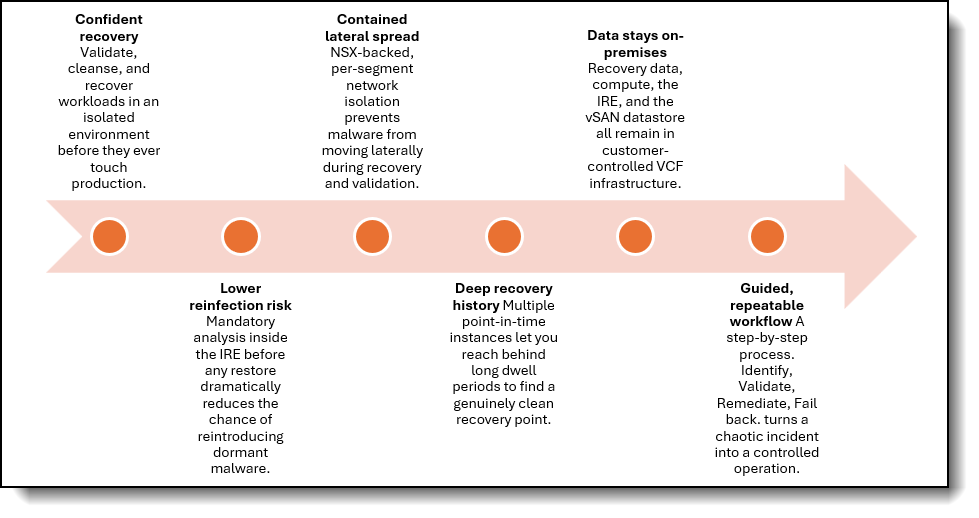
Why on premises? Recovery data, compute, the Isolated Recovery Environment, and the vSAN recovery datastore all remain within customer-controlled VCF infrastructure, rather than being replicated to a cloud file system and recovered in a cloud-based SDDC. Your recovery operations stay close to home; on hardware you govern directly.
Delivered on Lenovo ThinkAgile VX, a co-engineered, integrated HCI platform purpose-built for VMware Cloud Foundation. The solution provides the compute, vSAN ESA storage, and lifecycle management needed to stand up both the protected and recovery instances with confidence. The ThinkAgile servers are based on our ThinkSystem portfolio. Lenovo ThinkSystem ranked the most reliable x86-based server platform in the ITIC 2025 report extending that claim to 12 consecutive years (ITIC 2025 report).
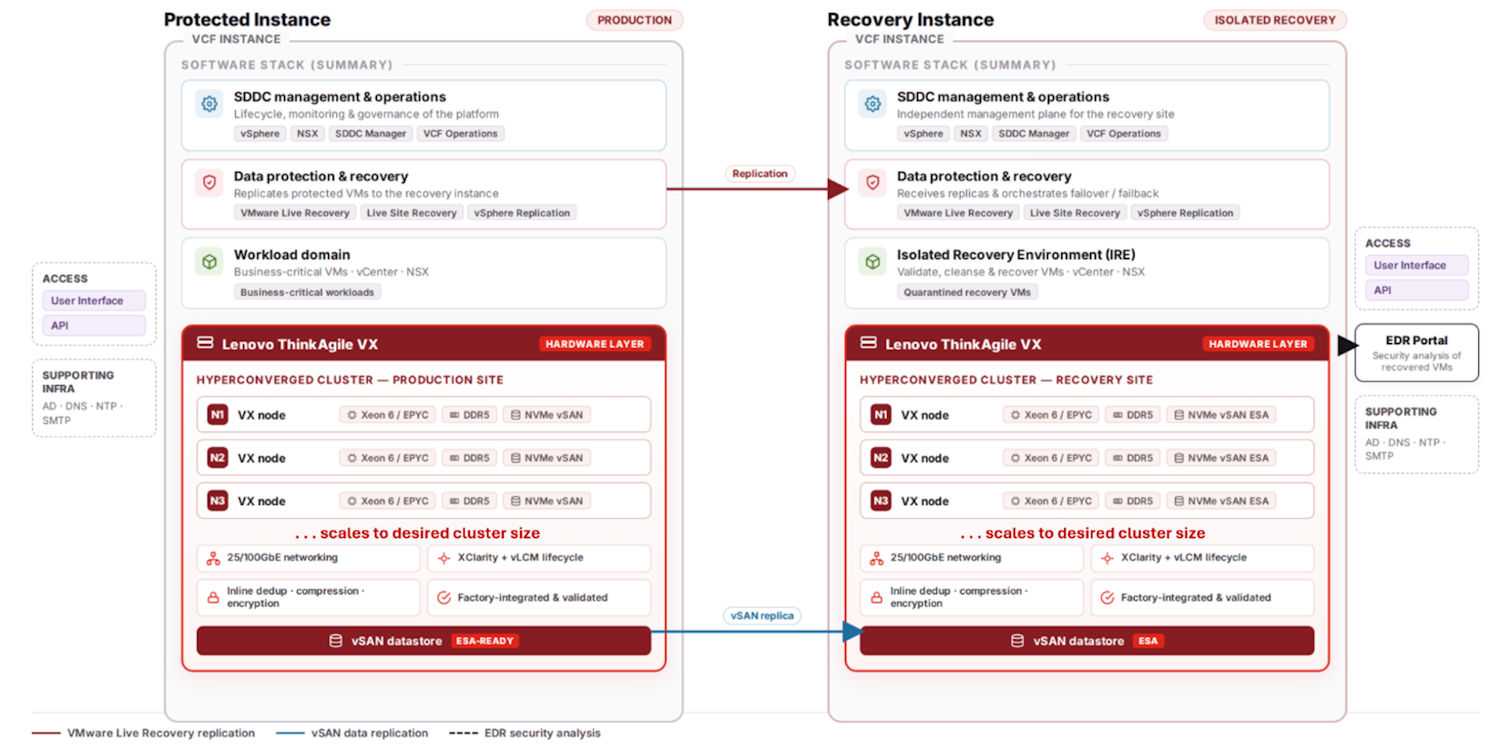
The diagram below provides a conceptual view of how protected VCF instance replicates business-critical workloads to a recovery VCF instance through VMware Advanced Cyber Compliance. The recovery instance hosts the Isolated Recovery Environment (IRE) and connects to an Endpoint Detection and Response (EDR) portal for security analysis.
How it works
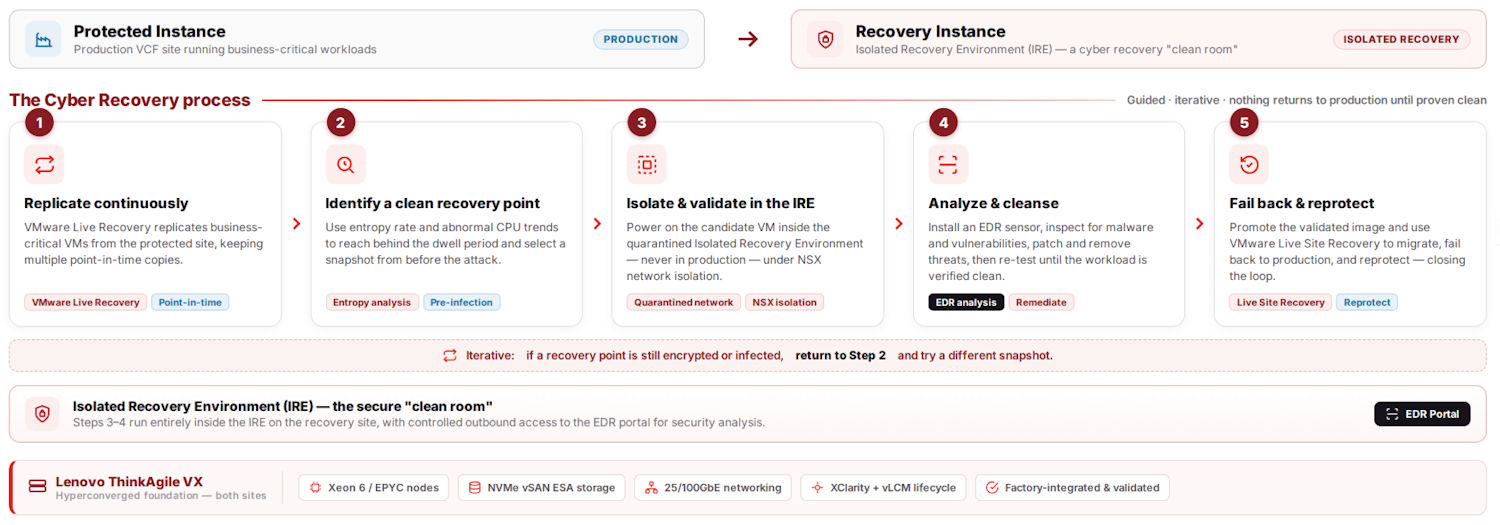
Recovery follows a guided, iterative workflow built around a single principle: nothing returns to production until it has been proven clean. The process moves through identification, isolated validation, remediation, and controlled failback
- Continuous, point-in-time replicationWorkload VMs replicate from the protected instance to the recovery instance using VMware Live Recovery with vSphere Replication. The validated design enables multiple point-in-time instances so responders can reach behind the dwell period to a recovery point taken before the infection began.
- Identify a clean recovery pointBecause recent replicas may be compromised, responders use data-driven signals, such as entropy rate (a measure of likely encryption) corroborated with abnormal CPU-usage trends, to select replicas from before the attack.
- Validate inside the Isolated Recovery EnvironmentThe selected replica is powered on as a test VM inside the IRE, never in production, under a quarantined network-isolation policy. Because VMs can be started directly in the IRE without data rehydration or VM format conversion, responders can iterate through candidate recovery points much faster to identify a pre-infection state. As each VM is brought online, an EDR sensor integrated into the workflow is automatically installed to perform behavioral analysis, which is essential for detecting fileless threats, along with signature-based scanning and vulnerability analysis. Customers can validate restore points with their preferred EDR, Carbon Black by default, or CrowdStrike Falcon with customer-provided licenses integrated into ACC’s guided cyber recovery workflow.
The resulting insights are surfaced to users so the team can validate, cleanse, and promote only trusted workloads. This same non-disruptive workflow also makes it easier to regularly test cyber recovery plans, improving recovery readiness before an actual incident occurs. - Cleanse, then RestoreOnce the workload is verified clean, the workflow stages VMs and restores workloads back to production, closing the loop safely.
The diagram below provides a conceptual view of the solution logical design flow.
The Isolated Recovery Environment
Central to any cyber recovery strategy is an Isolated Recovery Environment, a cyber recovery "clean room" disconnected from the production data center and used as an isolated place to safely power on, inspect, and recover ransomware-infected workloads. The IRE is dedicated to recovery and is not used for test/development, burst capacity, or any other purpose.
The solution is built on two VMware Cloud Foundation instances running on Lenovo ThinkAgile VX, each with its own management domain:
- Protected instance. The production VCF environment hosting business-critical workloads (management domain + workload domain).
- Recovery instance. Alternative VCF infrastructure that receives the replicated workloads and hosts the IRE as a dedicated, isolated workload domain.
Within the recovery instance, the IRE comprises a compute cluster with NSX edge clusters, providing a network-restricted environment in which to safely power on potentially infected VMs, and an ESA vSAN storage cluster that stores the replicas on a datastore remotely mounted to the compute cluster. An NSX Tier-1 gateway and IRE network segment isolate the recovered test VMs, while controlled outbound access reaches the EDR portal for sensor installation and security analysis.
In the following sections, we take a deeper dive:
Core software components
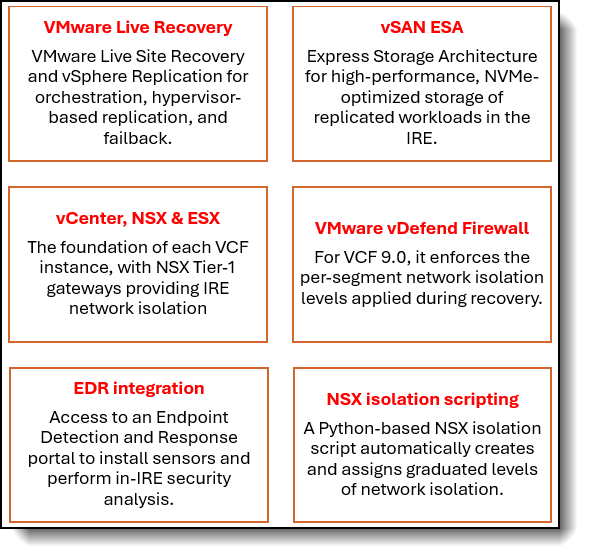
The Lenovo ThinkAgile VX solution with VMware, is design around the following software components:
Network isolation levels
NSX-backed isolation policies let responders precisely control what a VM under examination can reach, preventing lateral spread of malware while enabling granular behavioral analysis at each phase of recovery.
The following table lists the network isolation levels.
vSAN Cyber Recovery Profiles
These profiles are tailored for cyber recovery workloads, requiring fewer compute resources than a comparable vSAN ReadyNode, while enabling the use of high-capacity TLC or QLC storage devices.
By leveraging reduced CPU requirements and high-capacity QLC storage, organizations can build cost-effective recovery repositories without overprovisioning infrastructure.
These profiles are integrated into Lenovo DCSC for ThinkAgile VX to streamline the selection process.
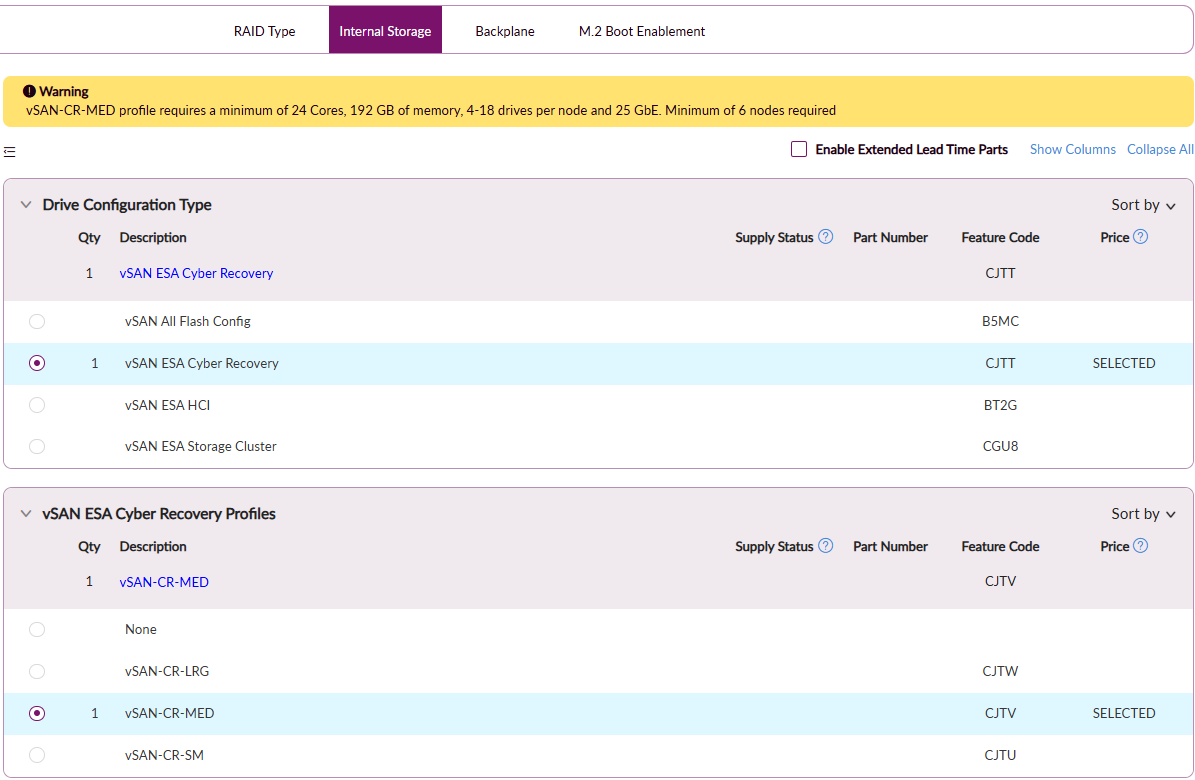
Figure 4. vSAN ESA Cyber Recovery Profiles in Lenovo DCSC
QLC NVMe drives deliver greater storage capacity at a lower cost, making them ideal for capacity-oriented workloads such as backup and cyber recovery repositories. Today, ThinkAgile VX only supports TLC drives, with plans to enable QLC drives by the end of CY 2026.
Notes on the QLC drives:
- NVMe QLC drives, when enabled, are supported exclusively for the Cyber Recovery use case.
- They require 4K IU (Indirection Unit) devices
- Minimum of 4 devices per host
- QLC support requires ESXi 9.1 or later
Sample Bill of Materials (BOM)
The following table lists the bill of materials (BOM) for the CyberRecovery-MED profile using ThinkAgile VX650 V4.
Target Use Cases
Here are some customer use cases for this solution.
Ransomware recovery for business-critical workloads
Restoring on-premises VMs after an attack on the protected VCF site, entirely within customer-owned infrastructure.
Isolated forensic analysis
Safely powering on and examining potentially infected VMs in a dedicated isolated workload domain before any restore to production.
Clean recovery-point identification
Iteratively selecting a malware-free recovery point using entropy, CPU-usage trends, and multiple point-in-time replicas.
Controlled failover, failback, and reprotection
Returning cleansed workloads to production and re-establishing protection through an orchestrated workflow.
Data-sovereignty-conscious recovery
Meeting governance and compliance requirements that mandate keeping recovery data and operations on premises.
Why Lenovo ThinkAgile VX
Lenovo ThinkAgile VX is a co-engineered solution with VMware, purpose-built to deliver an enterprise-grade private cloud using VMware Cloud Foundation. It arrives fully tested, validated on Lenovo's industry-leading server platforms, giving you a proven, consistent foundation for both the protected and recovery instances without the risk of integration of building it yourself.
High-performance vSAN ESA storage
High-density NVMe storage optimized for vSAN ESA, with inline deduplication, compression, and encryption, ideal for the recovery instance's isolated datastore.
Broadest platform choice
Support for Intel Xeon 6 and AMD EPYC processors across 1U and 2U form factors, with storage-dense and GPU-optimized configurations. Customers can get the assurance that their systems are tested, certified, and validated to support VCF, reducing risk and downtime.
Unified lifecycle management
Integrated into vSphere Lifecycle Manager (vLCM) through the Lenovo XClarity Integrator, with validated ThinkAgile VX Best Recipes that streamline full stack solution updates and keep environments compliant.
Scale on your terms
SStart small and scale seamlessly as protection needs grow, with cloud-like economics available through Lenovo TruScale.
VMware alignment without lock-in
Stay aligned with VMware roadmaps while preserving flexibility across hardware refresh cycles.
Services and support
Our comprehensive services accelerate time to value, minimize downtime, and free your IT staff to focus on driving innovation and business growth:
- 24x7 Single Point of Support. Premier Support delivered by Lenovo experts who specialize in ThinkAgile solutions, covering both Lenovo server hardware and VMware by Broadcom software, with rapid resolution and no finger-pointing.
- Comprehensive services portfolioDeployment and migration services, hybrid-cloud and modernization assessments, managed services, proactive health checks, and Technical Account Management (TAM)
- Flexible warrantyThree- or five-year hardware warranty options, with optional service upgrades including Enterprise Server Software Support, YourDrive YourData, and Health Check.
Get started
Ransomware recovery is the last line of defense. and the one that matters most when prevention fails. With the Lenovo Solution for On-Premises Ransomware Recovery for VMware Cloud Foundation on ThinkAgile VX, you can recover business-critical workloads quickly and confidently, validate them in true isolation, and keep your data on infrastructure you control.
To learn more, contact your Lenovo representative or Business Partner, or visit lenovo.com/thinkagile.
For More Information
For more information about Lenovo solutions, contact your Lenovo representative or Business Partner, or visit Lenovo servers.
Related publications and links
For more information, see these resources:
- VMware by Broadcom, VMware Validated Solutions 9.X: On-Premises Ransomware Recovery for VMware Cloud Foundation (overview, design objectives, detailed design, IRE design, and recovery process). Figures 1–3 reproduced from this document):
https://techdocs.broadcom.com/us/en/vmware-cis/vcf/vvs/9-X/on-prem-ransomware-recovery-for-vmware-cloud-foundation.html - VMware, Ransomware Recovery for VMware Cloud Foundation: Solution Brief:
https://www.vmware.com/docs/ransomware-recovery-for-vmware-cloud-foundation-solution-brief - Lenovo, ThinkAgile VX Series Datasheet:
https://lenovopress.lenovo.com/datasheet/ds0104-thinkagile-vx-series - Lenovo, VMware Cloud Foundation on Lenovo ThinkAgile VX:
https://lenovopress.lenovo.com/lp1533-vmware-cloud-foundation-on-lenovo-thinkagile-vx-fx-reference-design - CrowdStrike 2026 Global Threat Report:
https://go.crowdstrike.com/2026-global-threat-report.html
Authors
Alejandro Perez is a WW Enterprise IT Solution Manager within Lenovo’s Infrastructure Solutions Group (ISG). He leads the adoption and integration of Enterprise Infrastructure solutions, serving as the Subject Matter Expert for targeted solution architectures. He collaborates with organic and 3rd party SW ecosystem partners to drive innovation and contribute to the company's success. With over 20 years of experience in the IT industry, he has a strong background in Edge Computing, Business Development, and SAP HANA. He is passionate about bringing new technologies to the market and developing new solutions for regional markets.
Trademarks
Lenovo and the Lenovo logo are trademarks or registered trademarks of Lenovo in the United States, other countries, or both. A current list of Lenovo trademarks is available on the Web at https://www.lenovo.com/us/en/legal/copytrade/.
The following terms are trademarks of Lenovo in the United States, other countries, or both:
Lenovo®
Lenovo TruScale®
ThinkAgile®
ThinkSystem®
TruScale®
XClarity®
The following terms are trademarks of other companies:
AMD®, AMD EPYC®, and EPYC® are trademarks of Advanced Micro Devices, Inc.
Intel®, the Intel logo and Xeon® are trademarks of Intel Corporation or its subsidiaries.
Other company, product, or service names may be trademarks or service marks of others.
Configure and Buy
Please select a locale
Full Change History
Course Detail
Employees Only Content
The content in this document with a is only visible to employees who are logged in. Logon using your Lenovo ITcode and password via Lenovo single-signon (SSO).
The author of the document has determined that this content is classified as Lenovo Internal and should not be normally be made available to people who are not employees or contractors. This includes partners, customers, and competitors. The reasons may vary and you should reach out to the authors of the document for clarification, if needed. Be cautious about sharing this content with others as it may contain sensitive information.
Any visitor to the Lenovo Press web site who is not logged on will not be able to see this employee-only content. This content is excluded from search engine indexes and will not appear in any search results.
For all users, including logged-in employees, this employee-only content does not appear in the PDF version of this document.
This functionality is cookie based. The web site will normally remember your login state between browser sessions, however, if you clear cookies at the end of a session or work in an Incognito/Private browser window, then you will need to log in each time.
If you have any questions about this feature of the Lenovo Press web, please email David Watts at dwatts@lenovo.com.


