

Top
Author
Published
25 Aug 2026Form Number
LP2482PDF size
14 pages, 2.8 MBSubscribed to LP2482.
Thank you for your feedback.
Abstract
Lenovo ThinkAgile MX delivers a validated hyperconverged platform for Microsoft hybrid cloud workloads, and Microsoft Azure Arc extends the Azure control plane to that infrastructure so on-premises and edge resources can be governed with the same tools as resources running in Azure.
This implementation guide walks through the process end to end using a two-node ThinkAgile MX650 V3 Azure Local cluster: onboarding servers and virtual machines to Azure Arc, deploying Azure Local from the Azure Arc portal, and Arc-enabling virtual machines created both inside and outside the portal. It then covers day-to-day operations from the Azure Arc portal, including monitoring and security through Azure Monitor and Microsoft Defender for Cloud, cluster and node health views, Arc-enabled Kubernetes clusters, and SQL Server inventory. Preview capabilities for Machine Provisioning and Site Management are also introduced.
This paper is for infrastructure architects and IT administrators who are deploying or operating ThinkAgile MX in a hybrid environment.
Introduction
Modern IT environments are increasingly distributed across on-premises datacenters, edge locations, public cloud platforms, and multi-cloud ecosystems, creating new operational challenges around visibility, governance, security, and lifecycle management. Lenovo ThinkAgile MX addresses these challenges by providing a validated hyperconverged infrastructure platform designed to run business-critical workloads close to where data is created and consumed.
Azure Arc extends Azure management capabilities to on-premises and hybrid infrastructure, enabling organizations to manage resources such as virtual machines, Kubernetes clusters and data services through Azure Resource Manager and the Azure portal. For ThinkAgile MX deployments, Azure Arc provides a consistent cloud-based control plane that helps customers monitor, govern, secure, and operate their hybrid infrastructure using familiar Azure services.
Solution Overview
ThinkAgile MX provides a validated Lenovo platform for Microsoft hybrid cloud solutions, supporting use cases such as virtualized workloads, containerized applications, Azure Kubernetes Service scenarios, SQL workloads, edge computing, and cloud-connected infrastructure management. Lenovo’s ThinkAgile MX portfolio includes multiple validated Azure Local solutions, making it suitable for data center modernization, branch office deployments, retail environments, manufacturing sites, and edge locations.
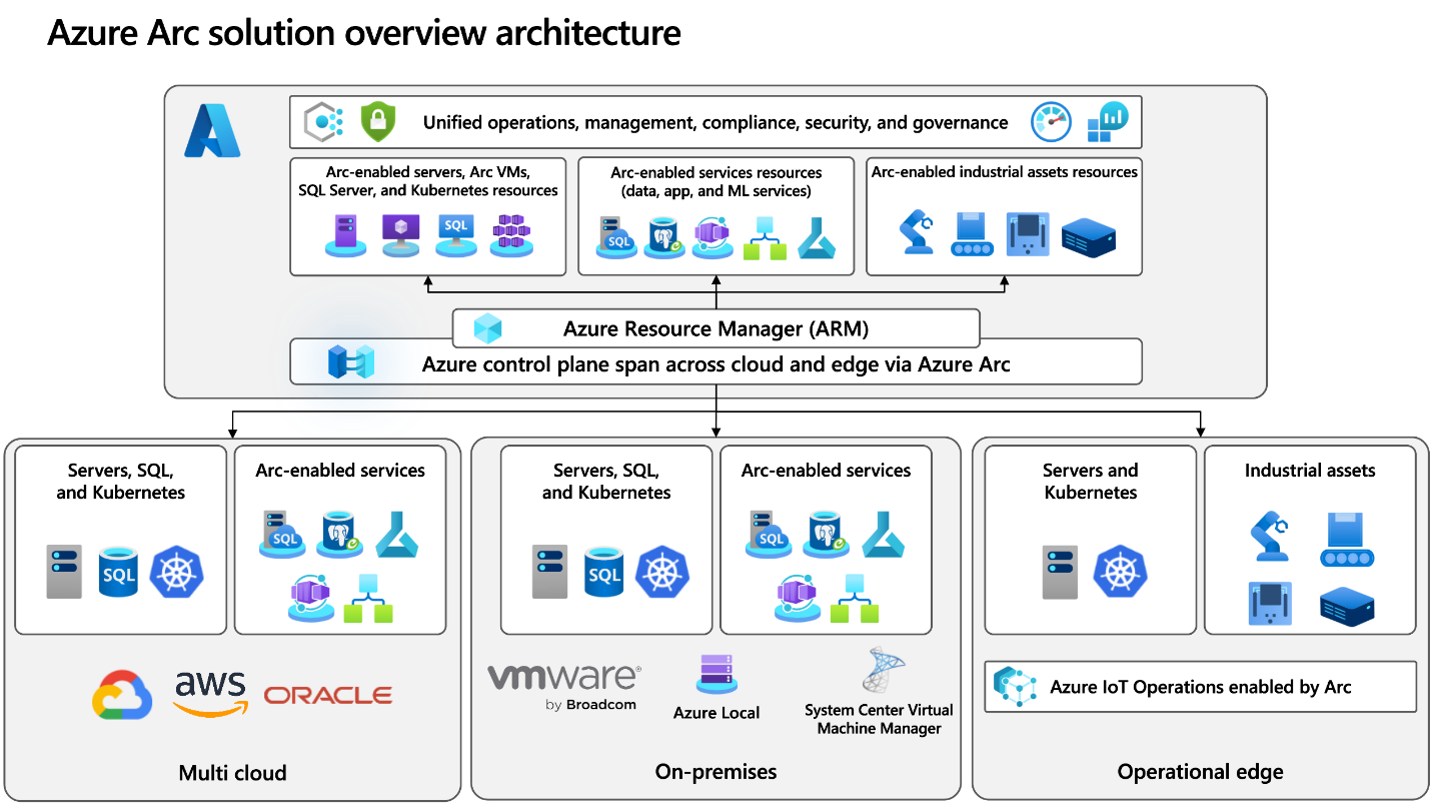
Figure 1. Azure Arc solution architecture (source: Microsoft)
The Azure Arc portal experience helps simplify day-to-day operations by enabling centralized resource visibility, policy enforcement, security management, and workload governance. It also supports a more consistent operational approach across hybrid environments by allowing IT teams to use Azure tools and services regardless of where the underlying infrastructure resides.
For Lenovo ThinkAgile MX customers, this integration strengthens the overall hybrid cloud value proposition by combining Lenovo’s validated infrastructure, Microsoft Azure Local capabilities, and Azure Arc-enabled management. Together, these technologies help organizations modernize their infrastructure, improve operational efficiency, support cloud-native application patterns, and maintain control over workloads that need to remain on-premises or at the edge.
Supported ThinkAgile MX Platforms
ThinkAgile MX is a fully engineered, jointly validated, and integrated solution. You don't need to design and test complex integrations yourself, which significantly reduces the time from deployment to value generation.
The following ThinkAgile MX offerings are supported:
- Rack solutions:
- ThinkAgile MX V4: MX630 V4/MX650 V4/MX650a V4
- ThinkAgile MX V3: MX630 V3/MX650 V3
- ThinkAgile MX V2: MX3330/MX3331/MX3530/MX3531on SR630/SR650 V2
- Edge solutions:
- ThinkAgile MX455 V3 Edge
- ThinkAgile MX450 Edge
- ThinkAgile MX1020/MX1021 on SE350 Edge
Key advantages of ThinkAgile MX include:
- Exceptional Performance: High-performance infrastructure designed for demanding enterprise workloads
- Validated Design: Pre-tested configurations reduce risk and deployment complexity
- Integrated Lifecycle Management: Coordinated updates via Lenovo XClarity and Azure tools
- Faster Time to Value: Eliminates the need for complex integration and testing
- Enterprise Reliability: Built on Lenovo ThinkSystem servers for mission-critical environments
Implementing Azure Arc on ThinkAgile MX
This section walks through Arc-enabling a ThinkAgile MX environment, using a two-node ThinkAgile MX650 V3 Azure Local cluster as the reference deployment. The work proceeds in three steps: onboarding physical servers and virtual machines to Azure Arc from the Azure portal, deploying Azure Local on a certified ThinkAgile MX solution, and Arc-enabling the virtual machines that run on the resulting cluster.
Virtual machines created through the Azure portal are registered as Arc resources automatically, while those created directly on the cluster are onboarded by running the connection script from inside the guest. Once these steps are complete, every server, cluster, and virtual machine in the environment appears as an Azure resource and can be governed, monitored, and secured through the Azure Arc portal.
- Step 1. Onboard servers and virtual machines to Azure Arc
- Step 2. Deploy Azure Local on ThinkAgile MX
- Step 3. Arc-enable virtual machines on the Azure Local cluster
Step 1. Onboard servers and virtual machines to Azure Arc
Arc-enabled servers allow organizations to manage Windows and Linux physical servers and virtual machines as Azure resources, regardless of where they are hosted. A list of the supported operating systems that can be managed by Azure Arc can be found here: https://learn.microsoft.com/en-us/azure/azure-arc/servers/prerequisites.
You can onboard your on-prem ThinkAgile MX servers to Azure Arc, as well as any VM not created in Azure, directly from the portal: go to Overview – Get started – Onboard machines:
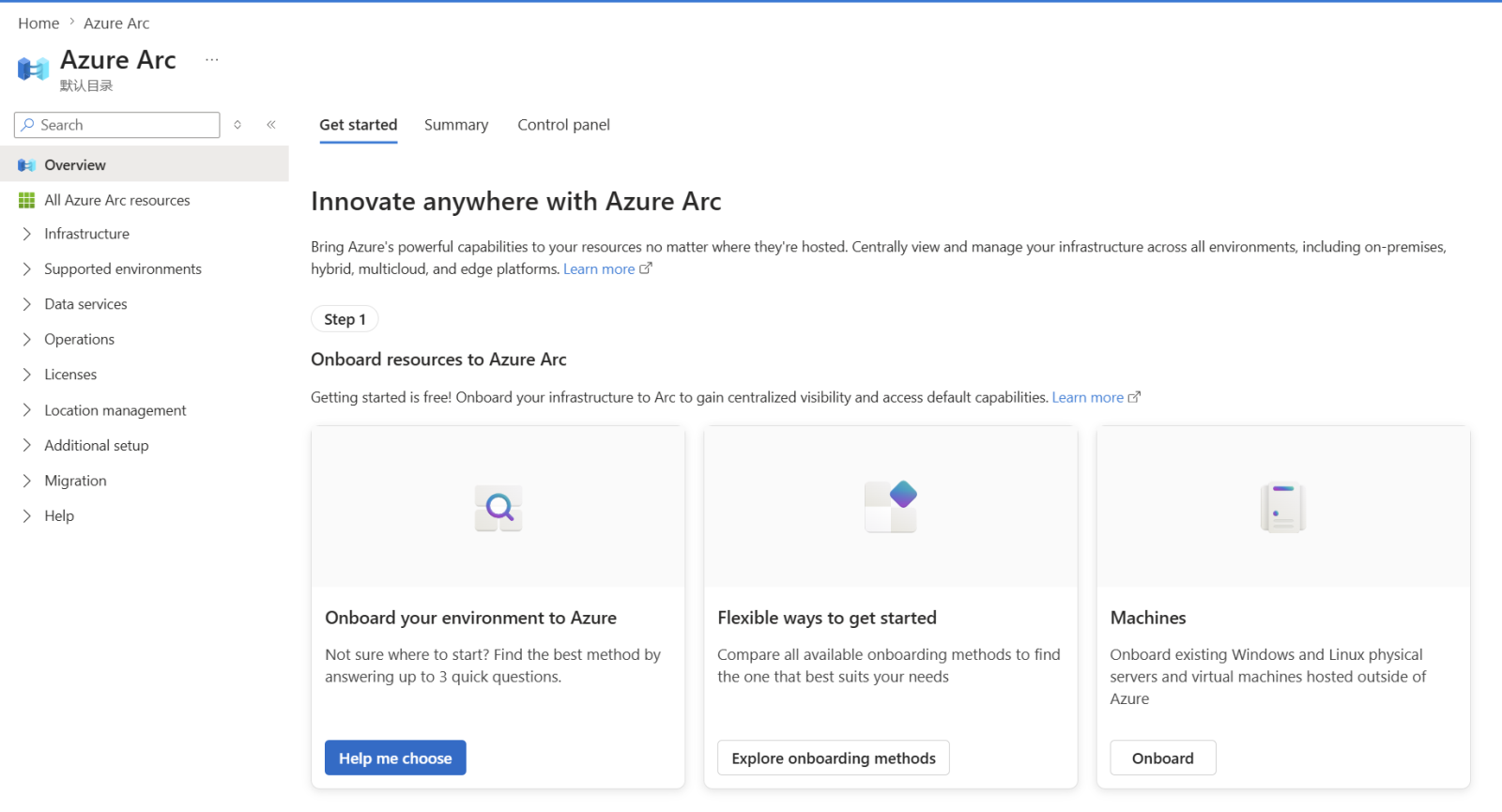
Follow the steps required, including running the required script, and your servers will be Azure-Arc enabled.
Step 2. Deploy Azure Local on ThinkAgile MX
Note: All ThinkAgile MX System (IS) and Premier (PR) solutions come with the OS preloaded, so the customers should not need to install the operating system on their own. However, as Microsoft offers the possibility to install Azure Stack HCI OS from Azure Arc portal, we decided to go this route so that we can show how to take full advantage of the portal’s capabilities.
To exemplify Azure Arc Portal on ThinkAgile MX, we deployed Azure Local on ThinkAgile MX650 V3 solution. You can do this using the very Azure Arc Portal, by going to Supported environments – Azure Local and downloading the Azure Stack HCI OS:
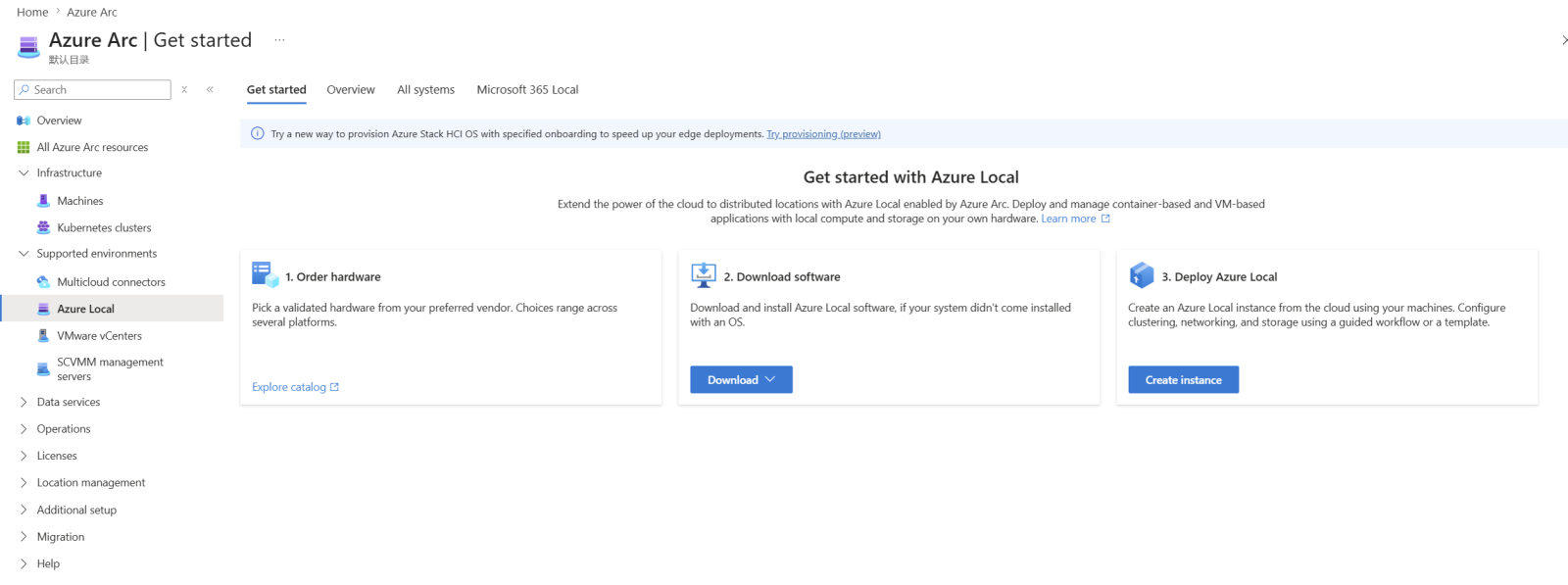
Figure 3: Azure Local view from the Azure Arc portal
After installing the image on your certified ThinkAgile MX solution and configuring and preparing the servers appropriately, you can continue from the same view to deploy Azure Local. This will allow for the Azure local cluster to be created in a resource group together with the arc resource bridge needed to manage the resources from Azure Arc.
Step 3. Arc-enable virtual machines on the Azure Local cluster
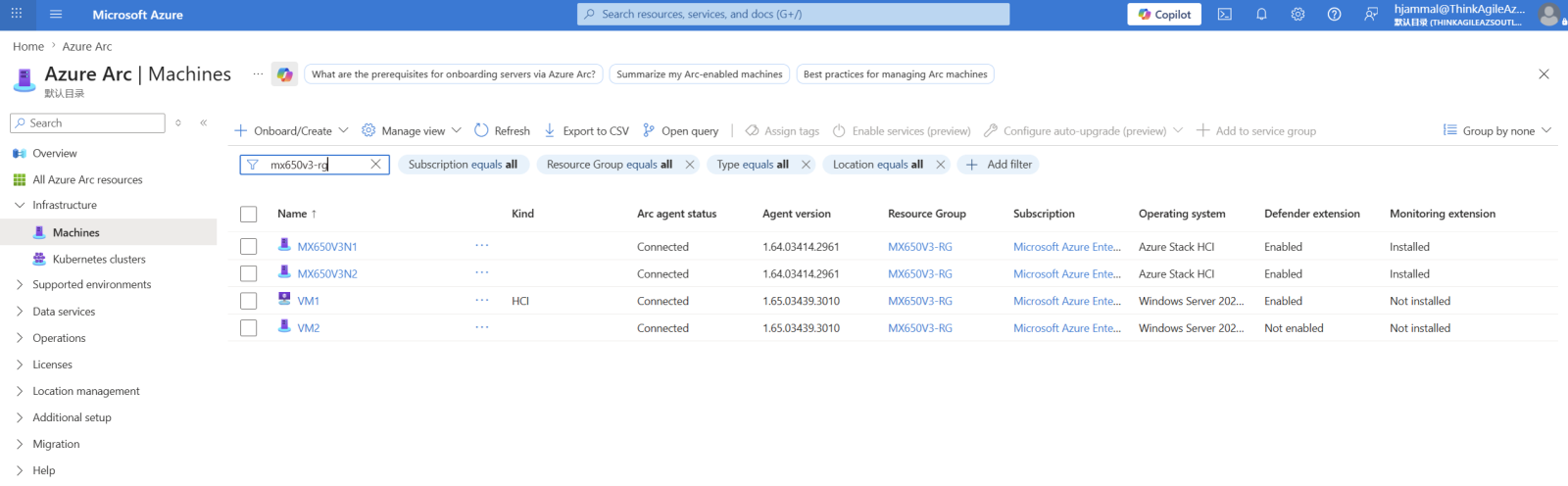
From this moment on, all the VMs deployed on the Azure Local cluster from the Azure Portal will be available in Azure Arc resources. We deployed a MX650 V3 2-node Azure Local cluster in the MX650V3-RG resource group, downloaded a VM image with WS2025 from marketplace and deployed from the Azure portal a VM using the image on the cluster. The VM is automatically listed under Azure Arc machines:
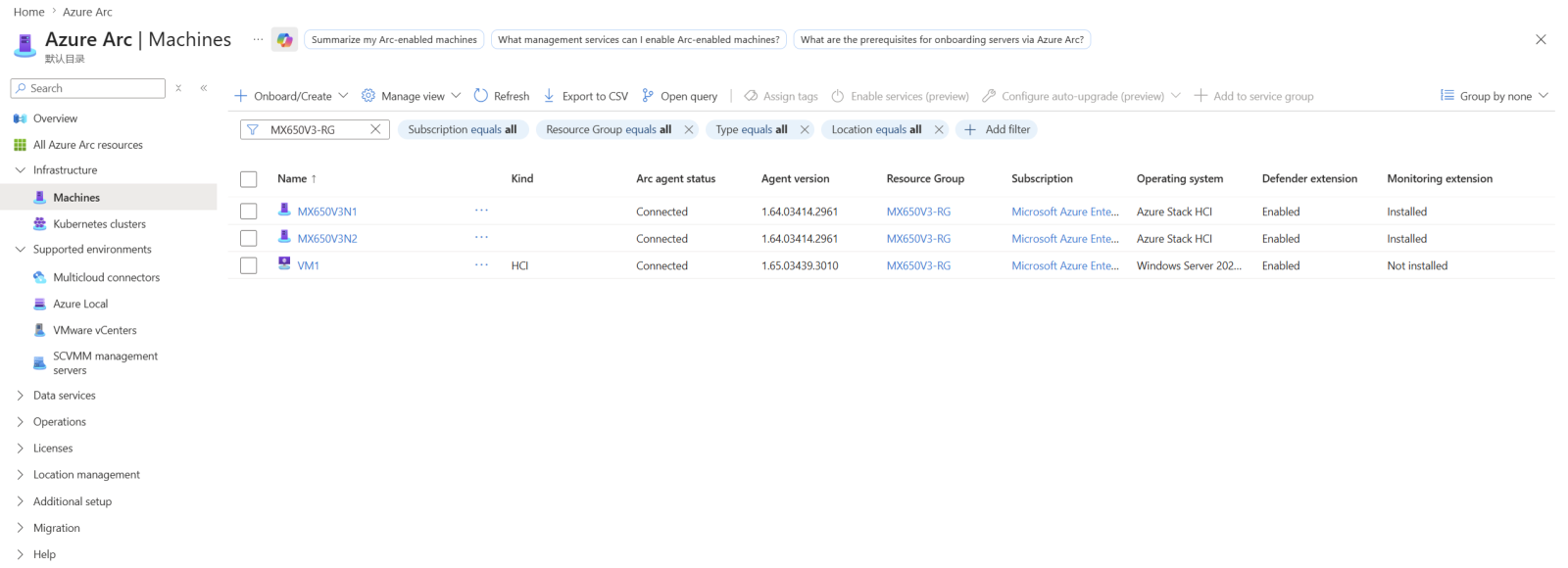
Figure 4: Azure Arc enabled machines
We also deployed another VM – VM2 – directly on the cluster without using Azure Portal and used the onboard script to make it Azure-Arc enabled:
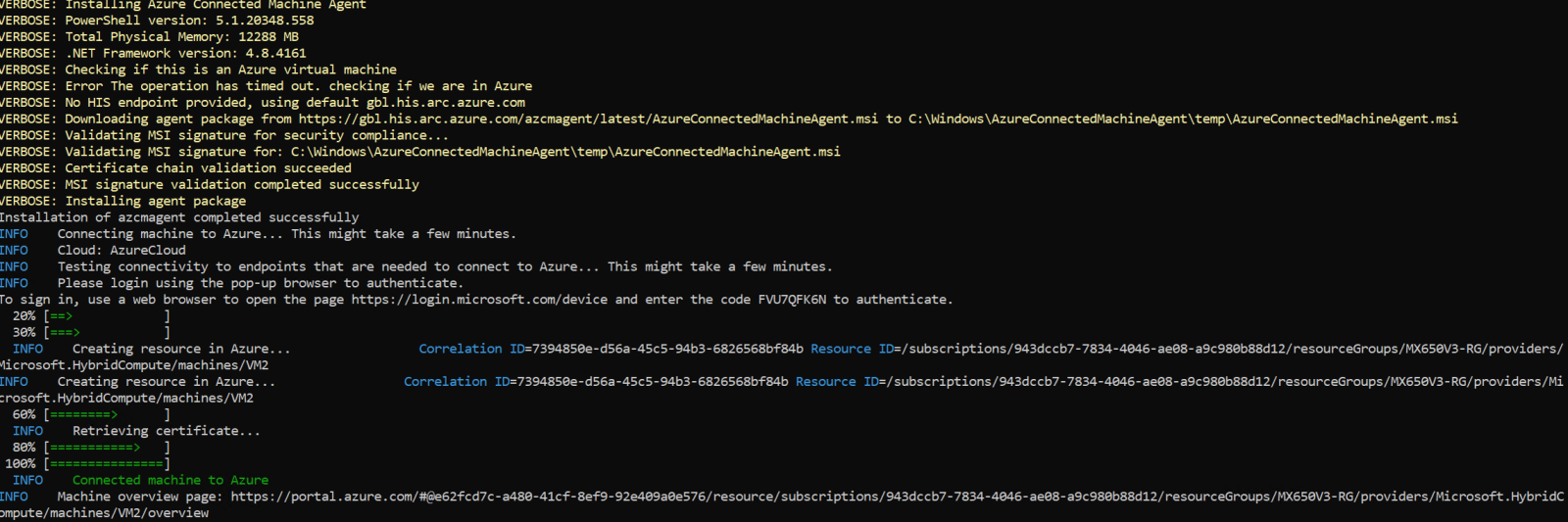
Figure 5: Running the onboarding script from inside the on-premises deployed VM
Now there are two VMs Azure Arc-enabled:
Managing the Environment from the Azure Arc Portal
With the ThinkAgile MX cluster and its workloads registered as Azure resources, the Azure Arc portal becomes the single place from which the environment is operated. This section moves through the management surfaces the portal exposes, working from the platform outward: monitoring and security through Azure Monitor and Microsoft Defender for Cloud, cluster and node health views that surface configuration and Azure connectivity status, Arc-enabled Kubernetes clusters, and SQL Server instance inventory.
Each of these views applies the same Azure tooling, policies, and governance model used for resources running in Azure, so administrators do not need a separate operational process for infrastructure that stays on-premises or at the edge.
Monitoring and security
Once connected, systems appear as Azure Arc-enabled resources. Policies, monitoring, and security can be applied centrally, and management is performed through the Azure portal.
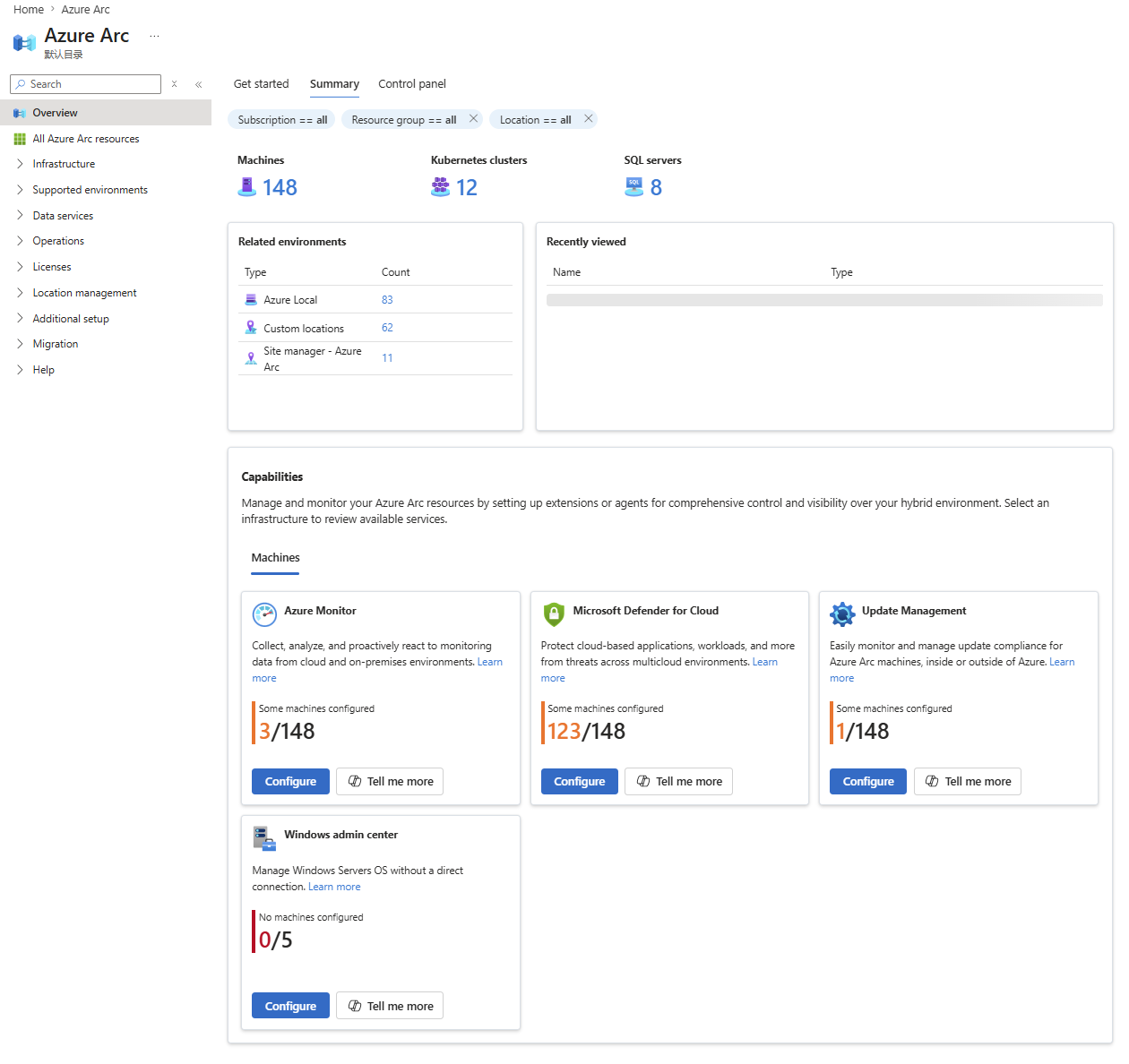
Figure 7: Azure Arc integrates monitoring and security capabilities by bringing Azure Monitor and Microsoft Defender for Cloud to hybrid and multicloud resources from a single Azure management experience
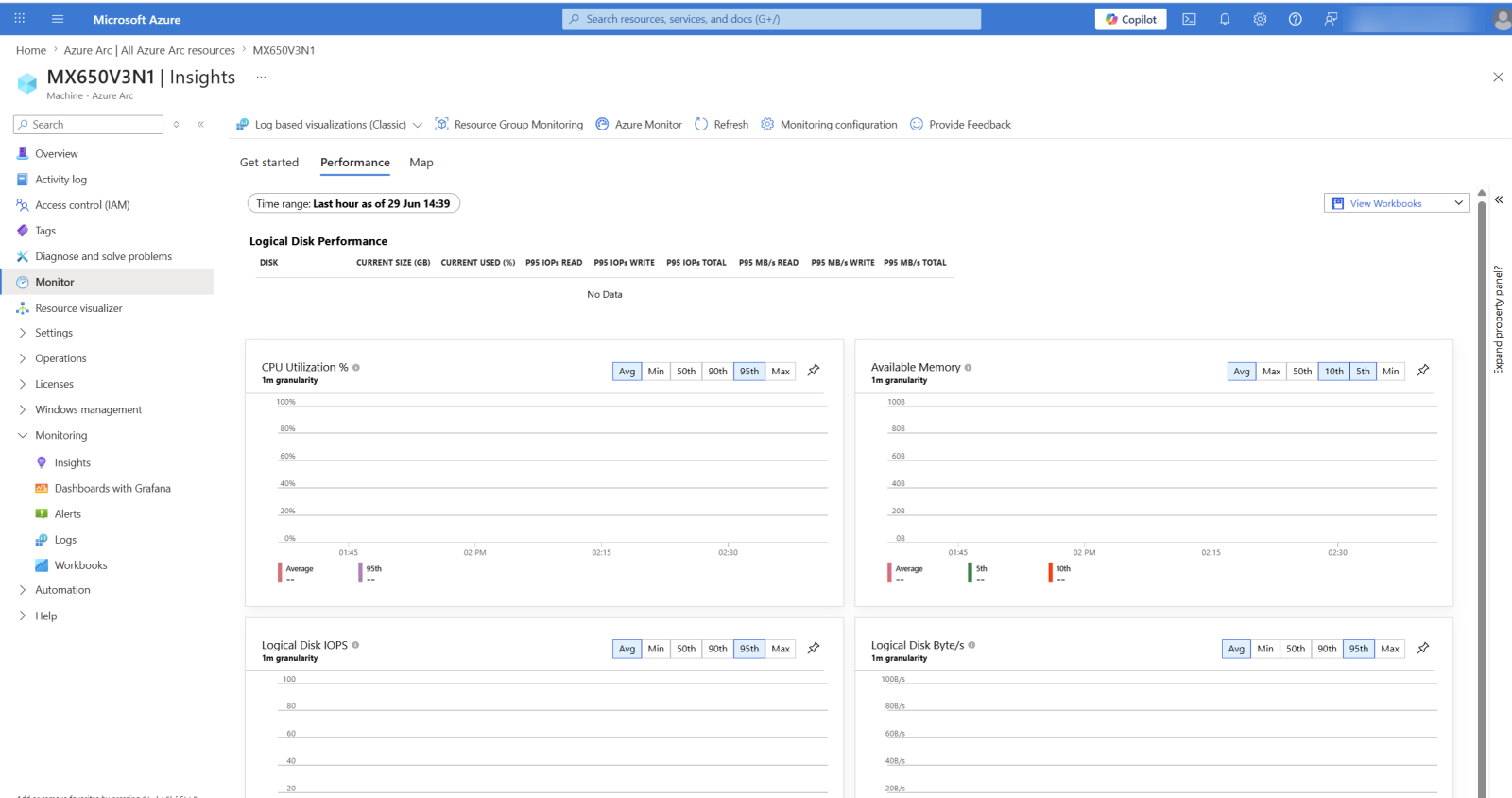
Figure 8: Cluster node Insights
Cluster and node views
Let’s have a quick look into the Azure Arc Portal, using the deployed cluster and its resource group.
Clicking on the cluster will lead you to the Azure Portal view, where you are able to receive information about cluster health, be informed about potential errors and solve them.
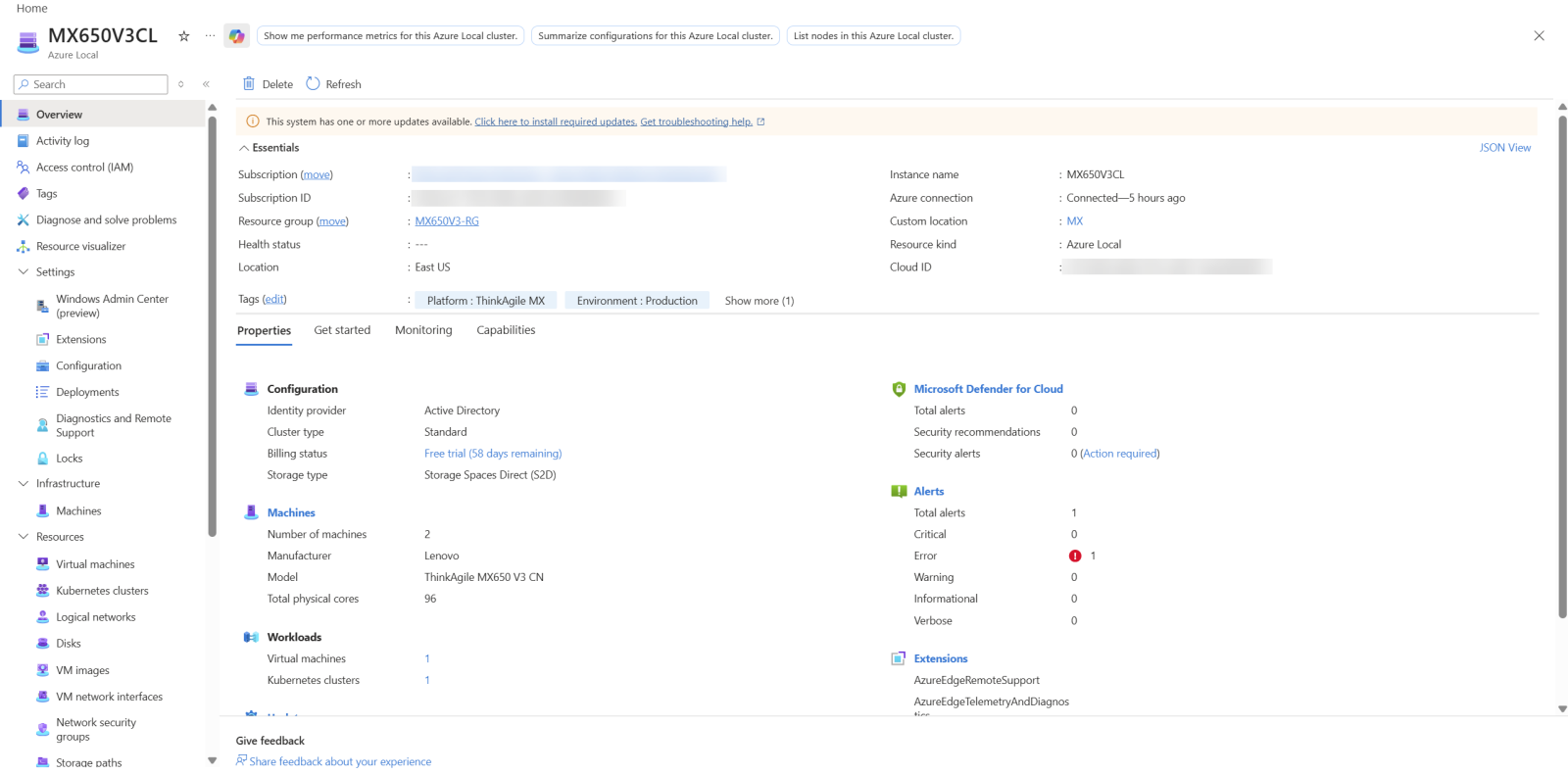
Figure 9: Centralized view of cluster health, configuration, and Azure connectivity status
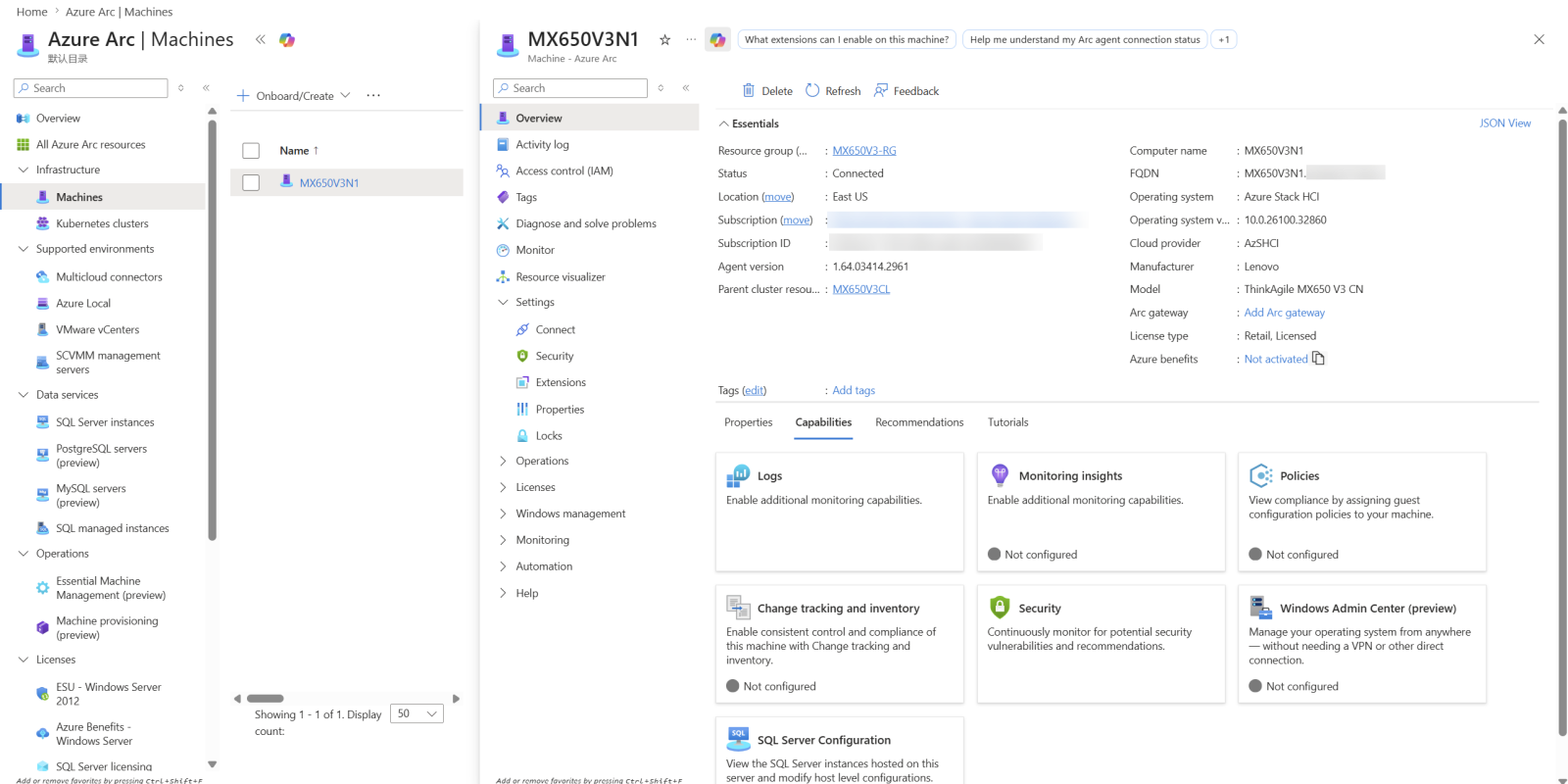
Figure 10: Individual ThinkAgile MX nodes projected into Azure and managed as Arc-enabled servers
Kubernetes clusters
Azure Arc provides centralized visibility and management for hybrid resources, including Arc-enabled servers, Kubernetes clusters, and SQL Server instances, directly from the Azure portal.
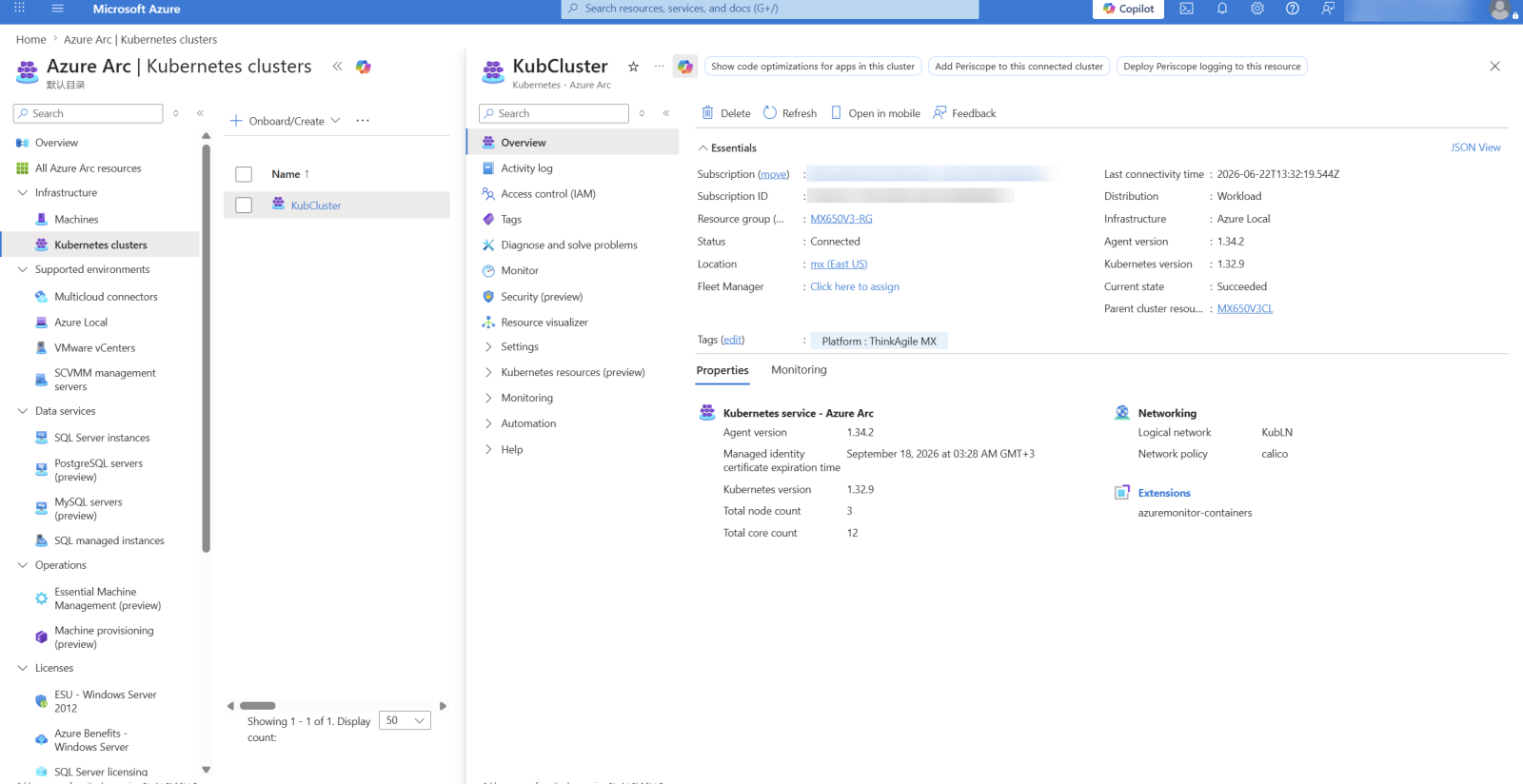
Figure 11: Azure Arc overview of a VM-based AKS cluster running on ThinkAgile MX Azure Local infrastructure, showing cluster configuration, connectivity, Kubernetes version, capacity, monitoring, and extensions
This enables:
- Centralized cluster visibility
- Policy enforcement
- Monitoring and extensions management
Kubernetes workloads can now be consistently managed across hybrid and multi-cloud environments.
SQL Server instances
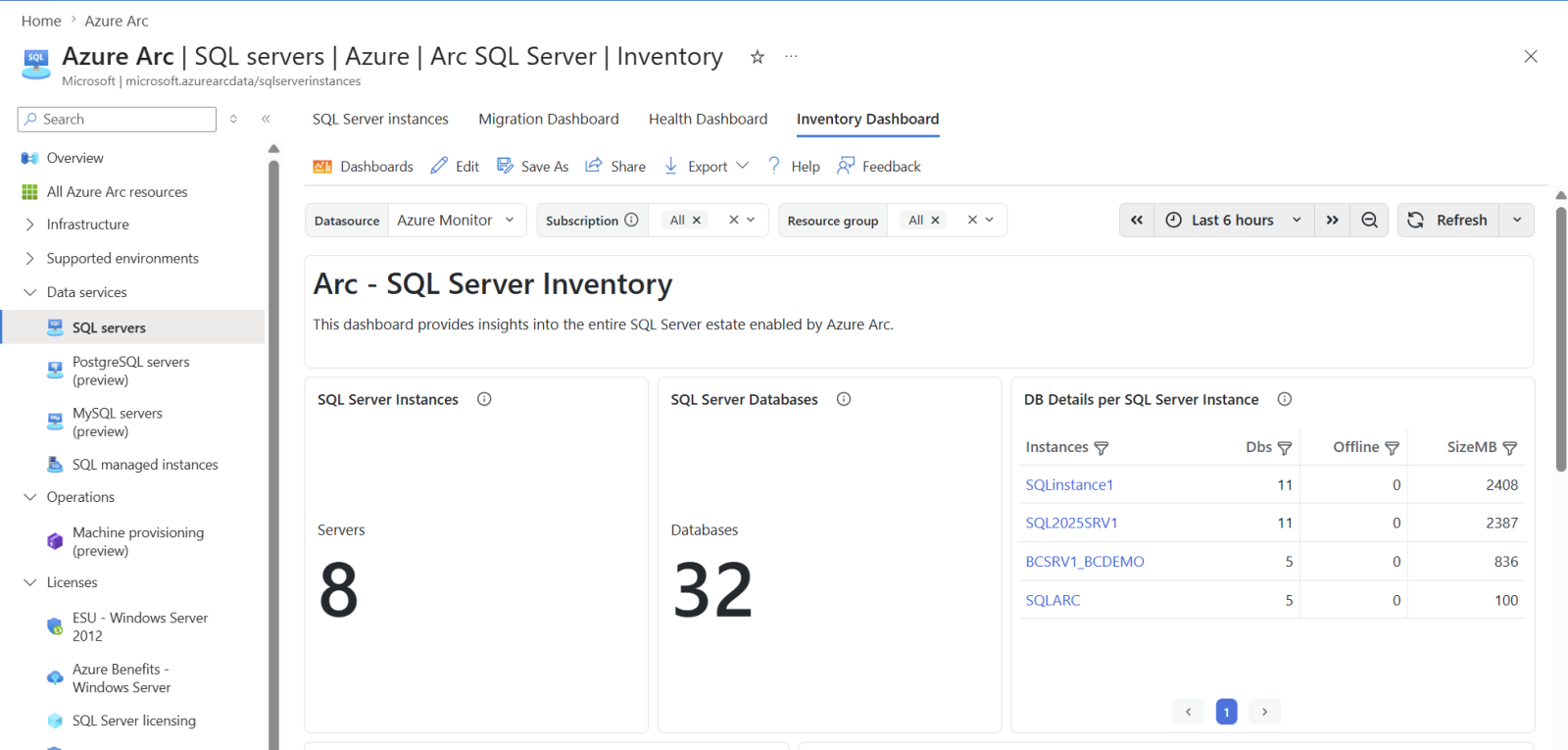
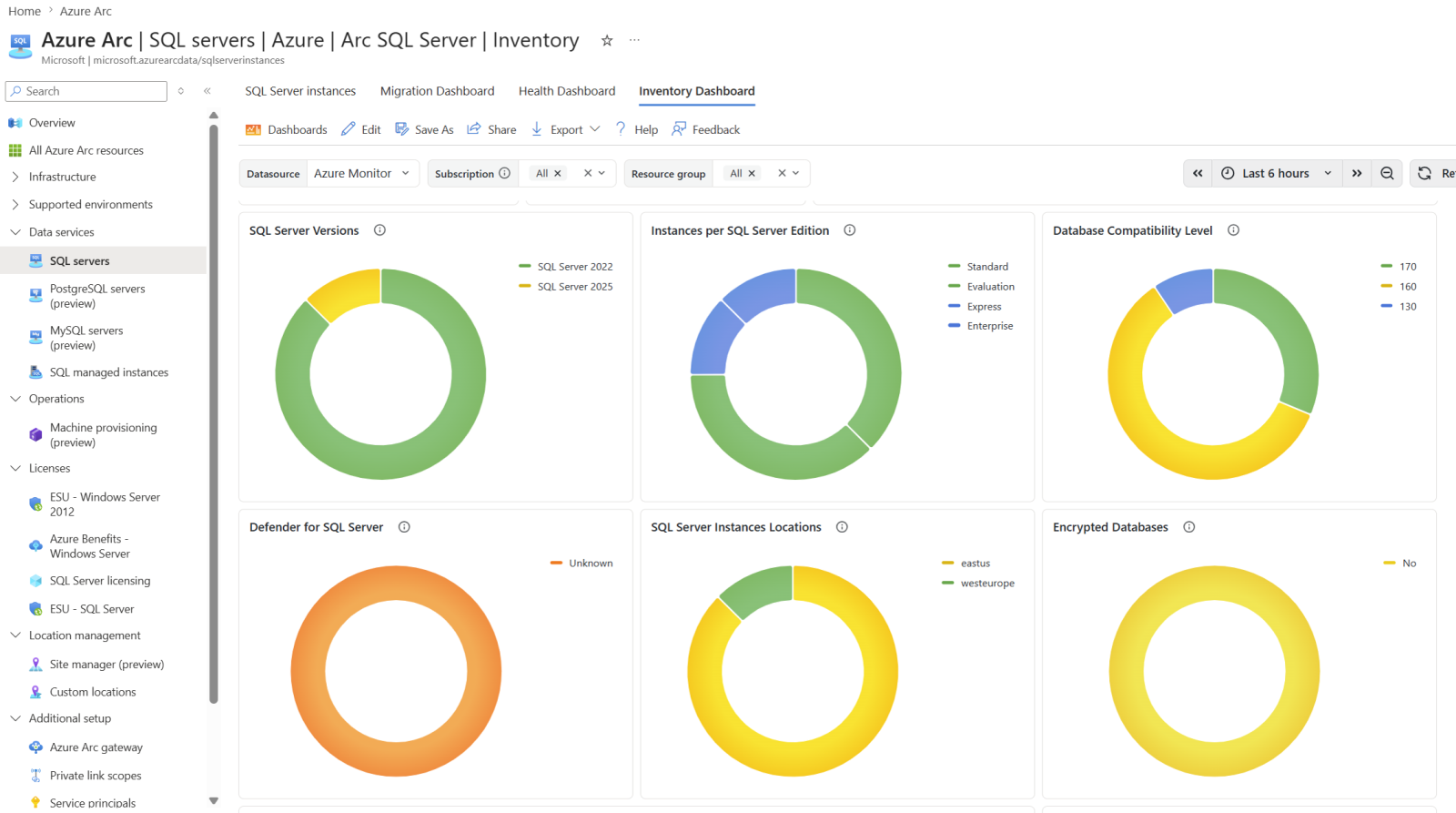
SQL Server instances running on the ThinkAgile MX cluster are projected into Azure as Arc-enabled SQL Server resources, giving administrators a consolidated inventory alongside the servers and Kubernetes clusters already registered. The portal view lists the discovered instances together with their host, version, and edition, so database estate visibility comes from the same console used for the rest of the environment rather than from a separate tool.
Preview Capabilities
Azure Arc continues to add capabilities that extend beyond visibility and governance into provisioning and organization of distributed infrastructure. Two of these are currently in preview and are worth evaluating for ThinkAgile MX environments:
- Machine Provisioning, which automates server deployment from pre-configured images to support zero-touch rollout
- Site Management, which provides a structured way to group and manage resources that are spread across multiple locations.
Both are shown below as configured in the test environment. Because these features are in preview, their behavior and availability may change before general release, so validate them against current Microsoft documentation before building them into a production deployment process.
The two features are described in the following sections:
Machine Provisioning
A newly introduced Azure Arc capability, currently in preview, is Machine Provisioning. This feature enables automated deployment of servers using pre-configured images, including downloadable Linux ISO files. The approach supports zero-touch provisioning, allowing organizations to rapidly deploy infrastructure with minimal manual intervention. Once provisioning is complete, the deployed resources can be integrated and managed as part of an Azure Local instance, ensuring consistency across hybrid environments.
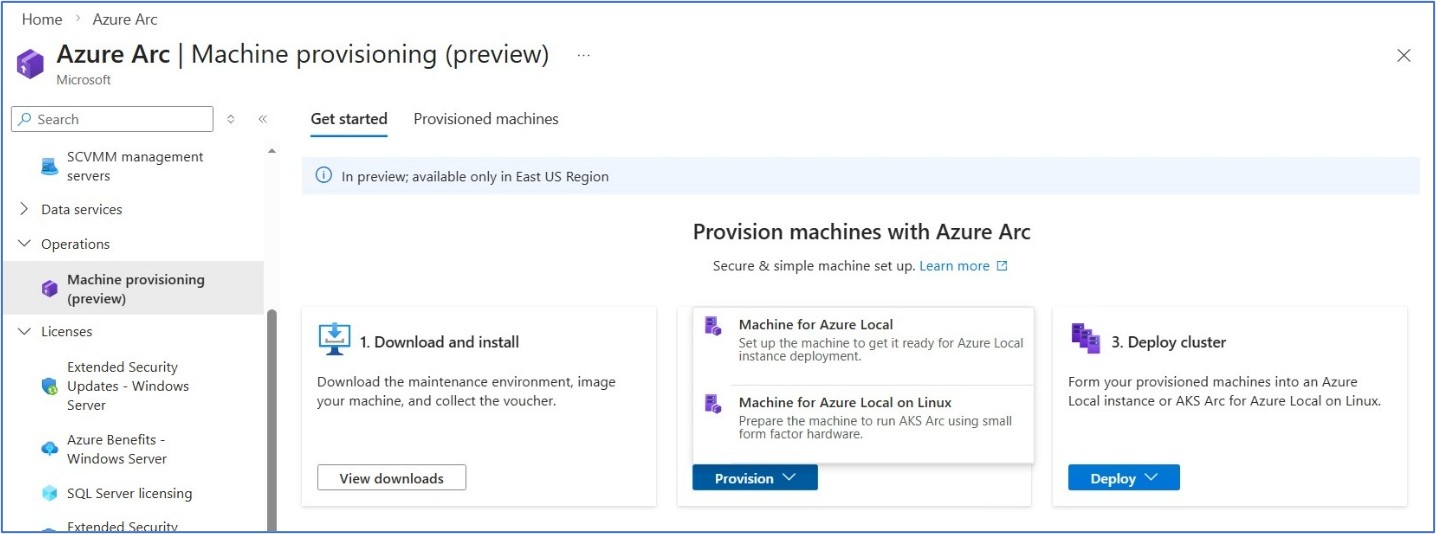
Figure 14: Machine Provisioning
Site Management
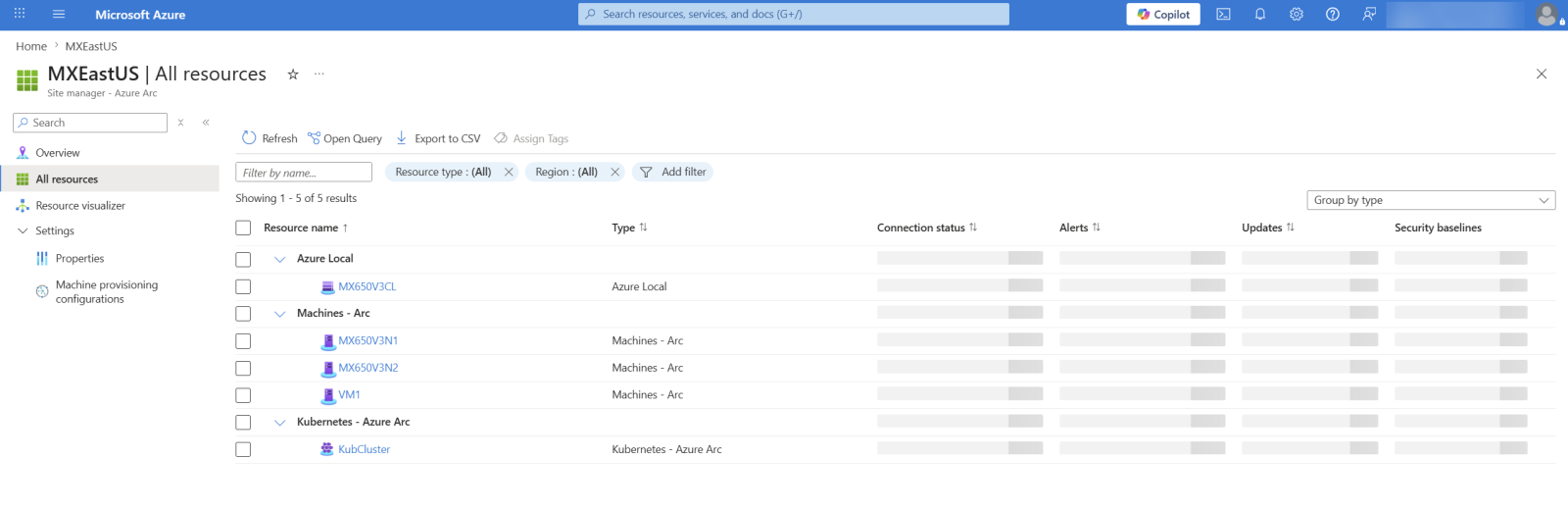
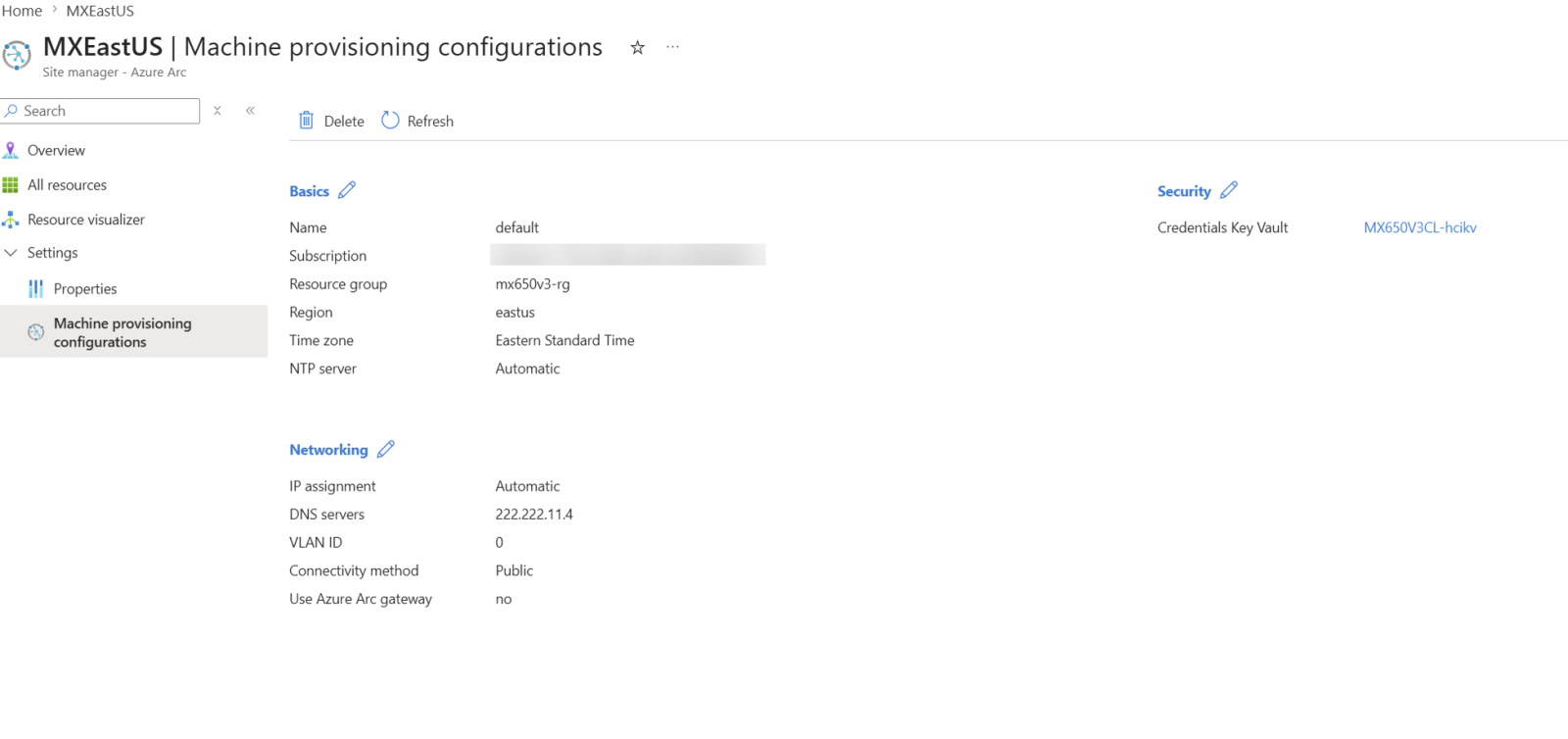
Another feature available in preview is Site Management, which provides a structured way to organize and manage distributed resources within Azure Arc. The example below illustrates a configured Azure Arc site, where all associated resources are centrally visible and manageable through a unified interface.
Conclusion
By combining Azure Arc with Lenovo ThinkAgile MX, customers gain a simplified, high-performance, and secure hybrid cloud platform that drives operational efficiency. It accelerates time-to-market for new applications, unlocks the power of on-premises AI with enterprise-grade hardware, and ensures consistent governance and security — all while offering flexible consumption and world-class support. This powerful partnership empowers your organization to innovate faster while keeping critical data and workloads securely on-premises.
References
For more information, see these resources:
- Technical Brief for Microsoft Azure Arc on ThinkAgile MX
https://lenovopress.lenovo.com/lp1682-azure-arc-on-thinkagile-mx - Azure Arc overview
https://learn.microsoft.com/en-us/azure/azure-arc/overview
Author
Adelina Onofrei is a Microsoft Solutions Engineer, specializing in Azure Local deployments, Azure Local cluster and LXCI testing. Adelina is dedicated to enabling business success through secure, innovative, and reliable solutions based on Azure Local and enterprise cloud technologies.
Trademarks
Lenovo and the Lenovo logo are trademarks or registered trademarks of Lenovo in the United States, other countries, or both. A current list of Lenovo trademarks is available on the Web at https://www.lenovo.com/us/en/legal/copytrade/.
The following terms are trademarks of Lenovo in the United States, other countries, or both:
Lenovo®
ThinkAgile®
ThinkSystem®
XClarity®
The following terms are trademarks of other companies:
Linux® is the trademark of Linus Torvalds in the U.S. and other countries.
Microsoft®, Azure®, Microsoft Defender®, SQL Server®, and Windows® are trademarks of Microsoft Corporation in the United States, other countries, or both.
Other company, product, or service names may be trademarks or service marks of others.
Configure and Buy
Please select a locale
Full Change History
Course Detail
Employees Only Content
The content in this document with a is only visible to employees who are logged in. Logon using your Lenovo ITcode and password via Lenovo single-signon (SSO).
The author of the document has determined that this content is classified as Lenovo Internal and should not be normally be made available to people who are not employees or contractors. This includes partners, customers, and competitors. The reasons may vary and you should reach out to the authors of the document for clarification, if needed. Be cautious about sharing this content with others as it may contain sensitive information.
Any visitor to the Lenovo Press web site who is not logged on will not be able to see this employee-only content. This content is excluded from search engine indexes and will not appear in any search results.
For all users, including logged-in employees, this employee-only content does not appear in the PDF version of this document.
This functionality is cookie based. The web site will normally remember your login state between browser sessions, however, if you clear cookies at the end of a session or work in an Incognito/Private browser window, then you will need to log in each time.
If you have any questions about this feature of the Lenovo Press web, please email David Watts at dwatts@lenovo.com.


