

Top
Authors
Published
8 Jul 2026Form Number
LP2471PDF size
18 pages, 1.7 MBSubscribed to LP2471.
Thank you for your feedback.
Table of Contents
Executive summary
Lenovo ThinkAgile MX650a V4, equipped with NVIDIA RTX PRO 6000 GPU, provides the validated infrastructure foundation for running enterprise AI inference workloads on-premises and at the edge. Foundry Local is an Azure-integrated platform, currently in preview, that provides a localized runtime for AI inference workloads and can be deployed as an Azure Arc extension on Azure Arc-enabled Kubernetes clusters.
Foundry Local enables AI models to run locally on customer-managed infrastructure, including environments with limited or disconnected connectivity. In connected scenarios, Azure Arc provides centralized deployment, lifecycle management, and governance integration. In disconnected scenarios, workloads continue to run locally, while Azure Arc-based management and synchronization depend on connectivity being available.
This brief document is the end-to-end deployment process, the security model, the inference pod architecture, and the verification steps required to bring the platform online. The procedure has been validated on a Lenovo ThinkAgile MX650a V4 server equipped with NVIDIA RTX PRO 6000 GPUs, used as the reference target for all examples.
Key Capabilities
The following are the Key Capabilities for the Foundry Local is an Azure-integrated platform:
- Hybrid authentication: API keys for simple service-to-service traffic, Microsoft Entra ID for identity-based access. Both can run side-by-side.
- Azure RBAC integration: When Entra ID is enabled, access is governed by standard Azure roles (`Cognitive Services OpenAI User`, `Cognitive Services Contributor`).
- Sidecar-based inference pods: Each model deployment runs with an `nginx` sidecar (TLS termination), an entra-sidecar (token validation), and an `msi-adapter` (identity broker for disconnected nodes).
- Advanced AI features: Entra ID authentication unlocks features such as Agentic Retrieval, allowing agents to interact with deployed models.
- Operational resilience: API key validation is fully local to the cluster; Entra ID flows cache signing keys and RBAC decisions to survive short network outages.
Lenovo ThinkAgile MX650V4a and NVIDIA RTX PRO 6000
This brief uses a Lenovo ThinkAgile MX650a V4 as the validated reference platform for hosting the Arc-enabled Kubernetes cluster that runs Foundry Local.
The MX650a V4 is a 2U, dual-socket server powered by Intel Xeon 6 processors and engineered for Microsoft Azure Local and Azure Arc–managed hybrid cloud environments. With support for up to four double-wide GPUs per node, high-capacity DDR5 memory, and high-performance NVMe storage, it provides a scalable platform for AI inference, data-intensive applications, and modern hybrid infrastructure deployments.
Why ThinkAgile MX650a V4 and RTX PRO 6000 Are the Right Foundation
The following are the key capabilities for Why ThinkAgile MX650a V4 and RTX PRO 6000 are the Right Foundation:
- Suited for modern open-weights models. The 96 GB of VRAM per RTX PRO 6000 accommodates 7B–13B parameter models comfortably in fp16 and supports 20B-class models with quantization or tensor parallelism across multiple cards in the same chassis.
- Multi-model density. With up to four RTX PRO 6000 in one MX650a V4, a single node can host several concurrent `ModelDeployment` instances (e.g. a generative model alongside an embedding model), all governed by the same Foundry Local operator.
- Azure Local alignment. The MX650a V4 is a first-class Azure Local node. Arc enrollment, lifecycle management, monitoring, and policy all flow through the same Azure control plane that Foundry Local relies on for identity (Entra ID) and authorization (Azure RBAC).
- Hybrid / edge readiness. The platform tolerates intermittent connectivity (cached Entra signing keys and RBAC decisions), so MX650a V4 deployments at branch or edge sites can keep serving authenticated inference during transient WAN outages.
- Performance headroom for vLLM / ONNX-GenAI runtimes. RTX PRO 6000 Tensor Cores with FP8 support deliver high tokens/sec for generative workloads, and the PCIe Gen4 x16 link plus large host RAM keep model load and KV-cache pressure off the critical path.
How to deploy Foundry Local as an Azure Arc Extension
In the following sections, we take a deeper dive in the deployment of Foundry Local:
Prerequisites and Preparation
The following are the list of prerequsites of Foundry Local:
- Cluster: Kubernetes v1.29+ connected to Azure Arc in a supported region. On the MX650a V4 reference platform this is typically an Azure Local / AKS-on-Azure-Local cluster.
- Tooling: `kubectl`, `helm`, `kubelogin` and Azure CLI installed and authenticated.
- Ingress (optional): NGINX ingress controller required if exposing inference endpoints externally.
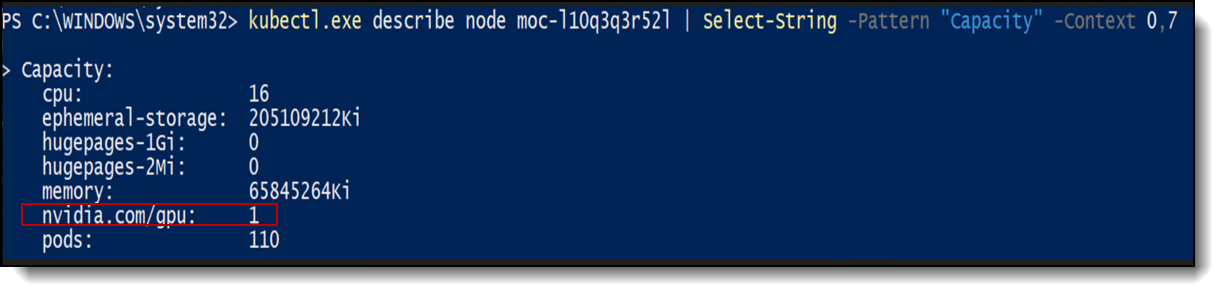
- GPU prerequisites: NVIDIA data-center driver compatible with the NVIDIA RTX PRO 6000, the NVIDIA device plugin for Kubernetes, and (recommended) the NVIDIA GPU Operator installed on GPU-bearing nodes. Figure 1 shows that the Kubernetes node advertises one NVIDIA GPU resource (nvidia.com/gpu: 1) for scheduling GPU-enabled workloads. In this deployment, the resource is backed by an NVIDIA RTX PRO 6000 GPU installed in the ThinkAgile MX650a V4 platform.
Identity and Authentication Configuration
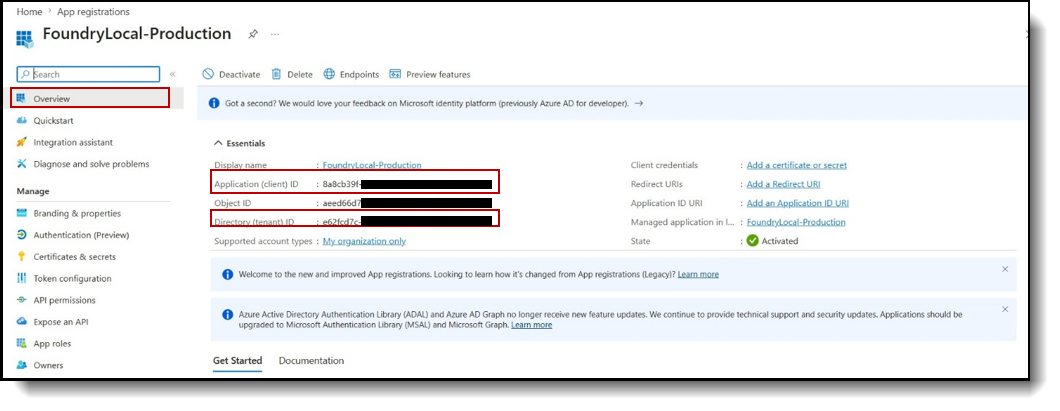
Foundry Local uses Microsoft Entra ID for identity-based access to inference services. Before deploying the Arc extension, create an application registration in the target tenant and record the Application client ID and Directory tenant ID.
- Create a single-tenant application registration in the target Entra ID tenant.
- Record the Application client ID and Directory tenant ID.
Expose the API
The application registration must expose an API so that access to Foundry Local inference endpoints can be represented through delegated permissions. The Application ID URI identifies the API, while the delegated scope defines the permission used for user access to the inference service.
- Set the Application ID URI using the default format `api://<client-id>`
- Add a delegated scope named `foundry_access`.
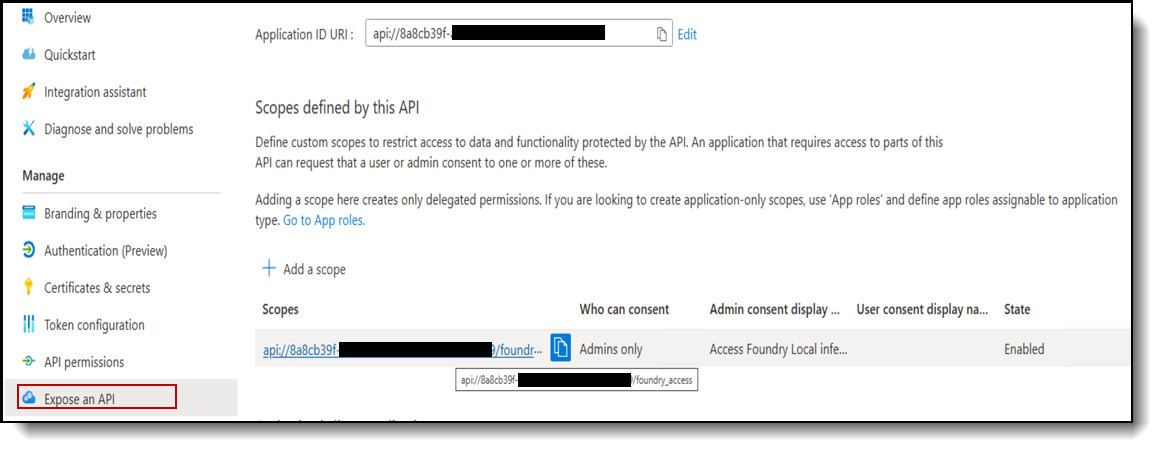
Figure 3. Exposed API Configuration (Application ID URI and the Delegated Scope)
Configure token format
Update the Microsoft Entra application manifest to issue version 2 access tokens, as showed in Figure 4. This setting is required for Foundry Local authentication. The authentication sidecar expects version 2 tokens and authentication requests may fail if the application continues to issue version 1 tokens.
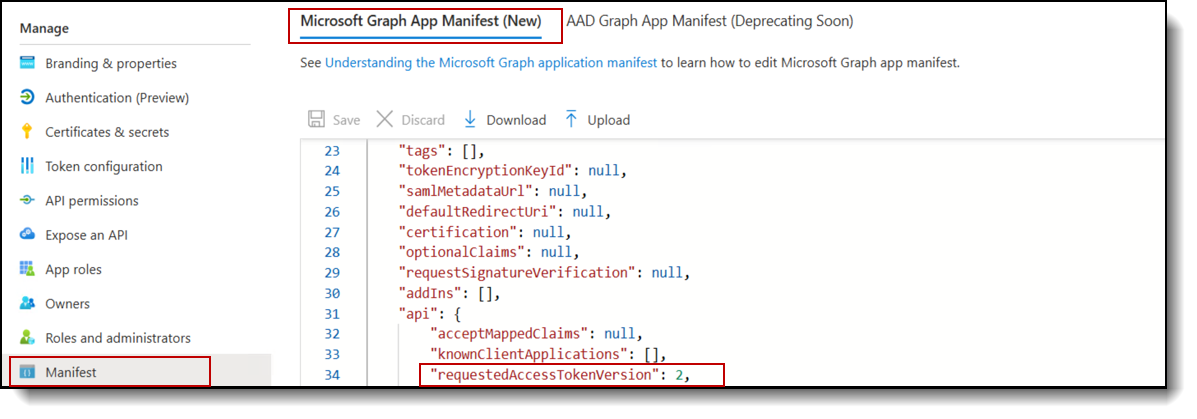
Figure 4. Token version Configuration in the Microsoft Entra Application Manifest
Authorize the Azure CLI
Configure Azure CLI as an authorized client for the Microsoft Entra application. This enables interactive token acquisition during Foundry Local access and validation workflows. Add the Microsoft Azure CLI client ID 04b07795-8ddb-461a-bbee-02f9e1bf7b46 as the authorized client application. (See the following figure)
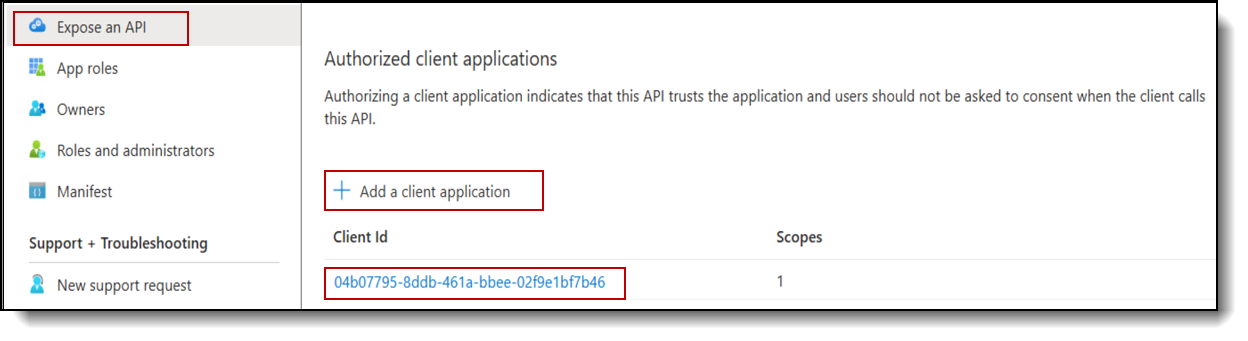
Figure 5. Azure CLI added as an Authorized Client Application
Assign Azure RBAC roles
Foundry Local uses Microsoft Entra authentication to validate the calling identity and Azure RBAC to authorize access to inference APIs. The `Cognitive Services OpenAI User` role is sufficient for calling deployed models’ endpoints and listing available models. In this deployment, the `Cognitive Services OpenAI Contributor` role (Figure 6) was used because the same identity also performs model deployment and management tasks.

Figure 6. Azure RBAC Role Assignment For Foundry Local Inference and Model Management
Install Certificate Management Components and the Inference Operator
Foundry Local depends on cert manager and trust manager to support certificate handling for secure communication across the deployment. These components should be installed first so the cluster is prepared for the required TLS and the service trust configuration.
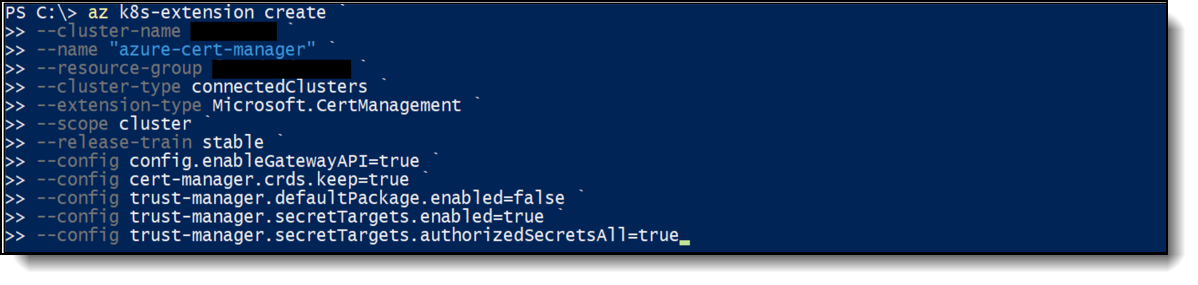
Figure 7. Certificate Management Extension Configuration
After the certificate management components are installed, deploy the Foundry Local inference operator (Figure 8). The operator enables the cluster to manage Foundry Local inference workloads and apply the identity configuration required for the deployment.
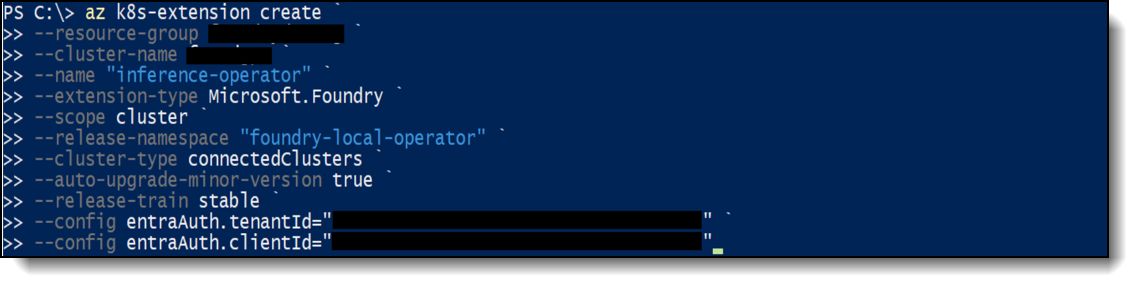
Figure 8. Foundry Local Inference Operator Extension Configuration
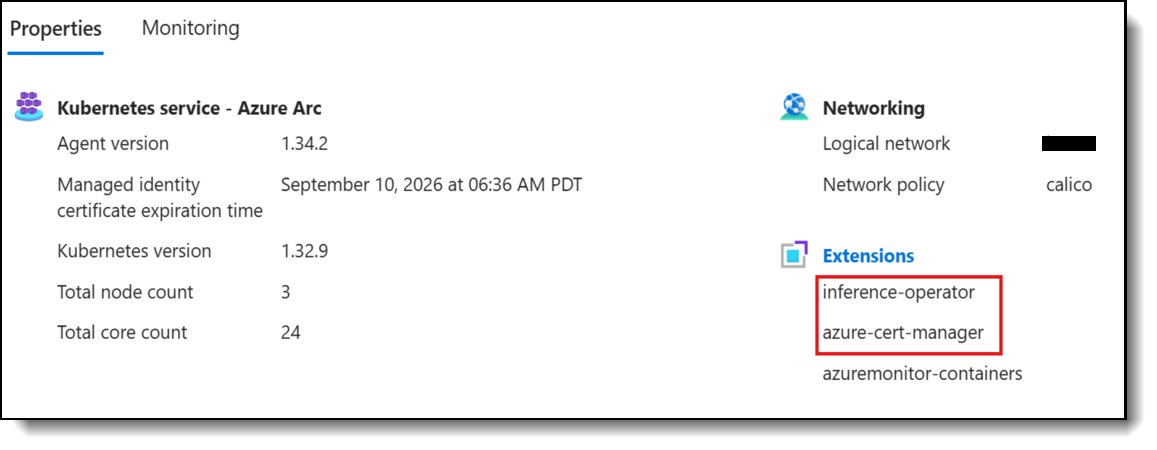
After installation, the extensions can be reviewed from the Azure portal. This confirms that the certificate management components and the Foundry local inference operator are registered on the Arc-enabled Kubernetes cluster before model deployment and validation, as shown in the following figure.
Model Deployment and Inference Validation
In the following sections, we take a deeper dive the deployment models:
Verify Available Models
After platform verification is complete, the environment is ready for deployment and inference testing. A vLLM based model is deployed to validate local model serving through Foundry Local. The following request uses the Microsoft Entra access token to query the local API and list the active models available for inference in the following figure:
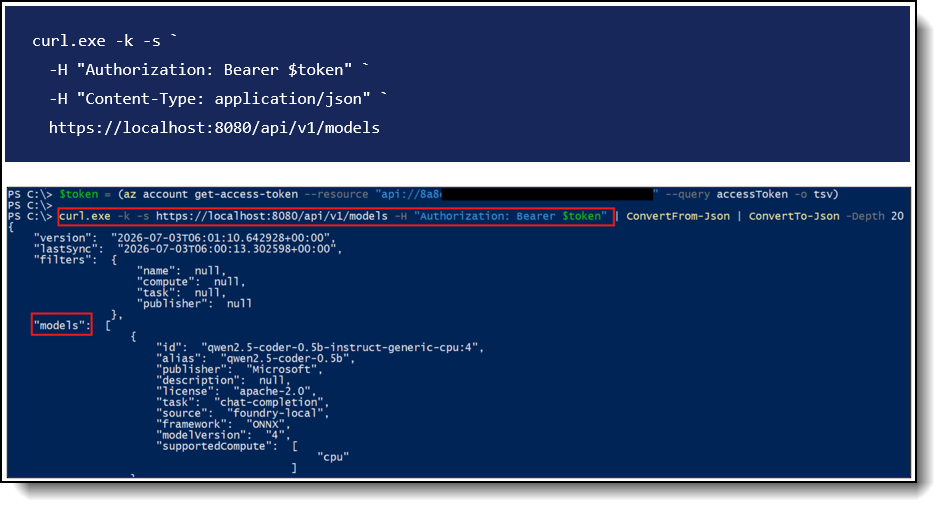
Deploy Model through the Local API using GPU compute
To deploy a model, such as `gpt-oss-20b`, submit the deployment definition to the Foundry Local API. The request body defines the model catalog entry, runtime, compute target, resource allocation and authentication setting required for the vLLM based workload.
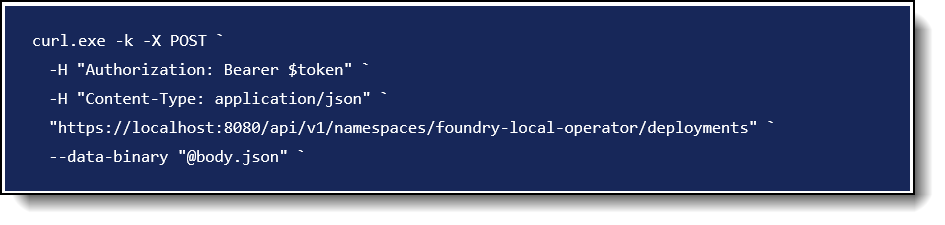
Figure 11. Json call to the local API
In this call, the `body.json` file provides the deployment configuration submitted to the Local API. The following figure shows the request body and the API call used to create the model deployment.
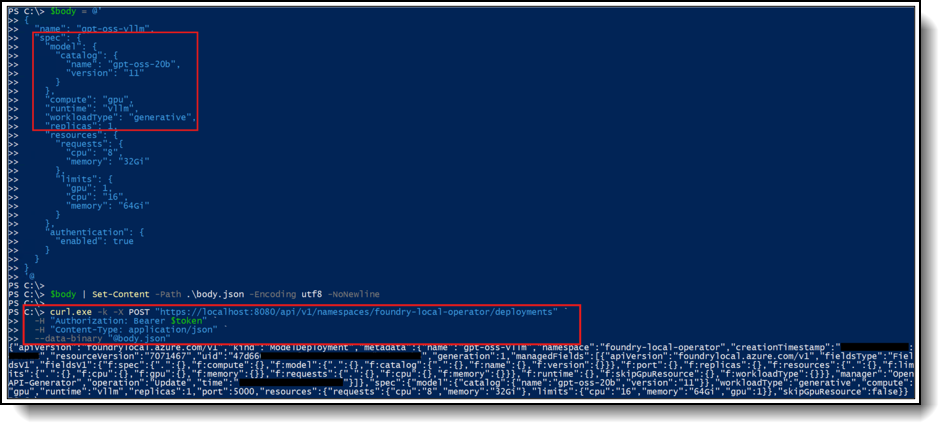
Validate Model Inference
Finally, validate the deployment by sending a simple prompt to the model and confirming that the local endpoint returns an inference response. This step verifies that the model is available, the API path is reachable, and Microsoft Entra based access is working as expected.
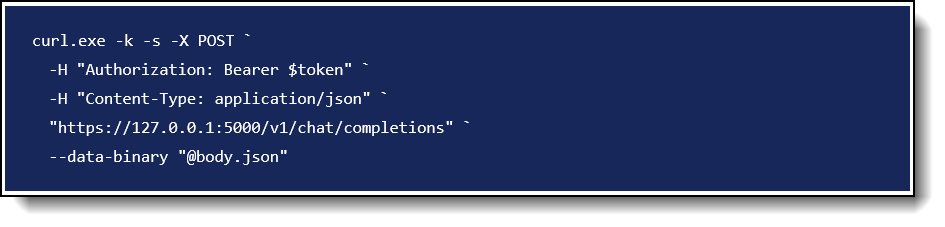
Figure 13. Prompt payload to the local chat
The command sends the prompt payload to the local chat completions endpoint using Microsoft Entra access token. Following figure shows the model response, confirming successful inference validation for gpt-oss-20.
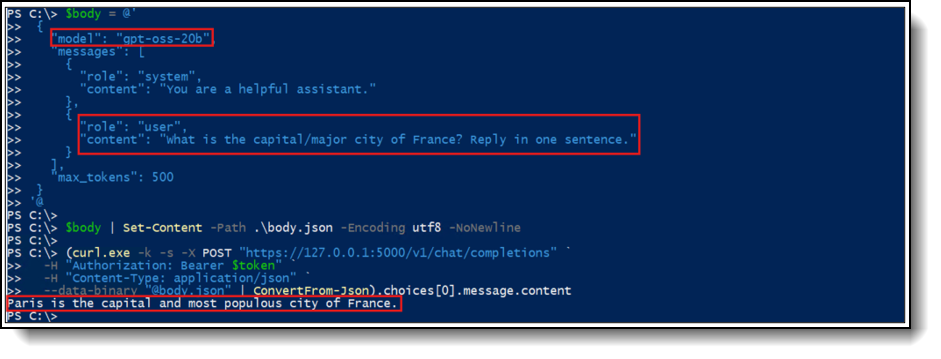
Figure 14. Local APU Inference Validation for the GPT OSS 20B Model
Deploy Model through the Local API using CPU compute
Azure Foundry Local also supports CPU hosted models’ deployments for lightweight inference workloads on standard CPU infrastructure rather than dedicated GPU hardware. This approach is suitable for smaller or distilled models, including the Phi family of Small Language Models, quantized variants and other compact architectures that can deliver acceptable latency and throughput without requiring GPU acceleration.
Because these deployments rely on standard CPU resources, they can reduce infrastructure complexity and provide a practical option for workloads with moderate performance requirements. This makes them suitable for scenarios such as:
- Budget-sensitive workloads, where cost-per-token matter more than raw performance.
- Edge-style and on-device scenarios, where GPUs may not be available or practical.
- Low-to-moderate traffic applications, such as internal tools, prototypes, chat assistants, classification, summarization, or retrieval-augmented generation (RAG) pipelines using smaller models.
- Always-on background services, where maintaining an active GPU allocation is unnecessary.
From a developer experience standpoint, the deployment workflow is identical to what we showcased for GPU-based LLMs: you browse the model catalog, select the desired model, choose a CPU-backed SKU instead of a GPU one, configure the endpoint, and deploy .
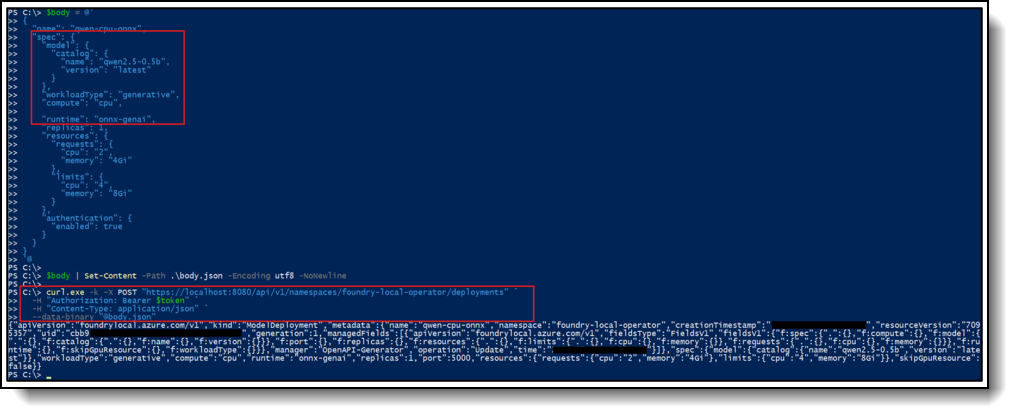
Figure 15. Model Deployment Request Body Using CPU Compute
The same Foundry tooling (model catalog, endpoint management, evaluation, monitoring, and SDK/API integration) applies in both cases, so teams can switch between CPU and GPU deployments (or run both side by side) without changing their application code or operational practices (Following figure).

Figure 16. Running GPU and CPU Model Deployments in Foundry Local
Outcome
In the following sections, we take a deeper dive into the following results:
Validated Deployment Result
On the Lenovo MX650a V4 + NVIDIA RTX PRO 6000 reference platform, the result is:
- A locally hosted, Azure-governed inference plane running on certified Azure Local hardware.
- Identity-aware access control through Entra ID and Azure RBAC.
- Edge-tolerant authentication that survives transient network loss.
- A consistent, sidecar-based runtime contract for every deployed model.
- GPU-accelerated generative inference via NVIDIA RTX PRO 6000, with headroom to host multiple models per node. .
Benefits of running Foundry Local in VMs on ThinkAgile MX650a V4
1. Data sovereignty and compliance
Models and prompts never leave the customer's premises. All inference happens locally on the MX650a V4, while only the control plane (Arc, RBAC, telemetry metadata) talks to Azure.
Simplifies meeting GDPR, HIPAA, FINMA, ITAR, and sector-specific data-residency requirements where shipping prompts/context to a public AI endpoint is not permitted.
Sensitive corpora (contracts, patient records, source code, engineering IP) can be used for RAG without crossing the WAN.
2. Azure-Grade Governance, on Your Hardware
Identity flows through Microsoft Entra ID; authorization uses Azure RBAC (Cognitive Services OpenAI User and Contributor), matching the model your applications already use in Azure OpenAI. Lifecycle, monitoring, policy, and patching flow through the Azure Arc control plane, giving on-premises AI the same lifecycle as cloud-hosted AI and one consistent operating model across cloud, datacenter, and edge.
3. Predictable Cost at Scale
After hardware amortization, inference cost is flat regardless of token volume — there's no per-token billing for the model itself.
Removes the per-call cost spikes typical of high-throughput workloads agent-driven or batch workloads (document processing, code generation pipelines, evaluations).
Right-sizes well: one RTX PRO 6000 can serve many small/medium models concurrently, and multiple RTX PRO 6000 in the MX650a V4 chassis let you grow without re-architecting.
4. Low and Deterministic Latency
Local PCIe-attached RTX PRO 6000 GPUs deliver single-digit to low-tens-of-ms time-to-first-token for typical generative workloads, with no WAN round-trip.
Removes variability from public cloud endpoints (regional capacity, throttling, noisy-neighbor).
Critical for interactive copilots, voice agents, and real-time analytics where consistent latency matters more than absolute peak throughput.
5. Edge and Disconnected Resilience
The platform supports intermittent connectivity by caching Entra signing keys and RBAC decisions, allowing authenticated inference to continue during short WAN outages. For fully local data plane access, API key authentication makes the MX650a V4 with NVIDIA RTX PRO 6000 suitable for branch offices, factories, hospitals and tactical sites.
6. High GPU Efficiency and Density
The NVIDIA RTX PRO 6000 provides 96GB of GDDR7 memory, giving the platform enough GPU memory for modern open weight inference workloads. This capacity is well suited for 7B to 13B models in FP16 and can support 20B class models depending on runtime settings, context length, batching and KV cache requirements.
The ThinkAgile MX650a V4 supports multiple double-wide GPUs per node, enabling multi-model density: a generative model, an embedding model, and a reranker can coexist on one node, each governed by its own ModelDeployment.
RTX PRO 6000 also accelerates graphics/video AI (decode/encode + Tensor) workloads alongside LLM serving.
7. Open Model Choice, No Vendor Lock-in
Pull any supported open-weights model from the Foundry catalog (Llama family, Phi, Mistral, gpt-oss, embedding models, and others) and serve it via vLLM or ONNX-GenAI. Switch runtimes or models with a ModelDeployment update; no application change is required. This avoids being tied to a single cloud LLM SKU or pricing model.
8. Operational simplicity for platform teams
Day two operations rely on standard Kubernetes and Azure CLI tools, including kubectl, Helm, and az k8s extension, with no need for a bespoke AI operations stack. The sidecar-based pod architecture, including nginx TLS, Entra sidecar authentication, and msi adapter identity, remains uniform across models, so operational runbooks can apply consistently across deployments. Lenovo ThinkAgile MX is co engineered and validated for Azure Local, reducing the integration burden compared to a custom GPU server approach.
9. Security Posture
TLS termination at the nginx sidecar with operator-managed certificates (cert-manager + trust-manager). Identity-aware ingress via the entra-sidecar (v2.0 tokens), with no model-side auth code to maintain. Network egress can be tightly scoped or eliminated for the data plane — useful for regulated networks.
10. Sustainability and Locality
Inference traffic stays on the local LAN, reducing WAN bandwidth, cloud egress cost, and the failure impact radius. Hardware can be placed close to data sources (factory floor, hospital wing, broadcast facility) to minimize backhaul. Use Cases:
A. Regulated-Industry Copilots
- Banking & insurance: internal copilots over policies, KYC files, claim histories — kept entirely on-prem to satisfy regulators.
- Healthcare: clinical decision support and clinician note summarization on PHI without sending data to a public model.
- Public sector / defense: classified or controlled-content assistants in environments where cloud AI is not approved.
B. Enterprise Knowledge & RAG over Private Data
- RAG copilots over SharePoint, Confluence, ticketing systems, code repos, ERP/CRM data, with embeddings and generation both running on the MX650a V4.
- Search-augmented assistants for legal, R&D, and engineering teams working with sensitive IP.
C. Developer and Engineering Productivity
- Self-hosted code assistants (completion, refactor, code review) using open-weights coding models, behind the corporate firewall.
- Bulk code generation / migration / test synthesis pipelines where per-token cloud pricing would be prohibitive.
D. Document and content processing at scale
- Contract analysis, claims processing, KYC document extraction, invoice understanding — long-running batch jobs that benefit from flat per-hour GPU cost rather than per-token cloud pricing.
- Multilingual translation / summarization of large internal document repositories.
E. Agentic Workflows on Private Systems
- Agentic Retrieval (enabled by Entra ID auth) lets agents securely call deployed models from inside the cluster, integrating with on-prem ERPs, CRMs, ITSM, and OT systems.
- Long-running autonomous agents (research, ops triage, IT auto-remediation) that would generate runaway cloud bills if hosted publicly.
F. Edge and Branch AI
- Retail: in-store assistants, planogram and shelf analytics, loss-prevention video AI — running on an MX650a V4 in the back office.
- Manufacturing: shop-floor copilots for operators and maintenance, predictive-quality assistants, work-instruction Q&A.
- Healthcare facilities: ward-level assistants and imaging triage running locally for low latency and data locality.
- Telco / MEC: GenAI services co-located with 5G workloads at the network edge.
G. Disconnected and Intermittent Environments
- Ships, oil rigs, mining sites, field forward operating bases, remote research stations — Foundry Local continues to authenticate (API key local, Entra cached) and serve inference during WAN outages.
H. Voice, Video, and Real-Time Interaction
- Contact-center copilots, live transcription + summarization, voice agents where round-trip latency to a public endpoint is unacceptable.
- RTX PRO 6000 NVENC/NVDEC + Tensor Cores enable combined video AI + LLM pipelines (e.g. video understanding feeding a generative summary) on the same node.
I. Multi-Tenant Internal AI Platform
- Platform teams expose a shared on-prem inference service to many business-unit apps. Azure RBAC governs which teams can call which models, and the operator can host multiple ModelDeployment instances per node thanks to RTX PRO 6000 VRAM density.
- Each tenant gets an OpenAI-compatible endpoint — apps that already speak the OpenAI API work unchanged.
J. Cost-Sensitive Batch Evaluation & Fine-Tuning Prep
- Offline evaluation harnesses, synthetic data generation, embedding back-fills, and other token-heavy batch jobs run continuously on owned hardware instead of metered cloud capacity.
K. Hybrid Bursting and Tiered Routing
- Local MX650a V4 + RTX PRO 6000 handles default and sensitive traffic; less-sensitive overflow or larger frontier-model requests are routed to Azure OpenAI. Same identity, same RBAC model on both ends.By combining Azure Foundry Local’s developer friendly AI runtime with Lenovo ThinkAgile MX V4 Azure Local Premier Solutions, joint Lenovo and Microsoft customers gain a proven, cost-effective platform to deploy production AI workloads where their data resides .
Seller training courses
The following sales training courses are offered for employees and partners (login required). Courses are listed in date order.
-
Excerpts from VTT: Systems and Data Center Cooling for Energy Efficient HPC and AI Computing
2026-05-12 | 29 minutes | Employees and Partners
DetailsExcerpts from VTT: Systems and Data Center Cooling for Energy Efficient HPC and AI Computing
Watch this video to see Dr Vinod Kamath speak on systems power and cooling for HPC and AI.
Published: 2026-05-12
Topics include:
Systems of the Future 2026-2029 - Platform Layouts and Cooling Challenges
Technologies that Deliver Energy Efficient Cooling for the System
Tags: Advanced DataCenter, Artificial Intelligence (AI), High-Performance Computing (HPC), Technical Sales
Length: 29 minutes
Course code: DVHPC233Start the training:
Employee link: Grow@Lenovo
Partner link: Lenovo 360 Learning Center
-
Excerpts from VTT: Understanding CDUs and their role in the Data Center
2026-05-12 | 50 minutes | Employees and Partners
DetailsExcerpts from VTT: Understanding CDUs and their role in the Data Center
Join this session to gain a clear understanding of Coolant Distribution Units (CDUs) and their role in modern liquid cooling environments. Our speaker - Matthew Ziegler will walk you through what CDUs are, how they function within solutions like Lenovo’s Neptune direct water cooling architecture, and why they are essential for high density compute environments.
Published: 2026-05-12
Length: 50 minutes
Course code: DVSYS215Start the training:
Employee link: Grow@Lenovo
Partner link: Lenovo 360 Learning Center
-
Lenovo Infrastructure Services Overview
2024-10-28 | 25 minutes | Employees and Partners
DetailsLenovo Infrastructure Services Overview
This e-learning course provides an overview of the full portfolio of Lenovo ISG Services for our Lenovo sellers and business partners.
Published: 2024-10-28
At the end of this course, you will be able to:
• Provide an overview of the full portfolio of service offerings
• Describe each service of the IT lifecycle from beginning to end
• Understand the benefits for your customers
Tags: Services, Services Lifecyle
Length: 25 minutes
Course code: DSVC102r5Start the training:
Employee link: Grow@Lenovo
Partner link: Lenovo 360 Learning Center
Related publications and links
For more information, see these resources:
- Microsfot Alliance
https://lenovopress.lenovo.com/software/alliances/microsoft#sort=relevance - Lenovo ThinkAgile MX650a V4 Product Guide
https://lenovopress.lenovo.com/lp2258-lenovo-thinkagile-mx650a-v4-hyperconverged-system - ThinkAgile MX Series for Microsoft Azure Local
https://lenovopress.lenovo.com/servers/thinkagile/mx-series#sort=relevance
Authors
Saleem Al Bouri is a Lenovo Solution Engineer based in Bucharest, Romania. He holds a Bachelor of Science in Computer Engineering and is currently pursuing a master's degree in security of Complex Information Networks. His expertise includes IT engineering, software development, containerized infrastructure, orchestration technologies, and Microsoft hybrid cloud and on-premises solutions.
Victor Talpeanu is a Microsoft Solutions Engineer with over 8 years of experience in the IT industry, specializing in Azure Local deployments and Azure Local cluster testing. He contributes to Lenovo’s MX portfolio through Software Builder Extension (SBE) validation, ensuring seamless integration and performance across hybrid and edge infrastructures. Victor focuses on delivering secure, modern, and reliable solutions built on Azure Local and enterprise cloud technologies.
Trademarks
Lenovo and the Lenovo logo are trademarks or registered trademarks of Lenovo in the United States, other countries, or both. A current list of Lenovo trademarks is available on the Web at https://www.lenovo.com/us/en/legal/copytrade/.
The following terms are trademarks of Lenovo in the United States, other countries, or both:
Lenovo®
ThinkAgile®
The following terms are trademarks of other companies:
Intel®, the Intel logo and Xeon® are trademarks of Intel Corporation or its subsidiaries.
Microsoft®, Azure®, Helm®, Microsoft Entra®, and SharePoint® are trademarks of Microsoft Corporation in the United States, other countries, or both.
NVIDIA® and NVIDIA RTX® are trademarks of NVIDIA Corporation.
Other company, product, or service names may be trademarks or service marks of others.
Configure and Buy
Please select a locale
Full Change History
Course Detail
Employees Only Content
The content in this document with a is only visible to employees who are logged in. Logon using your Lenovo ITcode and password via Lenovo single-signon (SSO).
The author of the document has determined that this content is classified as Lenovo Internal and should not be normally be made available to people who are not employees or contractors. This includes partners, customers, and competitors. The reasons may vary and you should reach out to the authors of the document for clarification, if needed. Be cautious about sharing this content with others as it may contain sensitive information.
Any visitor to the Lenovo Press web site who is not logged on will not be able to see this employee-only content. This content is excluded from search engine indexes and will not appear in any search results.
For all users, including logged-in employees, this employee-only content does not appear in the PDF version of this document.
This functionality is cookie based. The web site will normally remember your login state between browser sessions, however, if you clear cookies at the end of a session or work in an Incognito/Private browser window, then you will need to log in each time.
If you have any questions about this feature of the Lenovo Press web, please email David Watts at dwatts@lenovo.com.


