

Top
Authors
Updated
27 May 2026Form Number
LP2433PDF size
21 pages, 2.3 MBSubscribed to LP2433.
Thank you for your feedback.
Table of Contents
Abstract
The Hybrid AI 221 Microfactory with Red Hat represents an entry point to enterprise AI, providing a simple yet effective AI platform for inference workloads that can be deployed in hours, not days. Utilizing Red Hat OpenShift with Validated Patterns on top of NVIDIA AI Enterprise ensures a secure, consistent, and supported AI full stack. This guide will walk through the AI Factory architecture, software components, and deployment steps to get enterprises started quickly on Lenovo’s Hybrid AI 221 platform.
Change History
Changes in the May 27, 2026 update:
- Updated the following under Deploying OpenShift and a Validated Pattern section
- Replaced Patterns-operator project image
- Added new image - Edited yaml file
- Added new image - Deleting the patterns-operator-controller-manager pod
- Added new image - Pattern Catalog
- Updated the following under Application example section
- Replaced RAG model flow image
- Added new image - Editing RAG data sources
Introduction
Lenovo Hybrid AI 221 provides a compact and low-cost entry point for AI enterprise workloads. In partnership with Red Hat and NVIDIA, Lenovo has developed a full AI platform with minimal setup and configuration requirements. Customers can expect support for all layers of the stack, from hardware up to application layer, so that AI engineers can focus on development, not infrastructure management.
Business Problem
Enterprises want to begin with a right-sized infrastructure footprint but do not want to adopt a dead-end architecture. They need a small deployment that still looks and behaves like the platform they plan to scale in the future, without dealing with the complexities of a large-scale deployment up front. They also want a software stack that can support inference today while leaving room for model customization, lifecycle management, and broader application integration tomorrow.
Solution Overview
Red Hat AI Enterprise with Validated Patterns are central to this Hybrid AI 221 solution with Red Hat, making the AI application layer setup quick and easy with minimal configuration to deploy a tested and maintained GitOps pattern to an existing OpenShift cluster. Automation is the key point of this solution – both the OpenShift cluster bring-up and Validated Pattern installation have automation built in to ensure users can get started as fast as possible. Furthermore, OpenShift GitOps ensures that deployments are consistent and repeatable, because all software artifacts share a single source of truth in a git repository. As the Validated Pattern repository is updated the live pattern deployment will automatically have a rolling upgrade. Red Hat provides a large and growing catalog of patterns for PoCs or deployments.
The Hybrid AI 221 solution with Red Hat also provides flexibility with OpenShift and OpenShift AI, allowing easy model deployments and workload scheduling/management for any cloud-native workload. Combined with the rich ecosystem and feature set of OpenShift, this solution provides the full stack that an enterprise needs to run modern AI workloads and systems.
For a more information on the Lenovo Hybrid AI 221 platform, please see the Lenovo Hybrid AI 221 Platform Guide.
| Application Layer Red Hat Validated Patterns |
Red Hat Validated Patterns are a blueprint for automated deployments of ready to run software on OpenShift, utilizing GitOps for deployment management. |
| AI Platform & Scheduler OpenShift AI |
With OpenShift AI, users can perform model serving, fine tuning, and training. The platform includes curated third-party models to get enterprise started with AI quickly. |
| Container Orchestration Red Hat OpenShift |
OpenShift is an enterprise grade Kubernetes platform for deploying applications securely and at scale with minimal configuration or management. |
| Infrastructure Software NVIDIA AI Enterprise |
NVIDIA AI Enterprise includes critical software components such as the GPU Operator, Multi-Instance GPU, and GPU Drivers. |
| Infrastructure Hybrid AI 221 Platform |
Hybrid AI 221 on the ThinkSystem SR650a V4 server is a 2U AI platform for inference workloads, with 2 CPUs, 2 GPUs, and 1 Network Card. |
AI Software Stack
Deploying AI to production involves implementing multiple layers of software. The process begins with the system management and operating system of the compute nodes, progresses through a workload or container scheduling and cluster management environment, and culminates in the AI software stack that enables delivering AI agents to users.
Red Hat AI Enterprise
Red Hat AI Enterprise is an integrated AI platform for deploying and managing efficient and cost-effective AI models, agents, and AI-powered applications across hybrid cloud environments. Powered by Red Hat OpenShift, it brings together capabilities for model tuning, high-performance inference, AI application development, agentic workflow management, and lifecycle operations in a tested and supported enterprise stack. For the Lenovo Hybrid AI 221 Microfactory with Red Hat, Red Hat AI Enterprise bundles Red Hat OpenShift Container Platform, Red Hat OpenShift AI, and AI Accelerators to provide the core software foundation for deploying, serving, and managing inference-focused AI workloads with greater efficiency, flexibility, and control.
Red Hat OpenShift
Red Hat OpenShift Container Platform provides the enterprise Kubernetes foundation for this offering. As part of Red Hat AI Enterprise, OpenShift helps organizations deploy, run, and manage containerized AI applications and workloads consistently across hybrid cloud environments. Its orchestration, cluster management, and integrated platform capabilities, including the Red Hat Enterprise Linux CoreOS foundation used by OpenShift clusters, help support secure operations, automated lifecycle management, and consistent infrastructure for inference-focused workloads.
OpenShift AI
Red Hat OpenShift AI provides a comprehensive AI platform for building, tuning, deploying, serving, and monitoring predictive models, generative AI applications, and agentic systems at scale across hybrid cloud environments. As part of Red Hat AI Enterprise, OpenShift AI helps accelerate AI innovation and improve operational consistency through flexible inference, model serving, data connection workflows, observability, and governance capabilities. In this solution, OpenShift AI helps teams move inference-focused AI workloads from isolated experimentation into governed, enterprise-ready operations. For GPU-accelerated use cases, it supports seamless access to NVIDIA GPUs and leverages certified operators to simplify driver and runtime management. This makes it an ideal foundation for organizations looking to operationalize AI across hybrid cloud environments with consistency and control.
Red Hat Validated Patterns
Red Hat Validated Patterns are deployment assets that help accelerate implementation by providing repeatable, GitOps-based solution patterns for complex hybrid cloud environments. In this solution, a validated pattern helps codify the platform, application, and configuration elements needed for a more consistent deployment experience. Managed through Red Hat OpenShift GitOps, validated patterns use Git-based workflows to define and maintain desired-state configuration, helping teams deploy and update the AI software stack more consistently over time.
AI quickstarts
AI quickstarts provide ready-to-run example use cases that teams can deploy, explore, and extend on Red Hat OpenShift. Examples may include retrieval-augmented generation chatbots, product recommendation engines, or assistant-style applications. Because quickstarts are built on OpenShift, they can be deployed within this offering and adapted for customer-specific data, workflows, and application needs. Quickstarts are best positioned as starting points for experimentation and solution development, while Red Hat Validated Patterns provide a more structured, GitOps-based approach for repeatable deployment.
More on Validated Patterns
Validated Patterns can be used to deploy complex, multi-product solutions where correctness and repeatability are key. They are equally well-suited for proof-of-concept demonstrations due to their ease of deployment. Some example patterns include Multicluster GitOps, Hybrid data services, Industrial Edge, and RAG. These patterns can be used out of the box or customized to fit a use case or PoC.
What separates Validated Patterns with GitOps from traditional architectures is maintenance being baked into the framework as a core feature. There is no need to manually update the deployment, as all software artifacts will constantly sync with the connected git repository. As versions change, APIs degrade, and tools become outdated, the git repository can be updated and the changes will be automatically reflected in the Validated Pattern deployment.
GitOps delivers Infrastructure as code, where the desired state of infrastructure is determined by a codebase instead of manual implementation. Configuration files inside of a git repository outline the resources that should be provisioned, how they behave, and what properties they have. By leveraging git’s built in versioning system all changes can be tracked allowing easy updating and rollback. Therefore, by committing to a GitOps deployment, developers and DevOps teams get a standard workflow for application development, increased security, auditability, and consistency. With the OpenShift GitOps operator, the GitOps practice can be directly implemented within an OpenShift cluster. All Validated Patterns implement GitOps.
Validated Patterns are a great fit for organizations who already have a clear use case and are willing to commit fully to GitOps. The catalog of Validated Patterns includes a variety of use cases which many organizations are already implementing, such as RAG, Industrial Edge, and Multicloud applications. In that case, installing the pattern is simple and can become production-ready quickly. Teams already utilizing continuous integration and continuous development pipelines can transition easily to Validated Patterns.
Deploying OpenShift and a Validated Pattern
Deploying the 221 AI Factory can be broken down into 2 main steps: deploying OpenShift and installing the Validated Pattern. These steps assume your server is networked and can reach the internet, which is required for the OpenShift Assisted Installer. Either a static IP assignment or DHCP can be used, but this deployment guide will walk through the steps for a static IP address. For a visual step by step walkthrough of deploying the SNO cluster with the Assisted Installer and deploying the Validated Pattern onto a Lenovo server, click on this tutorial link.
In the following sections, we take a deeper dive the installations:
Single Node OpenShift Cluster Installation
Before you begin, if you want to use static IP addressing instead of DHCP you will need the MAC address, subnet, IP address, and DNS address of the node your cluster will be deployed to.
Ensure you are logged in and have activated your Red Hat AI Enterprise License. Navigate to https://console.redhat.com/ and click on Red Hat OpenShift. Then, click on “Create Cluster” under Red Hat.
OpenShift Container Platform. When prompted to select the type of cluster to create, click on the Datacenter tab, and click on “Create cluster” under Assisted Installer.
The Assisted Installer page will open. In Cluster Details, ensure that the option “1 (Single Node OpenShift)” is selected under Number of control plane nodes .
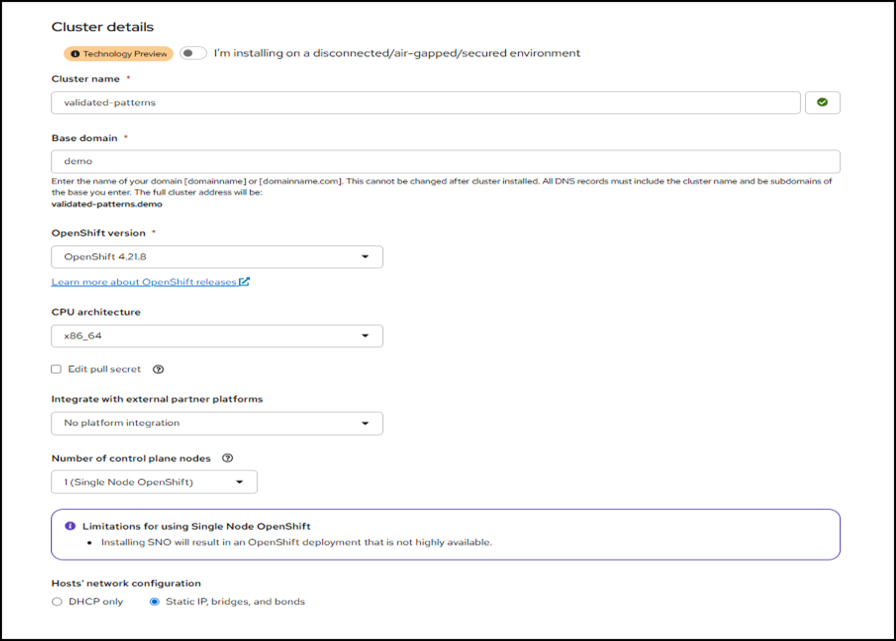
In this example, we assume the IP address for the node is static. If you are using DHCP, the static network configuration can be ignored.
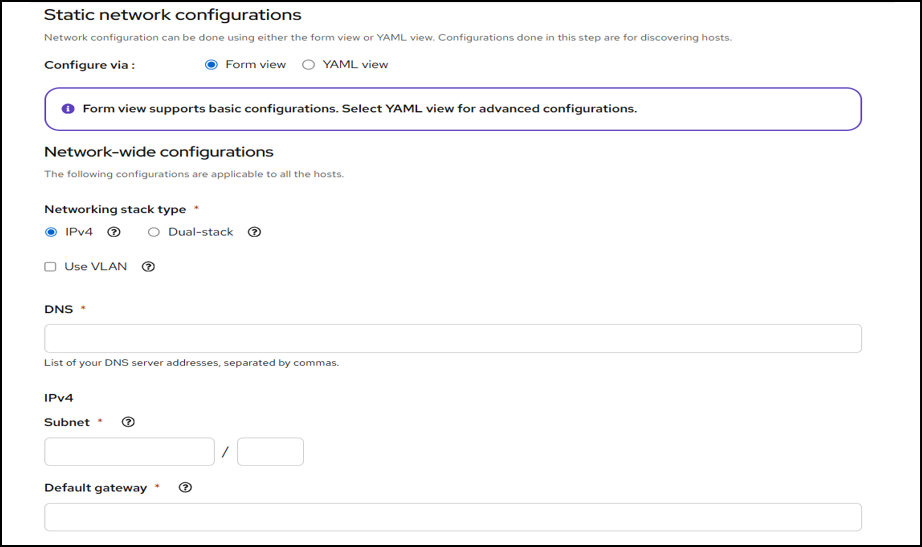
Figure 2. Network configuration
Enter the DNS server address for your node, the subnet your node is in, and the default gateway for that subnet. On the next page, enter the MAC address and IP address.
On the host discovery page, you can generate the discovery ISO that you will boot the server with. For a simple network configuration the minimal image file should suffice. However, for a node will multiple NICs or a complicated network topology, the full image file is recommended and was used to deploy an SR675 V3 with 5 NICs in this demo.
Download the ISO. The ISO can either be flashed to a USB stick or uploaded to media mount in XClarity Controller. If using a USB stick, ensure the software being used to flash it does not alter the installation in any way, as this can cause failure to boot.
Note: If XClarity Controller is used to mount the ISO, the session must stay open for the entire cluster bring-up. This can take up to an hour or even more, so ensure that you will be able to monitor the XCC session and ensure your computer does not go to sleep or the ISO may unmount.
Once the host has booted, you will see a login prompt. No need to login to the node, you can now go back to the Red Hat Console and see the new host pop up in the menu.
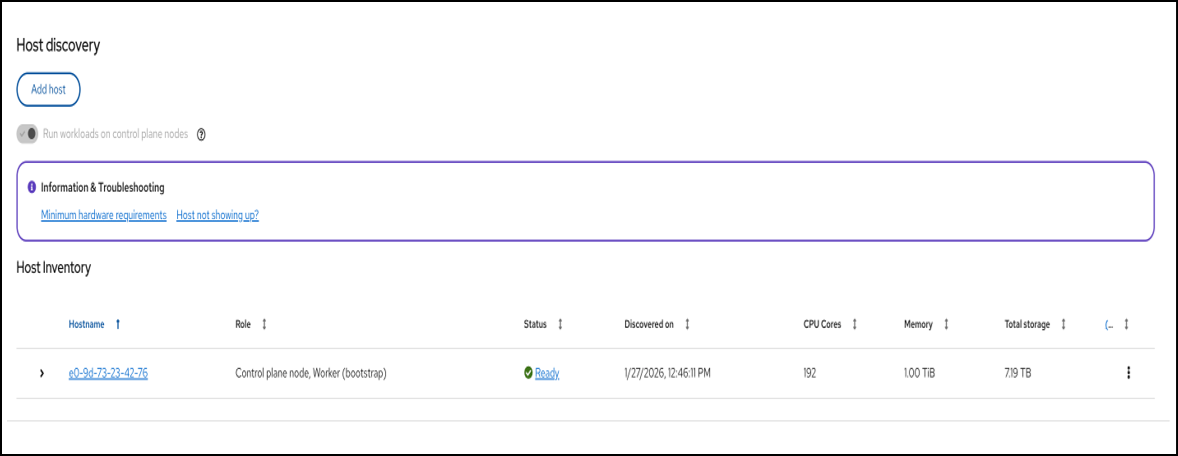
From here, you can progress directly to the Review section of the Assisted Installer and begin cluster installation.
Once the cluster has been installed, make sure to either add all the OpenShift hostnames to either your machine’s hosts file or the DNS server (on Windows you can find the hosts file in C:\Windows\System32\drivers\etc). The installation page contains the exact IPs and hostnames that you can copy and paste into the relevant file.
Validated Pattern Deployment
Before proceeding, please note that once a Validated Pattern is deployed, it can be difficult to uninstall due to the nature of GitOps. Depending on the exact Validated Pattern chosen, tearing down the cluster and redeploying it can be the easiest option.
You can explore the catalogue of Validated Patterns here: https://validatedpatterns.io/patterns/. This guide uses a specific pattern for the Hybrid AI 221 Microfactory that is unlisted on the main page, and will be added manually to the catalog.
On the OpenShift dashboard, select Ecosystem > Software Catalog.
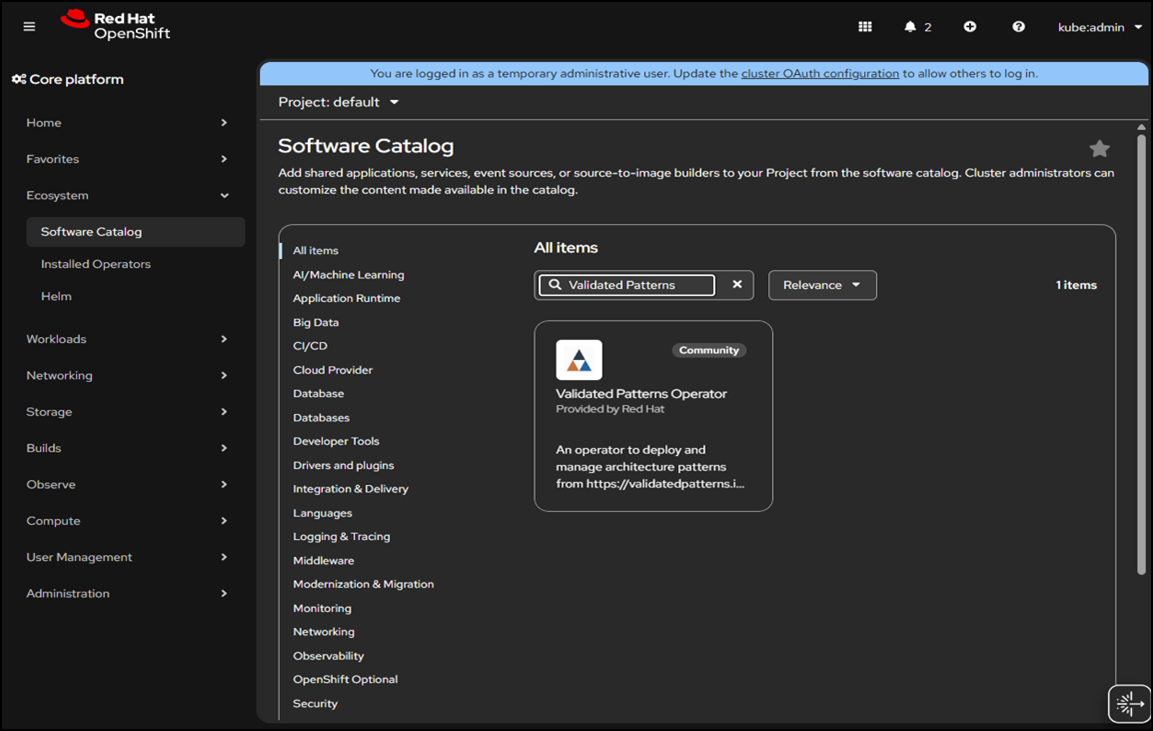
Search for the Validated Patterns Operator and install it (default settings are fine). After the operator is installed, we need to update the catalog with Lenovo 221 platform specific patterns. Under Workloads / ConfigMaps, click the Project: All Projects dropdown and select the patterns-operator project.
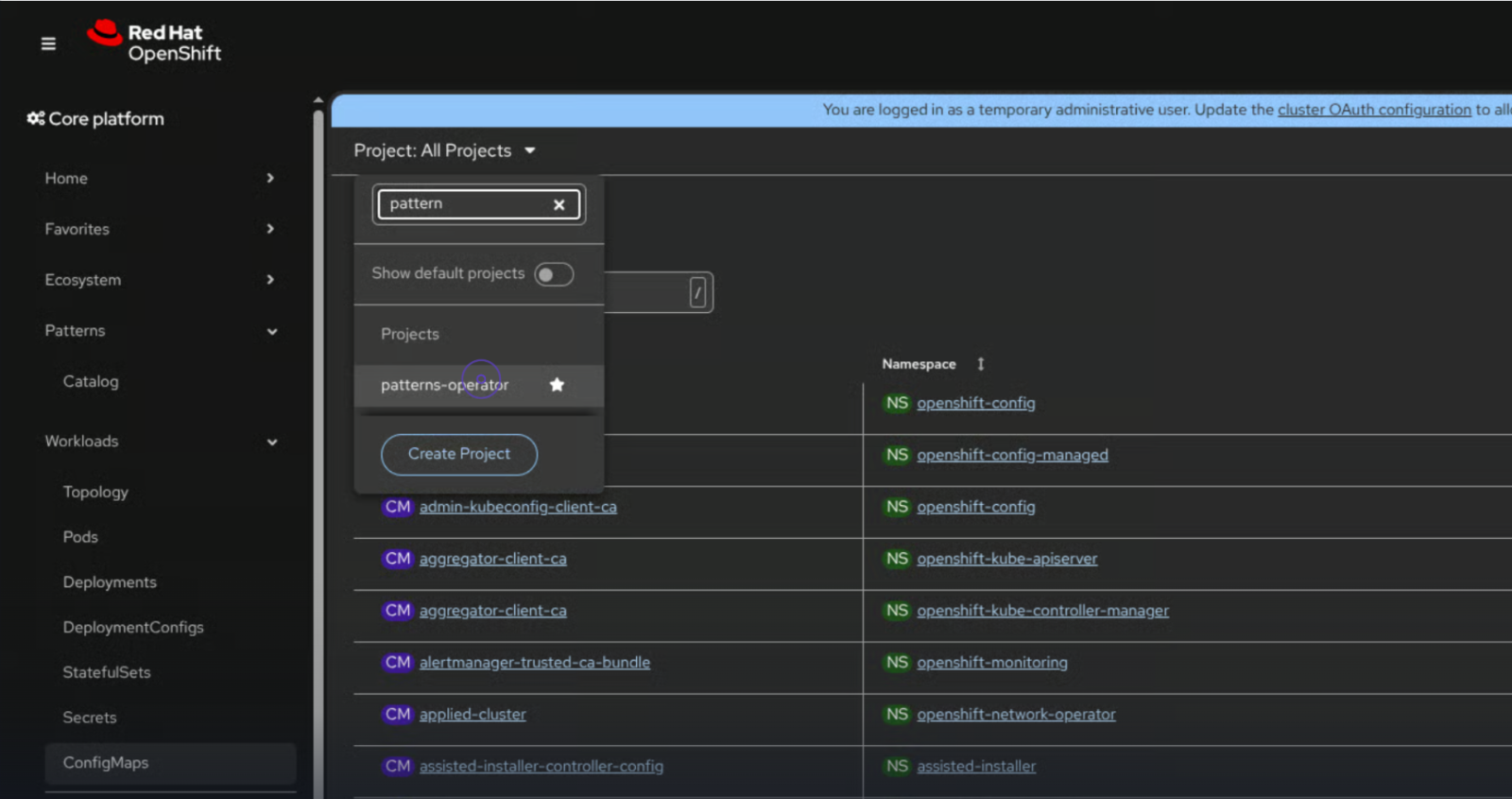
Figure 5. Patterns-operator project
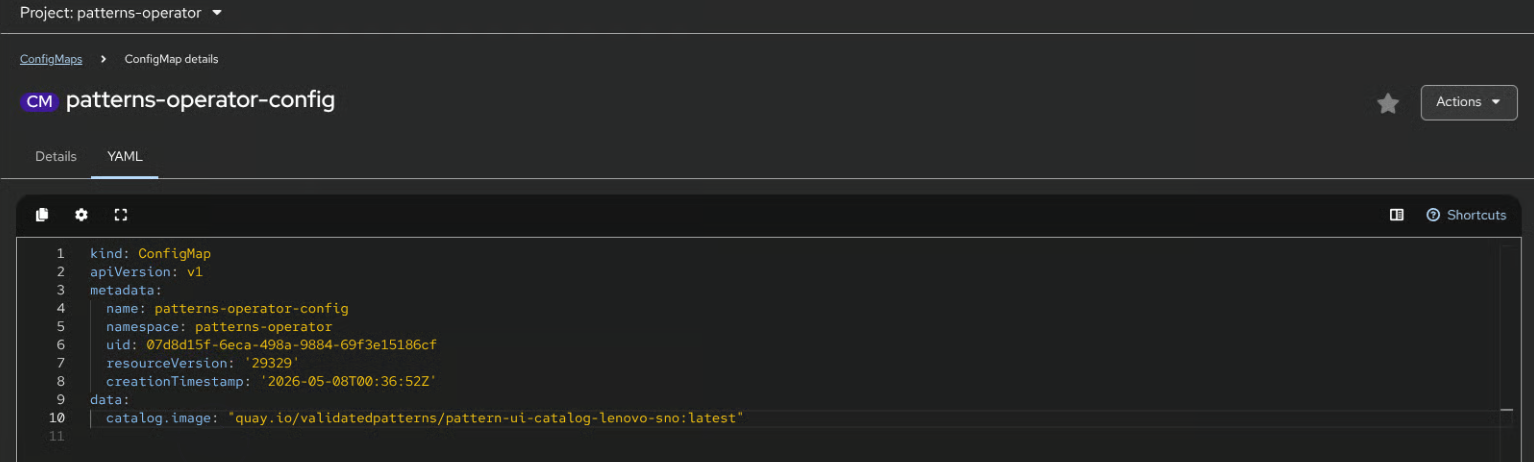
Then, you will see a patterns-operator-config configmap which you need to open and edit the yaml, adding the two lines at the bottom.
- data:
- catalog.image: “quay.io/validatedpatterns/pattern-ui-catalog-lenovo-sno:latest”
You must then delete the patterns-operator-controller-manager Pod under Workloads / Pods in the patterns-operator project.
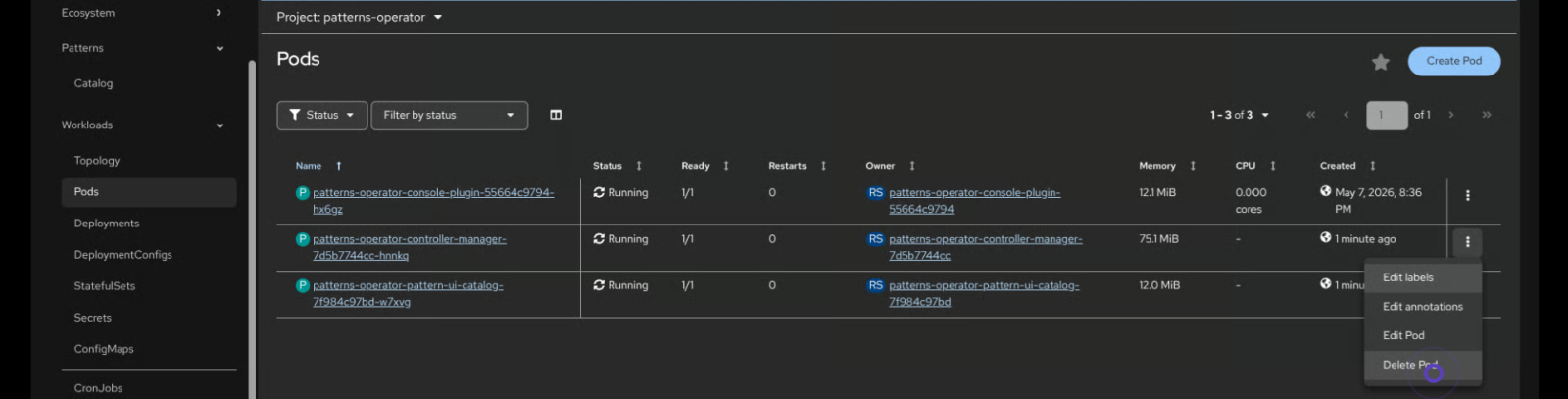
Figure 7. Deleting the patterns-operator-controller-manager pod
Now, the Lenovo Hybrid AI 221 tailored Validated Patterns will be shown in the Patterns / Catalog section, and we can install the RAG Validated Pattern.
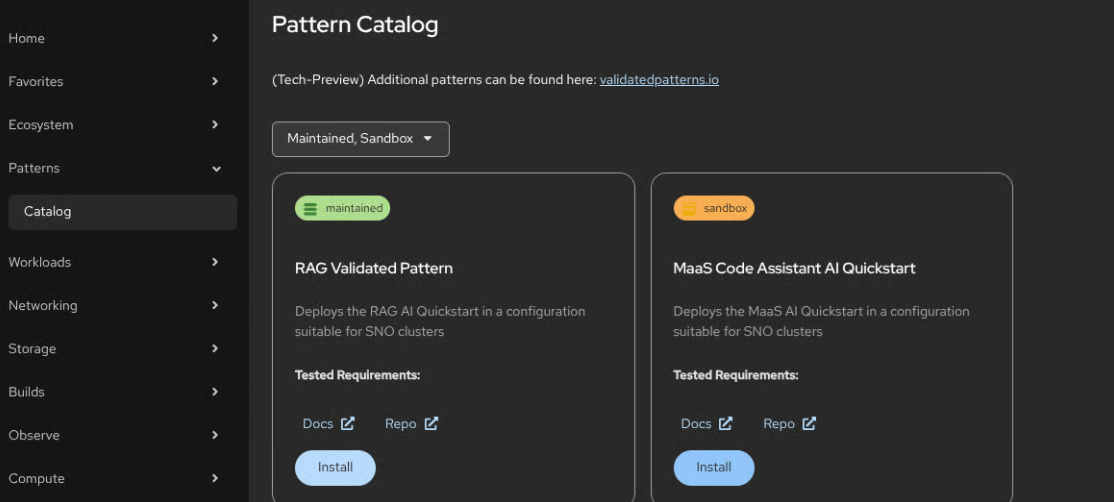
Click the Install button under the RAG Validated Pattern. You will need to fill in a huggingface “hf_token”, which is a free API token that will allow the validated pattern to download the LLMs it will deploy. For certain models you may have to accept a license agreement on the huggingface page for that model, for example Llama 3.2. Click Install again to begin the setup process. To check on progress, click the bento menu and select Prod ArgoCD.
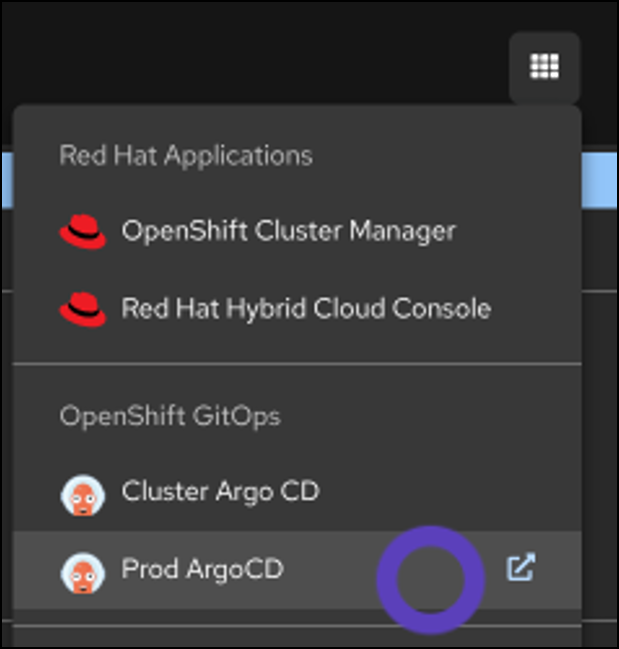
This will show the progress of each application bring up, and once each application is completely in sync the Validated Pattern is ready to be used. You can reach the UI from the same Bento Menu. For more detailed steps, please see the interactive demo.
Application Example
In the following sections, we take a deeper dive into the following:
RAG Validated Pattern
This Validated Pattern is for an LLM Chatbot with RAG on custom documentation and a Streamlit-based frontend. You can interact with the LLM through the frontend for a traditional chatbot experience.
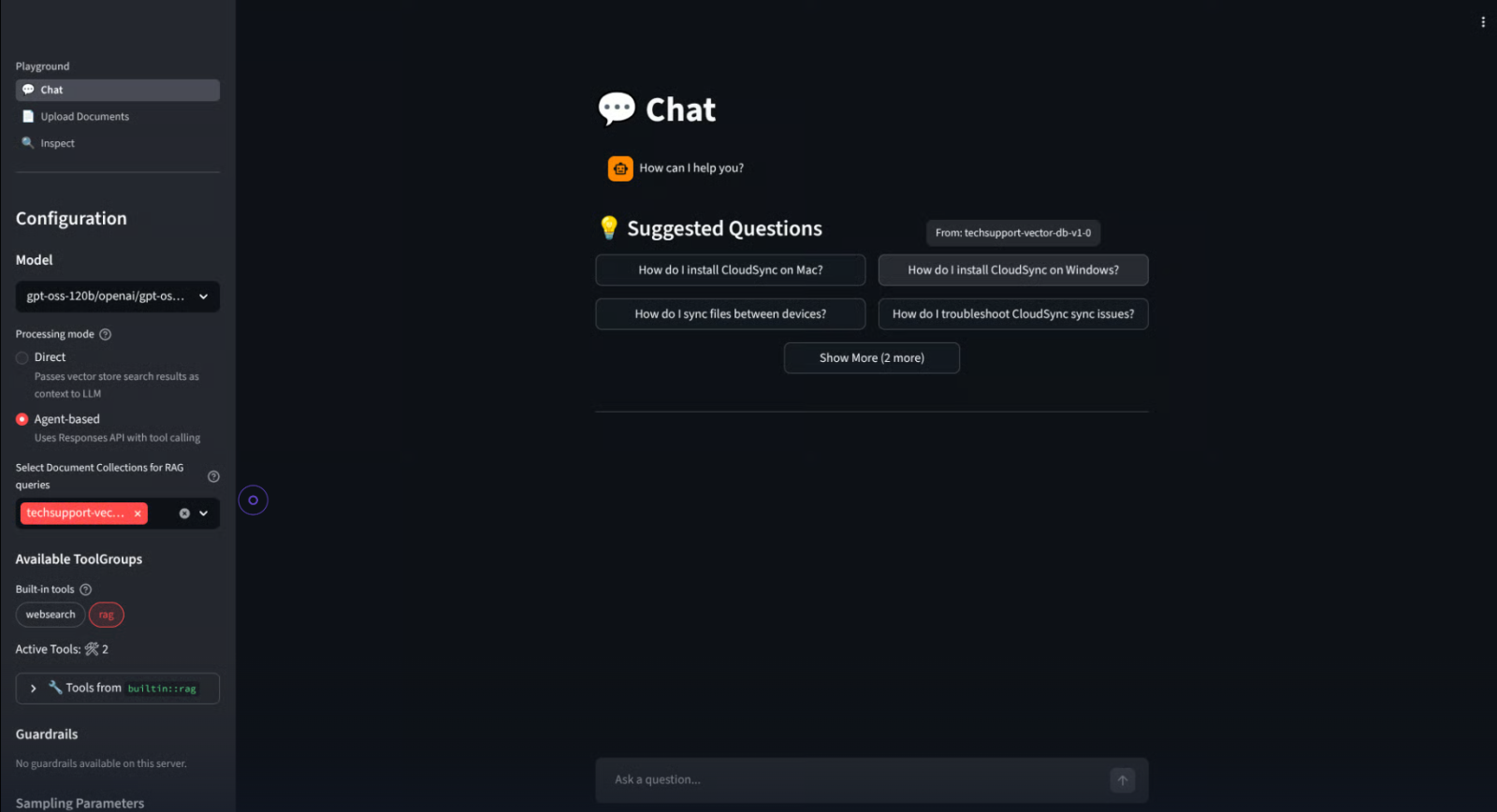
The RAG LLM Pattern uses these components out of the box:
- AI Model: Deepseek r1 or GPT-OSS 120B
- Inference Service: vLLM
- Orchestration: OpenShift AI
- Vector Database: PostgreSQL and PGVector
- Embedding Model: All-MiniLM-L6-v2
- Safety: Safety Guardrail
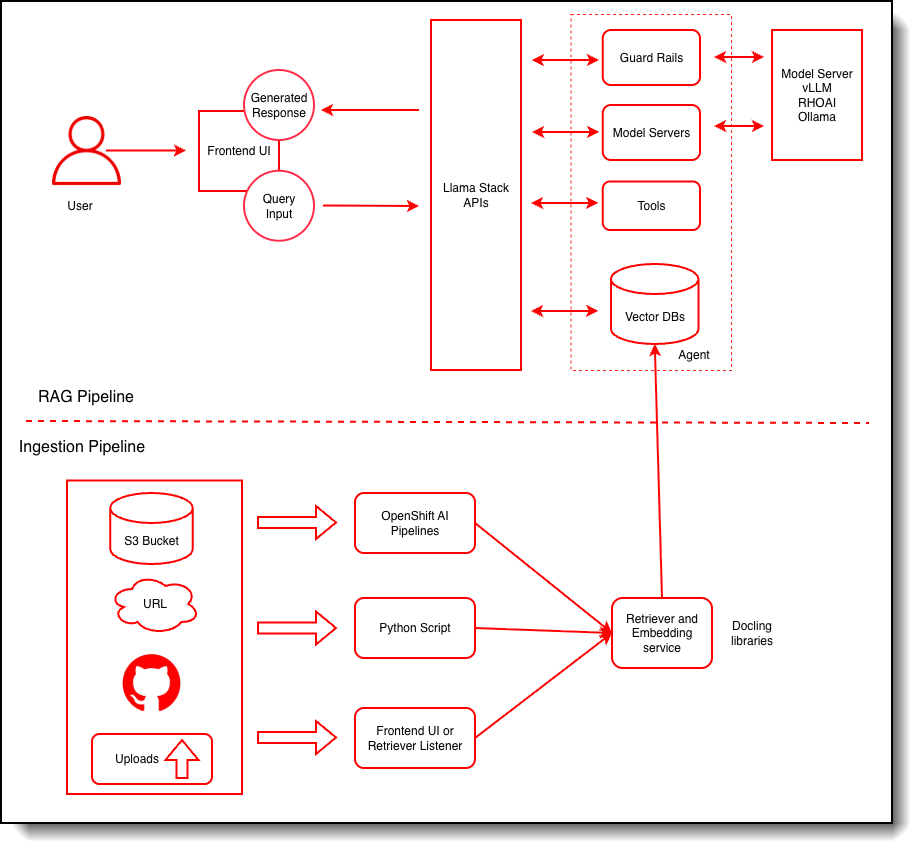
To customize the model and RAG database data used, you must fork the original repository and edit the necessary yaml files.
To edit the model used, you must edit the “models” field in the file overrides/values-gpu.yaml. The default model used is llama-3-2-3b-instruct.
Instead, to edit the default RAG data sources, you musted edit the sampleFileUpload.urls field in overrides/rag-quickstart.yaml.

Figure 12. Editing RAG data sources
Either GitHub repositories or web sources can be ingested into the vector database as data sources. Adding or removing URLs from this file will cause the relevant files to be loaded into the vector database once the deployment syncs with the forked GitHub repository.
OpenShift AI Install and Management
Automating and managing OpenShift AI deployment can be made easy with the OpenShift AI Validated Pattern. The quickstart involves only three simple steps: Fork the GitHub repository, clone it to the local machine, and run “./pattern.sh make install”. The installation can also be done with the Validated Patterns Operator for those who want to use the web console as demonstrated earlier in this product guide.
Furthermore, utilizing Validated Patterns with OpenShift GitOps provides a platform for unified management, which includes secrets management. This framework provides security and ensures consistency, making it much easier to dynamically manage the cluster and its security.
Ordering Through DCSC
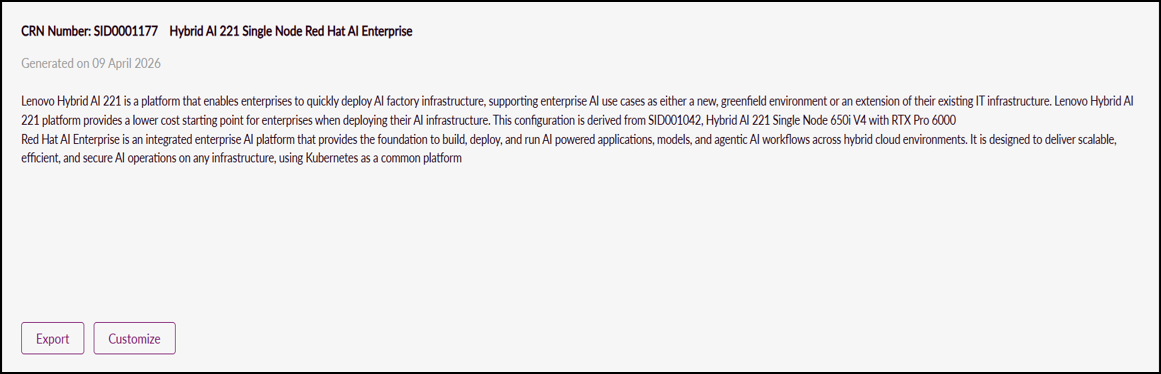
Pre-configured Hybrid AI 221 Single Nodes can be found in Lenovo Data Center Solution Configurator (DCSC) under Deployment Ready Solutions / AI / Datacenter / Hybrid AI 221. Look for “Hybrid AI 221 Single Node Red Hat AI Enterprise” for a single SR650i V4 server with RTX Pro 6000 and the Red Hat AI Enterprise License along with NVIDIA Enterprise. The node can be ordered as-is, or customized to fit specific needs.
Licensing
The Red Hat AI Enterprise license bundles licenses for Red Hat OpenShift Container Platform, OpenShift AI, and AI Accelerators. It is licensed on a per-node basis, and includes all components needed for the Lenovo Hybrid AI 221 platform with Red Hat.
| 7S0FCTOMWW | Red Hat AI Enterprise | 1 |
| SEVY | Red Hat AI Enterprise, Standard 3Yr w/Red Hat support | 1 |
The Lenovo Hybrid AI 221 platform can also be used with NVIDIA Enterprise, which will include support for the GPU Operator used in most Validated Patterns, as well as a suite of full stack AI tools that can either integrate with OpenShift or be used standalone. NVIDIA Enterprise is priced per GPU.
| 7S02CTO1WW | NVIDIA Software | 1 |
| S6Z3 | NVIDIA Enterprise (NVIDIA AI Enterprise and NVIDIA Omniverse Enterprise) Subscription per GPU, 3 Year | 2 |
Bill of Materials
The following table lists Bill of Materials.
Seller training courses
The following sales training courses are offered for employees and partners (login required). Courses are listed in date order.
-
Excerpts from VTT: Systems and Data Center Cooling for Energy Efficient HPC and AI Computing
2026-05-12 | 29 minutes | Employees and Partners
DetailsExcerpts from VTT: Systems and Data Center Cooling for Energy Efficient HPC and AI Computing
Watch this video to see Dr Vinod Kamath speak on systems power and cooling for HPC and AI.
Published: 2026-05-12
Topics include:
Systems of the Future 2026-2029 - Platform Layouts and Cooling Challenges
Technologies that Deliver Energy Efficient Cooling for the System
Tags: Advanced DataCenter, Artificial Intelligence (AI), High-Performance Computing (HPC), Technical Sales
Length: 29 minutes
Course code: DVHPC233Start the training:
Employee link: Grow@Lenovo
Partner link: Lenovo 360 Learning Center
-
Excerpts from VTT: Understanding CDUs and their role in the Data Center
2026-05-12 | 50 minutes | Employees and Partners
DetailsExcerpts from VTT: Understanding CDUs and their role in the Data Center
Join this session to gain a clear understanding of Coolant Distribution Units (CDUs) and their role in modern liquid cooling environments. Our speaker - Matthew Ziegler will walk you through what CDUs are, how they function within solutions like Lenovo’s Neptune direct water cooling architecture, and why they are essential for high density compute environments.
Published: 2026-05-12
Length: 50 minutes
Course code: DVSYS215Start the training:
Employee link: Grow@Lenovo
Partner link: Lenovo 360 Learning Center
-
Lenovo Infrastructure Services Overview
2024-10-28 | 25 minutes | Employees and Partners
DetailsLenovo Infrastructure Services Overview
This e-learning course provides an overview of the full portfolio of Lenovo ISG Services for our Lenovo sellers and business partners.
Published: 2024-10-28
At the end of this course, you will be able to:
• Provide an overview of the full portfolio of service offerings
• Describe each service of the IT lifecycle from beginning to end
• Understand the benefits for your customers
Tags: Services, Services Lifecyle
Length: 25 minutes
Course code: DSVC102r5Start the training:
Employee link: Grow@Lenovo
Partner link: Lenovo 360 Learning Center
Related publications and links
For more information, see these resources:
- Lenovo Hybrid AI 221 Platform Guide:
https://lenovopress.lenovo.com/lp2313-lenovo-hybrid-ai-221-platform-guide - NVIDIA Software Product Guide
https://lenovopress.lenovo.com/lp2311-lenovo-hybrid-ai-software-platform - Implementing AI Workloads using NVIDIA GPUs on ThinkSystem Servers:
https://lenovopress.lenovo.com/lp1928-implementing-ai-workloads-using-nvidia-gpus-on-thinksystem-servers - Making LLMs Work for Enterprise Part 3: GPT Fine-Tuning for RAG:
https://lenovopress.lenovo.com/lp1955-making-llms-work-for-enterprise-part-3-gpt-fine-tuning-for-rag - Lenovo to Deliver Enterprise AI Compute for NetApp AIPod Through Collaboration with NetApp and NVIDIA
https://lenovopress.lenovo.com/lp1962-lenovo-to-deliver-enterprise-ai-compute-for-netapp-aipod-nvidia
Trademarks
Lenovo and the Lenovo logo are trademarks or registered trademarks of Lenovo in the United States, other countries, or both. A current list of Lenovo trademarks is available on the Web at https://www.lenovo.com/us/en/legal/copytrade/.
The following terms are trademarks of Lenovo in the United States, other countries, or both:
Lenovo®
ThinkSystem®
XClarity®
The following terms are trademarks of other companies:
Intel®, the Intel logo and Xeon® are trademarks of Intel Corporation or its subsidiaries.
Linux® is the trademark of Linus Torvalds in the U.S. and other countries.
Windows® is a trademark of Microsoft Corporation in the United States, other countries, or both.
NVIDIA®, NVIDIA Omniverse®, and NVIDIA RTX® are trademarks of NVIDIA Corporation.
Other company, product, or service names may be trademarks or service marks of others.
Configure and Buy
Please select a locale
Full Change History
Changes in the May 27, 2026 update:
- Updated the following under Deploying OpenShift and a Validated Pattern section
- Replaced Patterns-operator project image
- Added new image - Edited yaml file
- Added new image - Deleting the patterns-operator-controller-manager pod
- Added new image - Pattern Catalog
- Updated the following under Application example section
- Replaced RAG model flow image
- Added new image - Editing RAG data sources
First published: March 11, 2026
Course Detail
Employees Only Content
The content in this document with a is only visible to employees who are logged in. Logon using your Lenovo ITcode and password via Lenovo single-signon (SSO).
The author of the document has determined that this content is classified as Lenovo Internal and should not be normally be made available to people who are not employees or contractors. This includes partners, customers, and competitors. The reasons may vary and you should reach out to the authors of the document for clarification, if needed. Be cautious about sharing this content with others as it may contain sensitive information.
Any visitor to the Lenovo Press web site who is not logged on will not be able to see this employee-only content. This content is excluded from search engine indexes and will not appear in any search results.
For all users, including logged-in employees, this employee-only content does not appear in the PDF version of this document.
This functionality is cookie based. The web site will normally remember your login state between browser sessions, however, if you clear cookies at the end of a session or work in an Incognito/Private browser window, then you will need to log in each time.
If you have any questions about this feature of the Lenovo Press web, please email David Watts at dwatts@lenovo.com.


