

Top
Author
Published
5 May 2026Form Number
LP2429PDF size
6 pages, 201 KBSubscribed to LP2429.
Thank you for your feedback.
Abstract
Lenovo XClarity One is Lenovo’s next-generation infrastructure management platform that unifies discovery, monitoring, automation, and lifecycle operations across On Premises, Edge, and Cloud-connected environments. This overview explains the platform’s architecture, security-forward design, and customer value—reducing operational overhead while improving visibility, control, and scalability for distributed IT.
This paper is for existing XClarity Administrator customers looking for information about migration to XClarity One. It outlines the transition path to XClarity One, including licensing/entitlement continuity and migration tooling to help customers move at their own pace with confidence.
Introduction
Lenovo is evolving its systems management strategy by transitioning from XClarity Administrator to XClarity One, a next-generation platform designed for increasingly complex and distributed IT environments. While XClarity Administrator has served as a reliable flagship for years, modern IT demands a shift from fragmented, reactive troubleshooting to a unified, proactive model.
XClarity Administrator and XClarity Orchestrator are planned to be withdrawn from marketing on June 30, 2026, with support planned until June 30, 2027. All future innovation and roadmap investments are now dedicated to XClarity One. To ensure a smooth transition, Lenovo provides a migration tool that is part of XClarity One Cloud and on-prem versions, allowing XClarity Administrator customers to move to XClarity One at their own pace.
XClarity One Deployment
XClarity One is based on a new highly scalable architecture that enables new deployment options that go beyond what was available with XClarity Administrator. XClarity One is made up of two distinct elements: XClarity One Portal and XClarity One Hub. Together these elements allow for a flexible deployment model to suit customers’ needs and goals.
The following figure shows the three ways XClarity One can be deployed.
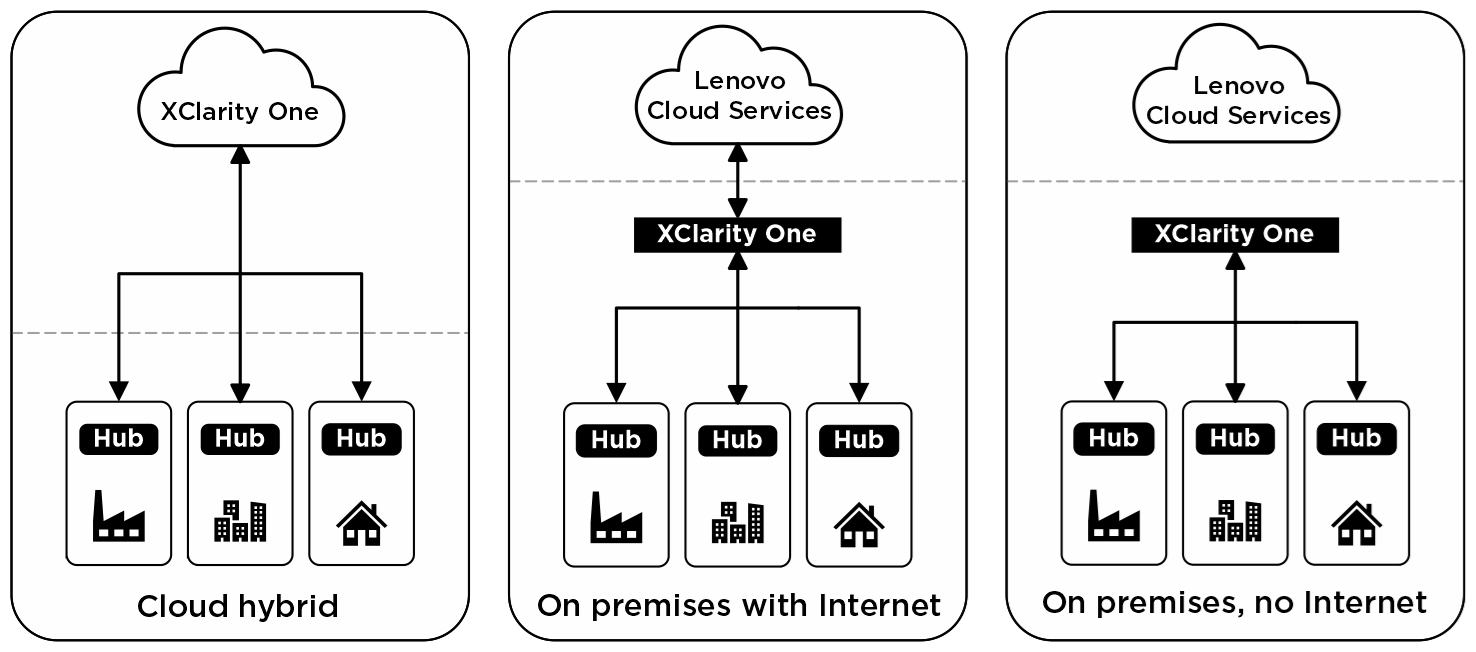
Figure 1. XClarity One implementation options
The Portal can be hosted in a Lenovo managed Cloud environment for an “access from anywhere” Cloud Hybrid experience or deployed on a customer’s own infrastructure for an On-Premises experience. The Portal then connects to one or more On-Premises XClarity One Hubs though a single highly secure link, which in turn connects to multiple end point devices.
Both of these deployment scenarios can benefit from a connection to other Lenovo Cloud services, to offer an enhanced experience. Features include:
- Automated firmware download
- Warranty lookup
- Log uploads to Lenovo Support
- Mitigation Action plans to help resolve issues quickly
- Awareness of latest CVE and your exposure
- Automatic support ticket creation through Call Home
As a further enhancement XClarity One is also one element within Premier Support Plus for Servers. This Lenovo Service delivers Always-On Infrastructure: Premier Support Plus for Servers Powered by Proactive, AI-Driven Support and is designed to help enterprises reduce downtime, simplify IT operations, and keep mission-critical infrastructure always ready.
For situations where having internet connections is not acceptable, the On-Premises deployment can also operate without the internet connection and off-line solutions to e.g. download firmware are available. Note that not all features are available when an internet link isn't present, such as warranty status.
Customers are advised to consider which deployment approach best suits their needs. The XClarity One license can be used in any of these scenarios, and the approach can even be changed without affecting the licensing position.
Licensing and Entitlement Continuity
Lenovo is committed to protecting customer investments. Existing eligible Lenovo XClarity Pro licenses are honored during the transition to XClarity One and mapped on a one-to-one basis to XClarity One Standard licenses. Current subscription and support end dates are preserved, ensuring continuity and minimizing disruption.
Users of the Cloud deployment of XClarity One will see their XClarity Pro license automatically duplicated and available in XClarity One for the matching Customer Number. Users of the On-Premises deployment can import XClarity Pro licenses directly into XClarity One.
New with XClarity One are 2 or 4 year per-device licenses as well as a Starter License that provides a cost-effective entry point for Small and Medium sized businesses. It offers essential Cloud-based or on-prem management for up to 10 devices per customer. It includes all the functionality of a Standard license, including proactive support and seamless scalability, allowing smaller organizations to benefit from enterprise-grade intelligence without the complexity or high upfront costs of traditional enterprise licensing.
Migration from XClarity Administrator
To ensure a smooth transition from XClarity Administrator, XClarity One has a built in Migration Tool that will migrate many aspects of your XClarity Administrator environment into the new XClarity One deployment.
Aspects that can migrate today include the following.
- Licenses
- Devices
- Device Groups
- Firmware Policies
- Configuration Patterns
- Service Tickets
- Call Home configurations
Note that the tool is currently limited to 500 endpoints. This limit will increase in a future release.
Platform Evolution and Roadmap Direction
Lenovo XClarity One is continuously enhanced through incremental updates that focus on automation, scalability, reporting, and ecosystem integration. Capabilities are delivered in phases to ensure stability and allow customers to adopt new functionality at their own pace.
This approach provides customers with confidence that the platform will continue to evolve while remaining aligned with Lenovo’s broader infrastructure management strategy.
You can migrate an existing Lenovo XClarity Administrator v4.3.4 or later instance to XClarity One using a migration tool that is delivered within the next gen platform. This transfers management of the devices to XClarity One and imports artifacts such as firmware policies, device-settings configurations (configuration patterns), groups, service tickets, and XClarity Pro licenses. After the migration is complete, you can continue managing these devices using XClarity One.
Using XClarity One in the Cloud is recommended for small to medium businesses that desire enterprise-grade capabilities without the heavy upfront investments and IT overhead.
Transition FAQ
- How do I migrate from XClarity Administrator?
Instructions are documented in the XClarity One user guide in the Migrating XClarity Administrator section.
- Will my existing XClarity licenses be supported?
Yes. Eligible existing Lenovo XClarity Pro licenses are honored and mapped into Lenovo XClarity One, with entitlement dates preserved.
- Is Lenovo XClarity One Cloud-only?
No. XClarity One supports both Cloud-connected and on‑premises deployment models, allowing customers to choose the approach that best fits their operational and regulatory needs.
- Do I need to migrate immediately?
No. Customers can transition at their own pace. XClarity Administrator is planned to remain supported until then end of June 2027.
- What is the primary value of moving to XClarity One?
XClarity One reduces complexity by unifying infrastructure management, improving visibility, and enabling more efficient operations across distributed environments.
- Will Lenovo XClarity Administrator continue to function if I do not migrate immediately?
Yes. Lenovo XClarity Administrator will remain supported until June 30, 2027, allowing customers to migrate at their own pace.
Additional Information
For additional information about Lenovo XClarity One, see the following resources:
- XClarity One Product Guide
- XClarity One User Guide
- XClarity One Software Download page
- Migrating from XClarity Administrator - XClarity One User Guide
- XClarity One Cloud Portal
Note: This article is provided for informational purposes only and does not constitute a commitment to deliver specific features or functionality. Product capabilities and timelines are subject to change at Lenovo’s discretion.
Author
Geoff Hunt is a Worldwide Product Manager working in the ISG Software team based in the UK. He has lead responsibility for the XClarity One offering and is ably supported by his teammates who cover specialist areas within XClarity One. He also has experience in hardware product management having brought the ThinkEdge SE455 V3 to market. Before that, many years were spent working closely alongside sales as an EMEA Product Manager, covering a variety of offerings. He holds a Master of Physics degree from Southampton, UK.
Trademarks
Lenovo and the Lenovo logo are trademarks or registered trademarks of Lenovo in the United States, other countries, or both. A current list of Lenovo trademarks is available on the Web at https://www.lenovo.com/us/en/legal/copytrade/.
The following terms are trademarks of Lenovo in the United States, other countries, or both:
Lenovo®
XClarity®
Other company, product, or service names may be trademarks or service marks of others.
Configure and Buy
Please select a locale
Full Change History
Course Detail
Employees Only Content
The content in this document with a is only visible to employees who are logged in. Logon using your Lenovo ITcode and password via Lenovo single-signon (SSO).
The author of the document has determined that this content is classified as Lenovo Internal and should not be normally be made available to people who are not employees or contractors. This includes partners, customers, and competitors. The reasons may vary and you should reach out to the authors of the document for clarification, if needed. Be cautious about sharing this content with others as it may contain sensitive information.
Any visitor to the Lenovo Press web site who is not logged on will not be able to see this employee-only content. This content is excluded from search engine indexes and will not appear in any search results.
For all users, including logged-in employees, this employee-only content does not appear in the PDF version of this document.
This functionality is cookie based. The web site will normally remember your login state between browser sessions, however, if you clear cookies at the end of a session or work in an Incognito/Private browser window, then you will need to log in each time.
If you have any questions about this feature of the Lenovo Press web, please email David Watts at dwatts@lenovo.com.


