

Top
Author
Published
6 Apr 2026Form Number
LP2418PDF size
11 pages, 258 KBSubscribed to LP2418.
Thank you for your feedback.
Abstract
Confidential Computing introduces a transformative approach to data security by protecting data not only at rest and in transit, but also during processing. This is made possible through Trusted Execution Environments (TEEs)—secure, isolated areas within a system’s processor that ensure the confidentiality and integrity of data while it is being computed.
This paper provides practical guidance for enabling Confidential Computing on Lenovo ThinkSystem V3 and V4 servers, covering both Intel and AMD architectures. It is intended for system administrators and IT professionals experienced with ThinkSystem server configuration, particularly those familiar with the F1-Menu and Lenovo OneCLI tools. Users can effectively implement TEEs to enhance the security posture of their ThinkSystem server environment through Confidential Computing by following the outlined procedures.
Introduction
Confidential Computing is defined by the Confidential Computing Consortium as the protection of data in use—achieved by performing computations within a hardware-based, attested Trusted Execution Environment (TEE). These secure environments ensure that data remains confidential and tamper-resistant during processing.
Leading CPU vendors such as Intel and AMD have introduced technologies that enable TEEs on their processors. Platform-level enablement through appropriate hardware and firmware configurations are required to leverage these capabilities on Lenovo ThinkSystem servers.
This paper provides detailed guidance for enabling TEEs on Lenovo ThinkSystem servers equipped with compatible CPUs and firmware. It is important to note that the scope of this document is limited to platform-level settings. Full Confidential Computing enablement also involves operating system, hypervisor, and application-level configurations, which vary by environment and are beyond the scope of this document. References to external documentation will be provided to support further implementation beyond the platform layer where applicable.
Confidential Computing Components and Layers
The figure below illustrates the layered architecture of a computing system, with each layer building upon the one below it. On the left is a virtualized system and on the right is a "bare metal" installation.
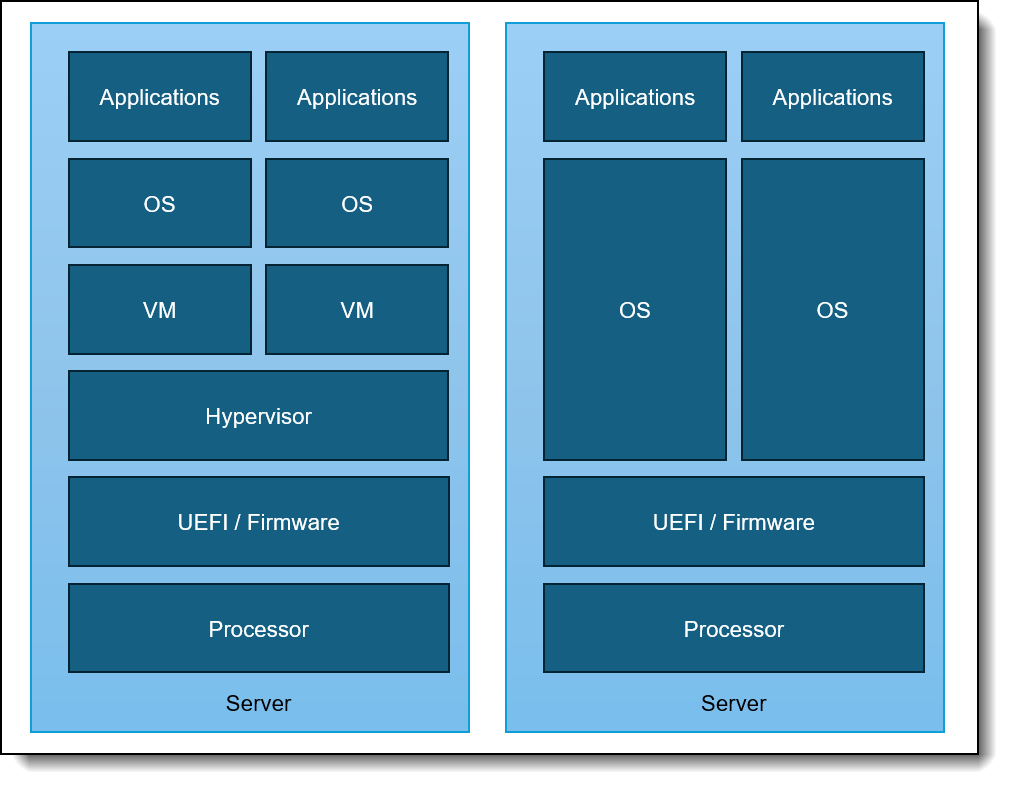
Figure 1. Components and Layers
The layers in the figure, from top to bottom, are as follows:
- Applications: The software that runs on the system, such as databases, web servers, or other workloads.
- Operating System (OS): The software that manages the system's hardware resources and provides a platform for applications to run on.
- Virtual Machine (VM): A virtualized environment that runs on top of the OS, providing a sandboxed space for applications to execute in.
- Hypervisor: A layer of software that creates and manages virtual machines, allocating hardware resources to each VM.
- UEFI/Firmware: The software that controls the platform’s hardware, such as the BIOS or UEFI firmware.
- Processor: The physical hardware that executes instructions, such as a CPU from Intel or AMD.
Each layer in this stack must be running software that supports Confidential Computing and must be properly configured to enable Confidential Computing. This means that:
- Applications must be designed to take advantage of Confidential Computing features, such as encrypting data in use and using secure enclaves.
- Operating System must be configured to support Confidential Computing, such as enabling secure boot and using a trusted kernel.
- Virtual Machine must be created with Confidential Computing capabilities, such as using a secure VM template and configuring the VM to use encrypted memory.
- Hypervisor must be configured to support Confidential Computing, such as enabling secure VM creation and using a trusted hypervisor.
- UEFI/Firmware must be updated to support Confidential Computing, such as enabling the platform root of trust, enabling secure boot, and using a trusted firmware.
- Processors must be capable of supporting Confidential Computing, such as having Intel Software Guard Extensions (SGX) or AMD Secure Encrypted Virtualization (SEV) capabilities.
This layered approach can help organizations ensure that their computing systems are properly secured and can take advantage of the benefits of Confidential Computing, such as improved data protection and reduced risk of data breaches.
Enable TEE on Intel-based ThinkSystem V3 and V4 Servers
The key capability that Intel CPUs provide for the Trusted Execution Environment (TEE) is called Intel Trusted Domain Extensions (TDX). For additional information on Intel TDX, please refer to the Intel Confidential Computing Documentation.
Topics in this section:
CPU and memory requirements - Intel
Intel TDX is supported on the following Intel Xeon processors:
- 5th Gen Intel Xeon Scalable Processors (Emerald Rapids)
- Intel Xeon 6 Processors (Granite Rapids and Sierra Forest)
These processors are available in ThinkSystem V3 and ThinkSystem V4 servers.
4th Gen not supported: ThinkSystem V3 servers also support 4th Gen Intel Xeon Scalable Processors, however TDX is not supported on these earlier processors.
The following DIMM requirements must be met to support TDX, according to Intel documentation:
- Memory slot 0 for all Integrated Memory Controller channels must be populated for each installed CPU.
- Other memory slots may additionally be populated.
This ensures that the system has sufficient memory resources to support the TDX feature.
Configuring UEFI settings - Intel
The following UEFI settings must be configured to enable Intel TDX on Intel processors:
- Limit CPU PA to 46 Bits:
This setting must be set to Disabled.
- Path: UEFI Settings → System Settings → Processor Details → LimitCPUPAto46bits → Disabled
- Description: When enabled it restricts the CPU's physical address space to 46 bits, which limits maximum addressable memory to 64 terabytes.
- Note: This setting is only available on ThinkSystem V3 servers.
- Intel TME:
This setting must be set to Enabled.
- Path: UEFI Settings → System Settings → Processor Details → TotalMemoryEncryption → Enabled
- Description: Enables Intel Total Memory Encryption, which is a prerequisite for Intel Total Memory Encryption–Multi-Key (Intel TME-MK).
- Intel TME Bypass:
This setting must be set to Auto.
- Path: UEFI Settings → System Settings → Processor Details → Total Memory Encryption (TME) Bypass → Auto
- Description: Activates/deactivates the Intel TME bypass mode, which allows memory outside of Intel TME-MK VMs, Intel SGX enclaves, and Intel TDX Trust Domains to be unencrypted to improve the performance of non-confidential software.
- Note: This setting only applies to ThinkSystem V3 servers.
- Total Memory Encryption Multi-Key (Intel TME-MK):
This setting must be set to Enabled.
- Path: UEFI Settings → System Settings → Processor Details → MultikeyTotalMemoryEncryption → Enabled
- Description: When enabled it allows memory pages to be encrypted with different keys which enables fine-grained isolation between virtual machines, containers and even processes.
- Memory Integrity:
This setting must be set to Enabled or Disabled based on type of installed memory. To enable this setting server class DDR5 Error Correct Code (ECC) memory is required otherwise the setting must be disabled.
- Path: UEFI Settings → System Settings → Processor Details → Memory integrity
- Description: If disabled, only Logical Integrity (SW integrity) is used for main memory protection. If enabled, Cryptographic Integrity (HW integrity) is also used for main memory protection, which requires the specific DIMMs to be installed.
- Intel TDX:
This setting must be set to Enabled.
- Path: UEFI Settings → System Settings → Processor Details → Trust Domain eXtension (TDX) → Enabled
- Description: Required for Confidential Computing. It protects virtual machines from unauthorized access.
- TDX Secure Arbitration Mode Loader (SEAM):
This setting must be set to Enabled.
- Path: UEFI Settings → System Settings → Processor Details → Secure Arbitration Mode Loader (SEAM) → Enabled
- Description: Defines from where the Intel TDX Module is loaded.
- Disable excluding Mem below 1MB in CMR:
This setting must be set to Auto.
- Path: UEFI Settings → System Settings → Processor Details → Disable excluding Mem below 1MB in CMR → Auto
- Description: Controls how memory below 1MB is managed in the Confidential Memory Region (CMR)
- Note: This setting requires TDX or MKTME to be enabled and only applies to ThinkSystem V3 servers.
- Intel TDX Key Split:
This setting must be set to a non-zero value.
- Path: UEFI Settings → System Settings → Processor Details → Intel TDX Key Split → non-zero value based on customer priorities. A value of 1 is typically cited.
- Description: Determines the split between the number of keys out of 63 allocated to the host (TME-MT) versus the guest virtual machines (TDX). The value should be based on the number of TDXs you need to run concurrently.
- Software Guard Extension:
This setting must be set to Enabled.
- Path: UEFI Settings → System Settings → Processor Details → SWGuardExtensions → Enabled
- Description: When enabled secure isolated regions of memory can be protected from access by other processes.
- Note: Specific DIMM configuration is required. See https://lenovopress.lenovo.com/lp1471-enabling-intel-sgx-on-lenovo-thinksystem-servers for additional details.
- SGX PRM Size:
This setting must be set to the required size.
- Path: UEFI Settings → System Settings → Processor Details → SGX PRM Size → Size
- Description: Defines the size of the Processor Reserved Memory (PRM), which is used by Intel SGX to hold enclaves and related protected data structures. A minimum SGX PRM is required to run the Quote Generation Service (QGS) on the host OS (or inside a dedicated VM). A safe and standard value is 128MB.
Additional recommendations - Intel
For optimal performance and compatibility:
- Consult the Intel documentation for the latest information on TDX support and requirements.
- Verify the server configuration and CPU compatibility before enabling TDX.
- Follow the recommended installation and configuration procedures for TDX on ThinkSystem V3 and V4 servers.
TEE can be successfully enabled on Intel-based ThinkSystem V3 and V4 servers by following these guidelines and recommendations, leveraging the benefits of Intel TDX for confidential computing workloads.
Additional information - Intel
Please refer to the following resources for more information on Intel TDX and configuring these settings:
- Lenovo UEFI Overview - ThinkSystem V3 with Intel processors
https://pubs.lenovo.com/uefi_xeon_4th/ - Lenovo UEFI Overview - ThinkSystem V4 with Intel processors
https://pubs.lenovo.com/uefi_xeon_6th/ - Enabling Intel SGX on Lenovo ThinkSystem Servers
https://lenovopress.lenovo.com/lp1471-enabling-intel-sgx-on-lenovo-thinksystem-servers - ThinkSystem (Xeon Based) Trust Chain of UEFI Image
https://download.lenovo.com/servers_pdf/thinksystem_uefi_trust_chain.pdf - Intel Confidential Computing Documentation - Hardware Setup
https://cc-enabling.trustedservices.intel.com/intel-tdx-enabling-guide/04/hardware_setup/
Enabling TEE on AMD-based ThinkSystem V3 Servers
AMD CPUs provide a Trusted Execution Environment (TEE) using AMD Secure Encrypted Virtualization-Secure Nested Paging (SEV-SNP). This technology provides hardware-based security to help prevent malicious hypervisor attacks, such as data replay and memory mapping. While SEV-SNP offers enhanced security capabilities, it may lead to lower network bandwidth and higher network latency.
Topics in this section:
CPU requirements - AMD
The following AMD EPYC CPUs support SEV-SNP:
- 4th Gen AMD EPYC Processors (Genoa, Genoa-X, Bergamo)
- 5th Gen AMD EPYC Processors (Turin)
Configuring UEFI settings - AMD
To enable SEV-SNP the following UEFI settings must be configured:
- Enable AMD Secure Memory Encryption (SME):
This setting must be set to Enabled.
- Path: UEFI Settings → System Settings → Memory → SMEE → Enabled
- Description: This setting is required to use all Secure Encrypted Virtualization features and uses a single key to encrypt system memory and provides additional security benefits. For example, when enabled it can protect the Hypervisor and the Host OS.
- Enable Transparent Secure Memory Encryption (TSME):
This setting must be set to Enabled or Disabled based on user preference.
- Path: UEFI Settings → System Settings → Memory → TSME → Enabled | Disabled
- Description: When enabled it provides full memory encryption without requiring changes to the operating system or applications. It is a simplified version of AMD Secure Memory Encryption. TSME is not strictly required for Confidential Computing.
- Configure the Secure Encrypted Virtualization Address Space Identifier (ASID) Space Limit:
Set this value based on the number of SEV-ES virtual machines you wish to run +1. SEV-ES virtual machines are the most secure virtual machines.
- Path: UEFI Settings → System Settings → Memory → SEV-ES ASID Space Limit → value
- Description: Defines the maximum number of virtual machines that can run simultaneously using SEV-ES. The maximum number of Address Space Identifier (ASID) keys is determined by the processor. ASIDs less than the specified value are used for SEV-ES, and ASIDs greater than or equal to the specified value are for SEV.
- Enable Secure Encrypted Virtualization Control:
This setting must be set to Enabled.
- Path: UEFI Settings → System Settings → Memory → SEV Control → Enabled
- Description: This setting enables SEV control. Enables confidential computing by protecting VM memory and state from unauthorized access.
- Enable SVM Mode:
This setting must be set to Enabled.
- Path: UEFI Settings → System Settings → Processors →SVM Mode→Enabled
- Description: This setting enables CPU Virtualization. Enables Secure Virtual Machine Mode and is required for SEV-ES and SEV-SNP and for Confidential Computing features.
- Enable Secure Encrypted Virtualization-Secure Nested Paging (SNP):
This setting must be set to Enabled.
- Path: UEFI Settings → System Settings → Processors → SEV-SNP Support → Enabled
- Description: This setting enables SEV-SNP support. Provides memory integrity protection and guest isolation from the hypervisor.
- Enable Secure Nested Paging (SNP) RMP Table Coverage:
This setting must be set to Enabled or Custom. If set to Enabled the entire system memory is covered by SNP. If set to Custom, the amount of memory covered by SNP must be configured using the “Amount of Memory to Cover” setting.
- Path: UEFI Settings → System Settings → Processors → SNP Memory (RMP Table Coverage) → Enabled (or Custom)
- Description: Enables the use of the Reverse Map Table (RMP) Table to protect memory when SEV-SNP is enabled. This must be enabled when SEV-SNP is enabled.
- Enable IOMMU:
This setting must be set to Enabled.
- Path: UEFI Settings → System Settings → Processors → Secured Core → IOMMU → Enabled
- Description: This setting enables Input-Output Memory Management Unit (IOMMU) support. Enables the Input-Output Memory Management Unit and is required for SEV-SNP enablement. The IOMMU is an AMD EPYC feature that manages and translates memory addresses between devices and system memory.
Additional information - AMD
Refer to the following resources for more information on AMD SEV-SNP and configuring these settings:
- Lenovo UEFI Overview - ThinkSystem V3 with AMD processors
https://pubs.lenovo.com/uefi_amd_4th/ - Enabling AMD Secure Nested Paging (SEV-SNP) on ThinkSystem Servers
https://lenovopress.lenovo.com/lp1893-enabling-amd-sev-snp-on-thinksystem-servers - Enabling AMD Security Features (SME, SEV and SEV-ES ) on ThinkSystem Servers
https://lenovopress.lenovo.com/lp1894-enabling-amd-security-features-on-thinksystem-servers - Platform Secure Boot Feature on AMD EPYC-Based ThinkSystem Servers
https://download.lenovo.com/servers_pdf/thinksystem-amd-psb.pdf - AMD SEV-SNP: Strengthening VM Isolation with Integrity Protection and More
https://www.amd.com/content/dam/amd/en/documents/epyc-business-docs/white-papers/SEV-SNP-strengthening-vm-isolation-with-integrity-protection-and-more.pdf - Using SEV with AMD EPYC Processors
https://www.amd.com/content/dam/amd/en/documents/epyc-technical-docs/tuning-guides/58207-using-sev-with-amd-epyc-processors.pdf
Resources for using Confidential Computing
This section provides links to additional information about Confidential Computing in general and information on how to use Confidential Computing capabilities in the layers above the UEFI firmware.
- Confidential Computing Consortium
https://confidentialcomputing.io - Google Cloud Confidential Computing
https://cloud.google.com/confidential-computing/docs/confidential-computing-overview - Trusted Execution Environment (TEE) | Microsoft Lean
https://learn.microsoft.com/en-us/azure/confidential-computing/trusted-execution-environment - Azure Confidential Computing
https://azure.microsoft.com/en-us/solutions/confidential-compute - NVIDIA Confidential Computing
https://www.nvidia.com/en-us/data-center/solutions/confidential-computing/ - Implementing NVIDIA Confidential Computing on Lenovo ThinkSystem Servers
https://lenovopress.lenovo.com/lp2383-implementing-nvidia-confidential-computing-on-lenovo-thinksystem-servers - Enabling TDX on Ubuntu
https://github.com/canonical/tdx - Confidential Computing on SUSE
https://www.suse.com/c/confidential-computing-securing-enterprise-innovation-with-suse/ - How to Enable AMD SEV on SLES
https://documentation.suse.com/sles/15-SP7/html/SLES-amd-sev/article-amd-sev.html - Setting up TDX on SLES
https://www.suse.com/c/intel-tdx-support-coming-to-suse-linux-enterprise-server/ - How to deploy confidential container on bare metal
https://developers.redhat.com/articles/2025/02/19/how-deploy-confidential-containers-bare-metal - Confidential Computing Platform Specific Details Red Hat
https://www.redhat.com/en/blog/confidential-computing-platform-specific-details
Author
Mike Demeter is a Principal Product Security Architect with the Lenovo Infrastructure Solutions Group’s Product Security Office. His product security background expands over 20 years as a security architect and software engineer. His focus is on ensuring that security is built into data center products throughout the entire secure development lifecycle. He has been the product security architect responsible for the Lenovo ISG ThinkEdge products since their inception.
Trademarks
Lenovo and the Lenovo logo are trademarks or registered trademarks of Lenovo in the United States, other countries, or both. A current list of Lenovo trademarks is available on the Web at https://www.lenovo.com/us/en/legal/copytrade/.
The following terms are trademarks of Lenovo in the United States, other countries, or both:
Lenovo®
ThinkSystem®
The following terms are trademarks of other companies:
AMD®, AMD EPYC®, and EPYC® are trademarks of Advanced Micro Devices, Inc.
Intel®, the Intel logo and Xeon® are trademarks of Intel Corporation or its subsidiaries.
Microsoft® and Azure® are trademarks of Microsoft Corporation in the United States, other countries, or both.
NVIDIA® is a trademark of NVIDIA Corporation.
Other company, product, or service names may be trademarks or service marks of others.
Configure and Buy
Please select a locale
Full Change History
Course Detail
Employees Only Content
The content in this document with a is only visible to employees who are logged in. Logon using your Lenovo ITcode and password via Lenovo single-signon (SSO).
The author of the document has determined that this content is classified as Lenovo Internal and should not be normally be made available to people who are not employees or contractors. This includes partners, customers, and competitors. The reasons may vary and you should reach out to the authors of the document for clarification, if needed. Be cautious about sharing this content with others as it may contain sensitive information.
Any visitor to the Lenovo Press web site who is not logged on will not be able to see this employee-only content. This content is excluded from search engine indexes and will not appear in any search results.
For all users, including logged-in employees, this employee-only content does not appear in the PDF version of this document.
This functionality is cookie based. The web site will normally remember your login state between browser sessions, however, if you clear cookies at the end of a session or work in an Incognito/Private browser window, then you will need to log in each time.
If you have any questions about this feature of the Lenovo Press web, please email David Watts at dwatts@lenovo.com.


