

Top
Author
Published
30 Mar 2026Form Number
LP2411PDF size
11 pages, 466 KBSubscribed to LP2411.
Thank you for your feedback.
Abstract
This document provides essential pre-sales information to understand MongoDB on Lenovo ThinkAgile VX650 V4 and FX V4 systems integrated with VMware Cloud Foundation 9.0, vSphere 9.0, and vSAN ESA, including key features of the tested solution, hardware and software configuration, benchmark methodology, and observed performance characteristics. It is intended for technical specialists, sales specialists, sales engineers, IT architects, and other IT professionals who want to learn more about MongoDB on Lenovo ThinkAgile platforms and evaluate its suitability for modern virtualized database deployments.
Introduction
A Modern Data Platform for Private Cloud, AI/ML, and Analytics
Today’s enterprise applications increasingly rely on dynamic, fast‑changing, and diverse data sources from customer profiles and product catalogs to clickstream events, IoT telemetry, application logs, and operational metrics. These workloads rarely fit neatly into rigid relational schemas. As a result, organizations are turning to document-based data models that align more naturally with the way modern applications evolve. MongoDB has emerged as a leading operational database platform for these scenarios because it enables agility, scalability, and simplicity across the full application lifecycle.
MongoDB’s document data model is flexible, semi-structured or hierarchical data model to support rapid application development cycle without constant schema redesign and refactoring resulting faster time to market. MongoDB’s horizontal scalability across clusters, high availability with built in replication and resilience for mission critical workload makes ideal for ingest-heavy environments such as IoT platforms, streaming analytics, and large-scale operational systems. MongoDB as a vector database combines vector search with full text search to retrieve most relevant results to power AI applications and agentic systems with retrieval augmented generation (RAG).
Lenovo ThinkAgile VX V4 and FX V4 with Intel Xeon 6 Processors
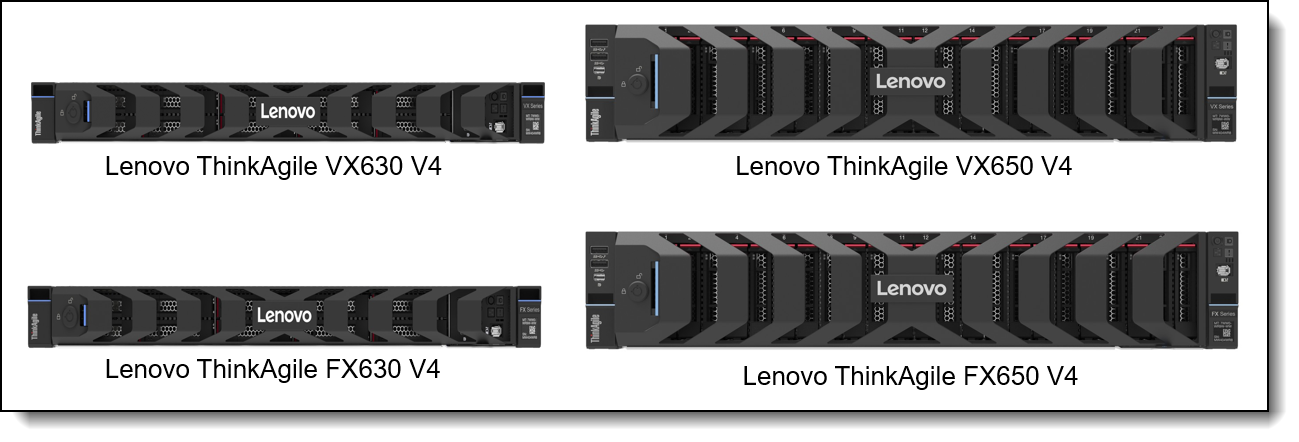
The Lenovo ThinkAgile VX650 V4 and FX650 V4 are 2-socket, 2U systems and The Lenovo ThinkAgile VX630 V4 and FX630 V4 are 2-socket, 1U systems. These hyperconverged systems features Intel Xeon 6 processors and powered by vSAN ESA and VMware Cloud Foundation and the servers support up to 86 cores, higher memory bandwidth and capacity, PCIe 5.0 I/O, and performance optimized all NVMe storage configuration to meet various workloads including databases, virtualization, VDI, analytics, AI/ML and ERP.
ThinkAgile FX offers a unique, industry first flexibility for software-defined approach to hyper convergence, leveraging the ability to move between hypervisors of your choice to deliver compute, storage and management in a tightly integrated software stack and future-proof your investment with seamless HCI software transitions.
MongoDB paired with a vSAN ESA and VMware Cloud Foundation provide cloud-like experience with on-prem cost efficiency, ensuring consolidated deployments, simplified scaling and unified management for computer, storage, container and database services. The ThinkAgile VX V4 and FX V4 with vSAN ESA enables a "Data-First" infrastructure with MongoDB which handles Transactional (OLTP), Analytics (OLAP), and Vector (AI) requirements simultaneously. Modern MongoDB versions are engineered to exploit high core processors to achieve maximum parallelism and allow insert-heavy ingest and mixed read/write activity to achieve maximum throughput.
MongoDB Features
Transactions, Analytics and Vector database
MongoDB’s combination of flexible modeling, distributed architecture, and AI-ready search and vector capabilities makes it a powerful choice for enterprises modernizing their private cloud and data platforms. MongoDB is a Document-based NoSQL database that uses BSON documents to map and store dynamic and semi-structured data which enables to build adaptable applications without rigid relational schemas.
MongoDB architecture consists of:
- mongod – primary database engine responsible for storage and querying
- mongos – a query router for sharded clusters, routing client requests to appropriate shards
- Config servers (CSRS) – store cluster metadata and sharding configuration
Replica Sets ensure high availability and fault tolerance by maintaining multiple copies of data across nodes. Primary node handles writes; secondary nodes replicate via the oplog and supports globally distributed deployments.
Sharding enables horizontal scaling across many machines for large datasets and high-throughput workloads by using shards (Replica set), partitioned data subsets.
MongoDB’s aggregation framework supports Time-series optimizations, complex transformations and real time analytics.
MongoDB Ops Manager: The "Command Center" for enterprise deployments. It automates backups, point-in-time recovery, and rolling upgrades.
MongoDB supports AI-native capabilities bringing full-text, semantic, and vector search to self managed and on prem deployment to build RAG (Retrieval Augmented Generation) systems directly where your data lives and eliminate external vector DBs and search engines, reducing complexity and latency.
MongoDB provides 8.2 provide significant performance improvement for unindexed queries and time series bulk inserts. Queryable Encryption enhances secure operations without compromising query expressiveness.
VMware Aria Operations for MongoDB provides monitoring dashboards and metrics across performance, capacity and KPIs.
YCSB overview
Yahoo Cloud Serving Benchmark (YCSB) is a benchmarking framework that is used to evaluate NoSQL and cloud-serving databases. It is designed to simulate application-access patterns and allows for a repeatable means of measuring latency and the throughput of a database under various load conditions.
There are two phases for the YCSB benchmarks:
- Load - the dataset used during testing is loaded into the database.
- Run - transactional workload (either read, update, insert or scan) defined by the mix of transactions is executed against the database. This makes it possible to test both the pure ingest of data as well as operational workloads randomly using a mixture of transaction types.
In this study, YCSB was used to evaluate MongoDB using only insert workloads and mixed read-write workloads while varying the size of the documents inserted into the database. By changing the size of the documents being added to the database and keeping the client-side concurrency the same, the benchmark demonstrates how the architecture of the database responds to different payload sizes and how throughput and latency react to different patterns of workloads.
Configurations
Hardware Configuration
The testing was performed with 4 node Lenovo ThinkAgile VX650 V4 cluster equipped with two Intel Xeon 6747P 48C processors with Hyper-Threading enabled. This provided a high-density compute platform for virtualized database workloads.
MongoDB configuration
MongoDB was configured to use the WiredTiger storage engine with a 64 GB WiredTiger cache. To improve storage throughput, the MongoDB data volume was built using eight VMDKs attached to the virtual machine. These virtual disks were combined in the guest operating system using LVM and formatted with XFS.
Testing
Testing Methodology
The goal of testing was to evaluate how changing document sizes, and the number of concurrent clients would affect throughput and latency.
For this testing, the YCSB dataset contained a record count of 10,000,000, operation count of 10,000,000 and a field count of 1. The document sizes were chosen to represent three practical application profiles, respectively, rather than a single synthetic point.
- 256 bytes represents small records, such as lightweight metadata, compact session objects, short key-value style application data, or simple event entries.
- 2000 bytes represents a medium-size operational document, which is a realistic size for many business applications using MongoDB for customer, catalog, profile, or transactional data.
- 8192 bytes represents a larger document profile, useful for understanding how the platform behaves when records contain richer payloads, embedded structures, or more application context.
The testing performed with 64, 96, and 128 concurrent threads to stress the database and observe not only the effects of document size, but also how well the platform performed as client concurrency is increased.
The following workload profiles tested, as follows:
| Insert | 100% write |
|---|---|
| 50/50 READ/WRITE | Reasonably balanced mix of transactional activity |
| 80/20 READ/WRITE | Read intensive workloads |
The data was loaded into the database at the selected document sizes at each client thread level for insert testing. The workload data was loaded first into the database and then tested with concurrent threads for the mixed workloads.
Test Results
Below are the YCSB results for MongoDB from the Lenovo ThinkAgile VX650 V4 running on VMware vSAN 9.0. The data included insert only operations as well as two mixed load profiles using a document size of 256 bytes, 2000 bytes, or 8192 bytes and 64, 96 or 128 concurrent client threads respectively.
Throughput Performance
The following table summarizes results for the three workload profiles tested. This dataset gives a very clear look into how MongoDB scales under vSAN ESA with increasing concurrency and IO sizes.
Throughput increases from 64-96 threads across most cases and throughput drops sharply from 96-128 threads for nearly all combinations.
Small documents (256B) and medium documents(2000B) achieved highest throughput and scaling overall.
Large documents (8192B) resulted significantly lower ops/sec at all the thread counts. The throughput performance can be mapped to vSAN ESA which chunk I/O for write heavy or mixed workloads with large documents which also increases network traffic between the nodes.
The read heavy workloads achieved higher threads for 96 threads and medium size document, and it can be mapped to MongoDB WiredTiger cache and fewer writes during the test.
It is recommended to evaluate different NVMe drive configurations to get optimal performance by exploiting vSAN ESA features NVMe-optimized data paths, Log‑structured writes and Parallel IO processing.
Latency Performance
The latency increases as threads increase (especially 96 → 128) and it correlates to the drop in throughput. The larger the document size, higher latency especially for write operations. The larger documents possess more overhead for MongoDB (journaling, cache, compression) and vSAN ESA (write amplification, parity and distribution across nodes). Mixed and write heavy workloads throughput saturates quickly and more drastic increase in latency. The mixed workload 50/50 throughput is lower and it could be mapped to read and write path contention. The MongoDB lock contention increases at high concurrency and creates CPU overhead resulting in increase in latency.
The following table shows the latency results.
Conclusion
The results show that Lenovo ThinkAgile VX V4 systems running VMware Cloud Foundation 9.0 with vSphere 9.0 and vSAN ESA provide an ideal platform for MongoDB in a virtualized environment. Overall, the performance aligns with expectations on vSAN ESA, which excels in read-heavy and moderate-size IO but sees increased latency under large, mixed read/write workloads. The latency trends mirror throughput results, confirming that write amplification and mixed IO patterns drive higher latency, especially with large documents. The solution demonstrated strong support for MongoDB workloads across insert-only and mixed access patterns, with the most favorable results occurring at the medium document size and midrange concurrency level.
Performance testing and results
The testing was performed under the following conditions:
- The local environment hosted two MongoDB virtual machines per node, resulting in a total of four MongoDB VMs across the cluster.
- Each virtual machine ran MongoDB and hosted a TPC‑C database configured with 800 warehouses.
- Each VM was allocated with 16 vCPUs and 128 GB RAM to ensure consistent resource availability during testing.
- HammerDB was used as the workload generator, specifically running the TPC‑C benchmark to simulate an OLTP workload
Across the four MongoDB virtual machines, the test configuration delivered a combined throughput of 7,715,373 TPM and 1,676,634 NOPM. These values were obtained on a instance built with Intel Xeon 6505P processors, a mid-range part with 12 performance cores per socket.
The results show that the platform maintains consistent OLTP throughput even when core counts are lower. This is relevant for customers who prioritize predictable latency and stable performance rather than maximum core density.
The Xeon 6505P operates at a lower TDP compared to higher-end models in the same generation. Because of this, the system shows favorable performance-per-watt behaviour under OLTP load.
MongoDB benefits from improved intelligent query processing and metadata engine efficiencies, which help sustain throughput without requiring high-frequency turbo states for long periods. Lower power draw reduces thermal load, keeps fan speeds stable and contributes to overall efficiency.
About the benchmarks:
- HammerDB was used as the workload generation tool for performance validation. HammerDB is an open‑source benchmarking framework that implements industry‑standard workloads and can automate large‑scale transactional testing. More information about HammerDB is available at: https://www.hammerdb.com
- The TPC‑C workload used in this test is defined by the Transaction Processing Performance Council and represents a classic OLTP profile composed of order entry, payment, delivery and stock‑level transactions. Full details on the TPC‑C benchmark specification can be found at: https://www.tpc.org
Bill of Materials
The following table lists the feature codes for the lab configuration.
Author
Cristian Ghetau is an Advisory Engineer for Lenovo in Romania and has experience in Cloud Infrastructure technologies. He has had more than 13 years of experience working with virtual environments from VMware, Microsoft, Oracle, and Linux.
Trademarks
Lenovo and the Lenovo logo are trademarks or registered trademarks of Lenovo in the United States, other countries, or both. A current list of Lenovo trademarks is available on the Web at https://www.lenovo.com/us/en/legal/copytrade/.
The following terms are trademarks of Lenovo in the United States, other countries, or both:
Lenovo®
ThinkAgile®
ThinkSystem®
XClarity®
The following terms are trademarks of other companies:
Intel®, the Intel logo and Xeon® are trademarks of Intel Corporation or its subsidiaries.
TPC® is a trademark of Transaction Processing Performance Council.
Other company, product, or service names may be trademarks or service marks of others.
Configure and Buy
Please select a locale
Full Change History
Course Detail
Employees Only Content
The content in this document with a is only visible to employees who are logged in. Logon using your Lenovo ITcode and password via Lenovo single-signon (SSO).
The author of the document has determined that this content is classified as Lenovo Internal and should not be normally be made available to people who are not employees or contractors. This includes partners, customers, and competitors. The reasons may vary and you should reach out to the authors of the document for clarification, if needed. Be cautious about sharing this content with others as it may contain sensitive information.
Any visitor to the Lenovo Press web site who is not logged on will not be able to see this employee-only content. This content is excluded from search engine indexes and will not appear in any search results.
For all users, including logged-in employees, this employee-only content does not appear in the PDF version of this document.
This functionality is cookie based. The web site will normally remember your login state between browser sessions, however, if you clear cookies at the end of a session or work in an Incognito/Private browser window, then you will need to log in each time.
If you have any questions about this feature of the Lenovo Press web, please email David Watts at dwatts@lenovo.com.


