

Top
Authors
Published
7 Apr 2026Form Number
LP2405PDF size
25 pages, 1.7 MBSubscribed to LP2405.
Thank you for your feedback.
Table of Contents
Abstract
This document details a "One-Touch" deployment solution for highly distributed edge computing environments, leveraging the combination of SUSE Edge and Lenovo ThinkEdge servers.
Addressing the primary challenges of edge infrastructure—high operational costs ("truck rolls"), deployment inconsistency, harsh operating environments, and limited network connectivity (air-gapping)—the solution utilizes the SUSE Edge Image Builder (EIB) to create a single, immutable, pre-configured operating system image. This image encapsulates all necessary components, including the Kubernetes distribution (K3s/RKE2), container images (Embedded Artifact Registry), and hardware-specific drivers. Deployment is streamlined using Lenovo XClarity Controller (XCC) with Redfish APIs, enabling remote, simultaneous provisioning to hundreds of ruggedized ThinkEdge servers (e.g., SE100, SE455 V3, SE360 V2, SE450).
The result is a consistent, secure, and fully operational Kubernetes cluster deployed at the edge with minimal human intervention, reducing time-to-value and eliminating the need for on-site IT expertise.
This paper is for Infrastructure Architects, Systems Engineers, and IT Operations Professionals who are responsible for deploying and managing infrastructure at "edge" locations such as retail stores, factories, or remote branch offices, where local IT staff is often unavailable. Specifically, the paper is for those looking to bridge the gap between Lenovo’s hardware capabilities and SUSE’s software stack to create a repeatable, automated deployment model. We assume readers have knowledge about Lenovo XClarity Controller (XCC), and SUSE Rancher, EIB and SL Micro.
Solving the Edge Complexity Challenge
Deploying and managing infrastructure at the "Edge"—such as retail stores, factory floors, or cell towers—presents unique hurdles that traditional data center solutions cannot meet. The SUSE Edge on Lenovo ThinkEdge solution is engineered to eliminate the following industry pain points:
- High Operational Cost of "Truck Rolls"
The Pain: Sending a specialized IT engineer to a remote site for installation or troubleshooting is expensive and slow.
The Solution: Our "One-Touch" deployment allows non-technical staff to simply plug in the server. The Edge Image Builder (EIB) ensures the system self-configures, eliminating the need for on-site IT expertise.
- Deployment Inconsistency & Configuration Drift
The Pain: Manually configuring servers leads to human error, resulting in a "snowflake" infrastructure where every site is slightly different and harder to patch.
The Solution: By using customized OS images, every single ThinkEdge server is preconfigured. What you test in the lab is exactly what is deployed in the field.
- Managing Hardware in Harsh, Non-Secure Environments
The Pain: Edge sites often lack climate control and physical security, leading to hardware failure or data theft.
The Solution: Lenovo ThinkEdge hardware is ruggedized for extreme temperatures and dust. Coupled with ThinkShield security, the solution provides physical tamper-detection that can automatically wipe encryption keys if the server is moved without authorization.
- Limited or Intermittent Connectivity (Air-Gapping)
The Pain: Most cloud-native solutions require a constant internet connection to pull container images or updates, which is not guaranteed at the edge.
The Solution: The architecture includes an Embedded Artifact Registry. All necessary software and Kubernetes components are bundled into the initial image, allowing the server to become fully operational even with zero internet access.
Lenovo ThinkEdge servers
The Lenovo ThinkEdge portfolio is a family of purpose-built servers designed to move computing power away from the centralized data center and directly to where data is generated (the "edge"). These systems are engineered for harsh, space-constrained environments like retail stores, factory floors, and telecommunications sites.
Key Characteristics
The key characteristics of the ThinkEdge servers include the following:
- Durability and Compact Design (Ruggedized Form Factor)
- Size: They feature a compact and lightweight design, with a volume that is typically only a fraction of traditional servers (e.g., 2U/1U rack or smaller embedded chassis, such as SE100, SE455 V3, SE360 V3, SE450).
- Environment: They are capable of withstanding harsh environmental conditions that traditional data centers cannot handle, such as:
- Wide Temperature Range: Many models support a broad operating temperature range (e.g., -20°C to 60°C)
- Dust/Shock Resistance: They feature high ingress protection ratings (such as IP50) and shock resistance.
- Fanless Design: Some models utilize fanless cooling to enhance reliability in dusty environments.
- High Performance
- Processors: They are typically equipped with Intel Core i5/i7 vPro, Intel Core Ultra series, or AMD EPYC Series processors.
- Applications: Specifically designed for processing real-time workloads that require Low Latency, such as
- Real-time Data Analytics: Inventory management, people counting/traffic monitoring.
- Internet of Things (IoT) Data Filtering and Aggregation.
- Security and Management
- Security: Provides physical tamper protection, disk encryption, and dedicated security features (such as ThinkShield).
- Management: Management is typically handled remotely through Lenovo's XClarity Controller (XCC) or cloud platforms, which simplifies the complexity of deploying and maintaining devices across many distributed locations.
Recommended Lenovo Server Models
In this paper, we recommend using the Lenovo ThinkEdge Server line to facilitate a one-touch deployment via the SUSE Edge product and Lenovo XClarity Software. Additionally, we also encourage the use of ThinkSystem models, such as the SD550 V3, for the central data center component.
You can easily find all the ThinkEdge server and ThinkSystem server portfolio on Lenovo website.
Deployment Context
In this paper, we have already successfully deployed the customized ISO on the following specific ThinkEdge systems: the SE100, the SE455 V3, the SE360 V3, the SE450. The details for these systems are provided below.
Introduction to Redfish on Lenovo XClarity Controller (XCC)
The Lenovo XClarity Controller (XCC) provides support for the industry-standard Redfish Scalable Platforms Management API. By utilizing RESTful interface semantics and JSON resource payloads over HTTPS, Redfish allows for seamless integration of Lenovo XCC capabilities into both Lenovo and 3rd party software.
Lenovo has released three generations of the XClarity Controller series: XCC, XCC2, and XCC3. This interface is a standard feature suitable for a wide range of environments, from stand-alone servers to rack mount and bladed environments, and scales equally well for large-scale cloud environments.
For detailed information regarding supported systems and management interfaces, please refer to the following Lenovo Press resources:
- XCC Server Support List: XCC Server Support List
- XCC2 Server Support List:XCC2 Server Support List
- XCC3 Server Support List: XCC3 Server Support List.
Introduction to SUSE Edge
SUSE Edge is a purpose-built, cloud-native platform designed to manage the entire lifecycle of infrastructure and applications in distributed edge environments. Rather than a single product, it is a validated stack of security-hardened open-source components specifically optimized for locations with limited power, space, and technical staff.
The SUSE Edge Philosophy: Traditional data center solutions are often too "heavy" for the edge. SUSE Edge follows a philosophy of minimalism and modularity, ensuring the platform remains lightweight enough to run on small hardware while being robust enough to operate autonomously if disconnected from the cloud.
For more information about SUSE Edge 3.5, refer to the official documentation.
For more information about solutions, refer to Cloud Native Edge Essentials ebook.
Introduction to Edge Image Builder (EIB)
Edge Image Builder (EIB) is a specialized tool developed by SUSE to solve the "Day 0" challenge of edge computing: how to consistently install a complex software stack on a remote server that may lack an internet connection or an on-site IT expert.
It functions as a build-time configuration engine that allows you to "bake" everything a server needs into a single, immutable bootable image (ISO or RAW).
Topics in this section:
How EIB Works: The "Input-to-Artifact" Process
Instead of manually installing an OS and then running scripts to set up Kubernetes, EIB uses a declarative approach:
- The Definition (Input): You provide a set of YAML files and configuration folders. These describe your desired network settings (IPs, VLANs), user accounts, security certificates and much more.
- The Ingredients: You provide the necessary "binaries"— which include SUSE Linux Micro OS, your custom application Helm charts or container images, any custom scripts/files needed, etc.
- The Build: EIB runs a localized build process (inside a container). It resolves all dependencies and integrates the configurations directly into the OS filesystem.
- The Output: You get a single file (an ISO or a raw file). When a Lenovo ThinkEdge server boots from this file, it doesn't just install an OS—it wakes up as a fully configured, secured, and clustered Kubernetes node.
Core Capabilities
The core capabilities of EIB include the following:
- Offline/Air-Gapped Readiness: EIB can pull all required container images and store them in an Embedded Artifact Registry inside the ISO. This means the server can be fully deployed in a basement or a remote site with zero internet access.
- Infrastructure-as-Code (IaC): Because the image is defined by YAML files, you can version-control your entire edge site configuration in Git. To update a site, you simply update the YAML, build a new image, and redeploy.
- Network Customization: Using the nmstate standard, EIB allows you to pre-configure complex networking (bonding, bridging, static IPs) so the server is "network-ready" the moment it hits the rack.
- Hardware Integration: It allows for the injection of specific Lenovo hardware drivers and firmware updates, ensuring the underlying ThinkEdge hardware is fully optimized before the applications even start.
Why use EIB with Lenovo ThinkEdge?
In the architecture, EIB is the "secret sauce" that makes the "One-Touch" deployment possible.
Without EIB, an engineer would have to log into each SE100 or SE455 V3, install the OS, configure the network, and then manually join it to a cluster. With EIB, that entire process is condensed into a single boot event, reducing deployment time from hours to minutes and eliminating the risk of human configuration errors.
Comparing EIB with Traditional Deployment
The following table provides a high-level comparison of EIB with traditional deployment methods.
One-Touch Deployment Example
Deploying complex edge infrastructure at scale demands simplicity and reliability. Our "one-touch" approach for SUSE Edge on Lenovo Edge servers significantly reduces the need for specialized knowledge and minimizes human error, enabling efficient deployments.
Key Principles:
- Pre-configured Images with Edge Image Builder (EIB): To achieve "one-touch" deployment, SUSE Edge leverages EIB to create highly customized operating system images. These images encapsulate all necessary configurations, software packages, components, and workload artifacts required for specific edge deployments. This eliminates manual post-installation configuration, streamlining the process significantly.
- Automated Role-Based Server Configuration: The complexities of cluster management are abstracted, allowing anyone familiar with basic OS installation to deploy sophisticated edge clusters. Server roles (e.g., management nodes, worker nodes) are predefined within the customized images. Servers are automatically identified by their network configurations, which are precisely managed using nmstate syntax within EIB-generated images. This ensures that each server assumes its intended role without manual intervention, even when configurations differ based on function.
- Integrated Hardware Enablement: To ensure seamless hardware compatibility, necessary drivers are integrated directly into the customized images. All required firmware and drivers for Lenovo Edge servers are readily available on the Lenovo support website, facilitating their inclusion during the image build process.
Benefits of One-Touch Deployment:
- Reduced Knowledge Requirements: Simplifies deployment, making it accessible to a broader range of IT personnel.
- Minimized Human Error: Automates complex configuration steps, drastically reducing the potential for mistakes.
- Accelerated Deployment: Enables rapid provisioning of edge infrastructure, critical for large-scale rollouts.
- Consistent Deployments: Ensures uniformity across all edge sites through standardized, pre-configured images.
As illustrated in the architecture diagram below, a joint engineering approach designed to simplify the deployment of Kubernetes and edge computing at scale. It maps the journey from a centralized "image building" phase to automated deployment on ruggedized edge hardware.
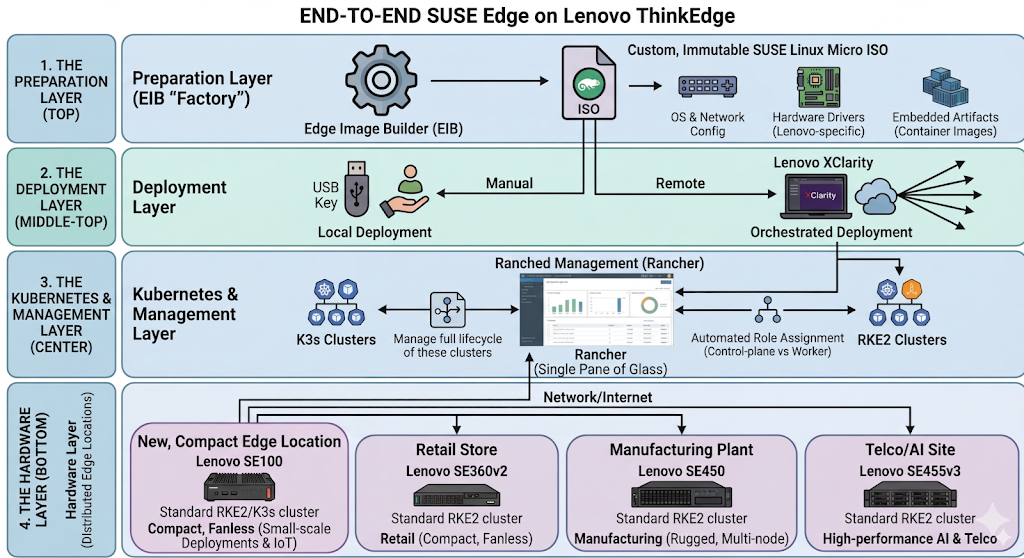
Figure 1. End-to-end SUSE Edge on Lenovo ThinkEdge
Here is a breakdown of the four primary sections of architecture:
- The Preparation Layer (Top)
At the top, the Edge Image Builder (EIB) serves as the "factory." It creates a custom, immutable SUSE Linux Micro ISO. This isn't just a basic OS; it includes:
- OS & Network Config: Pre-defined network settings to ensure the server works as soon as it's plugged in.
- Hardware Drivers: Lenovo-specific drivers and firmware to optimize the ThinkEdge hardware.
- Embedded Artifacts: All necessary container images bundled directly into the ISO, allowing for installations in air-gapped (offline) environments.
- The Deployment Layer (Middle-Top)
The diagram shows two paths for getting the software onto the hardware:
- Local Deployment: A manual "One-Touch" installation, typically via a USB key at the physical site.
- Orchestrated Deployment: Remote deployment using Lenovo XClarity, which allows IT teams to push the image to hundreds of edge servers simultaneously from a central location.
- The Kubernetes & Management Layer (Center)
Once installed, the server automatically bootstraps into a managed environment.
- It deploys K3s or RKE2 clusters (lightweight Kubernetes).
- Automated Role Assignment ensures the server knows if it is a control-plane or a worker node without manual intervention.
- Rancher (labeled here as "Ranched Management") provides the single pane of glass to manage the lifecycle of these clusters.
- The Hardware Layer (Bottom)
This layer highlights the Distributed Edge Locations where the work actually happens.
The architecture supports various Lenovo models tailored for different environments, such as the SE100 for small-scale deployments, the SE455 V3 for high-performance AI and Telco tasks, the SE360 V2 for retail, and the SE450 for manufacturing.
The Central Data Center (left) utilizes high-density ThinkSystem servers to host the primary management and image-building tools.
In this example, we demonstrate the configuration and deployment of key functionalities from a solution perspective. We will omit some detailed hardware and software configurations in this example; please refer to the official documentation for more detailed configuration information.
ThinkEdge servers used in the example
ThinkEdge SE100:
- Target Market: Small-scale Deployments & IoT
- Use Case: IoT Data Filtering and Aggregation
- Key Specifications:
- Powered by Intel Core Ultra processors with integrated GPUs and NPUs for AI
- Supports discrete GPUs like the NVIDIA 2000E
- Durable design for temperatures 5 to 45°C
- Supports up to 64GB DDR5 memory and up to 7.68TB via M.2 NVMe
- Includes ThinkShield security and XClarity remote management; operating power under 140W
ThinkEdge SE455 V3:
- Target Market: Telco & AI Powerhouses: Modern infrastructure needing high core density and massive "performance per watt."
- Use Case: 5G Open RAN (vRAN), large-scale Generative AI at the edge, and natural language processing.
- Key Specifications:
- CPU: AMD EPYC 8004 "Siena" (up to 64 cores)
- RAM: Up to 768GB DDR5 (4800MHz)
- GPU: Up to 6x single-width or 2x double-width
- I/O: Full PCIe Gen5 support
ThinkEdge SE360 V2:
- Target Market: Retail & IoT Hubs: Businesses needing ultra-compact, silent, and rugged compute for tight spaces.
- Use Case: Smart surveillance, machine learning at the edge, real-time retail analytics, and AR/VR streaming.
- Key Specifications:
- CPU: Intel Xeon-D 2700 (up to 16 cores)
- RAM: Up to 256GB DDR4
- GPU: 1x HHHL + 1x FHHL (NVIDIA L4/A2)
- Temp: −20°C to 65°C
ThinkEdge SE450:
- Target Market: Enterprise & Manufacturing: Industrial environments requiring enterprise-grade performance in a short-depth rack.
- Use Case: Virtualizing IT apps, computer vision, local inferencing for quality control, and predictive maintenance.
- Key Specifications:
- CPU: 3rd Gen Intel Xeon Scalable (up to 36 cores)
- RAM: Up to 1TB DDR4 + PMem support
- GPU: Up to 4x single-width or 2x double-width
- Depth: 300 mm or 360 mm options
Hardware configuration
To ensure successful and consistent deployment, the hardware configuration process involves two main steps.
- Planning the System Configuration: Determine the optimal system hardware configuration by reviewing the documents available on Lenovo Press.
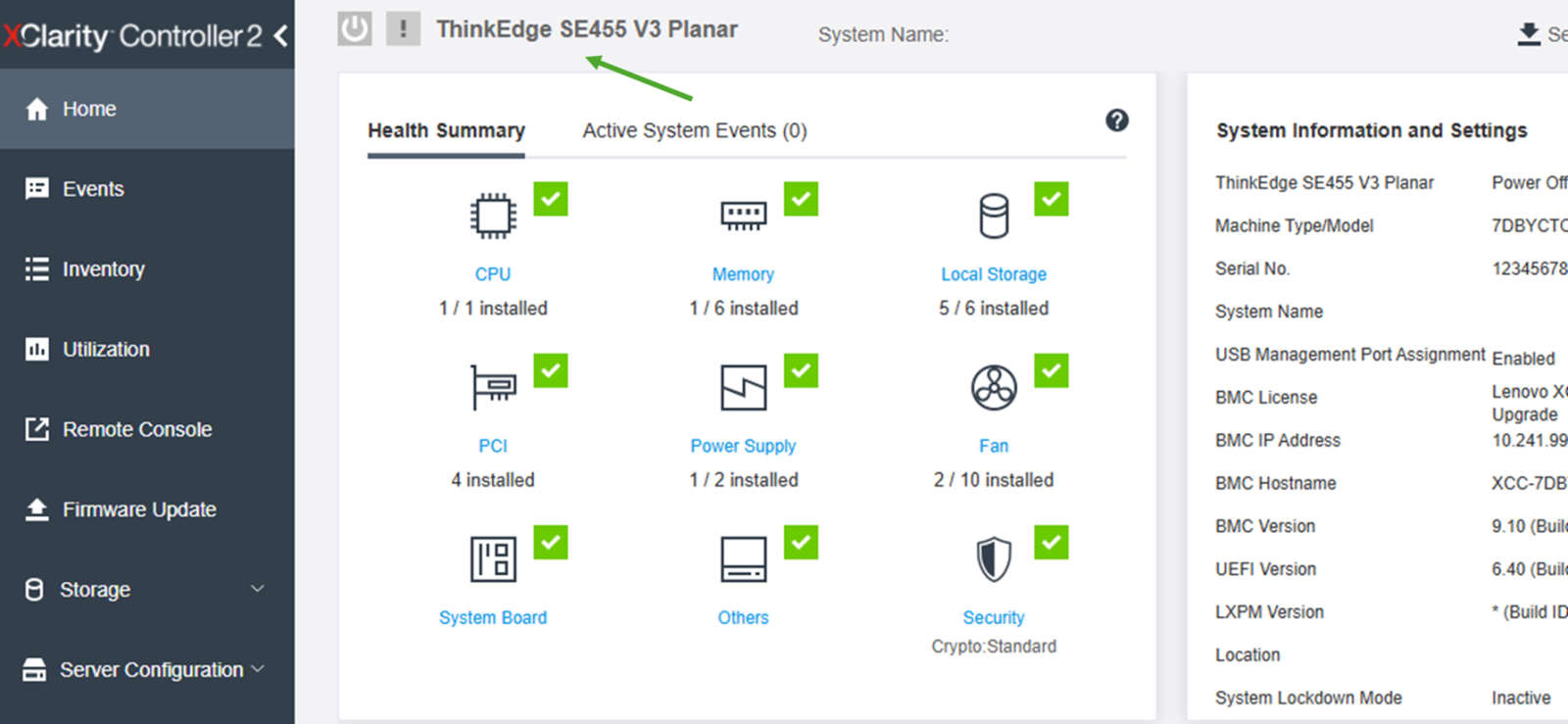
- Verifying the Configuration: Confirm the actual system hardware configuration through the Lenovo XClarity Controller (XCC), as shown in the following figure.
For more features and advanced usages, please refer to the Lenovo XCC User Guide.
Image customization for clusters
Edge Image Builder (EIB) is a powerful tool designed to simplify the creation of customized operating system images for edge deployments. It enables users to build customized images that include all necessary components, configurations, and applications, ensuring consistent and reliable deployments across diverse edge environments.
Topics in this section:
OS Configuration with EIB
EIB allows for granular control over the operating system configuration. Users can define various aspects of the OS, such as:
- Network settings: Configure static IP addresses, DHCP, DNS servers, and network interfaces using nmstate syntax directly within the image.
- User accounts and authentication: Pre-configure user accounts, passwords, SSH keys, and authentication methods for streamlined access management.
- System services: Enable or disable specific system services and define their startup behavior.
- Time synchronization: Configure NTP servers to ensure accurate timekeeping across edge devices.
- Storage partitioning: Define disk partitioning schemes and file system layouts.
- Custom configuration, scripts or files: Run custom scripts at deployment time, and drop custom configuration files (for example sshd config settings) or just plain files (for example /etc/motd) right from the deployment.
By embedding these configurations directly into the image, EIB eliminates the need for manual post-installation setup, significantly reducing deployment time and potential for human error.
Image build configuration
The configuration is as follows:
image:
 imageType: iso
 arch: x86_64
 baseImage: SL-Micro.x86_64-6.2-Default-SelfInstall-GM.install.iso
 outputImageName: lenovo-suse-edge-example.iso
The parameters are as follows:
- imageType: The output artifact type → here, an ISO installer.
- arch: Target CPU architecture (x86_64).
- baseImage: The starting SUSE Linux Micro base ISO.
- outputImageName: The name of the custom-built ISO that will be generated.
Operating system configuration
Configurations include the following:
- isoConfiguration → installDevice: Lenovo ThinkEdge servers support SATA/NVME/RAID. Users can choose any disk configuration based on your requirements.
operatingSystem: isoConfiguration: installDevice: /dev/nvme0n1 - Set the system timezone according to your location. In this case, the timezone is Asia/TaiPei.
- Configures NTP with Chinese pool servers.
- forceWait: true → wait for NTP sync before continuing.
time: timezone: Asia/TaiPei ntp: forceWait: true pools: - cn.pool.ntp.org servers: - 0.cn.pool.ntp.org - 1.cn.pool.ntp.org - Defines users and groups:
- root user enabled with password.
- Lenovo user with UID 2000, belonging to the admin group.
- Group admin has GID 1234.
- Passwords are encrypted (SHA-512).
users: - username: root createHomeDir: true encryptedPassword: - username: lenovo uid: 2000 createHomeDir: true encryptedPassword: primaryGroup: admin groups: - name: admin gid: 1234 - Registers the system with SUSE Customer Center using a registration code, so it can download needed packages during the building process.
packages:
   sccRegistrationCode: your-registration-code
Kernel Module and Hardware Feature Integration
EIB facilitates the seamless integration of kernel modules and other packages required to enable specific hardware features on Lenovo Edge servers. This is achieved by:
- Including necessary RPMs: Users can specify the RPM packages containing drivers and utilities for hardware components (e.g., specialized network cards, GPUs, security modules) to be included in the image. These RPMs are integrated during the image build process, ensuring that the hardware features are immediately functional upon deployment.
- Kernel module loading: EIB can be configured to automatically load specific kernel modules at boot time, ensuring that the necessary hardware drivers are active.
This capability is particularly crucial for leveraging unique Lenovo hardware features, as it ensures that the customized image is fully optimized for the target server, enhancing performance and stability.
There are two ways to integrate all the required packages into a customized ISO image:
- Copy all the rpms to “image-build-root/rpms” directory, like “keepalived” for HA and others.
- Using custom repositories, more detail can be found at the following page: https://documentation.suse.com/suse-edge/3.4/html/edge/quickstart-eib.html#eib-configuring-rpm-packages
Regarding the rpms for Lenovo hardware, please refer to Lenovo Data Center Support.
Rancher Product Configuration with EIB
EIB significantly simplifies the deployment and configuration of Rancher, a complete software stack for container management, on edge devices. This is achieved by:
- Kubernetes: EIB can deploy RKE2 (Rancher Kubernetes Engine 2) or K3s (Lightweight Kubernetes) Kubernetes clusters, along with their configuration files directly integrated into the customized image. This ensures that a fully functional Kubernetes cluster, managed by Rancher, is deployed as part of the one-touch process.
- Pre-configuring cluster roles: EIB enables the pre-definition of server roles within the Kubernetes cluster (e.g., control plane nodes, worker nodes). This allows for automated provisioning where each server assumes its designated role based on its network configuration, eliminating manual intervention during cluster setup.
- Automated agent registration: The customized image can be configured to automatically register the Rancher agent with a central Rancher management server upon initial boot. This enables immediate centralized management and monitoring of the edge Kubernetes cluster without any manual registration steps.
- Workload and application deployment: EIB can include manifests for deploying initial workloads, applications, or even entire Helm charts directly within the image. This ensures that the edge devices are ready to run specific applications immediately after deployment, accelerating time-to-value.
- Security hardening: Security configurations for Rancher and Kubernetes, such as network policies, access controls, and certificate management, can be predefined and integrated into the image, ensuring a secure-by-design deployment.
By leveraging EIB for Rancher configuration, organizations can achieve "zero-touch" provisioning of containerized environments at the edge, streamlining operations and enabling rapid scaling of containerized applications.
Configurations are as follows:
- RKE2 cluster configuration
- Network configuration for nodes
- Retreiving MAC addresses
- Setting up High Availability (HA) for a bare-metal or edge Kubernetes cluster using MetalLB and the Endpoint Copier Operator
- Custom settings
RKE2 cluster configuration
- Kubernetes version: RKE2 (Rancher’s Kubernetes distribution) v1.34.2.
- apiVIP: Virtual IP for Kubernetes API (high availability).
- apiHost: DNS hostname for the Virtual IP used above.
kubernetes: version: v1.34.2+rke2r1 network: apiVIP: 192.168.20.100 apiHost: cluster01-rancher.io - Defines cluster nodes:
- node0: control-plane (server), bootstrap initializer.
- node1–2: control-plane (server), HA.
- node3: worker nodes (agent).
nodes: - hostname: node0 type: server initializer: true - hostname: node1 type: server - hostname: node2 type: server - hostname: node3 type: agent - Configures Helm charts to be deployed automatically after cluster bootstrap. In this example we have 2 charts configured, and in your scenario, you can configure components based on your requirements. To customize charts, you can put the configure file under “kubernetes/helm/values”.
helm: charts: - name: cert-manager repositoryName: jetstack version: 1.19.2 targetNamespace: cert-manager valuesFile: certmanager.yaml createNamespace: true installationNamespace: kube-system - name: rancher version: 2.13.1 repositoryName: rancher-prime valuesFile: rancher.yaml targetNamespace: cattle-system createNamespace: true installationNamespace: kube-system repositories: - name: rancher-prime url: https://charts.rancher.com/server-charts/prime - name: jetstack url: https://charts.jetstack.io - Embedded Artifact Registry: images configured in the Embedded Artifact Registry will be imported automatically after OS is installed.
- Defines container images to embed directly into the ISO.
- Purpose: Ensure offline deployment (air-gapped environments).
embeddedArtifactRegistry:
 images:
   - name: registry.rancher.com/rancher/hardened-cluster-autoscaler:v1.10.2-build20251015
   - name: registry.rancher.com/rancher/hardened-cni-plugins:v1.8.0-build20251014
   - name: registry.rancher.com/rancher/hardened-coredns:v1.13.1-build20251015
   - name: registry.rancher.com/rancher/hardened-k8s-metrics-server:v0.8.0-build20251015
   ...
Network configuration for nodes
Create configuration files for all the nodes (node0.suse.com - node3.suse.com) by using nmstate syntax as follows:
routes:
 config:
 - destination: 0.0.0.0/0
   metric: 100
   next-hop-address: 192.168.20.1
   next-hop-interface: eth0
   table-id: 254
 - destination: 192.168.20.0/24
   metric: 100
   next-hop-address: 192.168.20.1
   next-hop-interface: eth0
   table-id: 254
dns-resolver:
 config:
   server:
   - 192.168.20.1
   - 8.8.8.8
interfaces:
- name: eth0
 type: ethernet
 state: up
 mac-address: 52:54:00:cf:a1:0a
 ipv4:
   address:
   - ip: 192.168.20.50
     prefix-length: 24
   dhcp: false
   enabled: true
 ipv6:
   enabled: false
All these files should be located in the “work-dir/network” folder, such as the following:
eib/network/
|-- node0.yaml
|-- node1.yaml
|-- node2.yaml
|-- node3.yaml
At least 1 MAC address is required for every node, it’s difficult for users to collect if the number of servers is large or servers are placed somewhere hard to reach. But with Lenovo XClarity Controller and Redfish, users can achieve it easily.
Retreiving MAC addresses
The method for retrieving MAC addresses depends on the specific server model and its Redfish implementation.
For most Lenovo ThinkSystem (e.g., SD550 V3, SE455 V3, SE100), these models display network devices directly in XCC. Consequently, the Redfish API can be used directly to query network adapter and port information. You can use Shell scripts (via curl) or Python to retrieve the system MAC address in a Linux environment.
API Endpoint Example:
curl -k -u username:password -s "https://[XCC ip]/redfish/v1/Chassis/1/NetworkAdapters/[network_slot]/Ports/[port_number]"
Example output of parsing is shown in the following figure:
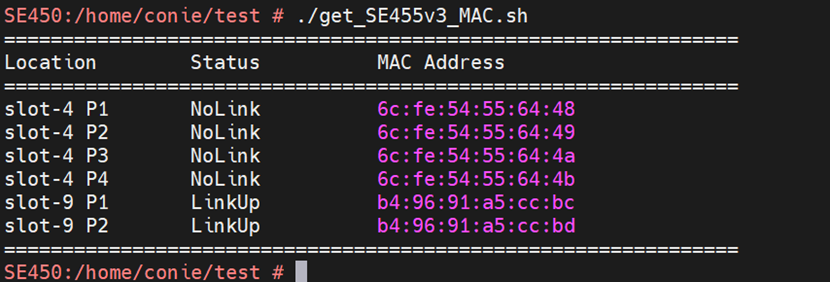
Figure 3. Parsing Example Output
For others Lenovo ThinkEdge Models (e.g., SE350 V2, SE360 V2), currently, these specific models do not report network device MAC addresses directly through XCC. Therefore, Redfish cannot retrieve this information via standard inventory queries. The alternative solution is that MAC addresses can be extracted from System Diagnostic Logs (FFDC), which contain UEFI configuration details.
Recommended Process:
- Collect FFDC through Redfish.
- Extract the FFDC log and identify the required MAC addresses.
- Refer to the following document for service data collection: LP1655 - Collecting Service Data on Lenovo ThinkSystem Servers.
Parsing example:
# grep -E "NetworkBootSettings.Q0001.[1-6]" ./tmp/ffdc_live_dbg/uefi_settings.txt | sed -e 's/.*Q0001.1 "/Eno1 /' 	-e 's/.*Q0001.2 "/Eno2 /' 	-e 's/.*Q0001.6 "/Eno3 /' 	-e 's/.*Q0001.5 "/Eno4 /' 	-e 's/.*Q0001.4 "/Eno5 /' 	-e 's/.*Q0001.3 "/Eno6 /' | awk '{print $1 "\t" $2}' | sed 's/"//g' | sort -V | column -t -N Interface,MAC
Interface  MAC
Eno1       08:3A:88:FB:80:C9
Eno2       08:3A:88:FB:80:C8
Eno3       08:3A:88:FF:D5:09
Eno4       08:3A:88:FF:D5:08
Eno5       08:3A:88:FF:D5:07
Eno6       08:3A:88:FF:D5:06
Tip: Collecting MAC addresses through either Redfish API or FFDC allows you to gather all the required MAC addresses by running a script automatically.
Setting up High Availability (HA) for a bare-metal or edge Kubernetes cluster using MetalLB and the Endpoint Copier Operator
By applying these three files, you create a robust chain: VIP (Pool) -> Network Announcement (L2 Adv) -> Service Binding (Endpoint Copier) -> API Servers. More information can be found at the following webpage:
https://documentation.suse.com/suse-edge/3.5/html/edge/guides-metallb-kubernetes.html
Files:
kubernetes/
`-- manifests
   |-- endpoint-copier-operator-vip.yaml
   |-- ingress-ippool-vip.yaml
   `-- ingress-l2-adv-vip.yaml
ingress-ippool-vip.yaml:
apiVersion: metallb.io/v1beta1
kind: IPAddressPool
metadata:
 name: kubernetes-vip-ip-pool
 namespace: metallb-system
spec:
 addresses:
 - 192.168.20.100/32
 serviceAllocation:
   priority: 100
   namespaces:
     - default
ingress-l2-adv-vip.yaml:
apiVersion: metallb.io/v1beta1
kind: L2Advertisement
metadata:
 name: kubernetes-vip-adv
 namespace: metallb-system
spec:
 ipAddressPools:
   - kubernetes-vip-ip-pool
endpoint-copier-operator-vip.yaml:
apiVersion: v1
kind: Service
metadata:
 name: kubernetes-vip
 namespace: default
spec:
 ports:
 - name: rke2-api
   port: 9345
   protocol: TCP
   targetPort: 9345
 - name: k8s-api
   port: 6443
   protocol: TCP
   targetPort: 6443
 type: LoadBalancer
In addition, similar to the VIP configuration, you can also set up a dashboard IP for Rancher GUI as below.
apiVersion: v1
kind: Service
metadata:
 name: dashboard-ip
 namespace: cattle-system
spec:
 selector:
   app: rancher
 ports:
 - name: dashboard-https
   port: 443
   protocol: TCP
   targetPort: 443
 type: LoadBalancer
---
apiVersion: metallb.io/v1beta1
kind: IPAddressPool
metadata:
 name: dashboard-ip-pool
 namespace: metallb-system
spec:
 addresses:
 - 192.168.20.201/32
 serviceAllocation:
   priority: 100
   namespaces:
     - cattle-system
---
apiVersion: metallb.io/v1beta1
kind: L2Advertisement
metadata:
 name: dashboard-ip-l2-adv
 namespace: metallb-system
spec:
 ipAddressPools:
 - dashboard-ip-pool
Custom settings
Files:
custom/
|-- files
|   |-- basic-setup.sh
|   `-- mgmt-stack-setup.service
`-- scripts
   |-- 99-alias.sh
   `-- 99-mgmt-setup.sh
The mgmt-stack-setup.service is a one-time provisioning service that configures customized settings. It is designed to run once during the first boot (or first successful installation) and then "self-destruct" to prevent re-execution.
99-mgmt-setup.sh:
#!/bin/bash

# Copy the scripts from combustion to the final location
mkdir -p /opt/mgmt/bin/
for script in basic-setup.sh; do
   cp ${script} /opt/mgmt/bin/
done

# Copy the systemd unit file and enable it at boot
cp mgmt-stack-setup.service /etc/systemd/system/mgmt-stack-setup.service
systemctl enable mgmt-stack-setup.service
mgmt-stack-setup.service:
[Unit]
Description=Setup Management stack components
Wants=network-online.target
After=network.target network-online.target eib-embedded-registry rke2-server.service k3s.service
ConditionPathExist=/opt/mgmt/bin/basic-setup.sh

[Service]
User=root
Type=oneshot
# Metallb needs to wait until rancher is installed, it can take a lot of time.
TimeoutStartSec=infinity

ExecStartPre=/bin/sh -c "echo 'Setting up Management components...'"
# Scripts are executed in StartPre because start can only run a single one
ExecStart=/bin/sh -c "echo 'Finished setting up Management components'"
RemainAfterExit=yet
KillMode=process
# Disable & delete everything
ExecStartPost=/bin/sh -c "systemctl disable mgmt-stack-setup.service"
ExecStartPost=rm -f /etc/systemd/system/mgmt-stack-setup.service

[Install]
WantedBy=multi-user.target
basic-setup.sh: Setup environment for other scripts.
#!/bin/bash
export PATH=$PATH:/var/lib/rancher/rke2/bin
export KUBECONFIG="/etc/rancher/rke2/rke2.yaml"

die(){
   echo ${1} 1>&2
   exit ${2}
}
Build the image:
The following example command attaches the image configuration directory and builds an image; you can use either docker or podman:
docker run --privileged --rm -it -v $PWD:/eib registry.suse.com/edge/3.5/edge-image-builder:1.3.2 build --definition-file ./definition.yaml
Once the image is built successfully, users only need to focus on the deployment. A detailed example with more components integrated can be found here: Setting up the management cluster | SUSE Edge Documentation
Deployment via XClarity
One-touch deployment can be executed either directly on the server or orchestrated via Lenovo XClarity.
High-level steps for deploying via XClarity are the following:
- Connect to the remote Lenovo ThinkSystem and remotely mount the customized ISO, as shown in the following figure.
- Perform the customized ISO installation, automating any interactive modes until completion, as shown in the following figure.
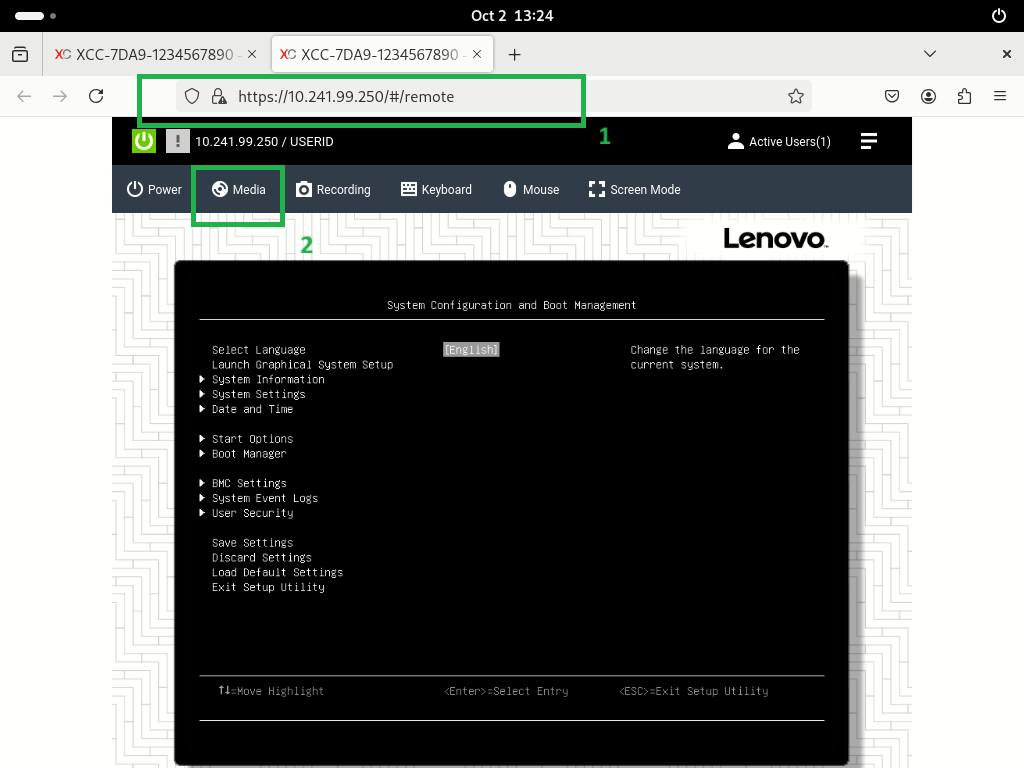
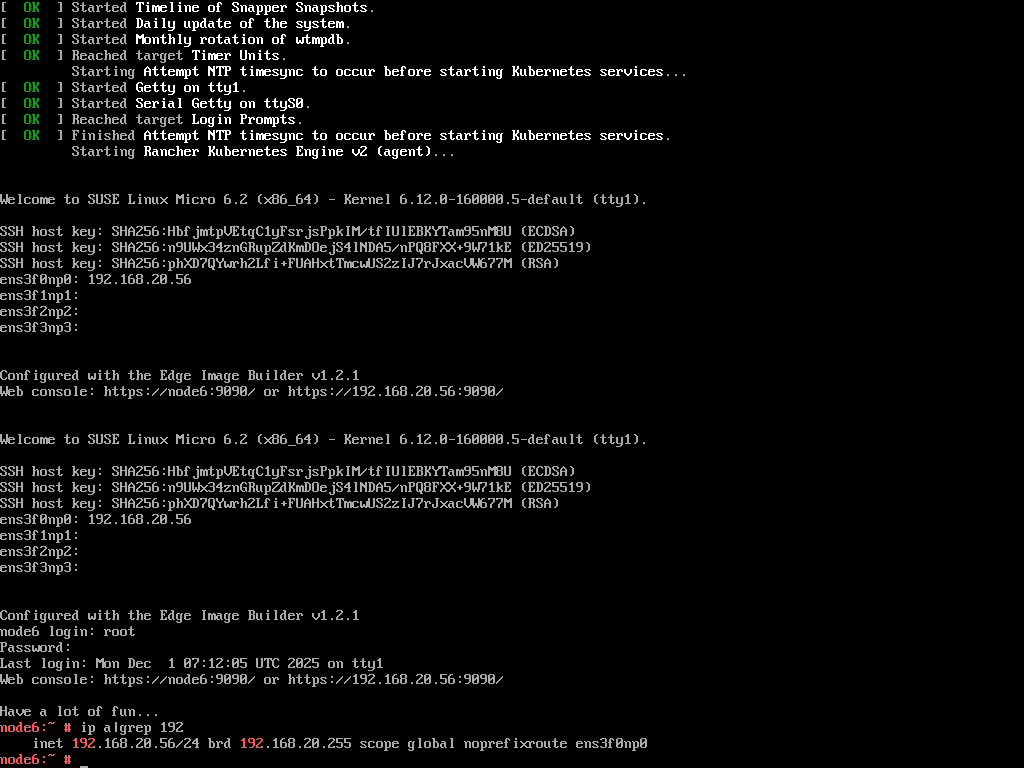
For a detailed step-by-step guide and technical reference, refer to Deploying and Managing SUSE Edge on Lenovo ThinkEdge SE360 V2
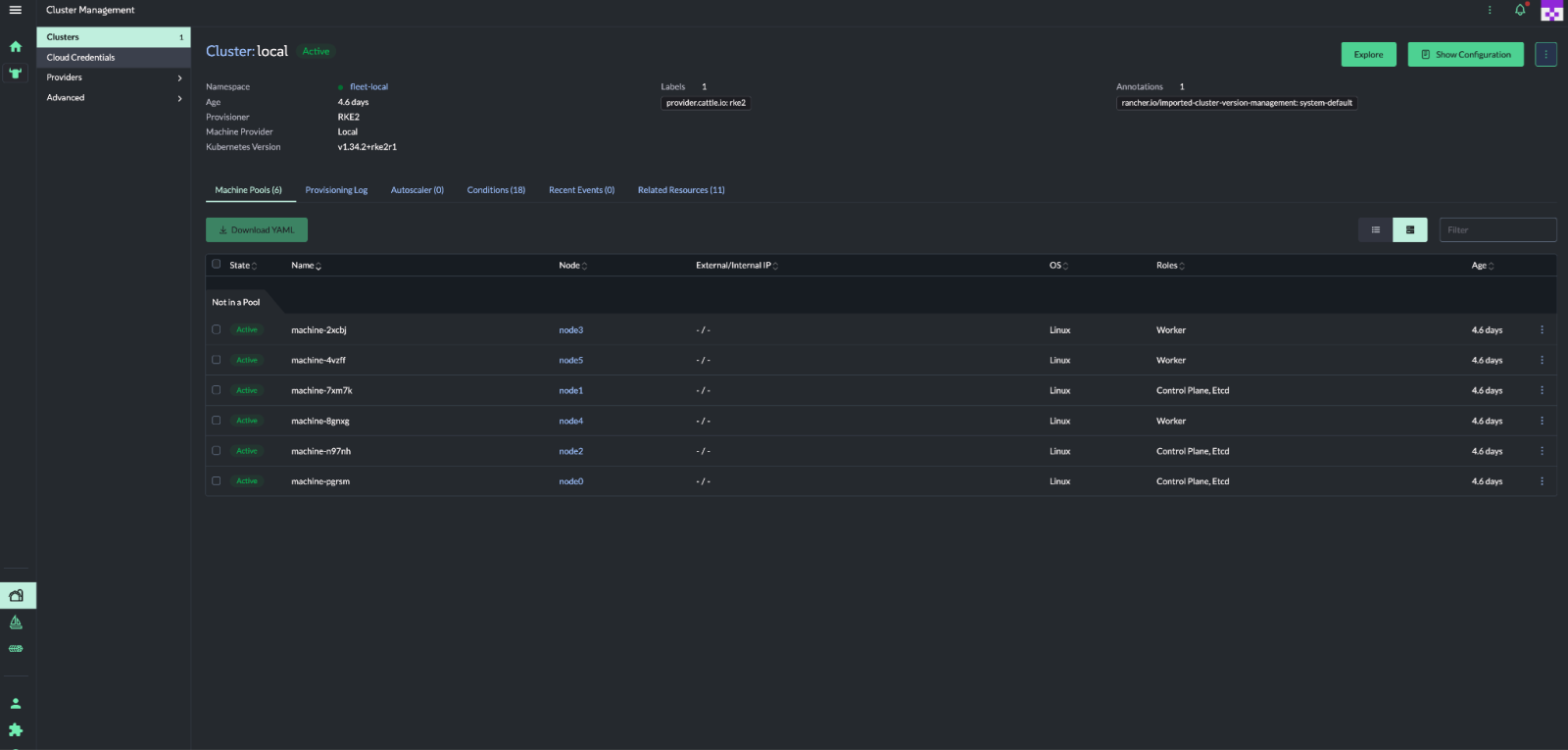
Once the installation is completed, you can run command to verify your cluster, such as the following:
kubectl get all -A
kubectl get nodes
Alternatively, access the dashboard as shown in the following figure.
References
For more information, see these resources:
- SUSE Edge 3.5:
https://documentation.suse.com/suse-edge/3.5/html/edge/suse-edge-documentation.html - EIB project:
https://github.com/suse-edge/edge-image-builder - Collecting Service Data on Lenovo ThinkSystem Servers:
https://lenovopress.lenovo.com/lp1655-collecting-service-data-on-lenovo-thinksystem-servers - Lenovo System redfish support information
- Lenovo XClarity Controller Redfish REST API:
https://pubs.lenovo.com/xcc/rest_api - Telco examples:
https://github.com/suse-edge/telco-cloud-examples/tree/main/telco-examples
Authors
Conie Chang is a Linux Engineer in the Lenovo Infrastructure Solutions Group, based in Taipei, Taiwan. She has experience in Red Hat and SUSE Linux OS.
Hui-Zhi Zhao is a Partner Technology Manager at SUSE.
Thanks to the following people for their assistance:
- Adrian Huang, Senior Linux Kernel Engineer
- David Watts, Lenovo Press
Trademarks
Lenovo and the Lenovo logo are trademarks or registered trademarks of Lenovo in the United States, other countries, or both. A current list of Lenovo trademarks is available on the Web at https://www.lenovo.com/us/en/legal/copytrade/.
The following terms are trademarks of Lenovo in the United States, other countries, or both:
Lenovo®
ThinkEdge®
ThinkShield®
ThinkSystem®
XClarity®
The following terms are trademarks of other companies:
AMD®, AMD EPYC®, and EPYC® are trademarks of Advanced Micro Devices, Inc.
Intel®, the Intel logo, Intel Core®, and Xeon® are trademarks of Intel Corporation or its subsidiaries.
Linux® is the trademark of Linus Torvalds in the U.S. and other countries.
Helm® is a trademark of Microsoft Corporation in the United States, other countries, or both.
NVIDIA® is a trademark of NVIDIA Corporation.
Other company, product, or service names may be trademarks or service marks of others.
Configure and Buy
Please select a locale
Full Change History
Course Detail
Employees Only Content
The content in this document with a is only visible to employees who are logged in. Logon using your Lenovo ITcode and password via Lenovo single-signon (SSO).
The author of the document has determined that this content is classified as Lenovo Internal and should not be normally be made available to people who are not employees or contractors. This includes partners, customers, and competitors. The reasons may vary and you should reach out to the authors of the document for clarification, if needed. Be cautious about sharing this content with others as it may contain sensitive information.
Any visitor to the Lenovo Press web site who is not logged on will not be able to see this employee-only content. This content is excluded from search engine indexes and will not appear in any search results.
For all users, including logged-in employees, this employee-only content does not appear in the PDF version of this document.
This functionality is cookie based. The web site will normally remember your login state between browser sessions, however, if you clear cookies at the end of a session or work in an Incognito/Private browser window, then you will need to log in each time.
If you have any questions about this feature of the Lenovo Press web, please email David Watts at dwatts@lenovo.com.


