

Top
Authors
Updated
6 Mar 2026Form Number
LP2386PDF size
15 pages, 1.9 MBSubscribed to LP2386.
Thank you for your feedback.
Table of Contents
Abstract
Organizations want to accelerate AI adoption while keeping sensitive data local, controlling costs, and minimizing latency for mission-critical applications. Azure Foundry Local running on Lenovo ThinkAgile MX V4 servers as Azure Local Premier Solutions gives customers a simple, secure, and high-performance way to build and test generative AI solutions on-premises with full Azure consistency.
As enterprises transition from AI experimentation to full-scale production, they encounter significant hurdles in operationalizing workloads across distributed environments. Critical barriers include strict data sovereignty requirements in regulated industries, the need for ultra-low latency in real-time applications, and the rising infrastructure complexity of fragmented technology stacks. Furthermore, developer productivity is often hindered by a lack of standardized, API-compatible endpoints, while scaling exclusively in the cloud frequently results in unpredictable costs.
This paper outlines the necessity for an integrated solution that bridges the gap between the edge and the data center. By delivering Azure-consistent AI services on enterprise-grade local hardware, organizations can maintain a familiar developer experience while simplifying operations. This balanced hybrid approach ensures data remains secure, performance remains high, and costs stay manageable, providing a scalable blueprint for modern AI infrastructure.
Introduction
Organizations want to accelerate AI adoption while keeping sensitive data local, controlling costs, and minimizing latency for mission critical applications. Azure Foundry Local running on Lenovo ThinkAgile MX V4 servers as Azure Local Premier Solutions gives customers a simple, secure, and high performance way to build and test generative AI solutions on premises with full Azure consistency.
Operationalizing AI at the edge and in the data center
Enterprises face several barriers when trying to implement AI in production:
- Data sovereignty and privacy
Sensitive data in healthcare, financial services, government, and manufacturing often cannot leave on‑premises or sovereign environments, blocking use of cloud‑only AI services.
- Latency‑sensitive workloads
Use cases such as real‑time copilots, quality inspection, or industrial control need millisecond response times that are difficult to achieve if inference runs only in a remote public cloud.
- Infrastructure complexity and fragmentation
Teams frequently stand up separate stacks for AI experiments, edge applications, and traditional workloads, driving up cost and operational overhead.
- Developer friction
AI developers want a simple, OpenAI‑compatible endpoint they can code against, without needing to understand the underlying hardware or infrastructure details.
- Unpredictable cloud cost and scale
Scaling inference exclusively in the cloud can quickly lead to cost overruns; many customers want a balanced model that uses local capacity for steady‑state workloads and cloud for burst.
Organizations need an integrated solution that delivers Azure‑consistent AI services locally, on enterprise‑grade hardware, with a familiar developer experience and simplified operations.
Azure Foundry Local
Azure Foundry Local is a free, developer‑focused service that lets you run and test large language models (LLMs) directly on local hardware, using an OpenAI‑compatible REST API. It is optimized for rapid prototyping, testing, and iteration of generative AI applications, with models executing fully on customer‑owned CPU, GPU, or NPU resources.
Key capabilities include:
- On‑device model execution to reduce latency and improve data privacy
- Automatic hardware detection (CPU/GPU/NPU) and download of optimized model variants
- OpenAI‑compatible REST endpoint for easy integration with existing tools and SDKs
- ONNX Runtime‑based execution engine with support for quantized and optimized models
- Model cache and lifecycle management for fast load/unload and local reuse
- Developer tooling via CLI, SDKs, and AI Toolkit for Visual Studio Code
Azure Foundry Local is supported on Windows 10/11 and Windows Server 2025 and can be deployed inside virtual machines running on Azure Local clusters.
Joint Lenovo and Microsoft solution
On Lenovo ThinkAgile MX V4 systems, Azure Local provides a cloud‑consistent platform for running Azure services and VMs on‑premises, while Azure Foundry Local runs inside Windows Server 2025 VMs to deliver local AI inference endpoints.
This joint solution delivers:
- Azure‑consistent infrastructure with Azure Local running on validated Lenovo ThinkAgile MX V4 configurations
- Enterprise‑class, hyperconverged servers tuned for hybrid cloud and AI workloads
- Local AI model execution through Azure Foundry Local, exposed via OpenAI‑compatible APIs to applications running in the Azure Local environment
- Unified management and lifecycle via Azure and Lenovo XClarity tooling, simplifying operations across cloud and edge.
ThinkAgile MX V4 as Azure Local Premier Solutions
Lenovo ThinkAgile MX V4 systems are Microsoft‑validated configurations designed specifically for Azure Local deployments and hybrid cloud with AI. They are based on the latest Intel Xeon or AMD EPYC processor platforms (depending on model) and leverage Lenovo’s ThinkSystem server technology.
ThinkAgile MX630 V4 Hyperconverged System
The ThinkAgile MX630 V4 is a 1U hyperconverged system optimized for dense, performance‑sensitive Azure Local deployments.
Key characteristics include:
- 1U form factor for high‑density Azure Local clusters
- Latest‑generation server processors with high core counts for virtualized and containerized workloads
- Large memory capacity with next‑generation DDR and support for AI workloads running in VMs
- Flexible NVMe and SAS/SATA storage configurations for VM boot, data, and AI model caches
- Optional GPU support (where offered) to accelerate inferencing workloads
- Tight integration with Azure Local for policy‑based management and lifecycle updates
This platform is ideal for edge locations or datacenters where space is at a premium but strong compute is required for AI, VDI, and general purpose workloads.
ThinkAgile MX650 V4 Hyperconverged System
The ThinkAgile MX650 V4 provides a 2U, performance‑ and capacity‑optimized platform for Azure Local and AI services. It is particularly well suited for larger models, high concurrency, or combined infrastructure plus AI workloads.
Key characteristics include:
- 2U form factor with higher drive, GPU, and expansion capacity
- High‑core‑count processors with balanced memory bandwidth for AI inferencing and general purpose compute
- Support for large memory footprints (multi‑TB) using modern DIMM technologies, ideal for hosting multiple AI models and caching datasets
- Configurable NVMe storage pools with high throughput for model loading and log/data capture
- Rich PCIe expansion for GPU accelerators and high‑speed networking
- Validated as an Azure Local Premier Solution, enabling standardized deployment patterns across sites
These platforms can be combined in a cluster to deliver a scalable Azure Local environment where AI workloads are distributed across multiple nodes as business demands grow.
Deployment model
Because Azure Foundry Local is designed for on‑device execution rather than direct installation on Azure Local cluster nodes, it is deployed inside Windows Server 2025 virtual machines running on the ThinkAgile MX V4 infrastructure.
A typical deployment pattern is:
- Deploy an Azure Local cluster on Lenovo ThinkAgile MX630 V4 and/or MX650 V4 systems using validated configurations.
- Create one or more Windows Server 2025 VMs on the cluster, assigning CPU, memory, and (optionally) GPU resources to each VM.
- Install Azure Foundry Local in each VM using the Windows Package Manager and configure desired models.
- Expose OpenAI‑compatible endpoints from each Foundry Local instance to applications running in the Azure Local environment.
- Use Azure Local and Lenovo management tools to monitor, scale, and lifecycle both the VMs and the underlying hardware.
This approach combines Azure Foundry Local’s on‑device inference design with the resiliency, management, and scalability of Azure Local running on Lenovo ThinkAgile MX.
Installation and Setup
The steps to install and setup Azure Foundry Local are as follows:
- Deploy Azure Local on one of the desired platforms.
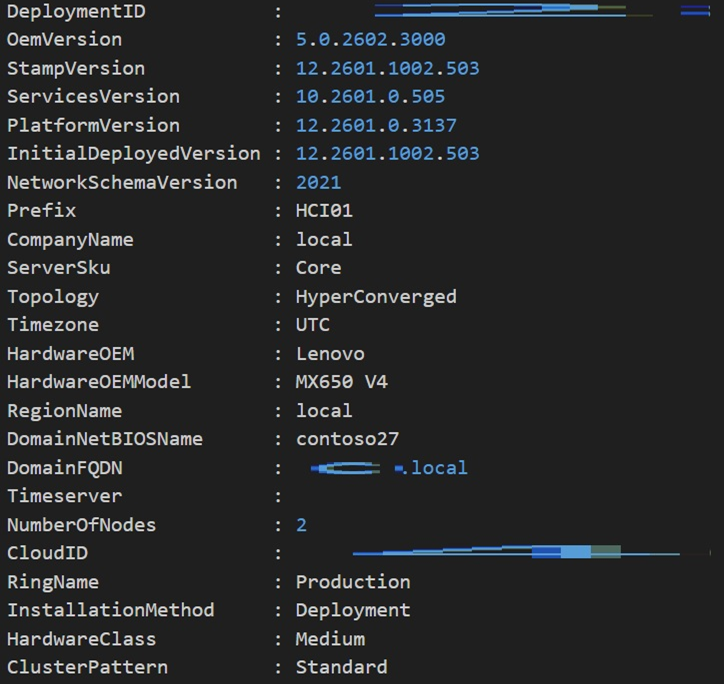
Figure 1. Deploying Azure Local - Create a virtual machine with one of the supported operating systems on the instance.

Figure 2. creating the VM - Use Windows Package Manager:
winget install Microsoft.foundry local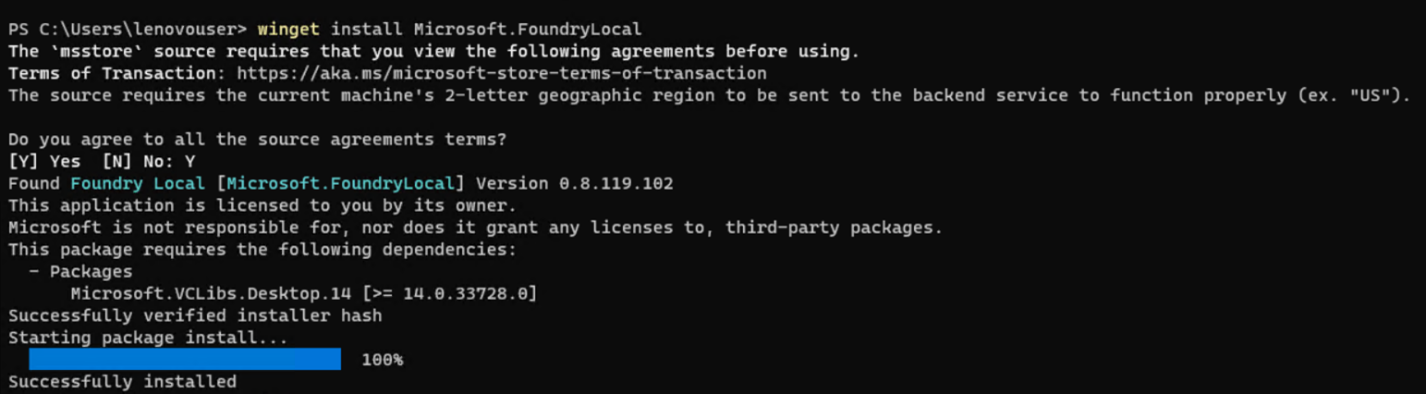
Figure 3. winget command - Check the available commands using:
foundry /?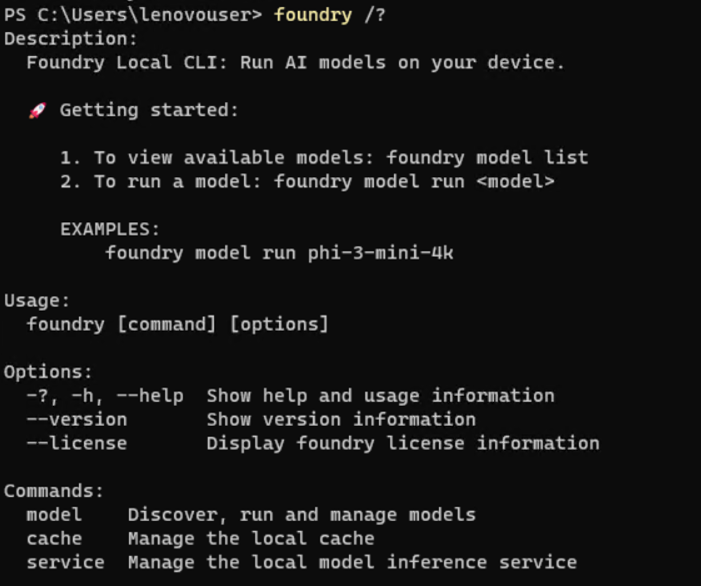
Figure 4. foundry help - Manage the background service using:
foundry service start
foundry service stop
foundry service status
Figure 5. foundry service commands


Managing Models
Managing models can be performed as follows:
- Use foundry model list to see the available catalog (e.g., Phi, Mistral, Qwen, DeepSeek).
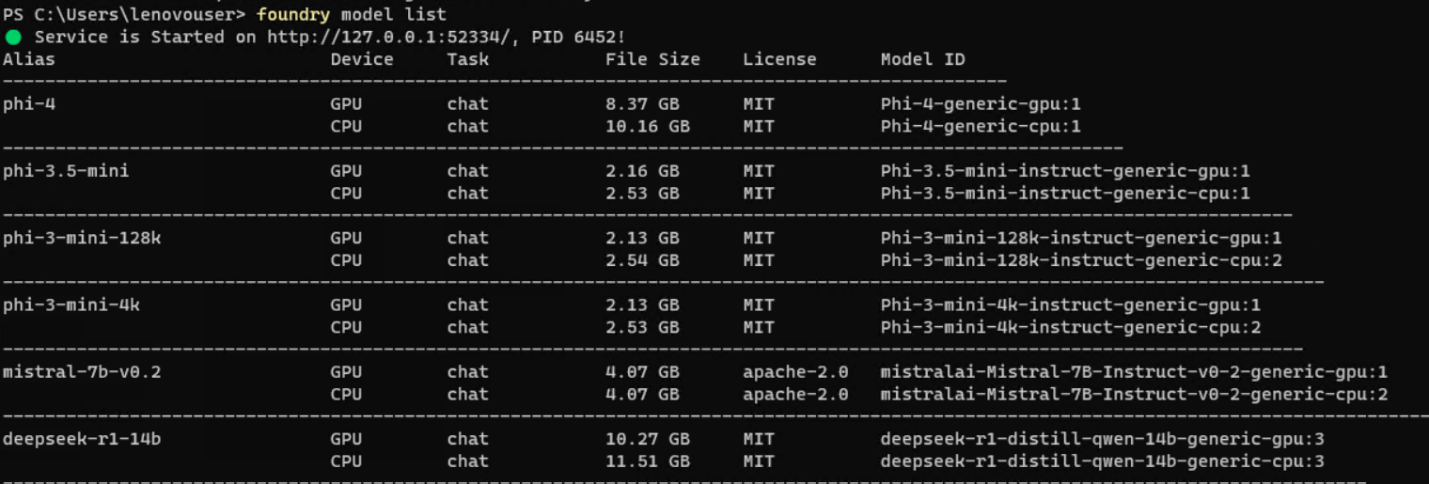
Figure 6. foundry model list command - Execute foundry model run [model-name] to download and load a model locally.

Figure 7. foundry --version command - Once loaded, you can chat with the model directly in the command prompt for immediate testing.
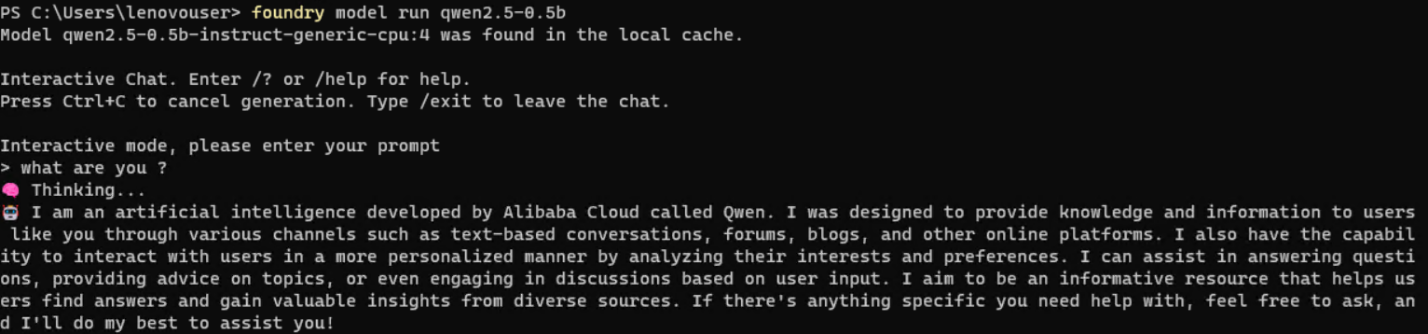
Figure 8. Chat with the model
Foundry Local cannot run directly on Azure local cluster infrastructures because Foundry Local is engineered strictly for on‑device execution. Supported environments include Windows 10/11, Windows Server 2025, macOS, and specific Android device platforms where AI models can run directly on local CPU, GPU, or NPU hardware. Foundry Local is not intended for deployment on server‑grade or Kubernetes‑based cluster nodes, which is why Azure local clusters cannot natively host it.
However, you can still enable this capability within an Azure local cluster by deploying a virtual machine running Windows Server 2025, a fully supported operating system for Foundry Local. Inside this VM, Foundry Local installs and operates normally, enabling local‑device inference while still leveraging your cluster’s infrastructure.
Additional Benefits of Running Foundry Local Inside a VM on an Azure Local Cluster
- Hardware Acceleration Flexibility
A VM can be configured with GPU‑Passthrough (NVIDIA/AMD) or vTPM/NPU‑capable hardware where supported, allowing Foundry Local to leverage acceleration exactly as designed—including optimized performance via ONNX Runtime.
- Isolated and Secure Execution Environment
Running Foundry Local inside a Windows Server 2025 VM creates a dedicated, isolated environment that prevents interference with other workloads and maintains strict data boundaries. Foundry Local already emphasizes on‑device data privacy, and the VM further strengthens this separation.
- Simplified Management Using Azure Local Cluster Tooling
You gain the ability to manage, scale, snapshot, and lifecycle the VM using your existing Azure Stack/cluster management tools—while still running the AI workload locally within the VM OS. This offers operational consistency without modifying cluster‑level configurations.
- High Availability Using Cluster‑Backed Infrastructure
Although Foundry Local itself is not distributed, placing the VM on a resilient Azure local cluster grant’s higher reliability. The cluster ensures storage redundancy, node failover, and automated VM restart capabilities.
- Centralized Deployment for Multiple Edge Users
A VM‑based Foundry Local instance can serve as a centrally hosted local inference endpoint for applications running within your edge environment. Because Foundry Local exposes an OpenAI‑compatible local endpoint, multiple services inside the cluster can consume the model without depending on the cloud.
- Compliance and Data Sovereignty Alignment
Since all inference happens inside the VM on‑premises, organizations retain full control over sensitive data. This aligns with Foundry Local’s design for privacy‑preserving, and offline execution.
- Ability to Run Multiple Model Variants or Versions
You can deploy multiple VMs, each running different models or configurations, enabling parallel experimentation and model isolation—while avoiding dependency conflicts.
Benefits of running Foundry Local in VMs on ThinkAgile MX V4
Running Azure Foundry Local inside VMs on Lenovo ThinkAgile MX V4 Azure Local clusters provides several advantages:
- Hardware acceleration flexibility
VMs can be configured with GPU passthrough or vGPU to leverage NVIDIA or AMD accelerators for faster LLM inference, while the ONNX Runtime optimizes execution for each hardware profile.
- Isolation and security
Each VM forms an isolated runtime boundary, aligning with zero‑trust and compliance requirements while preserving the on‑device data privacy model of Foundry Local.
- Operational consistency
IT teams can manage Foundry Local VMs like any other workload using Azure Local tools, including snapshot, backup, scaling, and policy enforcement.
- High availability
While Foundry Local itself is not a distributed service, running it on an Azure Local cluster provides underlying resiliency through node failover, storage redundancy, and automated VM restart.
- Centralized local AI endpoints
Multiple applications in the Azure Local environment can access one or more Foundry Local instances via internal networking, avoiding round‑trips to public cloud while keeping the programming model consistent.
- Flexibility for multiple model versions
Organizations can spin up multiple VMs, each hosting different model families, sizes, or configurations, to support experimentation and production workloads side‑by‑side.
Solving real world problems
The joint Lenovo and Microsoft solution addresses concrete business challenges across industries.
- Healthcare: Privacy‑preserving clinical copilots
- Financial services: Secure document intelligence
- Manufacturing: Edge quality inspection and service copilots
- Government and public sector: Sovereign AI services
- Retail and customer engagement: Localized experiences
Healthcare: Privacy‑preserving clinical copilots
Hospitals can deploy clinical copilots that assist with summarizing physician notes, generating discharge summaries, and drafting prior‑authorization letters while keeping PHI inside their environment. Foundry Local runs in VMs on ThinkAgile MX650 V4 systems with GPU acceleration, providing low‑latency responses integrated into EHR or clinical applications via OpenAI APIs.
Benefits:
- PHI remains on‑premises to meet regulatory and organizational requirements.
- Clinicians receive near real‑time assistance at the point of care.
- IT teams manage the solution as part of their existing Azure Local and Lenovo infrastructure.
Financial services: Secure document intelligence
Banks and insurers can use Azure Foundry Local to power document intelligence workloads such as contract analysis, KYC summarization, and internal policy Q&A without exposing sensitive financial data externally.
Running on ThinkAgile MX630 V4 clusters, the solution:
- Processes large volumes of documents with low and predictable latency.
- Allows fine‑tuning or prompt‑engineering against institution‑specific documents, hosted locally.
- Integrates with existing Azure‑based applications and identity controls.
Manufacturing: Edge quality inspection and service copilots
Manufacturers can deploy AI copilots at plant sites to assist technicians, analyze maintenance logs, or power chatbots that guide troubleshooting procedures, even when connectivity to the public cloud is limited.
ThinkAgile MX V4 nodes with Azure Local host local applications and Foundry Local VMs that:
- Run inference close to where data is generated on the shop floor.
- Continue to operate during network disruptions or constrained connectivity.
- Offer a consistent API surface that can also be used with cloud‑based Azure OpenAI for centralized scenarios.
Government and public sector: Sovereign AI services
Public sector agencies often require sovereign control over data and AI models. Azure Foundry Local on Lenovo ThinkAgile MX V4 in an Azure Local deployment enables local AI services with tight data boundary control.
Benefits:
- Data and inference remain within the jurisdiction‑controlled infrastructure.
- Agencies can build internal knowledge copilots for policy, procedures, and case management.
- Standard Azure tools and Lenovo platforms simplify accreditation and operations.
Retail and customer engagement: Localized experiences
Retailers can deploy store‑level or region‑specific copilots that use local product catalogs, transaction data, and promotions to provide personalized assistance without sending sensitive data to the cloud.
By leveraging Foundry Local on ThinkAgile MX630 V4 clusters in regional hubs:
- Customer queries are handled with low latency.
- Models can be tuned or configured for local languages and content.
- The same application logic can switch between local and cloud‑based Azure OpenAI depending on cost or latency requirements.
Why Lenovo ThinkAgile MX V4 is the best platform for Azure Foundry Local and AI
Lenovo ThinkAgile MX V4 servers stand out as the ideal foundation for Azure Foundry Local and Azure Local‑based AI deployments for several reasons:
- Purpose‑built for Azure Local
ThinkAgile MX V4 systems are Microsoft‑validated Azure Local Premier Solutions, ensuring predictable deployment, lifecycle, and support for joint customers.
- Enterprise‑class performance and scalability
The MX630 V4 and MX650 V4 offer high‑core‑count processors, large memory footprints, NVMe‑optimized storage, and GPU acceleration options to serve demanding AI and hybrid cloud workloads.
- Optimized for AI at the edge and in the datacenter
Flexible form factors and configuration options allow customers to build small edge clusters or large central environments, all running Azure Local and Foundry Local consistently.
- Proven Lenovo reliability and manageability
Lenovo’s ThinkSystem platforms deliver industry‑leading reliability, while Lenovo XClarity and Azure management tools provide a unified operational experience.
- Joint Lenovo–Microsoft engineering and support
Co‑engineered and validated configurations reduce risk and accelerate time to value for AI initiatives.
- Future‑ready hybrid cloud and AI
As Azure Local and Azure AI services evolve, customers on Lenovo ThinkAgile MX V4 can adopt new capabilities without forklift upgrades, protecting their investment.
By combining Azure Foundry Local’s developer‑friendly AI runtime with Lenovo ThinkAgile MX V4 Azure Local Premier Solutions, joint Lenovo and Microsoft customers gain a powerful, secure, and cost‑effective platform to design, test, and deploy real‑world AI solutions wherever their data lives.
For More Information
To learn more about Lenovo MX solution contact your Lenovo Business Partner or visit:
https://www.lenovo.com/au/en/servers-storage/sdi/thinkagile-mx-series/
Azure Foundry Local
Authors
Vinay Kulkarni is a Principal Technical Consultant in the Software and Solutions Development group at ISG, Lenovo. His current focus is on solution architectures in the areas of cloud, database analytics and AI. Vinay has more than 20 years’ experience with Lenovo, and IBM. During this time, Vinay has led diverse projects ranging from performance benchmark publications to solutions development, as well as business and technical strategy.
Victor Talpeanu is a Microsoft Solutions Engineer with over 8 years of experience in the IT industry, specializing in Azure Local deployments and Azure Local cluster testing. He contributes to Lenovo’s MX portfolio through Software Builder Extension (SBE) validation, ensuring seamless integration and performance across hybrid and edge infrastructures. Victor focuses on delivering secure, modern, and reliable solutions built on Azure Local and enterprise cloud technologies.
Trademarks
Lenovo and the Lenovo logo are trademarks or registered trademarks of Lenovo in the United States, other countries, or both. A current list of Lenovo trademarks is available on the Web at https://www.lenovo.com/us/en/legal/copytrade/.
The following terms are trademarks of Lenovo in the United States, other countries, or both:
Lenovo®
ThinkAgile®
ThinkSystem®
XClarity®
The following terms are trademarks of other companies:
AMD and AMD EPYC™ are trademarks of Advanced Micro Devices, Inc.
Intel®, the Intel logo and Xeon® are trademarks of Intel Corporation or its subsidiaries.
Microsoft®, Azure®, Visual Studio®, Windows Server®, and Windows® are trademarks of Microsoft Corporation in the United States, other countries, or both.
NVIDIA® is a trademark of NVIDIA Corporation.
Other company, product, or service names may be trademarks or service marks of others.
Configure and Buy
Please select a locale
Full Change History
Course Detail
Employees Only Content
The content in this document with a is only visible to employees who are logged in. Logon using your Lenovo ITcode and password via Lenovo single-signon (SSO).
The author of the document has determined that this content is classified as Lenovo Internal and should not be normally be made available to people who are not employees or contractors. This includes partners, customers, and competitors. The reasons may vary and you should reach out to the authors of the document for clarification, if needed. Be cautious about sharing this content with others as it may contain sensitive information.
Any visitor to the Lenovo Press web site who is not logged on will not be able to see this employee-only content. This content is excluded from search engine indexes and will not appear in any search results.
For all users, including logged-in employees, this employee-only content does not appear in the PDF version of this document.
This functionality is cookie based. The web site will normally remember your login state between browser sessions, however, if you clear cookies at the end of a session or work in an Incognito/Private browser window, then you will need to log in each time.
If you have any questions about this feature of the Lenovo Press web, please email David Watts at dwatts@lenovo.com.


