

Top
Authors
Updated
30 Aug 2026Form Number
LP2357PDF size
57 pages, 5.5 MBSubscribed to LP2357.
Thank you for your feedback.
Table of Contents
- Introduction
- Did you know?
- Key features
- Components and connectors
- System architecture
- Standard specifications - GB300 Compute tray
- Standard specifications - GB300 NVL Switch Tray
- Models
- Configurations
- Spare Compute Trays
- NVIDIA GB300 NVL72 HPM
- Processors
- Memory
- GPU accelerators
- Internal storage
- Controllers for internal storage
- Internal drive options
- I/O expansion
- Network adapters
- Cooling
- Water connections
- Power shelf
- System Management
- Security
- Operating system support
- Physical and electrical specifications
- Operating environment
- Regulatory compliance
- Warranty
- Services
- Rack cabinets
- Genie Material Lift
- Lenovo Financial Services
- Seller training courses
- Related publications and links
- Related product families
- Trademarks
Abstract
The Lenovo NVIDIA GB300 NVL72 is a rack scale solution leading the new era of AI with optimized compute and increased memory.
Based on the NVIDIA GB300 NVL72 platform, the Lenovo NVIDIA GB300 NVL72 server combines the high-performance NVIDIA B300 GPUs, NVIDIA Grace processors, and a hybrid cooling solution, which results in extreme HPC/AI performance in dense packaging.
This product guide provides essential pre-sales information to understand the NVIDIA GB300 NVL72 server, its key features and specifications, components and options, and configuration guidelines. This guide is intended for technical specialists, sales specialists, sales engineers, IT architects, and other IT professionals who want to learn more about the NVIDIA GB300 NVL72 and consider its use in IT solutions.
Change History
Changes in the August 30, 2026 update:
- Updated NVIDIA SXM B300 DLC column with the following footnote under Gpu accelerators section
- Listed values in this column are per NVIDIA Blackwell SXM GPU
Introduction
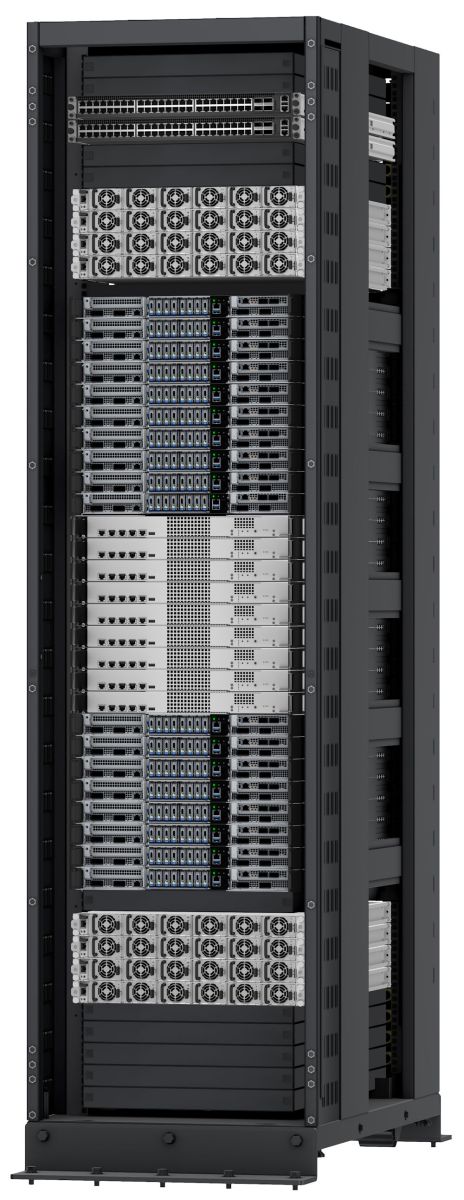
The Lenovo NVIDIA GB300 NVL72 is a rack scale solution built on the NVIDIA Blackwell architecture, which delivers groundbreaking advancements in accelerating computing, leading the new era of AI with optimized compute and increased memory.
The GB300 NVL72 is the NVIDIA flagship rack-scale AI offering. It is an end-to-end NVIDIA reference design adopted by the market.
The NVIDIA GB300 NVL72 is a platform designed for AI reasoning performance and efficiency, a scalable building block approach design, featuring 72 NVIDIA Blackwell Ultra GPUs and 36 Arm-based NVIDIA Grace CPUs in a hybrid cooling standard rack.
The GB300 NVL72 uses a hybrid cooling architecture: CPUs, GPUs, and NVSwitch components are liquid‑cooled, while OSFP modules, storage drives, and PDB components are air‑cooled.
The components of the AI rack solution are designed to be compliant with the NVIDIA MGX rack. The liquid cooling solution consists of a CDU, rear manifold, quick disconnects, and cold plates for the CPUs, GPUs, ConnectX-8 network adapters, and all NVSwitch components.
Did you know?
The GB300 NVL72’s integrated NVLink switch enables every GPU in the rack to communicate as part of one unified fabric. Each rack delivers 72 NVIDIA Blackwell GPUs interconnected through the 5th generation NVIDIA NVLink™ technology, forming a single high performance compute domain ideal for large‑scale multimodal reasoning, high‑performance inference and LLM training workloads.
Key features
The Lenovo NVIDIA GB300 NVL72 is a rack scale solution for multiple interconnected NVIDIA GPUs. The solution consists of 18 GPU Compute trays, 9 Switch trays and either 6 or 8 Power Shelves all connected via a rear cable cartridge backplane.
Turnkey AI Rack Design
Engineered for large-scale Artificial Intelligence (AI) and High Performance Computing (HPC), Lenovo NVIDIA GB300 NVL72 excels in intensive simulations and complex modeling. It is designed to handle modeling, training, simulation, rendering, financial tech, scientific research, technical computing, grid deployments, and analytics workloads in various fields such as research, life sciences, energy, engineering, and financial simulation.
The NVIDIA GB300 NVL72 by Lenovo features a mix of air and liquid cooling to meet its demanding power requirements. The NVIDIA GB300 NVL72 integrates seamlessly into a standard 19" rack cabinet. Each rack consumes 135 kW TDP; up to 155 kW peak depending on workload and EDP behavior. At the rack level, the split between air and liquid heat capture is about 10% to air and 90% to liquid.
This design ensures easy serviceability and extreme performance density, making the NVIDIA GB300 NVL72 the go-to choice for compute clusters of all sizes - from departmental/workgroup levels to the world’s most powerful supercomputers – from Exascale to Everyscale®.
Each rack delivers 72 NVIDIA Blackwell GPUs interconnected through the 5th generation NVIDIA NVLink™ technology, forming a single high performance compute domain ideal for large‑scale multimodal reasoning, high‑performance inference and LLM training workloads.
Direct water-cooled solutions are factory-integrated and are re-tested at the rack-level to ensure that a rack can be directly deployed at the customer site. This careful and consistent quality testing has been developed as a result of over a decade of experience designing and deploying DWC solutions to the very highest standards.
Scalability and performance
The Lenovo NVIDIA GB300 NVL72 is based on a GB300 rack infrastructure which offers the following features to boost performance and improve scalability:
- The NVIDIA GB300 NVL72 Rack Level GPU System
- One rack with 1U Compute Trays, 72 GPUs with NVLINK with non‑scalable (NVLink domain is contained within a single rack; no inter‑rack NVLink scaling) NVSwitches.
- Cooling solution is a hybrid of liquid and air-cooled components
- Power shelves either 6 or 8. Quantity dependent on rack configuration and power redundancy requirement
- The 1U Compute Tray leverages the NVIDIA GB300 NVL72 architecture:
- Two NVIDIA Grace processors
- Four NVIDIA Blackwell SXM7 GPUs
- Highspeed NVLink interconnects between GPUs
- Each compute tray has up to 3x PCIe Gen 5 x16 slots for high-speed networking, depending on the configuration.
- Each compute tray also supports up to 8x E1.S 3.84T drive bays, depending on the configuration, for internal storage and 1x 1.92T M.2 NVMe SSD for OS boot
- All drives are E1.S NVMe drives with PCIe Gen 5 x4 host interface, to maximize I/O performance in terms of throughput, bandwidth, and latency.
- The compute tray includes one 1Gb Ethernet onboard port for debug networking. One BMC card for system management (Out Of Band port supports for BMC management communication). High speed host networking can be added through the included PCIe slots.
- The compute tray offers PCI Express 5.0 (PCIe Gen 5) I/O expansion capabilities. A PCIe Gen 5 x16 slot provides 128 GB/s bandwidth, enough to support 800GbE via OSFP network connections (1x 1pt NVIDIA BlueField-3 adapter). 400/200GbE supported via breakout DAC/AOC cables. Two Gen 5 x16 connections (32 lanes total) provide the bandwidth needed for an 800 GbE connection using the ConnectX-8 8180 network adapter (2x 2port ConnectX-8 adapters).
- The 1U NVLink™ Switch Tray leverages the NVIDIA GB300 NVL72 architecture:
- One GB300 NVL72 NS Switch Tray Base (non‑scalable)
- One GB200 NVL72 Reduntant Power Shelf Solution
- The NVIDIA SN2201 Management Switch leverages the NVIDIA GB300 NVL72 architecture:
- One NVIDIA SN2201 48 port DC switch
- One GB200 NVL72 Redundant Power Shelf Solution
Energy efficiency
The direct water cooled solution offers the following energy efficiency features to save energy, reduce operational costs, increase energy availability, and contribute to a green environment:
- Water cooling eliminates power that is drawn by cooling fans in the enclosure and dramatically reduces the required air movement in the server room, which also saves power in the data center due to the reduced need for air conditioning.
- Water chillers may not be required with a direct water cooled solution. Chillers are a major expense for most geographies and can be reduced or even eliminated because the water temperature can now be 10°C to 35°C in an air-cooled environment.
- Heat energy absorbed may be reused for heating buildings in the winter, or generating cold through Adsorption Chillers, for further operating expense savings.
- The processors and other microelectronics are run at lower temperatures because they are water cooled, which uses less power, and allows for higher performance.
- The power solution consists of 50V power shelves delivering power to the bus bar and complying with the standard MGX v1.1 rack specifications.
Manageability and security
The following powerful systems management features simplify local and remote management of the NVIDIA GB300 NVL72 system:
- Support for industry standard management protocols, IPMI 2.0, Redfish REST API, serial console via IPMI
- The NVIDIA GB300 NVL72 is enabled with Lenovo HPC & AI Software Stack, so, you can support multiple users and scale within a single cluster environment.
- Lenovo HPC & AI Software Stack provides our HPC customers you with a fully tested and supported open-source software stack to enable your administrators and users with for the most effective and environmentally sustainable consumption of Lenovo supercomputing capabilities.
- Our Confluent management system provides an interface designed to abstract the users from the complexity of HPC cluster orchestration and AI workloads management, making open-source HPC software consumable for every customer.
- Integrated Trusted Platform Module (TPM) 2.0 support enables advanced cryptographic functionality, such as digital signatures and remote attestation.
- Supports Secure Boot to ensure only a digitally signed operating system can be used.
- Industry-standard Advanced Encryption Standard (AES) NI support for faster, stronger encryption.
- For management: BMC Server Management chip (ASPEED AST2600) and HMC.
- Power shelves are located at top and bottom of the rack (33kW each).
- The Baseboard Management Controller (BMC) in the compute trays is used in conjunction with the Host Module Controller (HMC) to provide Out-of-band management.
Availability and serviceability
The GB300 Compute tray and GB300 NVL Switch Tray provide the following features to simplify serviceability and increase system uptime:
- Designed to run 24 hours a day, 7 days a week
- With hybrid cooling, water cooling and air cooled systems, some fans are required.
- Power Shelves to minimize downtime as current is shared between multiple shelves.
- Toolless cover removal on the nodes provides easy access to upgrades and serviceable parts such as adapters and drives.
- The system desired to support non-disruptive firmware upgrade for any programmable.
- FRUs (Field Replaceable Unit) that are supported by the design. FRUs are parts that can be field replaceable.
- Any cabling connectors desired to include a latch and a fool proof design to prevent users from plugging it in backwards.
- The external debug console port desired to have terminal access to each of the major components (CPU/OS, BMC) for debug and diagnostic purposes.
- There is a three-year customer replaceable unit and onsite limited warranty, with next business day 9x5 coverage. Optional warranty upgrades and extensions are available.
Components and connectors
The table below shows the main system components of the rack scale solution. This is to depict an overall hardware configurability, and capability, for the complex set of feature options that the system needs to be able to support in hardware. Not all configurable combinations, or feature options, are shown here; such as DIMM memory options, TPM, or storage options as examples. Also not shown are the TOR switches which are dependent on customer network topology configuration.
* Is a collection of many high-speed NVLink channels providing the interconnection between every GPU to every NVSwitch Tray. The copper wires are protected by a chassis to ensure no damage to the connectors or wires within the cartridge.
The GB300 Compute trays, GB300 NVL Switch Trays, Power Shelves and Top of Rack switches are all integrated and rack mounted. Below is a high-level rack overview of the NVL72 rack configuration.
Note: Configuration choices are:
- Customer can choose 6 or 8 power shelves.
- Customer can choose either Top‑Feed Manifold (CA40) or Bottom‑Feed Manifold (C5RN)
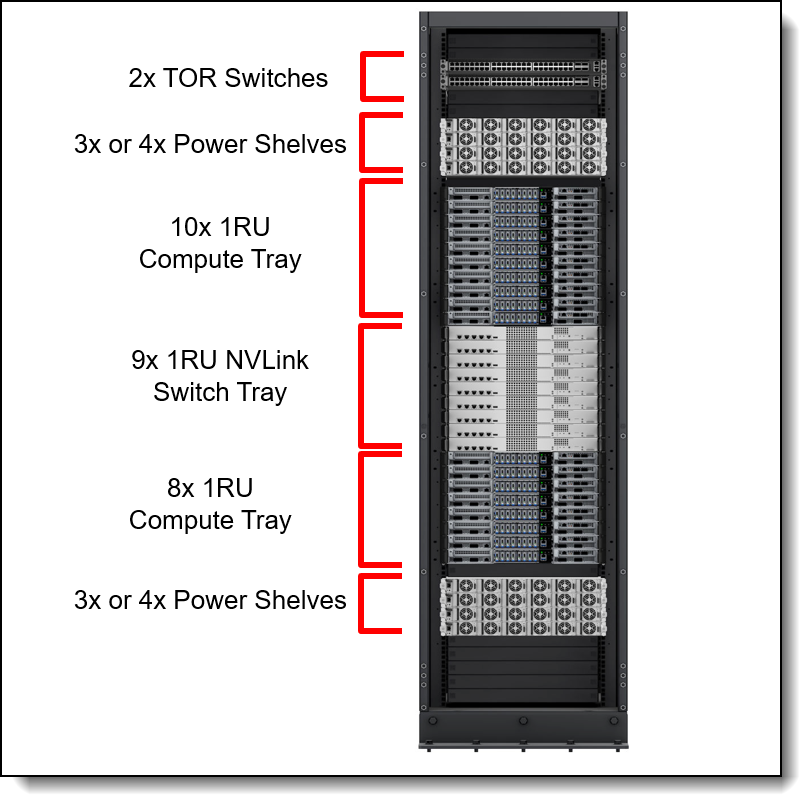
Figure 2. Front view of the Lenovo NVIDIA GB300 NVL72 rack
The front of the compute server is shown in the following figure.
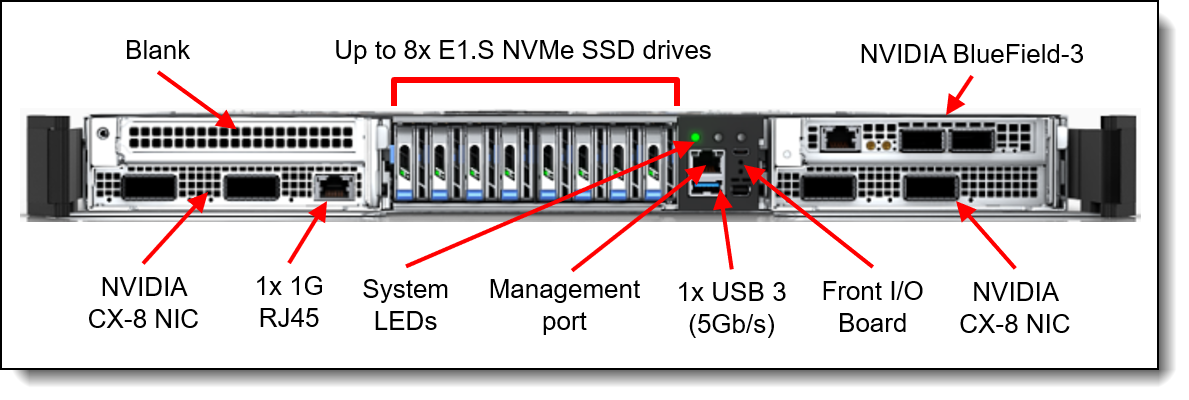
Figure 3. Front view of the GB300 Compute Tray
The following figure shows the main components on the rear of the Compute Tray configuration that includes Quick Disconnect (QD) ports and Busbar clip.
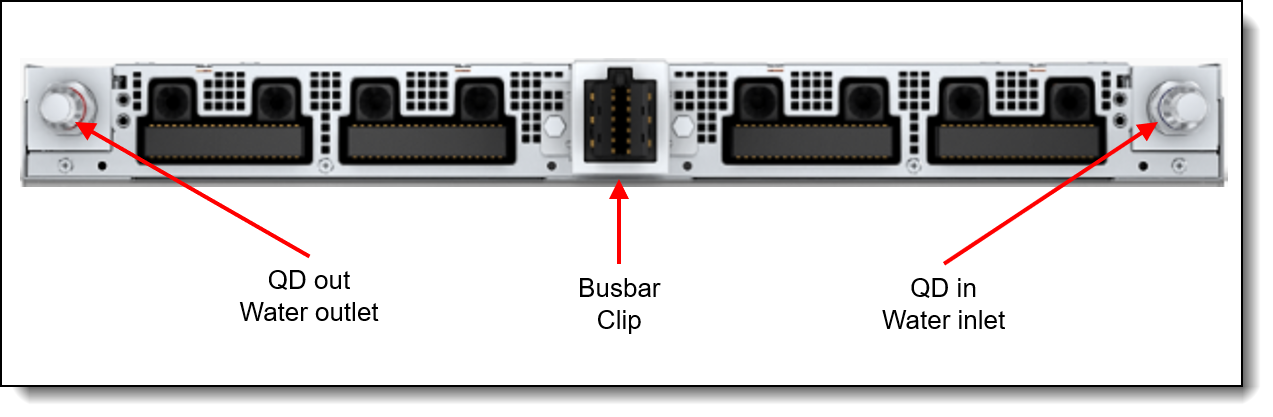
Figure 4. Rear view of the GB300 Compute Tray
The following figure shows key components internal to the Compute Tray.
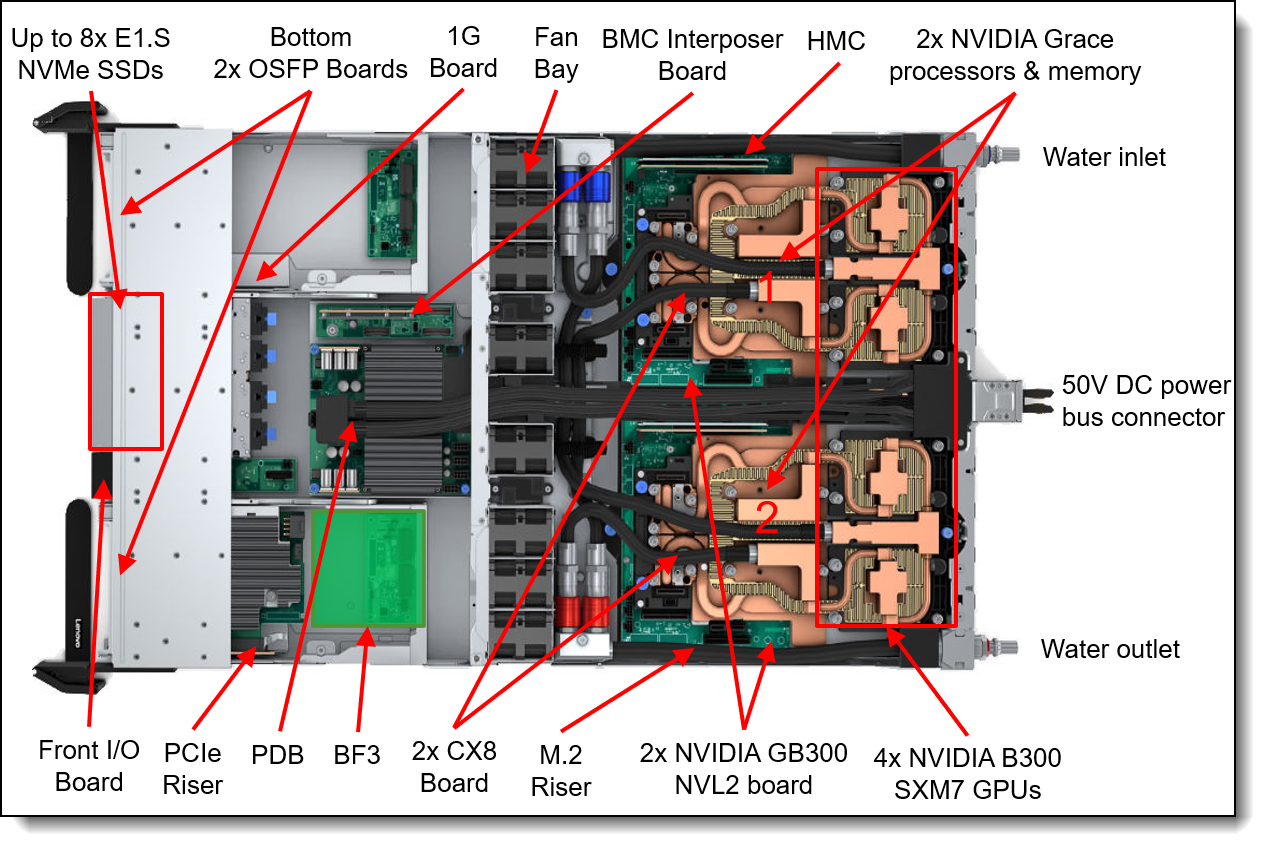
Figure 5. Inside view of the GB300 Compute in the water-cooled tray
The following figure shows key components internal GB300 NVL Switch Tray.
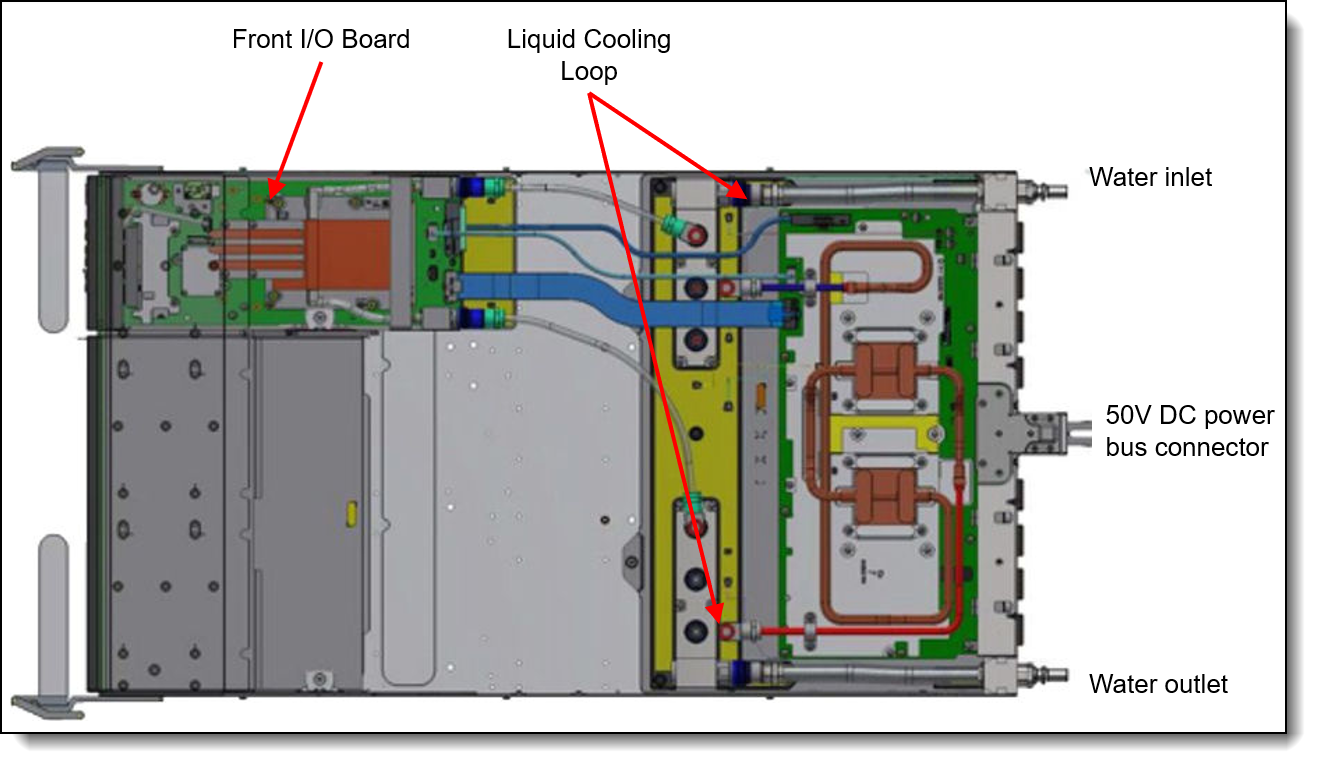
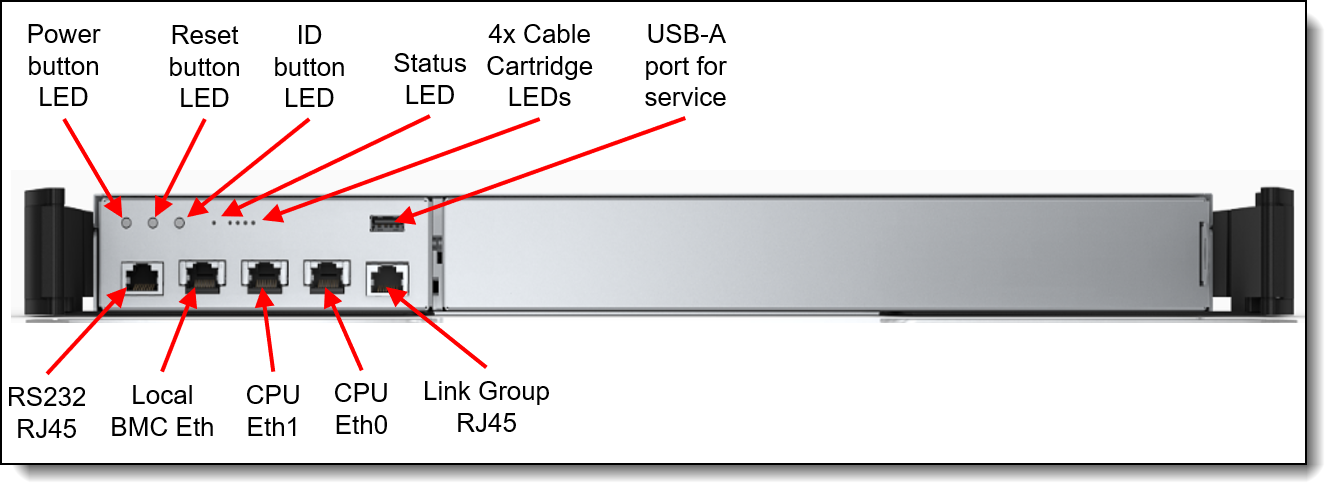
The front of the NVLink™ Switch Tray is shown in the following figure.
System architecture
The NVIDIA GB300 NVL72 is offered with the following integrated systems:
- GB300 Compute tray
- GB300 NVL Switch Tray
- SN2201 Management Switch
- Power Shelf
The following figure shows the architectural block diagram of the GB300 Compute Tray. This configuration includes 4x GPUs and 3x PCIe Gen5 x16 slots all directly connected to the CPUs. This configuration optimizes network connectivity while maximizing computational efficiency, ensuring cost-effectiveness in performance.
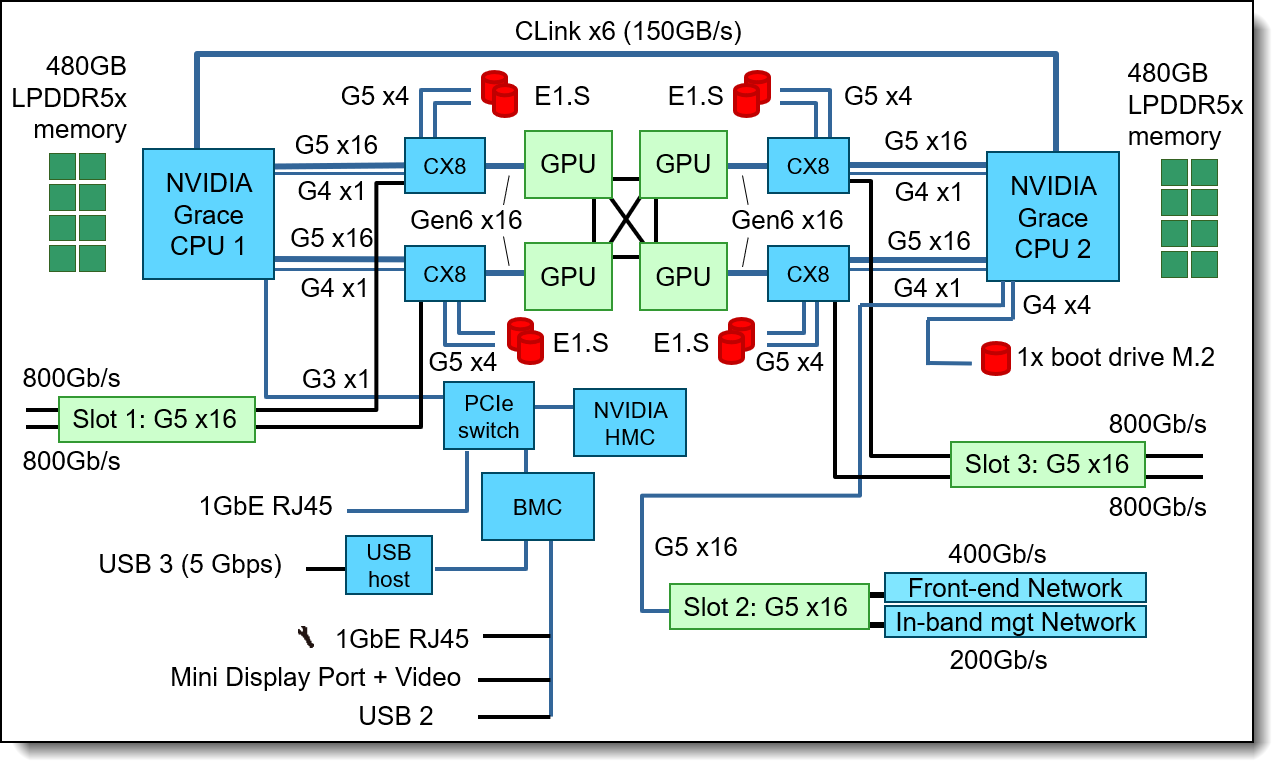
Figure 8. 1U GB300 Compute Tray system architectural block diagram
The following figure shows the architectural block diagram of the GB300 NVL Switch Tray. This switch interfaces by connecting the Compute Tray nodes, GPUs, 800Gb/s OSFP network interfaces and drives all together using ConnectX-8 switches. The AI Training configuration is optimized for scale-out GPU performance which provides advantages in large AI training workloads.
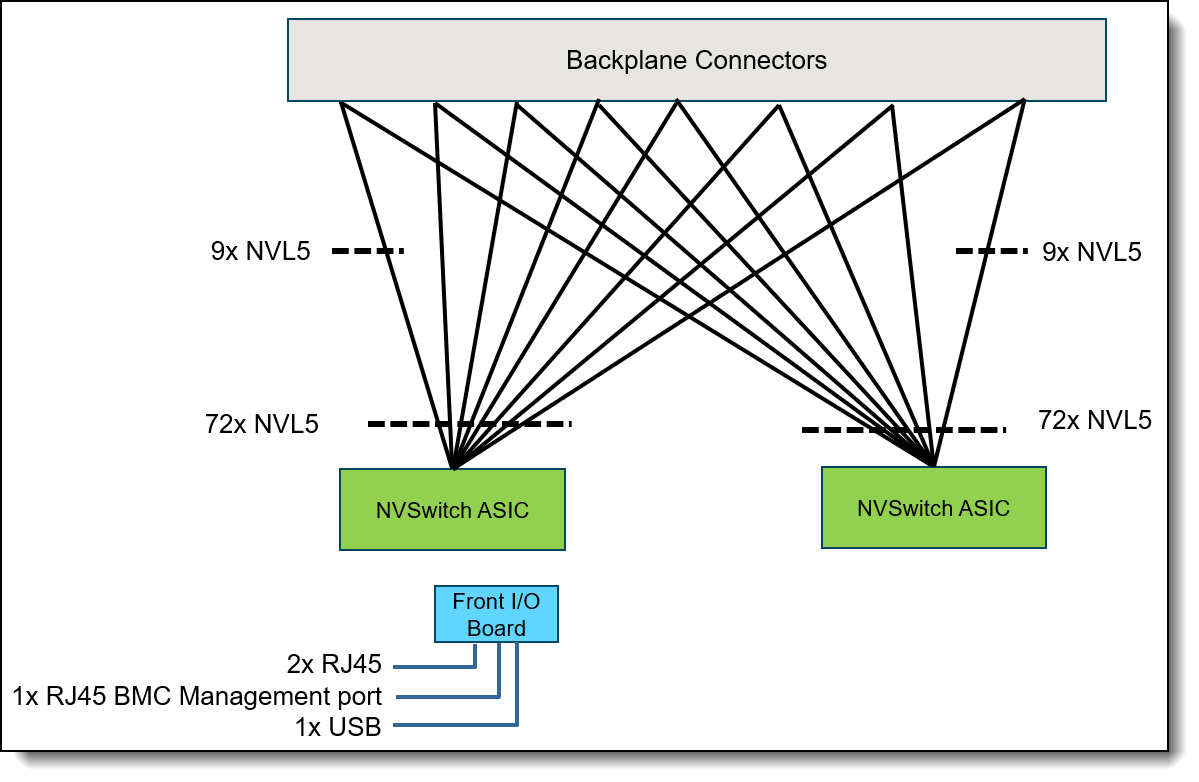
Figure 9. GB300 NVL Switch Tray system architectural block diagram
For more information about the two configurations, see the Configurations section.
Standard specifications - GB300 Compute tray
The following table lists the standard specifications of the Lenovo NVIDIA GB300 Compute tray.
| Components | Specification |
|---|---|
| Machine type | 7DLZ - 3-year warranty |
| Form factor | GB300 Compute architecture system in a hybrid air/water-cooled compute tray, installed horizontally in a rack |
| Processor | Two NVIDIA Grace processors, with 72 Arm Neoverse V2 cores, core speeds of up to 3.1 GHz base frequency, and TDP rating of 300W. Supports PCIe 5.0 for high performance connectivity to network adapters and NVMe drives. |
| Chipset | None. Integrated into the processor. |
| GPUs | Four NVIDIA Blackwell B300 GPUs per tray, each with 288 GB HBM3e memory |
| CPU memory | Up to 480GB of LPDDR5x ECC memory per processor, memory operates at 4266 MHz |
| Memory maximum | 960GB per Compute Tray |
| Memory protection | ECC with Single Error Correction (SEC), Double Error Detection (DED, parity, scrubbing, poisoning, and page off-lining |
| Disk drive bays | Each Compute Tray supports up to 8x EDSFF E1.S NVMe SSDs, installed in 8 internal drive bays (non-hot-swap). Only 4x 8x EDSFF E1.S NVMe SSDs populated in reference architecture. Each drive has a PCIe Gen5 x4 host interface. |
| Maximum internal storage | 61.4TB using 8x 7.68TB E1.S NVMe SSDs |
| Storage controllers |
|
| Optical drive bays | None |
| Network interfaces |
|
| PCI Expansion slots |
|
| Power Supply |
|
| Cooling | Hybrid cooling:
|
| System LEDs | System identification, reset, and system power. Each power conversion station (PCS) has AC, DC, and error LEDs. |
| Temperature |
See Operating Environment for more information. |
| Fans |
|
| Electrical power |
|
| Power cords | Custom power cables for direct data center attachment, 1 dedicated (32A) or 1 shared (63A) per power module |
| External USB |
|
| Video | One video port ( Mini Display Port ). Maximum resolution is 1920x1200 32bpp at 60Hz. |
| Security features | Power-on password, administrator's password, Trusted Platform Module (TPM), supporting TPM 2.0. |
| BMC Management |
|
| Operating systems supported |
Ubuntu is Supported & Certified. See the Operating system support section for details and specific versions. |
| Limited warranty | Three-year or five-year customer-replaceable unit and onsite limited warranty with 9x5 next business day (NBD). |
| Service and support | Optional service upgrades are available through Lenovo Services: 4-hour or 2-hour response time, 6-hour fix time, 1-year or 2-year warranty extension, software support for Lenovo hardware and some third-party applications. |
| Dimensions | Width: 438 mm (17 inches), height: 43.6 mm (1.72 inches), depth: 766 mm (30.16 inches) |
| Weight | 29 kg (63.93 lbs) |
Notes:
Onsite spares (Compute trays and NVL Switch Trays) would be needed to support an onsite Next Business Day Service Level target. 2% of the order recommended quantity. For Compute Tray base alternatives available for selection, see the Spare Compute Trays section.
Standard specifications - GB300 NVL Switch Tray
The following table lists the standard specifications of the Lenovo GB300 NVL Switch Tray.
| Components | Specification |
|---|---|
| Machine type | 7DJY - 3-year warranty |
| Form factor | GB300 NVL Switch architecture system in a water-cooled compute tray, installed horizontally in a rack |
| I/O architecture | None integrated. The NVL72 configuration includes connections for all 72 GPUs with no front OSPF connections. Use top-of-rack networking switches. |
| Power Supply |
|
| Cooling | Direct water cooling supplied by water hoses connected to the rear of the enclosure. |
| System LEDs | System error, identification, status, and system power. Each power conversion station (PCS) has AC, DC, and error LEDs. |
| Systems management | The NVL Switch Tray includes connection for a COMe module board used for NVL Switch Tray management. |
| Temperature |
See Operating Environment for more information. |
| Electrical power | 3-phase 200V-480Vac |
| Power cords | Custom power cables for direct data center attachment, 1 dedicated (32A) or 1 shared (63A) per power module |
| Ports | DisplayPort , 1x USB port and 2x RJ-45 1GbE. |
| Limited warranty | Three-year or five-year customer-replaceable unit and onsite limited warranty with 9x5 next business day (NBD). |
| Service and support | Optional service upgrades are available through Lenovo Services: 4-hour or 2-hour response time, 6-hour fix time, 1-year or 2-year warranty extension, software support for Lenovo hardware and some third-party applications. |
| Dimensions | Width: 438 mm (17 inches), height: 43.6 mm (1.72 inches), depth: 766 mm (30.16 inches) |
| Weight | 17 kg (37.5 lbs) |
Models
The NVIDIA GB300 NVL72 rack is configured by using the configure-to-order (CTO) process with the Lenovo Cluster Solutions configurator (x-config) or in Lenovo Data Center Solution Configurator (DCSC).
The following table lists the base CTO models and base feature codes
The Lenovo NVIDIA GB300 NVL72 node is equipped with high-performance GPUs. It is RoHS complaint and meets all the environmental certifications.
Configurations
There are two primary configurations offered with the NVIDIA GB300 NVL72. Block diagrams for Compute Tray and Switch Tray leveraged in these configurations are shown in the System architecture section.
The following table lists the Bill of Materials for the Non-redundant Power with 6 Power Shelves
* Either C5RN Bottom feed or CA40 Top feed
** Up to 8 drives are supported
The following table lists the Bill of Materials for Redundant Power with 8 Power Shelves
* Either C5RN Bottom feed or CA40 Top feed
** Up to 8 drives are supported
For more information about the, see the Lenovo NVIDIA GB300 NVL72 datasheet.
The following table lists the Configurators used to create the above configurations.
Configurator tips:
- The following Compute Tray Base alternatives are available for selection:
- For Rack Installed compute Trays: Select Lenovo Feature Code CABF - 1U 4GPU GB300 DWC Front IO
- For Spare compute Trays with individual node packaging: Select Lenovo Feature Code CD96 - 1U 4GPU GB300 DWC Front IO w Package - Mainly for customer who would like to order for replacement or as a spare.
- For Service Spare compute Trays with individual node packaging: Select Lenovo Feature Code CCQD - 1U 4GPU GB300 DWC Front IO w/o E1.S, w Package" – For Service, for repair purpose.
Spare Compute Trays
To guarantee a consistent next business day response objective and minimize potential downtime, we strongly recommend the purchase of on-site spare Compute Trays and NVLink Switch Trays. Lenovo recommends a minimum spare-to-production ratio of 2%, however the ideal number of spares depends on the scale of your deployment. Contact Lenovo Services for tailored guidance on the appropriate number of spares.
The following Compute Tray Base alternatives are available for selection:
The following NVLink Switch Tray alternatives are available for selection:
NVIDIA GB300 NVL72 HPM
The NVIDIA GB300 NVL72 leverages two NVIDIA GB300 NVL72 host processor motherboards (HPMs) per tray that integrate processors, memory and GPU accelerators in a powerful package.
Processors
Each of the NVIDIA GB300 NVL72 HPMs include one NVIDIA Grace processor, as part of the NVIDIA GB300 NVL72 module. The processors are standard in all configurations of the NVIDIA GB300 NVL72.
Each processor has the following features:
- 72 Arm Neoverse V2 cores with 4x 128b SVE2
- Up to 3.1 GHz base frequency
- 3.0 GHz all-core SIMD frequency
- L1 cache: 64KB i-cache + 64KB d-cache
- L2 cache: 1MB per core
- L3 cache: 114MB
- 64 PCIe Gen5 lanes (implemented as 8x x8)
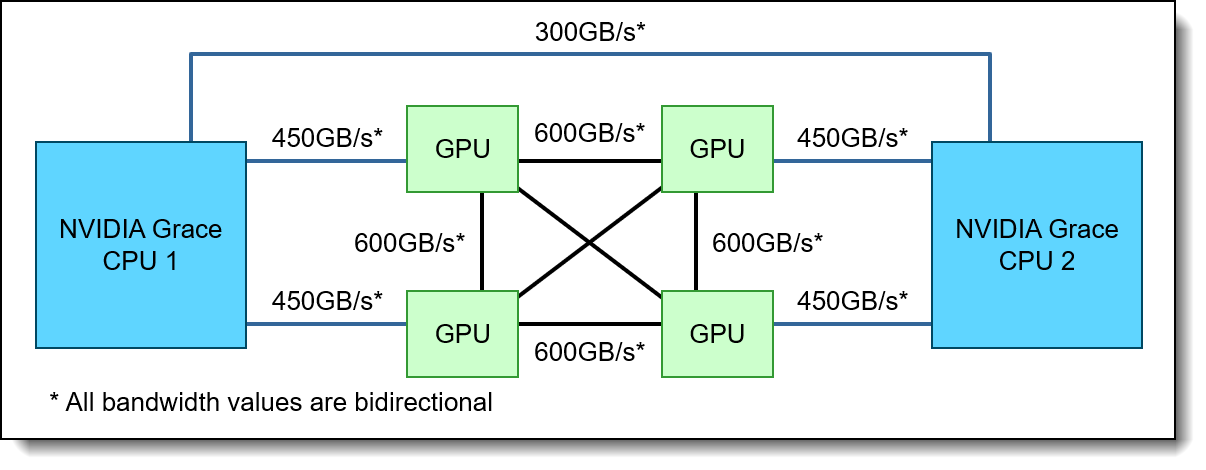
- 300 GB/s bi-directional NVLink-C2C connectivity between processors
- 450 GB/s bi-directional NVLink connectivity to two GPUs each
- NVIDIA Scalable Coherency Fabric (SCF) with 3.2 terabytes/s bisection bandwidth interconnecting Cores, Memory and IO
- 300W TDP (includes power for memory)
The NVIDIA Grace processor is integrated using Ball Grid Array (BGA) technology and is soldered onto the NVIDIA GB300 NVL72 HPM board. To replace the CPU, it is necessary to replace the entire module.
Memory
The NVIDIA GB300 NVL72 HPM boards incorporate processor memory via LPDDR5x modules.
Features of the memory subsystem are as follows:
- 960GB of LPDDR5X ECC memory in a fixed configuration, 480GB per processor
- Implemented using 8x 128GB modules (4 per CPU)
- Peak memory bandwidth per CPU: Up to 384 GB/s
- Memory clock per CPU: 4266MT/s
The Single Error Correction (SEC) and Double Error Detection (DED) algorithms as part of the ECC are designed to mitigate multi-bit aliasing and correct errors effectively. Furthermore, features such as parity, scrubbing, poisoning, and page off-lining are implemented to enhance Reliability, Availability, and Serviceability (RAS).
GPU accelerators
The NVIDIA GB300 NVL72 HPM boards support four onboard NVIDIA B300 GPUs. The following table lists the specifications for each GPU and for the full package. Measured performance will vary by application.
The following table lists the specifications for each GPU.
† Listed values in this column are per NVIDIA Blackwell SXM GPU
* With structural sparsity enabled
The following figure shows how the GPUs interconnect.
Internal storage
The NVIDIA GB300 NVL72 node supports the following drives.
- Up to 8x E1.S drives for data storage.
- These are front accessible.
- 1x M.2 NVMe drive for OS boot
- This is an internal drive - not front accessible and non-hot-swap.
The following images shows drives that come standard in the Compute Tray and their location.
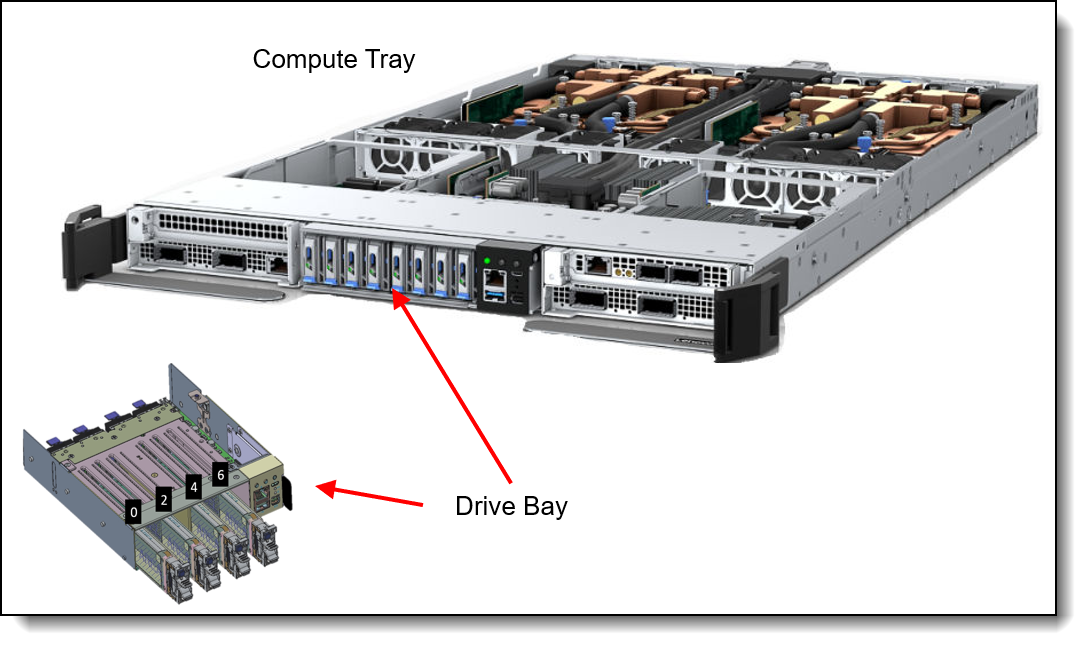
Figure 11. NVIDIA GB300 NVL72 internal drive bays
Each of the 8 drive bays supports either of the following:
- E1.S 7.68TB drives
- E1.S 3.84 TB drives
Configuration notes:
- E1.S installation rule:
- 1. Default: 4 x E1.S SSDs, install bays 0, 2, 4, 6
- 2. If select 8 x E1.S SSDs, install bays 0, 1, 2, 3, 4, 5, 6, 7
- Dummy Panels required to fill in unused bay slots
- The Compute Tray supports E1.S NVMe SSDs for data and 1× M.2 NVMe SSD for OS boot
- The drives are connected to onboard controllers; RAID functionality is provided using the operating system features
- Boot drive is the same as other drives but use switched PCIe and may have lower performance. The M.2 riser kit (feature C58W) is needed. The M.2 riser kit is not field upgradable.
- The same PCIe lanes can be used either for PCIe adapters or for NVMe drives.
- NVMe drives are connected to CPUs as follows:
- Drives 0-3 are data storage drives connected to CX8 / CPU 1
- Drives 4-7 are data storage drives connected to CX8 / CPU 2
The feature codes to select the appropriate storage cage are listed in the following table.
Tip: To configure boot drives, specify feature C58W plus feature CERX or C43X (1x boot drive). See the table below. The boot drive kit is only required when 8 performance and 1 boot drives are installed.
Controllers for internal storage
The drives of the NVIDIA GB300 NVL72 are connected to integrated NVMe storage controllers.
If desired, RAID functionality is provided by the installed operating system (software RAID only)
Internal drive options
The following table lists the drive options for internal storage of the Compute Tray or server.
I/O expansion
The NVIDIA GB300 NVL72 node supports up to 3x front-accessible slots, depending on the configuration:
- Slots 1, 2: PCIe 5.0 x16 slots connected to CPU 1
- Slots 3: PCIe 5.0 x16 slot connected to CPU 2
The location of the slots is shown in the following figure.
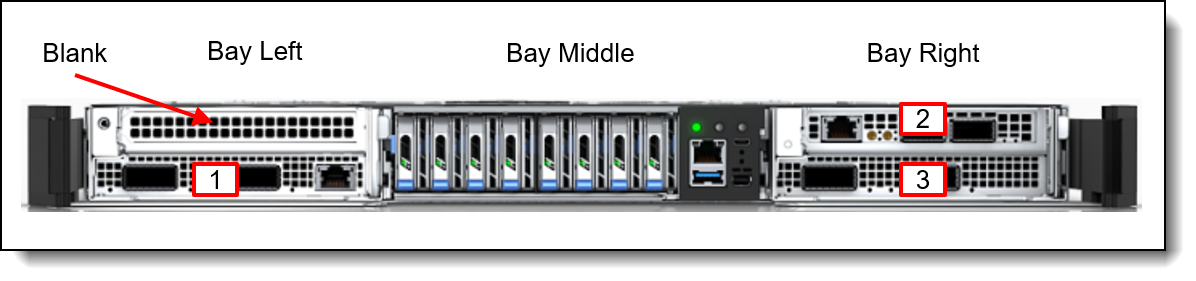
Figure 12. NVIDIA GB300 NVL72 PCIe slots
Slot availability is based on the configuration selected. Derived parts come standard within the 7DLZCTO2WW GB300 Compute tray BOM.
PCIe adapters and data drives share the same PCIe connections to the processors. The following table lists the supported data and boot drives.
OSFP 800Gb ports
The GB300 Compute tray configuration includes two OSFP interface boards (feature CCCS), each providing two OSFP ports. Supported connections are each up to 800 Gb/s (a total of 3200 Gb/s with 4x ports).
Supported cables and transceivers follow ConnectX‑8 OSFP compatibility matrix.
For more information, including the supported transceivers and cables, see the adapter product guide:
Network adapters
The NVIDIA GB300 NVL72 supports up to 3 network adapters installed in the front PCIe slots. The following table lists the supported adapters.
For more information, including the supported transceivers and cables, see the adapter product guide:
Cooling
The Lenovo NVIDIA GB300 NVL72 offering supports the two most common fluids used the de-ionized water and PG25.
The customer can choose the coolant they want to use:
- Deionized (DI) water (recommended); Rack ships without water
- PG25 (glycol-based)
One of the most notable features of the Lenovo NVIDIA GB300 NVL72 offering is direct water cooling. Direct water cooling (DWC) is achieved by circulating the cooling water directly through cold plates that contact the GPUs, CPU and memory in the Compute Trays and through cold plates in the NVL Switch Trays.
The NVIDIA GB300 NVL72 by Lenovo features a mix of air and liquid cooling to meet its demanding power requirements. Each rack consumes 135 kW TDP; up to 155 kW peak depending on workload and EDP behavior. At the rack level, the split between air and liquid heat capture is about 10% to air and 90% to liquid.
GPU Compute Tray contains a hybrid cooling solution. The CPU, GPU, and HBM (GPU memory) are liquid cooled while the front option components, Power Distribution Board, and M.2 are air cooled. Therefore, while the air cooled component temperatures drive fans speeds, the liquid cooled components do not change fluid flow as a function of component temperature.
There are several components’ temperatures monitored to properly drive the eight system fan pairs. They are OSFP transceivers, QSFP transceivers, BlueField-3, Power Distribution Board components, ambient air, BMC, HMC, M.2, and E1.S components.
One of the main advantages of direct water cooling is the water can be relatively warm and still be effective because water conducts heat much more effectively than air. Depending on the environmentals like water and air temperature, effectively 90% of the heat can be removed by water cooling; in configurations that stay slightly below that, the rest can be easily managed by a standard computer room air conditioner.
Allowable inlet temperatures for the water can be as high as 45°C (113°F) with the NVIDIA GB300 NVL72 for real-world applications. In most climates, water-side economizers can supply water at temperatures below 45°C for most of the year. This ability allows the data center chilled water system to be bypassed thus saving energy because the chiller is the most significant energy consumer in the data center. Typical economizer systems, such as dry-coolers, use only a fraction of the energy that is required by chillers, which produce 6-10°C (43-50°F) water. The facility energy savings are the largest component of the total energy savings that are realized when the NVIDIA GB300 NVL72 is deployed.
The advantages of the use of water cooling over air cooling result from water’s higher specific heat capacity, density, and thermal conductivity. These features allow water to transmit heat over greater distances with much less volumetric flow and reduced temperature difference as compared to air.
For cooling IT equipment, this heat transfer capability is its primary advantage. Water has a tremendously increased ability to transport heat away from its source to a secondary cooling surface, which allows for large, more optimally designed radiators or heat exchangers rather than small, inefficient fins that are mounted on or near a heat source, such as a CPU.
The NVIDIA GB300 NVL72 offering uses the benefits of water by distributing it directly to the highest heat generating node subsystem components. That energy savings results from the removal of the system fans and the lower operating temp of the direct water-cooled system components.
The direct energy savings at the enclosure level, combined with the potential for significant facility energy savings, makes the NVIDIA GB300 NVL72 an excellent choice for customers that are burdened by high energy costs or with a sustainability mandate.
The liquid cooling solution consists of a coolant distribution unit (CDU), rear manifold, Disconnect Quick Connect (QD)s, and cold plates for the CPUs, GPUs, CX-8 NICs and all NVL Switch components.
The following table lists the reference design cooling percentages.
Water connections
Water connections to the MGX Rack are provided using hoses that connect directly to the coolant distribution unit (CDU), inlet and return, either an in-rack CDU or in-row CDU. As shown in the following figure, hose lengths required depend on the placement of the Compute Trays and GB300 NVL Switch Trays in the rack cabinet.
The midplane in the chassis routes the water via QuickConnects to each of the Compute Tray, and each of the NVL Switch Trays.
The GB300 offers two options for the rack level liquid cooling manifold: bottom feed and top feed. Both options are shown below.
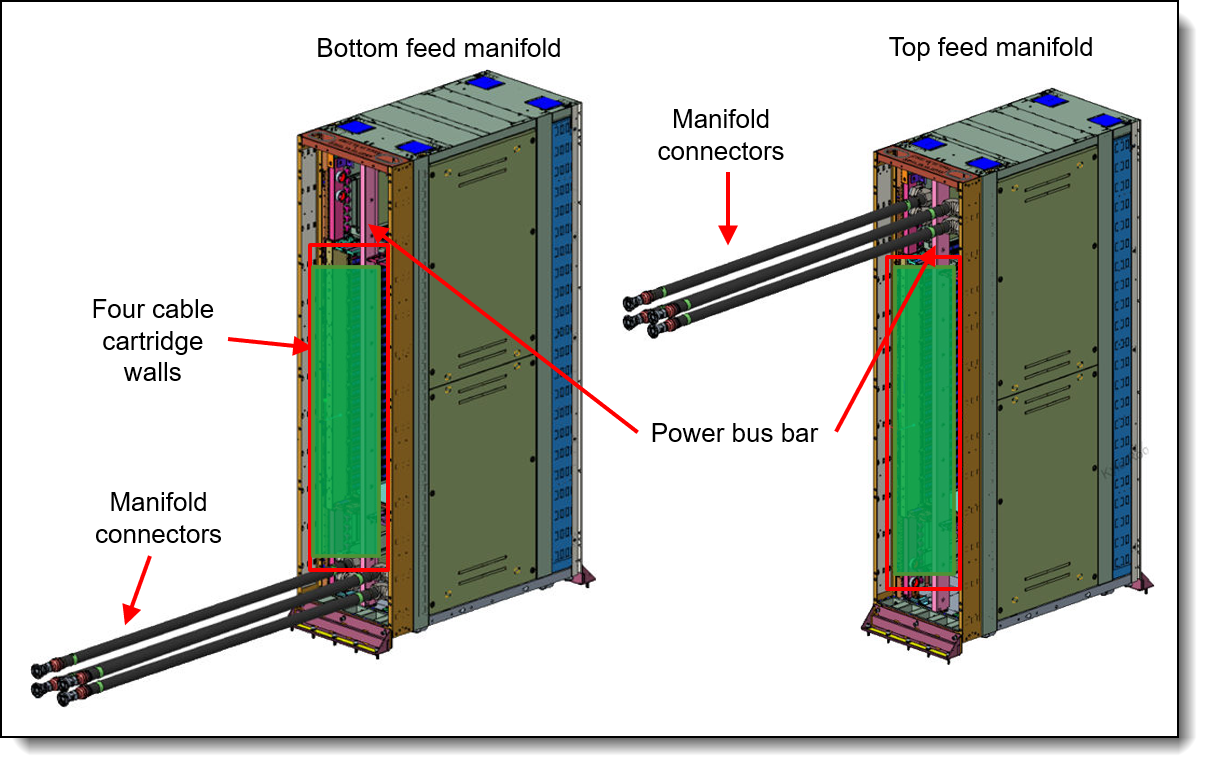
Figure 13. Water connections to the MGX Rack cabinet
Water connections are made up of the following:
- Short hoses permanently attached to the rear of the rack cabinet
- Intermediate hoses, orderable as three different pairs of hoses, based on the location of the components in the rack.
- Connection to the CDU through additional hoses or valves on the data center water loop. Lenovo Datacenter Services can provide the end-to-end enablement for your water infrastructure needs.
For additional information, see the Cooling section.
To support the onsite setup for the direct water-cooled solution, a service kit is available providing a flow meter, bleed hose, pressure gauge and vent valve.
Note: Service kits equipment shall be prepared and provided by the customer
| Part number | Service kit FRU | Description |
|---|---|---|
| 4XH7B14786 | 03PV563 |
|
| 4XF7B19042 | 03RR355 |
|
| Part number | Feature code | Description |
|---|---|---|
| CTO only | CA40 | Manifold ASM, Top Feed |
| CTO only | C5RN | Manifold R&L, Bottom Feed |
The liquid cooling manifold information is listed in the following table.
For details on Lenovo Neptune direct water-cooling standards, see the following document:
Lenovo Neptune Direct Water-Cooling Standards https://lenovopress.lenovo.com/lp2018-lenovo-neptune-direct-water-cooling-standards
Power shelf
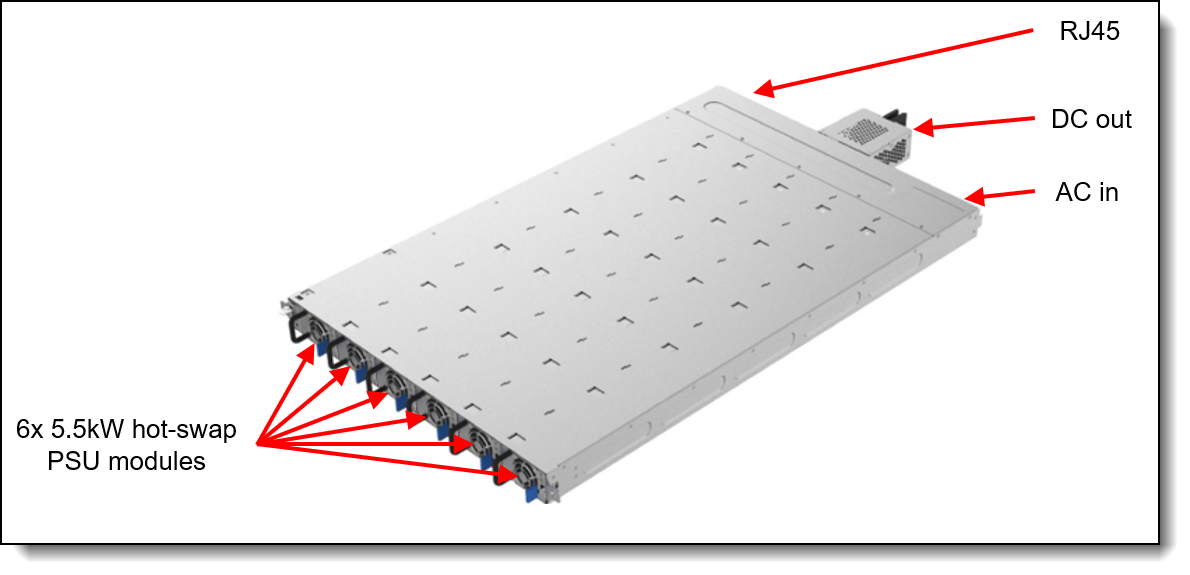
The Lenovo NVIDIA GB300 NVL72 supports up to 6 or 8 power shelves. The use of water-cooled power conversion stations enables an even greater amount of heat can be removed from the data center using water instead of air-conditioning.
The Power Shelves supply internal system power to a 50V busbar. This innovative design merges power conversion, rectification, and distribution into these power units, a departure from traditional setups that require separate units, including separate power supplies, resulting in best-in-class efficiency.
The following table lists specifications for Power Shelf.
The following table lists Bus Bar specifications.
| Components | Specification |
|---|---|
| Type | MGX Rack Compliant |
| Current Rating | 1400A |
The following table lists other rack components.
The following image shows the power shelf.
The following table lists the supported power cables.
System Management
The NVIDIA management is the BMC board option which provides advanced control, monitoring, and alerting functions. The BMC is used in conjunction with the Host Module Controller (HMC) to provide OOB management. The HMC interposer board is within the GPU Compute Tray, which connects the HMC board and the BMC board to the GB300 HPM via cables.
The HMC and BMC work together to provide the out-of-band manageability for the tray.
Topics in this section:
Local management
The following figure shows the ports and LEDs on the front of the GB300 Compute tray.
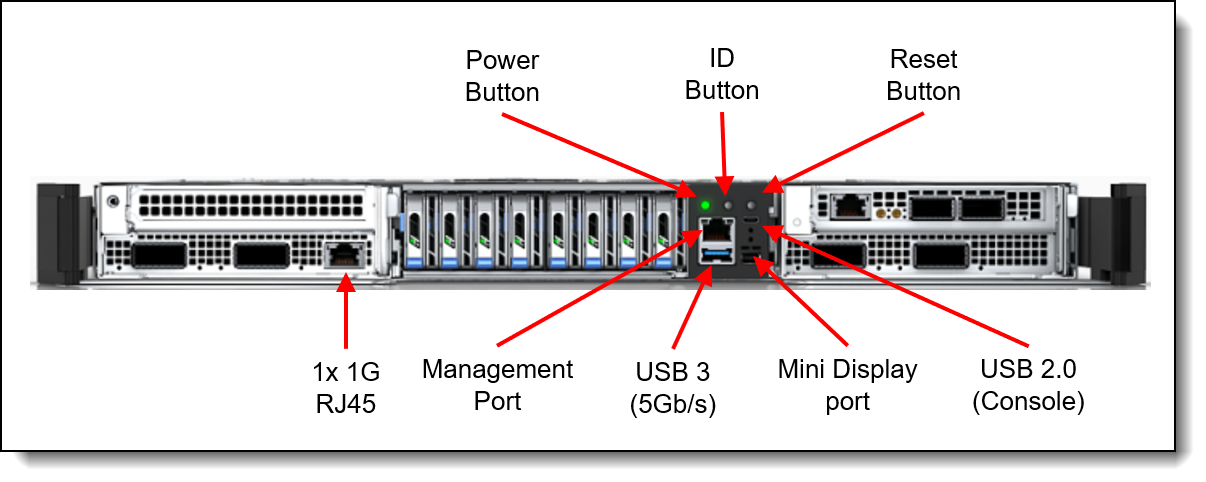
Figure 15. NVIDIA GB300 NVL72 Front operator panel
The LEDs are as follows:
- Identification (ID) LED (blue)to identify a specific server to local service engineers
- Error LED (yellow): Indicates if there is a system error.
- Drive LED: Indicates activity on any drive
Additionally, the following table lists the features of the BMC Server Management.
The following table lists the features of the SBIOS.
The following table lists the supported CAT6 cables.
NVIDIA AI Enterprise
The NVIDIA GB300 NVL72 is designed for NVIDIA AI Enterprise, which is a comprehensive suite of artificial intelligence and data analytics software designed for optimized development and deployment in enterprise settings.
NVIDIA AI Enterprise includes workload and infrastructure management software known as Base Command Manager. This software provisions the AI environment, incorporating the components such as the Operating System, Kubernetes (K8S), GPU Operator, and Network Operator to manage the AI workloads.
Additionally, NVIDIA AI Enterprise provides access to ready-to-use open-sourced containers and frameworks from NVIDIA like NVIDIA NeMo, NVIDIA RAPIDS, NVIDIA TAO Toolkit, NVIDIA TensorRT and NVIDIA Triton Inference Server.
- NVIDIA NeMo is an end-to-end framework for building, customizing, and deploying enterprise-grade generative AI models; NeMo lets organizations easily customize pretrained foundation models from NVIDIA and select community models for domain-specific use cases.
- NVIDIA RAPIDS is an open-source suite of GPU-accelerated data science and AI libraries with APIs that match the most popular open-source data tools. It accelerates performance by orders of magnitude at scale across data pipelines.
- NVIDIA TAO Toolkit simplifies model creation, training, and optimization with TensorFlow and PyTorch and it enables creating custom, production-ready AI models by fine-tuning NVIDIA pretrained models and large training datasets.
- NVIDIA TensorRT, an SDK for high-performance deep learning inference, includes a deep learning inference optimizer and runtime that delivers low latency and high throughput for inference applications. TensorRT is built on the NVIDIA CUDA parallel programming model and enables you to optimize inference using techniques such as quantization, layer and tensor fusion, kernel tuning, and others on NVIDIA GPUs. https://developer.nvidia.com/tensorrt-getting-started
- NVIDIA TensorRT-LLM is an open-source library that accelerates and optimizes inference performance of the latest large language models (LLMs). TensorRT-LLM wraps TensorRT’s deep learning compiler and includes optimized kernels from FasterTransformer, pre- and post-processing, and multi-GPU and multi-node communication. https://developer.nvidia.com/tensorrt
- NVIDIA Triton Inference Server optimizes the deployment of AI models at scale and in production for both neural networks and tree-based models on GPUs.
It also provides full access to the NVIDIA NGC catalogue, a collection of tested enterprise software, services and tools supporting end-to-end AI and digital twin workflows and can be integrated with MLOps platforms such as ClearML, Domino Data Lab, Run:ai, UbiOps, and Weights & Biases.
Finally, NVIDIA AI Enterprise introduced NVIDIA Inference Microservices (NIM), a set of performance-optimized, portable microservices designed to accelerate and simplify the deployment of AI models. Those containerized GPU-accelerated pretrained, fine-tuned, and customized models are ideally suited to be self-hosted and deployed on the NVIDIA GB300 NVL72.
Security
Topics in this section:
Security features
The server offers the following electronic security features:
- Support for Platform Firmware Resiliency (PFR) hardware Root of Trust (RoT)
- Firmware signature processes compliant with FIPS and NIST requirements
- Administrator and power-on password
- Integrated Trusted Platform Module (TPM) supporting TPM 2.0
The server is NIST SP 800-147B compliant.
The following table lists the security options for the NVIDIA GB300 NVL72.
Operating system support
The NVIDIA GB300 NVL72 supports the following operating systems:
- Ubuntu 22.04 with NVIDIA optimized HWE kernel (kopt)
The NVIDIA GB300 NVL72 has the following Red Hat certifications:
- Red Hat Enterprise Linux 9.6 (Vendor Certified only)
- Red Hat OpenShift Container Platform 4.19
- Red Hat AI Inference Server 3.3
Physical and electrical specifications
The Lenovo 48U MGX Rack has the following dimensions:
- Width: 600 mm (23.6 inches)
- Height: 2,294 mm (90.3 inches)
- Depth: 1,068 mm (42.05 inches) - Expands to 1,200 mm with extension frame
- Weight: 185 kg (407.8 lbs)
GB300 Compute trays are installed onto the rack. Each GB300 Compute tray has the following dimensions:
- Width: 438 mm (17.3 inches)
- Height: 43.6 mm (1.72 inches)
- Depth: 766 mm (29.9 inches) (799 mm, including the water connections at the rear of the server)
- Weight: 29 kg (63.93 lbs)
The GB300 NVL Switch Tray has the following overall physical dimensions, excluding components that extend outside the standard chassis, such as EIA flanges, front security bezel (if any), and power conversion station handles:
- Width: 438 mm (17.3 inches)
- Height: 43.6 mm (1.72 inches)
- Depth: 770 mm (30.3 inches)
- Weight: 17 kg (37.5 lbs)
The NVIDIA SN2201 48 port DC switch has the following dimensions:
- Width: 438 mm (17.3 inches)
- Height: 43.6 mm (1.72 inches)
- Depth: 781 mm (28.3 inches)
- Weight: 11.39 kg (25.1 lbs)
The Power Shelf has the following dimensions:
- Width: 448 mm (17.6 inches)
- Height: 43.6 mm (1.72 inches)
- Depth: 718.5 mm (28.3 inches)
The following table lists the detailed dimensions. See the figure below for the definition of each dimension.
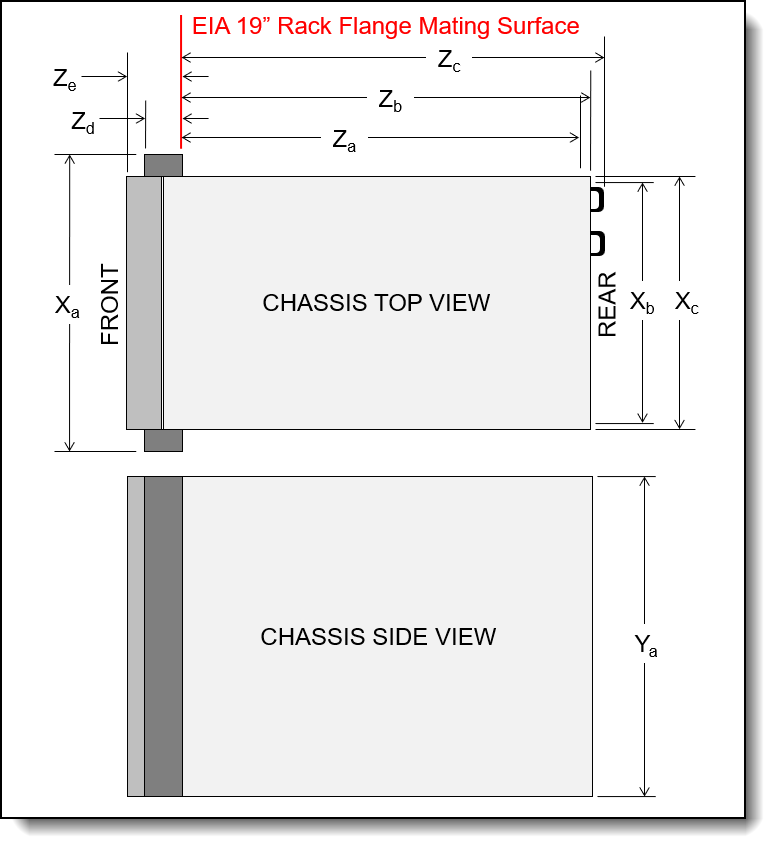
Operating environment
The GB300 Compute tray or server trays and GB300 NVL Switch Trays are supported in the following environment.
Topics in this section:
Air temperature and humidity
Air temperature/humidity requirements:
- ASHRAE standard A2
- Temperature operating:
- Meets ASHRAE standard A2 (10°C to 35°C)
- Maximum rate of change (°C /hr) ≤ 20
- Operating temperature de-rated 1C per 300m (10,00ft) to 1,371m (4,500ft) above sea level
- Humidity operating:
- 20% - 80%, non-condensing
- Humidity transition rate < 10%/hr
- Temperature operating:
- Acoustics idle/working mode:
- Fan control from BMC with multiple temperature input
- Sound pressure level (LpAm): up to 82.9 dB
- Estimated that the rack will operate around 92dBA from rack rear, typical ambient and rack exercised
- Altitude:
- Supports 0 – 5,000 ft (0 - 1,524m)
- Temperature Non-operating: w/o PKG
- -40C to 70C (Rack shipped with pressurized nitrogen)
- Non-operating with Di-H20: 5-70C
- Non-operating with PG25: 10-70C
Water requirements
For details on the NVIDIA GB300 NVL72 direct water-cooling standards, see the following table:
Standard specifications of the Lenovo GB300 NVL Switch Tray.
- Operating water temperature: 2°C to 50°C (35.6°F to 122°F) (ASHRAE W45 compliant)
Particulate contamination
Airborne particulates (including metal flakes or particles) and reactive gases acting alone or in combination with other environmental factors such as humidity or temperature might damage the system that might cause the system to malfunction or stop working altogether.
The following specifications indicate the limits of particulates that the system can tolerate:
- Reactive gases:
- The copper reactivity level shall be less than 200 Angstroms per month (Å/month)
- The silver reactivity level shall be less than 200 Å/month
- Airborne particulates:
- The room air should be continuously filtered with MERV 8 filters.
- Air entering a data center should be filtered with MERV 11 or preferably MERV 13 filters.
- The deliquescent relative humidity of the particulate contamination should be more than 60% RH
- Environment must be free of zinc whiskers
For additional information, see the Specifications section of the documentation for the server, available from the Lenovo Documents site, https://pubs.lenovo.com/
Regulatory compliance
The NVIDIA GB300 NVL72 conforms to the following standards:
- ANSI/UL 62368-1
- IEC 62368-1 (CB Certificate and CB Test Report)
- CSA C22.2 No. 62368-1
- Mexico NOM-019
- CE, UKCA Mark (EN55032 Class A, EN62368-1, EN55035,(EN61000-3-2, EN61000-3-3 or EN61000-3-11, EN61000-3-12) , (EU) 2019/424, and EN IEC 63000 (RoHS))
- FCC - Verified to comply with Part 15 of the FCC Rules, Class A
- Canada ICES-003, issue 7, Class A
- CISPR 32, Class A, CISPR 35
- Japan VCCI, Class A
- Taiwan BSMI CNS15936, Class A; CNS15598-1; Section 5 of CNS15663
- Australia/New Zealand AS/NZS CISPR 32, Class A; AS/NZS 62368.1
- SGS, VOC Emission
- Japanese Energy-Saving Act
- EU2019/424 Energy Related Product (ErP Lot9)
Warranty
The NVIDIA GB300 NVL72 has the following warranty:
- Lenovo GB300 NVL72 (machine type 7DJV) rack and included components require a 3-Year Premier Next Business Day (NBD) Warranty.
Note: Spare parts are required in order for NBD service.
- Support is provided at the rack level and the serial number of the rack is required for support entitlement.
Services
Lenovo Infrastructure Services empower you at every stage of your IT lifecycle. From expert advisory and strategic planning to seamless deployment and ongoing support, we ensure your infrastructure is built for success. Our comprehensive services accelerate time to value, minimize downtime, and free your IT staff to focus on driving innovation and business growth.
Note: Some service options may not be available in all markets or regions. For more information, go to https://lenovolocator.com/. For information about Lenovo service upgrade offerings that are available in your region, contact your local Lenovo sales representative or business partner.
In this section:
- Lenovo Advisory Services
- Lenovo Implementation Services
- Infrastructure Deployment Services
- Lenovo Support Services
- Lenovo Managed Services
- Lenovo Sustainability Services
- Additional Lenovo Essential Equipment Service
Lenovo Advisory Services
Lenovo Advisory Services simplify the planning process, enabling customers to build future-proofed strategies in as little as six weeks. Consultants provide guidance on projects including VM migration, storage, backup and recovery, and cost management to accelerate time to value, improve cost efficiency, and build a flexibly scalable foundation.
- Assessment Services
An Assessment helps solve your IT challenges through an onsite, multi-day session with a Lenovo technology expert. We perform a tools-based assessment which provides a comprehensive and thorough review of a company's environment and technology systems. In addition to the technology-based functional requirements, the consultant also discusses and records the non-functional business requirements, challenges, and constraints. Assessments help organizations like yours, no matter how large or small, get a better return on your IT investment and overcome challenges in the ever-changing technology landscape.
Lenovo Implementation Services
Optimize your IT operations by shifting labor-intensive functions to Lenovo's skilled technicians for seamless on-site or remote deployment, configuration, and migration. Enjoy peace of mind, faster time to value, and comprehensive knowledge sharing with your IT staff, backed by our best-practice methodology.
Infrastructure Configuration Services
- Factory Integrated Services
A suite of value-added offerings provided during the manufacturing phase of a server or storage system that reduces time to value. These services aim at improving your hardware deployment experience and enhance the quality of a standard configuration before it arrives at your facility.
Infrastructure Deployment Services
Lenovo Infrastructure Deployment Services help you move from hardware delivery toward production with the planning, installation, configuration, integration, validation, documentation, and operational handoff support your project requires. Choose from clearly defined Premier Deploy for Infrastructure options, Specialized Deployment Services, or Hardware Installation Services based on your platform, project complexity, internal IT capabilities, and desired level of assurance.
For more information, consult our Lenovo Infrastructure Deployment Services Catalog.
- Premier Deploy for Infrastructure
Clearly defined deployment options for eligible ThinkSystem servers, ThinkSystem storage arrays, and ThinkAgile solutions.
For more information, see the Premier Deploy for Infrastructure 1-pager.
- Specialized Deployment Services
Focused deployment expertise for specific technologies or project requirements when Premier Deploy for Infrastructure is not supported or is not the right fit for your project. Services can support ThinkSystem storage arrays, ThinkAgile solutions, HPC, liquid cooling, and private cloud environments through activities such as readiness planning, configuration, integration, validation, documentation, knowledge transfer, and operational handoff, as applicable. Availability and scope vary by platform, project requirements, geography, and service scope.
- Hardware Installation Services
Expert physical installation for eligible hardware outside the Premier Deploy for Infrastructure scope, or for projects that require installation only.
- Hardware Installation Plus
Extends Hardware Installation Services with:
- RAID configuration
- Supported operating system installation
- Driver-level verification
Lenovo Support Services
In addition to response time options for hardware parts, repairs, and labor, Lenovo offers a wide array of additional support services to ensure your business is positioned for success and longevity. Our goal is to reduce your capital outlays, mitigate your IT risks, and accelerate your time to productivity.
- Premier Support for Infrastructure
Helps you build business resilience with expert-led support, responsive issue resolution, and coordinated troubleshooting across supported Lenovo server and storage environments. Direct access to Lenovo expertise and accountable end-to-end case ownership help reduce disruption and simplify ongoing infrastructure operations.
- Premier Support Plus for Infrastructure
Gain all the benefits of Premier Support for Infrastructure, with proactive and predictive support capabilities, designated account oversight, preventative maintenance guidance, and Keep Your Drive to help identify potential issues earlier, plan service more effectively, and maintain control of sensitive data.
- Committed Service Repair (CSR)
Our commitment to ensuring the fastest, most seamless resolution times for mission-critical systems that require immediate attention to ensure minimal downtime and risk for your business. This service is only available for machines under the Premier 4-Hour Response SLA.
- Multivendor Support Services (MVS)
Your single point of accountability for resolution support across a vast range of leading Server, Storage, and Networking OEMs, allowing you to manage all your supported infrastructure devices seamlessly from a single source.
- Keep Your Drive (KYD)
Protect sensitive data and maintain compliance with corporate retention and disposal policies to ensure your data is always under your control, regardless of the number of drives that are installed in your Lenovo server.
- Technical Account Manager (TAM)
Your single point of contact to expedite service requests, provide status updates, and furnish reports to track incidents over time, ensuring smooth operations and optimized performance as your business grows.
- Enterprise Software Support (ESS)
Gain comprehensive, single-source, and global support for a wide range of server operating systems and Microsoft server applications.
For more information, consult our Lenovo Operational Support Services for Data Centers Services Brochure.
Lenovo Managed Services
Achieve peak efficiency, high security, and minimal disruption with Lenovo's always-on Managed Services. Our real-time monitoring, 24x7 incident response, and problem resolution ensure your infrastructure operates seamlessly. With quarterly health checks for ongoing optimization and innovation, Lenovo's remote active monitoring boosts end-user experience and productivity by keeping your data center's hardware performing at its best.
- Managed Services
Lenovo Managed Services provides continuous 24x7 remote monitoring (plus 24x7 call center availability) and proactive management of your data center using state-of-the-art tools, systems, and practices by a team of highly skilled and experienced Lenovo services professionals.
Quarterly reviews check error logs, verify firmware & OS device driver levels, and software as needed. We’ll also maintain records of the latest patches, critical updates, and firmware levels, to ensure your systems are providing business value through optimized performance.
Lenovo Sustainability Services
Lenovo Sustainability Services helps you address sustainability priorities across the IT lifecycle, from offsetting emissions associated with device purchases and extending equipment life to securely managing assets at end of life. Together, these services support more circular IT practices while helping you protect data, manage costs, and recover value from technology investments.
- Asset Recovery Services
Lenovo Asset Recovery Services (ARS) provides a secure, seamless solution for managing end-of-life IT assets, ensuring data is safely sanitized while contributing to a more circular IT lifecycle. By maximizing the reuse or responsible recycling of devices, ARS helps businesses meet sustainability goals while recovering potential value from their retired equipment. For more information, see the Simplify IT Asset Recovery page.
- CO2 Offset Services
Lenovo’s CO2 Offset Services offer a simple and transparent way for businesses to take tangible action on their IT footprint. By integrating CO2 offsets directly into device purchases, customers can easily support verified climate projects and track their contributions, making meaningful progress toward their sustainability goals without added complexity.
- Lenovo Certified Refurbished
Lenovo Certified Refurbished offers a cost-effective way to support IT circularity without compromising on quality and performance. Each device undergoes rigorous testing and certification, ensuring reliable performance and extending its lifecycle. With Lenovo’s trusted certification, you gain peace of mind while making a more sustainable IT choice.
- Data Center Power and Cooling Services
The Data Center Infrastructure team will provide solution design and implementation services to support the power and cooling needs of the multi-node chassis and multi-rack solutions. This includes designing for various levels of power redundancy and integration into the customer power infrastructure. The Infrastructure team will work with site engineers to design an effective cooling strategy based on facility constraints or customer goals and optimize a cooling solution to ensure high efficiency and availability. The Infrastructure team will provide the detailed solution design and complete integration of the cooling solution into the customer data center. In addition, the Infrastructure team will provide rack and chassis level commissioning and stand-up of the water-cooled solution which includes setting and tuning of the flow rates based on water temperature and heat recovery targets. Lastly, the Infrastructure team will provide cooling solution optimization and performance validation to ensure the highest overall operational efficiency of the solution.
Additional Lenovo Essential Equipment Service
For safety reasons, it is highly recommended to use the Genie® Lift™ GL™-8 due to the server's weight. Lenovo offers the lift with add on fixtures, see Genie Material Lift for more information. If no lift is available onsite, customers must move the machine to an accessible, powered area before the technician arrives and handles reinstallation.
Lenovo strongly advises configuring a complete solution for GB300 and SC-Systems with the lift tool through options.
Essential Equipment that must be available at the customer site ahead of each Service event.
Note: All components listed below must be prepared and provided by the customer
- Service Lift: PN: 4XF7B02087
- Air compressor:
- Max Pressure: 150 PSI
- Air Flow: 1.41 SCFM at 0 PSI
- Accuracy: +/- 1 PSI with auto-pressure check
- Hose: 36-inch hose with all-brass chuck
- Smart Features: Auto-shutoff at target PSI and 4 programmable memory presets
- System: Cordless - Battery operated - with charger and battery
- Fill charger:
- Flow Rate: 480 Gallons Per Hour (GPH)
- Connections: 3/4" Brass (Standard garden hose threads)
- Lift/Head: 18 ft. max suction lift; 75 ft. max head height
- Priming: Self-priming (No manual priming required)
- Protection: Auto-shutoff when water stops flowing (prevents motor damage)
- System: Cordless - Battery operated - with charger and battery
- 2x 30L Labeled tanks for new and discarded liquid coolant
- Spill kit
- PG25 or NALCO® TCS101 or HPCCL2000 (DI water premixed with antimicrobial agent)
- Nitrogen cylinder (Vendor: e.g. : Airgas-NI 80A-Industrial grade Nitrogen, size 80 high pressure aluminum cylinder, CGA 580).
- Nitrogen regulator (Vendor: e.g. : Airgas HCL3001036 – Harris® Model 425-50PSI-CGA580 Heavy-Duty Single-Stage Industrial Regulator for Argon, Helium, and Nitrogen).
- Service kits:
- Service kit 1: FRU PN: 03PV563
- Service kit 2: FRN PN: 03RR355
- Note, that 03RR355 function is the same as 03PV563
- See Service kit table for more information
Notes:
Onsite spares (Compute trays and NVL Switch Trays) would be needed to support an onsite Next Business Day Service Level target. 2% of the recommended order quantity. For Compute Tray base alternatives available for selection, see the Spare Compute Trays section.
Rack cabinets
The GB300 Compute trays, GB300 NVL Switch Trays, SN2201 Management Switches and Power Shelves are supported in the following racks:
- 7DJVCTO2WW Lenovo 48U MGX Rack
Genie Material Lift
Considering the weight of the trays in the server, an onsite material lift is required to allow service by a single person. If you do not already have a material lift available, Lenovo offers the Genie Lift GL-8 material lift as configurable option to the rack cabinets. Ordering information is listed in the following table.
Note: If neither the Genie Lift GL-8 nor the ServerLift SL-350x is available onsite when onsite service is required, the customer will be responsible for getting the system to a suitable work surface (with access to power) prior to service technician arrival and returning the system to the rack when service is complete prior to service technician departure.
Lenovo Financial Services
Why wait to obtain the technology you need now? No payments for 90 days and predictable, low monthly payments make it easy to budget for your Lenovo solution.
- Flexible
Our in-depth knowledge of the products, services and various market segments allows us to offer greater flexibility in structures, documentation and end of lease options.
- 100% Solution Financing
Financing your entire solution including hardware, software, and services, ensures more predictability in your project planning with fixed, manageable payments and low monthly payments.
- Device as a Service (DaaS)
Leverage latest technology to advance your business. Customized solutions aligned to your needs. Flexibility to add equipment to support growth. Protect your technology with Lenovo's Premier Support service.
- 24/7 Asset management
Manage your financed solutions with electronic access to your lease documents, payment histories, invoices and asset information.
- Fair Market Value (FMV) and $1 Purchase Option Leases
Maximize your purchasing power with our lowest cost option. An FMV lease offers lower monthly payments than loans or lease-to-own financing. Think of an FMV lease as a rental. You have the flexibility at the end of the lease term to return the equipment, continue leasing it, or purchase it for the fair market value. In a $1 Out Purchase Option lease, you own the equipment. It is a good option when you are confident you will use the equipment for an extended period beyond the finance term. Both lease types have merits depending on your needs. We can help you determine which option will best meet your technological and budgetary goals.
Ask your Lenovo Financial Services representative about this promotion and how to submit a credit application. For the majority of credit applicants, we have enough information to deliver an instant decision and send a notification within minutes.
Seller training courses
The following sales training courses are offered for employees and partners (login required). Courses are listed in date order.
-
Partner Technical Webinar - AI Stories - Part 1
2026-09-04 | 60 minutes | Employees and Partners
DetailsPartner Technical Webinar - AI Stories - Part 1
In this 60 minute replay, John Encizo’s AI team joined us to share some AI Stories: from Requirements to Architecture. Part 1
Published: 2026-09-04
Length: 60 minutes
Course code: AUG2826Start the training:
Employee link: Grow@Lenovo
Partner link: Lenovo 360 Learning Center
-
Think AI Weekly: NVIDIA AI Software Use Cases
2026-08-13 | 23 minutes | Employees Only
DetailsThink AI Weekly: NVIDIA AI Software Use Cases
Please watch this session of Think AI Weekly as Farah Fallah Toosi, NVIDIA AI Software Product Manager talks to us about NVIDIA AI Software.
Published: 2026-08-13
Topics include:
-Understand key NVIDIA AI software
- NemoClaw
- Confidential Computing
- NVIDIA AI Enterprise (changes)
-Connect use cases to customer needs
-Position NVIDIA software value
Length: 23 minutes
Course code: DTAIW125Start the training:
Employee link: Grow@Lenovo
-
Think AI Weekly: NVIDIA Software Overview
2026-07-14 | 24 minutes | Employees Only
DetailsThink AI Weekly: NVIDIA Software Overview
Watch this Think AI Weekly video to see Farah Fallah Toosi introduce the suite of NVIDIA software available to sellers. Our second speaker, David Watts, covered Lenovo Press and the information it offers, and highlighted where to find training materials linked to product guides.
Published: 2026-07-14
Length: 24 minutes
Course code: DTAIW179Start the training:
Employee link: Grow@Lenovo
-
FY26Q4 Solutions Launch GTC Launch Quick Hit
2026-03-12 | 10 minutes | Employees and Partners
DetailsFY26Q4 Solutions Launch GTC Launch Quick Hit
This Quick Hit covers the Lenovo Hybrid AI Advantage - from personal AI to gigawatt scale AI factories. Lenovo is uniquely positioned to meet your customers' needs in all AI environments, no matter how small or large. The combination of hardware, software, services, and solutions is unmatched in the industry.
Published: 2026-03-12
Length: 10 minutes
Course code: DAIQ101Start the training:
Employee link: Grow@Lenovo
Partner link: Lenovo 360 Learning Center
-
HPC VTT: Unlocking Hybrid HPC + AI_ Slinky Bridge for Unified GPU Workloads
2026-03-10 | 62 minutes | Employees Only
DetailsHPC VTT: Unlocking Hybrid HPC + AI_ Slinky Bridge for Unified GPU Workloads
View this session to hear from our speakers, Aurelien Ortiz, Software Architect
Published: 2026-03-10
HPC & AI, Lenovo and Nick Ihli, Sr Product Manager System Software – Slurm, SchedMD, as they explain how Slinky helps with unified GPU workloads. Topics include:
Why Slinky? Bridging HPC and Cloud-Native AI Workloads
How Slinky Bridge Works: Architecture, Components, and Flow
Deployment Requirements & How to Position Slinky
Length: 62 minutes
Course code: DVHPC231Start the training:
Employee link: Grow@Lenovo
-
Edge VTT - NVIDIA Robotics Platform
2026-01-08 | 67 minutes | Employees Only
DetailsEdge VTT - NVIDIA Robotics Platform
In this session we feature speakers from both NVIDIA and Lenovo. Attendees will learn about NVIDIA’s platform stack for Robotics and what Lenovo is doing in the field of robotics.
Published: 2026-01-08
During this session we will dive into NVIDIA’s three-computer stack for Physical AI. Our speaker will explore libraries and workflows to develop, train, simulate, deploy, operate, and optimize AI robot systems and software. This session will cover the basics of the technical platform, how to get started and case studies from some NVIDIA's ecosystem.
Objectives:
Discuss acceleration libraries
Describe simulation workflows
List foundational models for robotics
Tags: Artificial Intelligence (AI), Sales, Software Platforms, Technical Sales
Length: 67 minutes
Course code: DVEDG223Start the training:
Employee link: Grow@Lenovo
-
Lenovo Unlocks the Power of NIM: Overview, Industry Use Cases and Lenovo Services
2025-10-16 | 55 minutes | Employees and Partners
DetailsLenovo Unlocks the Power of NIM: Overview, Industry Use Cases and Lenovo Services
Join us for an insightful session with our Lenovo speakers, Farah Toos and Dinesh Tripathi where we’ll explore the transformative potential of NVIDIA Inference Microservices (NIM). This webinar will provide a comprehensive overview of NIMs, highlighting how it streamlines operations, enhances scalability, and drives innovation across industries.
Published: 2025-10-16
Discover real-world use cases in sectors such as healthcare, manufacturing, retail, and finance, and learn how Lenovo’s portfolio of services—including deployment, optimization, and lifecycle support—can help your customers maximize the value of their infrastructure investments.
Whether you're engaging with enterprise clients or mid-market opportunities, this session will equip you with the knowledge and tools to position Lenovo’s NIM solutions effectively and drive impactful conversations.
Key Takeaways:
- Understand the core capabilities and benefits of NIM
- Explore industry-specific applications and success stories
- Learn how Lenovo services complement and enhance NIM deployments
- Gain selling strategies and resources to support customer engagements
Tags: Artificial Intelligence (AI), NVIDIA,Services,Technical Sales, ThinkAgile, ThinkSystem
Length: 55 minutes
Course code: DVCLD228Start the training:
Employee link: Grow@Lenovo
Partner link: Lenovo 360 Learning Center
-
Partner Technical Webinar - NVIDIA Software
2025-07-21 | 60 minutes | Employees and Partners
DetailsPartner Technical Webinar - NVIDIA Software
In this 60-minute replay, Carlos Huescas, Lenovo, and Sandeep Brahmarouthu and Rob Magno of NVIDIA, presented the key software offerings of NVDIA AI Enterprise (NVAIE) and Run:ai, including a demo of Run:ai.
Published: 2025-07-21
Tags: Artificial Intelligence (AI)
Length: 60 minutes
Course code: JUL1825Start the training:
Employee link: Grow@Lenovo
Partner link: Lenovo 360 Learning Center
-
Partner Technical Webinar - AI Vertical Spotlight Pt 2
2025-07-08 | 60 minutes | Employees and Partners
DetailsPartner Technical Webinar - AI Vertical Spotlight Pt 2
In this 60-minute replay, we concluded the AI Vertical Spotlight (Pt 2) with our final two speakers. Peter Orban, AI Business Development Manager, discussed Financial and Banking, while Eric Skomra, Public Sector & Spaces AI Technologist, provided insights on State, Local, Education (SLED), and Smart Spaces.
Published: 2025-07-08
Tags: Artificial Intelligence (AI)
Length: 60 minutes
Course code: JUN2725Start the training:
Employee link: Grow@Lenovo
Partner link: Lenovo 360 Learning Center
-
AI VTT: NVIDIA Run:ai
2025-07-02 | 75 minutes | Employees Only
DetailsAI VTT: NVIDIA Run:ai
NVIDIA Run:ai is a GPU orchestration and optimization platform designed to help organizations maximize their GPU compute resources for AI workloads. It accelerates AI development, reduces costs, and improves AI development cycles by enabling dynamic allocation and scheduling of GPU resources, as well as workload submission and sharing. Essentially, it provides a centralized interface to manage AI compute infrastructure, making it easier for AI teams to access and utilize GPUs effectively.
Published: 2025-07-02
Join Carlos Huescas from Lenovo, Sandeep Brahmarouthu and Robert Magno from NVIDIA as they discuss NVIDIA Run:ai. Topics include:
•What is Run:ai and its capabilities?
•Customer segmentation for Run:ai
•How to order, part numbers and licensing
•Demo of Run:ai
Tags: Artificial Intelligence (AI), NVIDIA
Length: 75 minutes
Course code: DVAI218Start the training:
Employee link: Grow@Lenovo
-
VTT Edge: Understanding Visual AI Agents with NVIDIA June 2025
2025-06-16 | 60 minutes | Employees and Partners
DetailsVTT Edge: Understanding Visual AI Agents with NVIDIA June 2025
Join our guest speakers from NVIDIA as they discuss what’s behind the scenes of visual AI Agents for Smart Cities, Smart Spaces and Manufacturing. Explore the modular approach to building a workforce of AI Agents. Topics include:
Published: 2025-06-16
• Sensors which feed the AI Agents
• How AI agents improve safety and prevent accidents in Smart Spaces
• Demo: Modular development of AI Agents
Tags: Artificial Intelligence (AI), Technical Sales, NVIDIA
Length: 60 minutes
Course code: DVEDG221Start the training:
Employee link: Grow@Lenovo
Partner link: Lenovo 360 Learning Center
-
Lenovo Cloud Architecture VTT: Supercharge Your Enterprise AI with NVIDIA AI Enterprise on Lenovo Hybrid AI Platform
2025-04-17 | 75 minutes | Employees and Partners
DetailsLenovo Cloud Architecture VTT: Supercharge Your Enterprise AI with NVIDIA AI Enterprise on Lenovo Hybrid AI Platform
Join us for an in-depth webinar with Justin King, Principal Product Marketing Manager for Enterprise AI exploring the power of NVIDIA AI Enterprise, delivering Generative and Agentic AI outcomes deployed with Lenovo Hybrid AI platform environments.
Published: 2025-04-17
In today’s data-driven landscape, AI is evolving at high speed, with new techniques delivering more accurate responses. Enterprises are seeking not just an understanding but also how they can achieve AI-driven business outcomes.
With this, the demand for secure, scalable, and high-performing AI operations-and the skills to deliver them-is top of mind for many. Learn how NVIDIA AI Enterprise, a comprehensive software suite optimized for NVIDIA GPUs, provides the tools and frameworks, including NVIDIA NIM, NeMo, and Blueprints, to accelerate AI development and deployment while reducing risk-all within the control and security of your Lenovo customer’s hybrid AI environment.
Tags: Artificial Intelligence (AI), Cloud, Data Management, Nvidia, Technical Sales
Length: 75 minutes
Course code: DVCLD221Start the training:
Employee link: Grow@Lenovo
Partner link: Lenovo 360 Learning Center
-
AI VTT: GTC Update and The Lenovo LLM Sizing Guide
2025-03-12 | 86 minutes | Employees Only
DetailsAI VTT: GTC Update and The Lenovo LLM Sizing Guide
Please view this session that is two parts. Part one is Robert Daigle, Director, Global AI Solutions and Hande Sahin-Bahceci, AI Solutions Marketing Leader explaining the upcoming announcements for NVIDIA GTC. Part Two is Sachin Wani, AI Data Scientist explaining the Lenovo LLM Sizing Guide with these topics:
Published: 2025-03-12
• Minimum GPU requirements for fine-tuning/training and inference
• Gathering requirements for the customer's use case
• LLMs from a technical perspective
Tags: Artificial Intelligence (AI), Technical Sales
Length: 86 minutes
Course code: DVAI214Start the training:
Employee link: Grow@Lenovo
-
VTT AI: Components of the AI Stack and Where Lenovo Sits November 2024
2024-11-26 | 75 minutes | Employees Only
DetailsVTT AI: Components of the AI Stack and Where Lenovo Sits November 2024
Join Per Ljungstrom, Lenovo Principal TC EMEA, as he explores AI concepts where innovations meet simplified predefined solutions which deploy at scale. Topics for this session include:
Published: 2024-11-26
• Associating software with the ground level of hardware
• Attach NVIDIA AI Enterprise, Microsoft, Tiber AI Stacks and more
• AI at the Edge and the complete solution
• What to consider when talking AI Stack with your customer
Tags: Artificial Intelligence (AI), Cloud, Technical Sales, Technology solutions, ThinkEdge
Length: 75 minutes
Course code: DVAI210Start the training:
Employee link: Grow@Lenovo
-
VTT AI: NVIDIA OVX
2024-10-23 | 55 minutes | Employees and Partners
DetailsVTT AI: NVIDIA OVX
Please join this session as Steven Puzio, Global Sales Leader of NVIDIA Omniverse speaks to us about these topics:
Published: 2024-10-23
• OVX use cases
• Target customers
• OVX reference architectures
• Parts, pieces and technical details
Tags: Artificial Intelligence (AI), Nvidia
Length: 55 minutes
Course code: DVAI209Start the training:
Employee link: Grow@Lenovo
Partner link: Lenovo 360 Learning Center
-
Think AI Weekly: Ride the NVIDIA Wave for AI
2024-10-07 | 60 minutes | Employees Only
DetailsThink AI Weekly: Ride the NVIDIA Wave for AI
In this session, a panel including speakers from NVIDIA, Lenovo IDG and Lenovo ISG address the topics:
Published: 2024-10-07
•Leveraging AI workstations to start an AI journey
•Leading an ISG sale with NVIDIA AI Enterprise
•NVIDIA sales tools available for Lenovo sellers
•NVIDIA training on grow@lenovo and more
Tags: Artificial Intelligence (AI), Nvidia
Length: 60 minutes
Course code: DTAIW121Start the training:
Employee link: Grow@Lenovo
-
Lenovo VTT Cloud Architecture - Unlock Gen AI with VMware Private AI Foundation with NVIDIA
2024-07-16 | 60 minutes | Employees and Partners
DetailsLenovo VTT Cloud Architecture - Unlock Gen AI with VMware Private AI Foundation with NVIDIA
In today's rapidly evolving digital landscape, businesses are hungry for the transformative power of Artificial Intelligence (AI). They see AI as the key to streamlining operations and unlocking exciting new opportunities. However, widespread adoption has been hampered by concerns surrounding privacy, the complexity of implementation, and the hefty costs associated with deploying and managing AI solutions at an enterprise level.
Published: 2024-07-16
Join Chris Gully and Baker Hull, Solutions Architects from VMware by Broadcom, as they discuss how Lenovo, NVIDIA, and VMware By Broadcom are partnering to deliver a private, secure, scalable, and flexible AI infrastructure solution that helps enterprise customers build and deploy AI workloads within their own private cloud infrastructure, ensure the control of sensitive data and compliance with regulatory requirements, ultimately driving faster time to value and achieving their AI objectives.
Tags: Artificial Intelligence (AI), Cloud, Nvidia, ThinkAgile, VMware
Length: 60 minutes
Course code: DVCLD214Start the training:
Employee link: Grow@Lenovo
Partner link: Lenovo 360 Learning Center
-
Guidance for Selling NVIDIA Products at Lenovo for ISG
2024-07-01 | 25 minutes | Employees and Partners
DetailsGuidance for Selling NVIDIA Products at Lenovo for ISG
This course gives key talking points about the Lenovo and NVIDIA partnership in the Data Center. Details are included on where to find the products that are included in the partnership and what to do if NVIDIA products are needed that are not included in the partnership. Contact information is included if help is needed in choosing which product is best for your customer. At the end of this session sellers should be able to explain the Lenovo and NVIDIA partnership, describe the products Lenovo can sell through the partnership with NVIDIA, help a customer purchase other NVIDIA product, and get assistance with choosing NVIDIA products to fit customer needs.
Published: 2024-07-01
Tags: Artificial Intelligence (AI), Nvidia
Length: 25 minutes
Course code: DNVIS102Start the training:
Employee link: Grow@Lenovo
Partner link: Lenovo 360 Learning Center
1-10 of 18 courses.
Related publications and links
For more information, see these resources:
- Lenovo NVIDIA GB300 NVL72 server product page
https://www.lenovo.com/us/en/servers-storage/?IPromoID=LEN781264 - Lenovo NVIDIA GB300 NVL72 datasheet
- https://lenovopress.lenovo.com/datasheet/DS0207
- Interactive 3D Tour of the Lenovo NVIDIA GB300 NVL72:
- https://lenovopress.lenovo.com/datasheet/LP2381
- Lenovo NVIDIA GB300 NVL72 drivers and support
https://datacentersupport.lenovo.com/us/en/products/solutions-and-software/aiinfrastructure/gb300nvl72/7djv/downloads/driver-list/
- ServerProven hardware compatibility:
https://serverproven.lenovo.com/ - Data Center Solution Configurator (DCSC)
https://dcsc.lenovo.com - Lenovo Cluster solutions configurator (x-config)
https://lesc.lenovo.com/products/hardware/configurator/worldwide/bhui/asit/index.html
Trademarks
Lenovo and the Lenovo logo are trademarks or registered trademarks of Lenovo in the United States, other countries, or both. A current list of Lenovo trademarks is available on the Web at https://www.lenovo.com/us/en/legal/copytrade/.
The following terms are trademarks of Lenovo in the United States, other countries, or both:
Lenovo®
from Exascale to Everyscale®
Neptune®
ServerProven®
ThinkAgile®
ThinkSystem®
The following terms are trademarks of other companies:
AMD® is a trademark of Advanced Micro Devices, Inc.
Intel®, the Intel logo and Intel Core® are trademarks of Intel Corporation or its subsidiaries.
Linux® is the trademark of Linus Torvalds in the U.S. and other countries.
Microsoft®, Fluid®, PowerPoint®, and Windows® are trademarks of Microsoft Corporation in the United States, other countries, or both.
IBM® is a trademark of IBM in the United States, other countries, or both.
NVIDIA®, CUDA®, NGC®, NVIDIA Grace, NVIDIA RAPIDS®, NVIDIA Spectrum®, NVIDIA Triton®, and NVLink® are trademarks of NVIDIA Corporation.
Other company, product, or service names may be trademarks or service marks of others.
Configure and Buy
Please select a locale
Full Change History
Changes in the August 30, 2026 update:
- Updated NVIDIA SXM B300 DLC column with the following footnote under Gpu accelerators section
- Listed values in this column are per NVIDIA Blackwell SXM GPU
Changes in the August 24, 2026 update:
- Updated GPUs row with the following under Standard specifications gb300 Compute tray section
- Four NVIDIA Blackwell B300 GPUs per tray, each with 288 GB HBM3e memory
Changes in the August 13, 2026 update:
- Included the following under under Services section
- Nitrogen cylinder (Vendor: e.g. : Airgas-NI 80A-Industrial grade Nitrogen, size 80 high pressure aluminum cylinder, CGA 580).
- Nitrogen regulator (Vendor: e.g. : Airgas HCL3001036 – Harris® Model 425-50PSI-CGA580 Heavy-Duty Single-Stage Industrial Regulator for Argon, Helium, and Nitrogen) - This equipment shall be prepared and provide by the customer.
- Service kit 2: FRN PN: 03RR355 (N2 Filler Tube Kit)
Changes in the July 23, 2026 update:
- Updated the following under the GPU accelerators section
- 288 GB HBM3e per GPU
Changes in the July 15, 2026 update:
- Updated the following under the GPU accelerators section
- Total values for GPU specifications
Changes in the June 30, 2026 update:
- Added the following under the Internal drive options section
- Samsung PM9D3a 7.68T MZTL67T6HBLC-00AW7 E1.S 9.5mm SED without Tray SSD CSP, C8XR
Changes in the June 2, 2026 update:
- Added the following under the Operating System Support section
- The NVIDIA GB300 NVL72 has the following Red Hat certifications:
- Red Hat Enterprise Linux 9.6 (Vendor Certified only)
- Red Hat OpenShift Container Platform 4.19
- Red Hat AI Inference Server 3.3
- The NVIDIA GB300 NVL72 has the following Red Hat certifications:
Changes in the May 6, 2026 update:
- Added the following options under the Power shelf section
- Lenovo NVIDIA GB300 NVL72 33kW 1U Delta Th Power Shelf, 4XF7B11367
- Lenovo NVIDIA GB300 NVL72 5500W Delta Th Power Supply, 4P57B11364
- Lenovo NVIDIA GB300 NVL72 33kW 1U Delta Th PMC Power Shelf, 4TA7B11361
- Lenovo NVIDIA GB300 NVL72 33kW 1U Delta Power Shelf, 4XF7B11366
- Lenovo NVIDIA GB300 NVL72 33kW 1U Delta Power PMC Shelf, 4TA7B11360
- Lenovo NVIDIA GB300 NVL72 5500W Delta Power Supply, 4P57B11363
- Lenovo NVIDIA GB300 NVL72 33kW 1U Liteon Power Shelf, 4XF7B11365
- Lenovo NVIDIA GB300 NVL72 33kW 1U Liteon PMC Power Shelf, 4TA7B11359
- Lenovo NVIDIA GB300 NVL72 5500W Liteon Power Supply, 4P57B11362
Changes in the May 5, 2026 update:
- Added MTM 7DLZCTO2WW under the Spare compute trays section
Changes in the April 10, 2026 update:
- Updated the Warranty section
Changes in the March 31, 2026 update:
- Added NVLink Switch tray front view image under Components and connectors section
Changes in the March 25, 2026 update:
- Updated note - Onsite spares to include Compute trays and NVL Switch Trays under Services section
First published: March 16, 2026
Course Detail
Employees Only Content
The content in this document with a is only visible to employees who are logged in. Logon using your Lenovo ITcode and password via Lenovo single-signon (SSO).
The author of the document has determined that this content is classified as Lenovo Internal and should not be normally be made available to people who are not employees or contractors. This includes partners, customers, and competitors. The reasons may vary and you should reach out to the authors of the document for clarification, if needed. Be cautious about sharing this content with others as it may contain sensitive information.
Any visitor to the Lenovo Press web site who is not logged on will not be able to see this employee-only content. This content is excluded from search engine indexes and will not appear in any search results.
For all users, including logged-in employees, this employee-only content does not appear in the PDF version of this document.
This functionality is cookie based. The web site will normally remember your login state between browser sessions, however, if you clear cookies at the end of a session or work in an Incognito/Private browser window, then you will need to log in each time.
If you have any questions about this feature of the Lenovo Press web, please email David Watts at dwatts@lenovo.com.


