

Top
Author
Published
5 Jan 2026Form Number
LP2349PDF size
18 pages, 1.7 MBSubscribed to LP2349.
Thank you for your feedback.
Abstract
Confidential Computing protects data during active processing by executing computations within a hardware-based, attested Trusted Execution Environment (TEE). These secure and isolated environments prevent unauthorized access or modification of applications and data while they are in use, thereby enhancing the security level of organizations that manage sensitive and regulated data.
AMD SEV-SNP builds upon the foundational capabilities of AMD SEV and AMD SEV-ES to enable the creation of confidential VMs that are isolated to external entities, including the bare-metal hypervisor, Basic Input/Output System (BIOS), other VMs, and even external I/O devices
This document provides an overview of AMD SEV-SNP and describes how to perform platform attestation in VMware ESXi 9.0 on Lenovo ThinkSystem servers. This document is intended for IT specialists and IT managers who are familiar with VMware vSphere products.
Introduction
The rapid migration of data and applications to cloud platforms is a defining characteristic of the evolving global computing infrastructure. This paradigm shift imposes novel challenges on security frameworks, necessitating adaptive measures to protect data across its lifecycle —including storage, network transmission, and active use. The escalating imperative for data protection, driven by industry regulations and the increasing threat landscape of cyberattacks, underscores the critical role of confidential computing. As such, confidential computing is positioned to become the de facto technological standard for secure cloud computing environments.
Cloud service providers are continually seeking innovative methodologies to protect and secure sensitive intellectual property (IP) and workload data. As the following figure shows, data protection strategies have focused on two primary domains:
- Encrypting data in transit through secure communication channels
- Encrypting data at rest via encrypted storage solutions
The advent of confidential computing, however, introduces a novel approach to protecting data in use. This is achieved through the utilization of hardware-based Trusted Execution Environment (TEE), which isolate data within a virtual machine, thereby shielding it from potential vulnerabilities posed by the hypervisor, host operating system, and cloud management components.
Attestation serves as the foundational process for establishing trust within Confidential Computing frameworks. This mechanism functions as a digital verification protocol, guaranteeing that confidential data is exclusively processed within TEEs that have undergone strict validation.
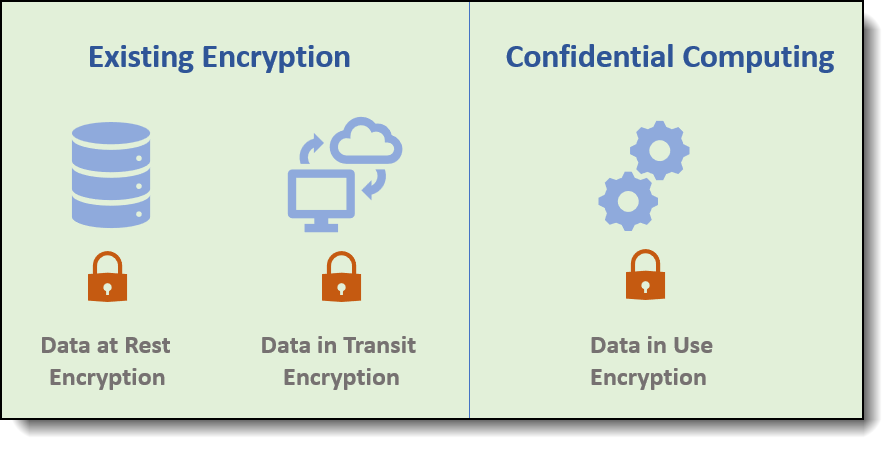
Figure 1. Confidential Computing data encryption
Confidential computing is particularly advantageous in scenarios where the entity responsible for the workload differs from the owner of the underlying physical infrastructure. This disparity may arise from heightened security concerns, apprehensions regarding the exploitation of vulnerabilities within cloud infrastructure by other tenants, or the inherent sensitivity of the data housed within the virtual machine. Sensitive information, such as customer data, financial records, and health information, often falls under strict regulatory or compliance frameworks. By leveraging confidential computing, the risk of data leakage while the data resides in the cloud is significantly mitigated.
AMD SEV-SNP
In 2016, AMD pioneered Secure Encrypted Virtualization (SEV), a foundational technology designed to launch encrypted virtual machine or Confidential VM (CVM), thereby facilitating support for confidential computing. This innovation was subsequently enhanced with the introduction of SEV Encrypted State (SEV-ES), which encrypts the CPU register state during periods of VM inactivity.
The most developed version of SEV, known as SEV Secure Nested Paging (SEV-SNP), represents a significant advancement. SEV-SNP builds upon the foundational capabilities of SEV and SEV-ES to enable the creation of confidential VMs that are isolated to external entities, including the bare-metal hypervisor, Basic Input/Output System (BIOS), other VMs, and even external input/output (I/O) devices. SEV-SNP incorporates robust memory integrity protection mechanisms to mitigate malicious hypervisor-based attacks, such as data replay and memory re-mapping, thereby establishing an isolated execution environment.
SEV-SNP also supports remote attestation, an attestation report can be generated, allowing any third party to verify the identity and state of a confidential VM, thereby ensuring the integrity and trustworthiness of the computing environment.
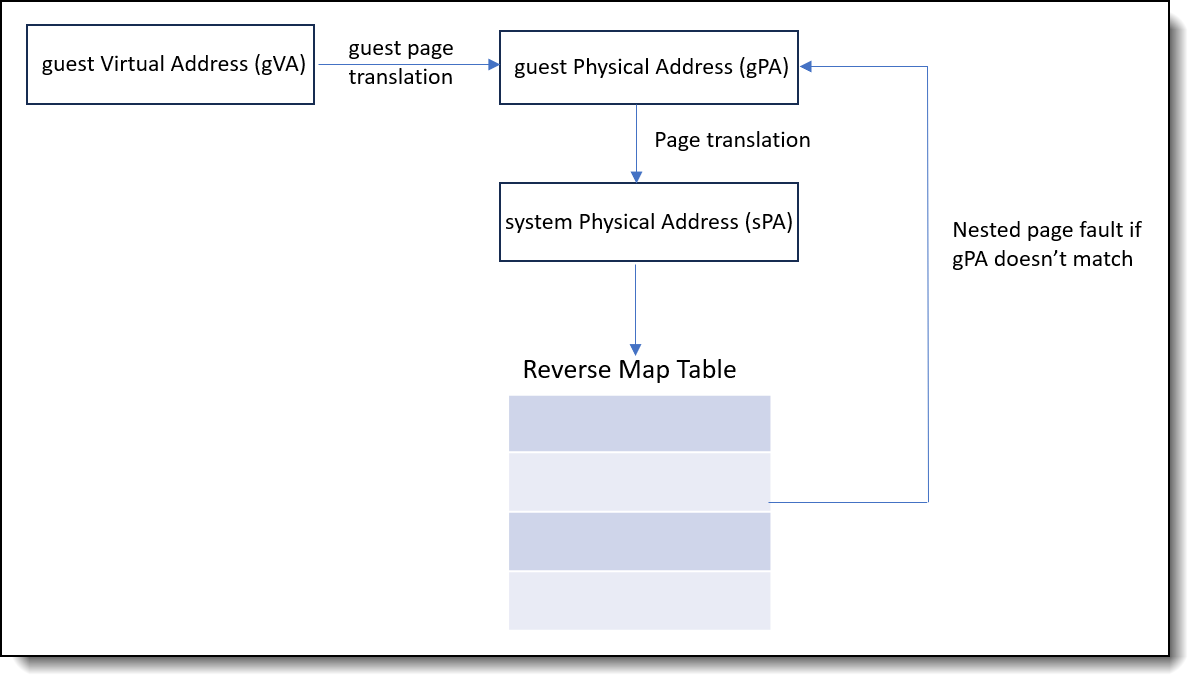
The SEV-SNP architecture enforces data integrity on guest private pages through the utilization of the Reverse Map Table (RMP) structure, which is globally shared by all logical processors. Conventionally, memory access is facilitated via CPU instructions, which employ an internal Memory Management Unit (MMU) to translate virtual addresses into physical addresses using page tables before accessing memory. In the SEV-SNP architecture, the hypervisor manages the page tables and the mapping to addresses within the physical address space. However, the RMP enforces access control within this physical address space. The RMP is a substantial in-memory data structure that tracks the ownership of each memory page. Each 4KB page of memory is associated with a 16-byte RMP entry, which contains the security attributes of the system physical page and specifies the entities permitted to write to that page.
As the following figure shows, during the translation of a virtual address to a physical address, an RMP check is typically performed as the final step in this process. The physical address that the software or device intends to access is used as an index for the RMP to verify that the assigned owner matches the entity attempting to access the page. If this verification fails, a fault is generated and access to the page is subsequently blocked.
Attestation workflow
Attestation is a cryptographic process wherein an entity, referred to as the attester, collects comprehensive information about its operational state and transmits this information to a client for verification purposes. The attester, in this context, is the entity responsible for generating evidence—a structured set of information pertaining to the TEE. Successful verification of this evidence assures the client that the TEE is executing the anticipated code on the designated hardware and is configured in accordance with specified parameters. Upon establishing the trustworthiness of the attester, the client proceeds to transmit confidential code and data to the attester, thereby initiating secure and verified communication.
The following figure depicts the standard attestation workflow.
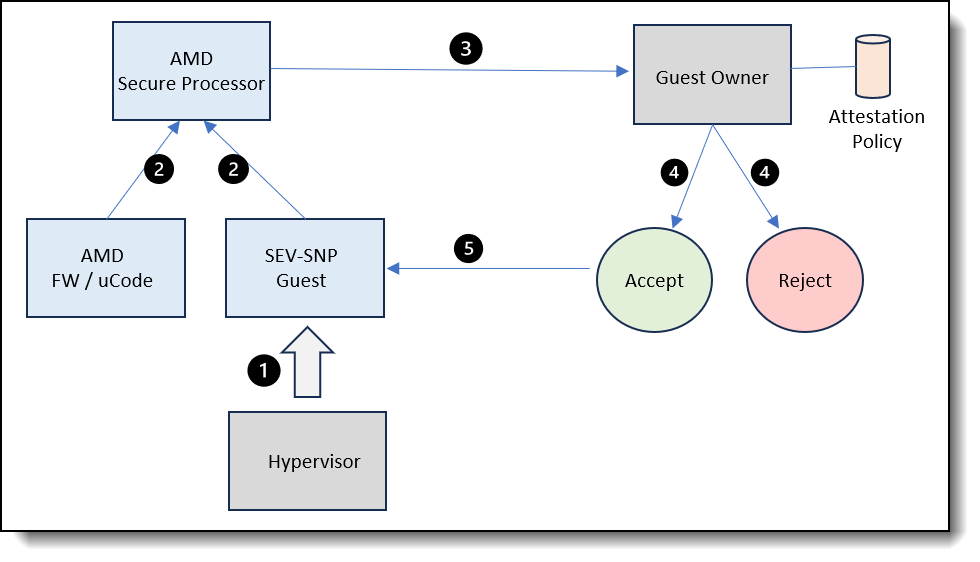
Figure 3. Attestation workflow
The following steps describe the standard attestation workflow on an AMD SEV-SNP platform.
- The hypervisor initiates the launch of the SEV-SNP guest, during which the AMD Secure Processor cryptographically measures the content of the initial set of pages, generating a launch digest.
- Platform measurements, including AMD firmware and microcode, along with guest measurements derived from the SEV-SNP guest, are aggregated to generate an attestation report from AMD secure processor. The data exchanged between the AMD secure processor and the VM is secured using the VM Platform Communication Keys (VMPCKs) to encrypt and decrypt the messages transmitted between these components.
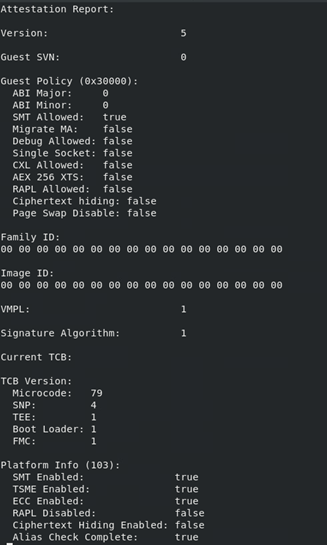
The following figure provides an example of an attestation report. The Trusted Computing Base (TCB) comprises a set of hardware, firmware, and software components that collectively provide a secure environment for operations. To ensure the integrity and trustworthiness of the VM, it is essential to trust the TCB components to function as intended. The TCB version is included within the attestation report and is represented as a 64-bit numerical value.
- The attestation report is transmitted to the guest owner for subsequent verification.
- The guest owner makes a determination regarding the trustworthiness of the guest. The regular attestation workflow involves retrieving the requisite signing certificates directly from the official AMD Key Distribution Service (KDS), thereby establishing a robust chain of trust that originates from AMD.
Critically, the entire attestation report is cryptographically signed by a unique key embedded within the processor, known as the Versioned Chip Endorsement Key (VCEK). The VCEK is a private Elliptic Curve Digital Signature Algorithm (ECDSA) key that is unique to each AMD chip running a specific TCB version. The authenticity of the VCEK can be traced back to AMD's root keys through a certificate chain, as illustrated in the figure below.
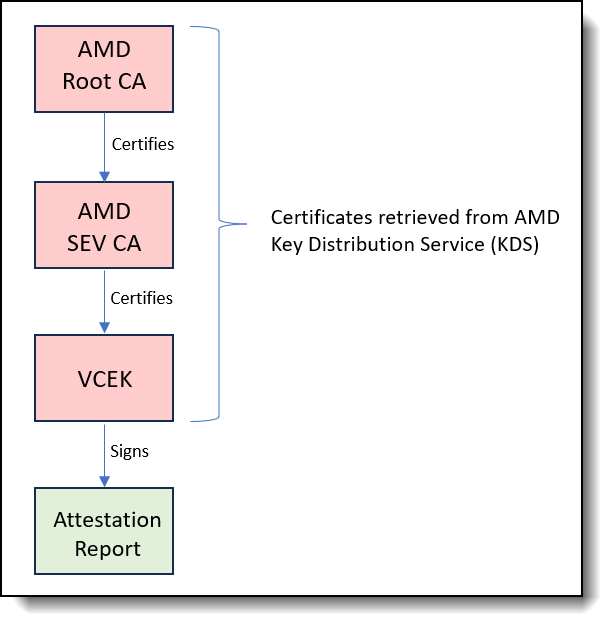
Figure 5. VCEK Certificate Trust ChainThe AMD Root Key (ARK) is the root of trust, so it is self-signed. The ARK then signed the AMD SEV Key (ASK), and the ASK, in turn, signs the VCEK, which is the certificate used to confirm the attestation report’s authenticity and the system’s configuration
- Upon establishing trust, the guest owner authorizes the guest to handle sensitive information, thereby enabling the secure launch of the guest.
Hardware and OS requirements
The test configuration used in this paper is based on the Lenovo ThinkSystem SD535 V3 server. The configuration of the server is summarized in the following table.
To facilitate the attestation process, both the ESXi host and the guest VM must meet the following requirements:
- Processor: AMD EPYC 7003 Zen 3 "Milan" or subsequent generations.
- Host Firmware Configuration:
- SME, SEV-ES, SEV-SNP must be enabled
- When SEV-ES is activated, an appropriate value must be specified for the Minimum SEV non-ES Address Space Identifier (ASID) setting.
- The Reverse Map Table (RMP) must be enabled for the entirety of host memory.
- SNP features for IOMMU must be enabled.
- Guest Operating System: Ubuntu server 25.04, RHEL10.0, or SLES 15 SP6 (kernel version 6.9 or newer is recommended).
- Virtual Machine Hardware Version: The virtual machine hardware version must be 22 or later.
Restrictions to virtual machine functions
When AMD SEV-SNP is enabled, certain VM operations are unavailable. Specifically, the following functionalities are restricted:
- vMotion
- Suspending a VM
- Taking a snapshot of a VM
- Hotplug
- vTPM
- FT
- Secure Boot
- Quick boot
- Virtual IOMMU
Setting up Attestation in ESXi 9
VMware initially incorporated support for confidential computing five years ago, with the introduction of AMD SEV-ES. In VMware Cloud Foundation 9.0, this support was further extended to include AMD SEV-SNP. This technological advancement facilitates hardware-based encryption of data in use, employing per-Virtual Machine encryption keys. Additionally, it provides capabilities for workload and host attestation, thereby enhancing the security level of virtualized environments.
The remaining sections of the paper describe the steps required to enable the attestation process with a guest VM hosted on an ESXi 9.0 platform:
UEFI Configuration
The following steps describe the procedure for configuring AMD SEV-SNP through the System Setup or Lenovo XClarity Essentials OneCLI utility on a Lenovo ThinkSystem server.
Configure AMD SEV-SNP through the System Setup:
- During the boot process, press the F1 key to access the System Setup utility.
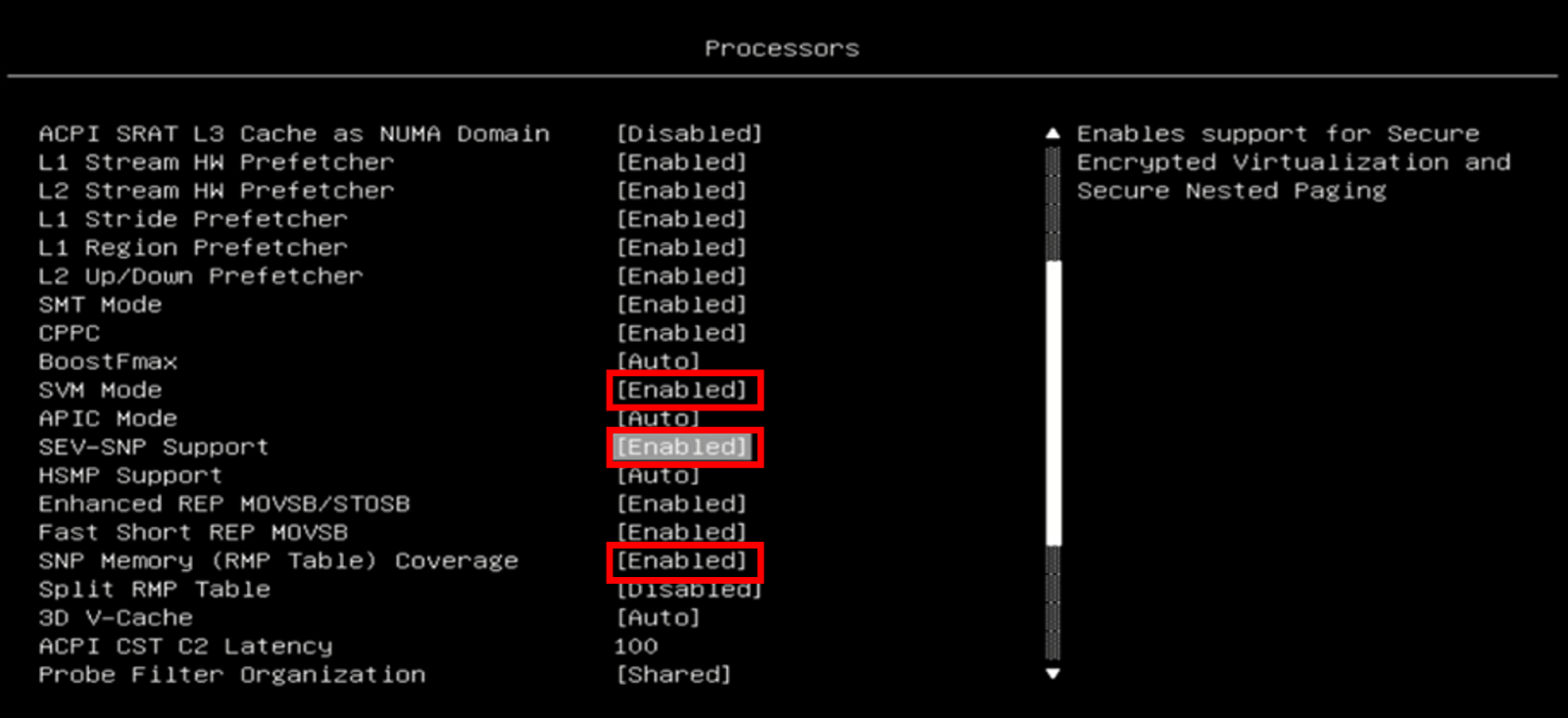
- Navigate to the Processor section and enable the following configurations, as the following figure shows.
SVM Mode: Enabled
SEV-SNP Support: Enabled
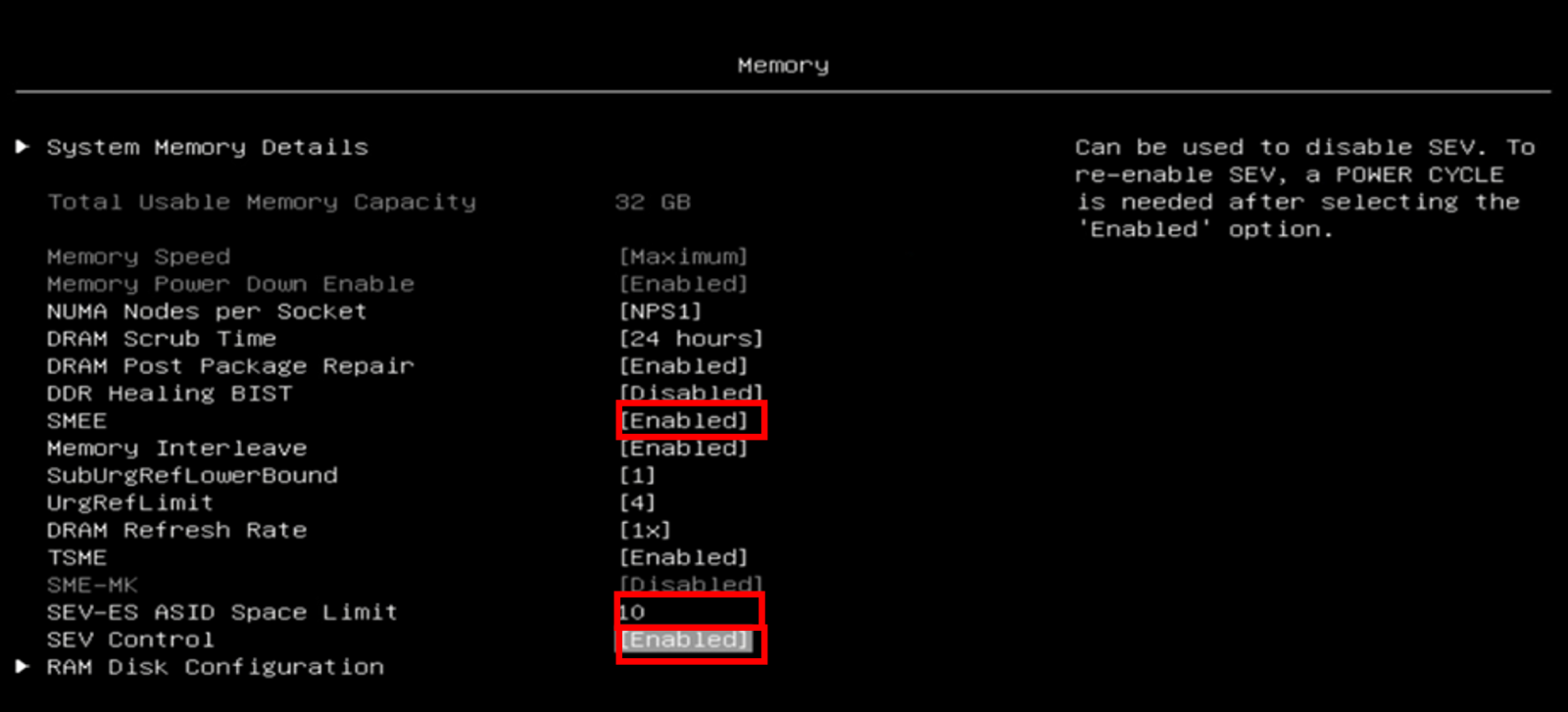
SNP Memory (RMP Table) Coverage: Enabled - Proceed to the Memory section and enable the following configurations, as the following figure shows.
SMEE: Enabled
SEV-ES ASID Space Limit: 10
SEV Control: Enabled - Save the configurations and reboot the server to apply the configured settings.
- Configure AMD SEV-SNP through the Lenovo XClarity Essentials OneCLI utility as follows:
- Enable the SVM Mode
$ ./ OneCli config set Processors.SVMMode Enabled --bmc :@ - Enable the SEV-SNP Support
$ ./ OneCli config set Processors.SEV-SNPSupport Enabled --bmc :@ - Enable the SNP Memory (RMP Table) Coverage
$ ./ OneCli config set Processors.SNPMemoryRMPTableCoverage Enabled --bmc :@ - Enable the SMEE
$ ./ OneCli config set Memory.SMEE Enabled --bmc :@ - Set the SEV-ES ASID Space Limit
$ ./ OneCli config set Memory.SEV-ESASIDSpaceLimit 10 --bmc :@ - Enable SEV Control
$ ./ OneCli config set Memory.SEVControl Enabled --bmc :@ - Dump the UEFI settings and confirm that the settings are configured correctly.
$ ./ OneCli config show Processors --bmc :@ $ ./ OneCli config show Memory --bmc :@ - Reboot the server to apply the configured settings.
- Enable the SVM Mode
ESXi Configuration
The following steps outline the procedure for configuring and enabling AMD SEV-SNP within the VMware vSphere environment. This process is demonstrated using vSphere ESXi 9.0 and an Ubuntu server 25.04 VM deployed on a Lenovo ThinkSystem server.
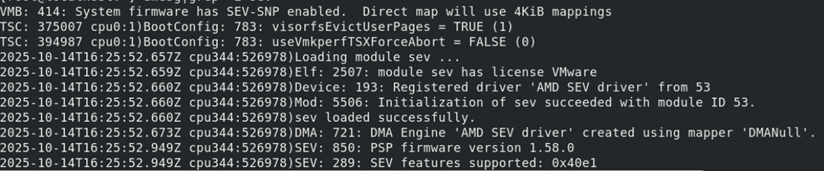
- Proceed with the installation of ESXi 9.0 on the server. Upon reviewing the operating system boot log, it is evident that the system firmware has AMD SEV-SNP enabled. Additionally, the AMD Platform Security Processor (PSP) version is confirmed to be 1.58.0, as depicted in the following figure.
- Establish a connection between the ESXi 9.0 host and a vCenter Server utilizing the vSphere client.
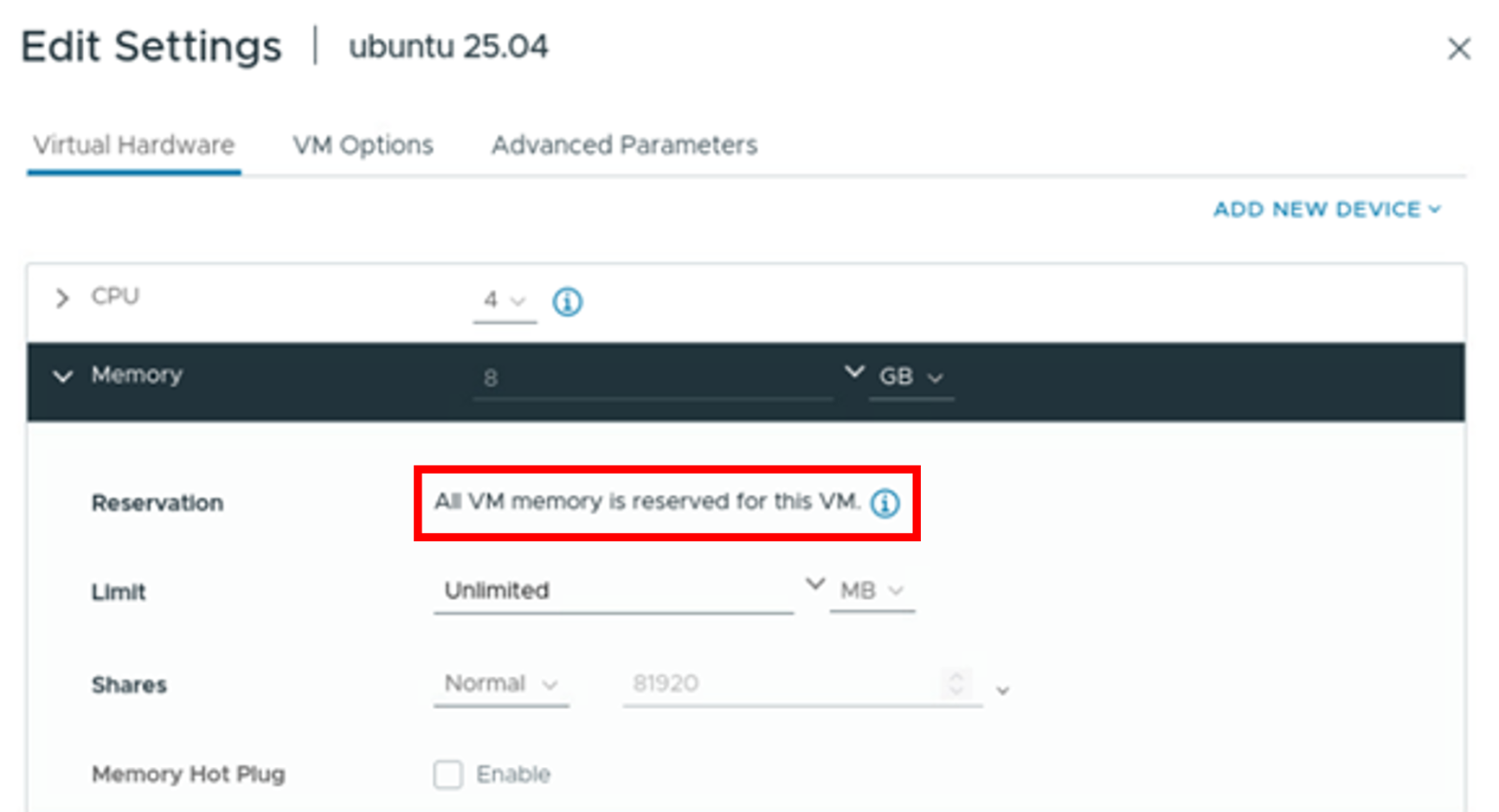
- Deploy an Ubuntu server 25.04 virtual machine. Prior to powering on the virtual machine, navigate to the Memory section within the virtual hardware settings. Ensure that the entirety of the VM memory is reserved for this specific VM, as illustrated in the following figure.
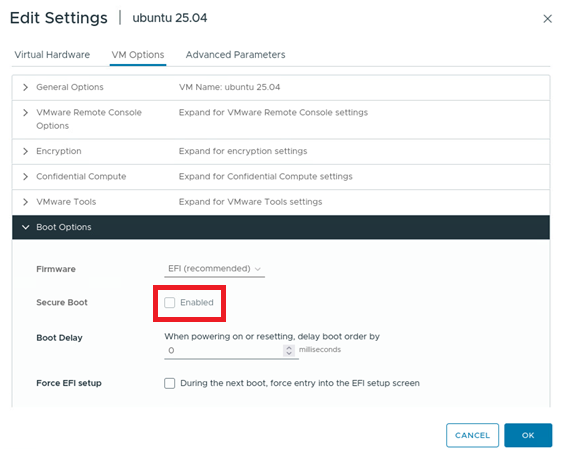
- Proceed to the Boot Options within the VM Options tab and verify that UEFI Secure Boot is not enabled, as shown in the following figure.
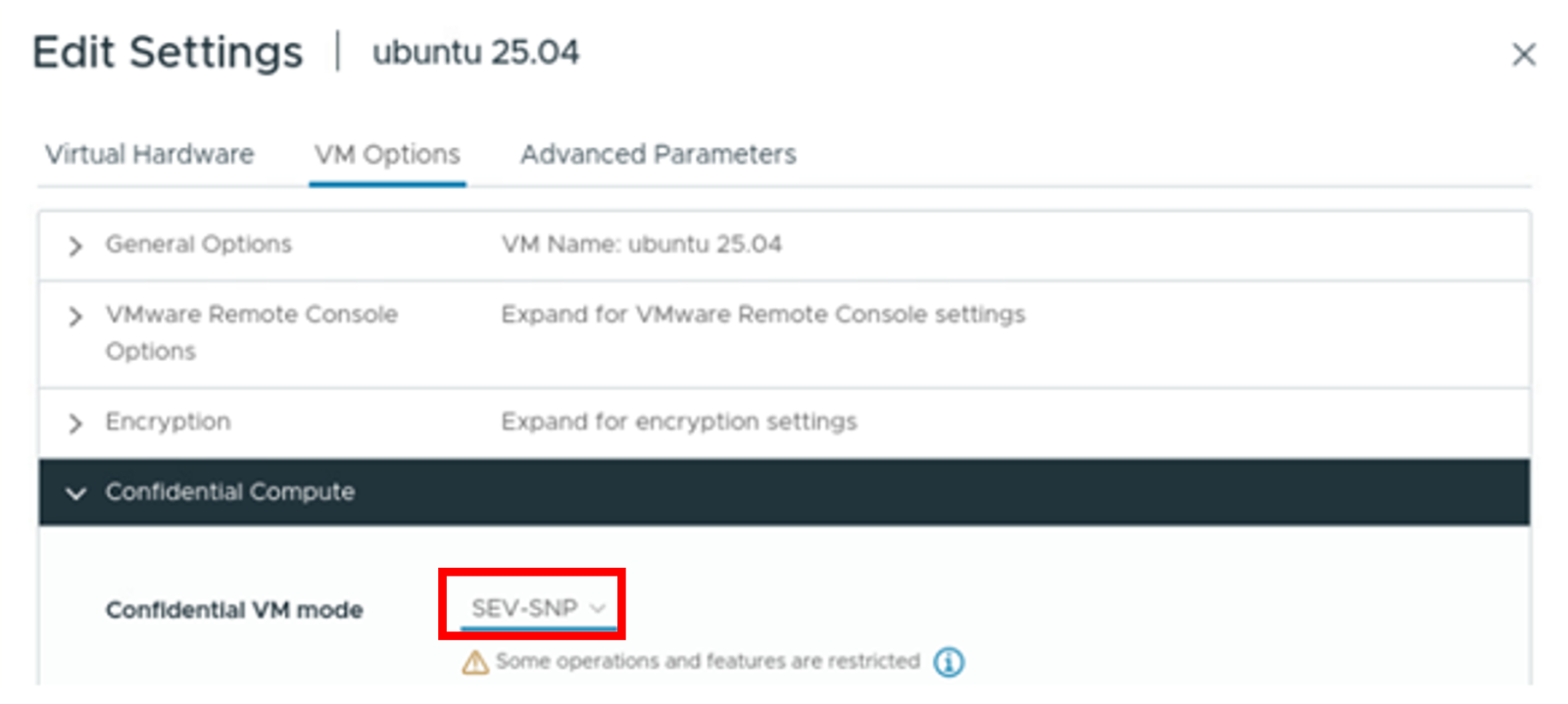
- Navigate to the Confidential Compute section and configure the Confidential VM mode to SEV-SNP, as shown in the following figure.
- Initiate the power-on sequence for the VM and proceed with the standard installation of the guest operating system.
Guest OS Configuration
The snpguest utility is a command-line tool designed for managing an AMD SEV-SNP enabled guest. This utility facilitates user interaction with the guest firmware device, enabling a range of operations including attestation, certificate management, derived key fetching, and additional functionalities.
To enable and verify SEV-SNP attestation on a Linux guest operating system, follow to the below steps:
- Upon launching the guest operating system, execute the following command to verify the status of SEV-SNP, as the following figure shows. The kernel log will contain messages that describe the state of AMD memory encryption features within the VM. The presence of the SEV-SNP feature in the kernel log, alongside other active memory encryption features, indicates that SEV-SNP is operational for the VM.
sudo dmesg | grep -i sev - Install the Rust toolchain and Cargo package manager.
$ curl --proto '=https' --tlsv1.2 -sSf https://sh.rustup.rs | sh - Compile the snpguest utility from the source repository.
$ git clone https://github.com/virtee/snpguest.git $ cd snpguest $ cargo build -r $ cd target/release - Execute the following command to request the AMD Secure Processor to generate an attestation report (report.bin). This report will include random data to ensure its uniqueness and integrity:
$ ./snpguest report report.bin requtest-file.txt --random - Execute the following command to retrieve the AMD certificate chain and the VCEK certificate from the AMD KDS:
$ ./snpguest fetch ca -r report.bin pem ./Certificates $ ./snpguest fetch vcek pem ./Certificates ./report.bin - Execute the following command to verify the validity of the certificate chain. Successful verification of these relationships is represented in the following figure.
$ ./snpguest verify certs ./Certificates - Execute the following command to validate the attestation report, as the following figure shows. This process involves utilizing the VCEK certificate to examine the cryptographic signature on the report.bin file. Additionally, it compares the TCB version numbers embedded within the VCEK certificate to those documented in the attestation report. It is imperative that these version numbers match to ensure the integrity and authenticity of the report, with the final line confirming the validity of the certificate.
$ ./snpguest verify attestation ./Certificates ./report.bin



Summary
AMD SEV-SNP was the first commercially available x86 technology to offer VM isolation—including confidentiality and integrity—for the cloud and is deployed in the form of confidential VMs on Microsoft Azure, AWS, and Google Cloud.
Confidential VM takes advantage of security technologies to offer the following benefits:
- Isolation: CPUs are equipped with an AES hardware memory encryption engine, the encryption key itself is stored in the hardware root of trust, inaccessible to the hypervisor.
- Attestation: We can verify the identity and the state of the VM, to make sure that key components haven't been tampered with. The measurement is cryptographically signed and can be attested to a remote verifier
Resources
For more information, see these resources:
- Securing Virtual Machines with AMD Secure Encrypted Virtualization-Secure Nested Paging
https://techdocs.broadcom.com/us/en/vmware-cis/vsphere/vsphere/9-0/vsphere-security/securing-virtual-machines-in-the-vsphere-client/securing-virtual-machines-with-amd-secure-encrypted-virtualization-secure-nested-paging.html - snpguest on github
https://github.com/virtee/snpguest - General overview of AMD SEV-SNP and Intel TDX
https://sys.cs.fau.de/extern/lehre/ws22/akss/material/amd-sev-intel-tdx.pdf - AMD SEV SNP Attestation: Establishing Trust in Guests
https://www.amd.com/content/dam/amd/en/documents/developer/lss-snp-attestation.pdf
Author
Alpus Chen is an OS Engineer at the Lenovo Infrastructure Solutions Group in Taipei, Taiwan. As a specialist in Linux and VMware technical support for several years, he is interested in operating system operation and recently focuses on VMware OS.
Trademarks
Lenovo and the Lenovo logo are trademarks or registered trademarks of Lenovo in the United States, other countries, or both. A current list of Lenovo trademarks is available on the Web at https://www.lenovo.com/us/en/legal/copytrade/.
The following terms are trademarks of Lenovo in the United States, other countries, or both:
Lenovo®
ThinkSystem®
XClarity®
The following terms are trademarks of other companies:
AMD and AMD EPYC™ are trademarks of Advanced Micro Devices, Inc.
Intel®, the Intel logo is a trademark of Intel Corporation or its subsidiaries.
Linux® is the trademark of Linus Torvalds in the U.S. and other countries.
Microsoft® and Azure® are trademarks of Microsoft Corporation in the United States, other countries, or both.
Other company, product, or service names may be trademarks or service marks of others.
Configure and Buy
Please select a locale
Full Change History
Course Detail
Employees Only Content
The content in this document with a is only visible to employees who are logged in. Logon using your Lenovo ITcode and password via Lenovo single-signon (SSO).
The author of the document has determined that this content is classified as Lenovo Internal and should not be normally be made available to people who are not employees or contractors. This includes partners, customers, and competitors. The reasons may vary and you should reach out to the authors of the document for clarification, if needed. Be cautious about sharing this content with others as it may contain sensitive information.
Any visitor to the Lenovo Press web site who is not logged on will not be able to see this employee-only content. This content is excluded from search engine indexes and will not appear in any search results.
For all users, including logged-in employees, this employee-only content does not appear in the PDF version of this document.
This functionality is cookie based. The web site will normally remember your login state between browser sessions, however, if you clear cookies at the end of a session or work in an Incognito/Private browser window, then you will need to log in each time.
If you have any questions about this feature of the Lenovo Press web, please email David Watts at dwatts@lenovo.com.


