

Top
Authors
Updated
28 May 2026Form Number
LP2289PDF size
30 pages, 863 KBSubscribed to LP2289.
Thank you for your feedback.
Table of Contents
Abstract
This product guide provides an overview of Lenovo NVIDIA software portfolio tailored for HPC and Enterprise AI workloads on Lenovo infrastructure. Designed for AI practitioners and IT managers, it explains how to accelerate time to production, optimize GPU utilization, and scale AI operations efficiently usingbelow software licenses and Part Numbers associated with each product.
Lenovo offers below products from NVIDIA software portfolio
- NVIDIA Enterprise, comprised of:
- NVIDIA AI Enterprise – Offers a secure, production-grade AI platform
- NVIDIA Omniverse Enterprise – Powers collaborative 3D simulation and digital twin environments
- NVIDIA Run:ai (Self-hosted)– Orchestrates GPU workloads for maximum efficiency
- NVIDIA Run:ai (SaaS version)–Delivers fully managed SaaS solution for GPU resource management
- NVIDIA vGPU – Enables scalable GPU virtualization for VDI and simulation
- NVIDIA Mission Control – Unified Operations Software for AI Infrastructure at Scale
Change History
Changes in the May 28, 2026 update:
- Added the new NVIDIA Enterprise, a bundle of NVIDIA AI Enterprise and Omniverse Enterprise
- Added Discounted software with RTX PRO Server GPU bundle (promotion ends April 2027)
- Added NVIDIA Mission Control
- Removed NVIDIA AI Workbench
Introduction
Enterprise adoption of AI is rapidly accelerating, but many organizations face challenges moving from pilot projects to full-scale production. Lenovo, in partnership with NVIDIA, delivers a comprehensive portfolio of software solutions designed to overcome these hurdles.
NVIDIA's software stack is purpose-built to maximize the performance of NVIDIA hardware and GPUs across the full AI lifecycle. Unlike generic open-source alternatives, every layer of the NVIDIA software ecosystem; from GPU drivers and CUDA libraries to inference servers, orchestration tools, and enterprise management platforms; is engineered to work in concert with NVIDIA silicon. The result is measurably higher throughput, lower cost per inference, and faster time to value for organizations running AI at scale.
While these solutions are optimized to run on Lenovo's AI-ready infrastructure, the software is fully supported by NVIDIA Enterprise Support and Services. Together, Lenovo and NVIDIA provide a path from experimentation to enterprise-grade AI, ensuring better ROI, reduced deployment times, and scalable innovation.
Did you know?
With the changes to licensing that NVIDIA announced in October 2025, customers receive even greater value for the same price. NVIDIA consolidated NVIDIA AI Enterprise and Omniverse Enterprise into the new NVIDIA Enterprise suite. It includes the NVIDIA Omniverse and Run:ai self-hosted services, delivering a complete AI platform in a single entitlement.
The three pillars work as a complete, unified system:
- NVIDIA AI Enterprise — Production-grade AI frameworks, pre-trained models, and security to build AI
- NVIDIA Omniverse Enterprise — Real-time 3D simulation and digital twin capabilities
- NVIDIA Run:ai (Self-Hosted) — Dynamic GPU orchestration across all workloads, maximizing utilization and eliminating idle compute.
The unified subscription eliminates the need for separate software stack, separate GPU pools, and separate vendor relationships; delivering a single, cost-efficient AI platform where software, orchestration, and hardware are optimized together.
Lenovo and NVIDIA
Lenovo offers a range of software solutions from NVIDIA to complement and maximize the value of NVIDIA GPU investments. This includes standalone software licenses purchased directly through Lenovo, as well as promotional licenses bundled together with qualifying NVIDIA GPU purchases. Lenovo also incorporates NVIDIA software solutions as core components of our AI Factory and Hybrid AI platform offerings, ensuring customers get a fully validated, production-ready stack from day one.
This product guide covers the complete Lenovo ordering portfolio for NVIDIA software, including:
- Full part number listings for every available SKU, across all license types and subscription durations
- Minimum Order Quantities (MOQ) where applicable, so sellers and customers can plan purchases accurately
- All support tiers, including:
- Business Standard Support — Included with most base subscriptions; provides access to NVIDIA's support portal and standard response SLAs during business hours
- Business Critical Support — An upgrade tier offering faster response times, higher severity prioritization, and extended coverage for production environments
- Premium / Technical Account Manager (TAM) Support — The highest tier, pairing the customer with a dedicated NVIDIA Technical Account Manager who owns cases end-to-end and proactively monitors the environment
Whether a customer is purchasing their first NVIDIA software license, scaling an existing AI platform, or integrating NVIDIA software into a broader Lenovo AI Factory deployment, this guide provides everything needed to identify the right product, the right support level, and the right part number to place the order.
Discounted software with RTX PRO Server GPU bundle
Customers can now benefit from NVIDIA software capabilities at a significant discount when purchased from Lenovo with NVIDIA RTX PRO Blackwell Server Edition GPUs. Protect your data center investment from changing needs over time, and future proof for growing enterprise AI and accelerated computing.
Discounts are as follows:
- NVIDIA software purchased with NVIDIA RTX PRO 4500 Blackwell Server Edition (4X67B12675): 70% discount on the software
- NVIDIA software purchased with NVIDIA RTX PRO 6000 Blackwell Server Edition (4X67B09287): 50% discount on the software
Note: To qualify for the discounted software, the GPU must be ordered at the same time as the software
Two different promotions are available:
Details of the promotion are shown in the figure below (click the image for a larger version).
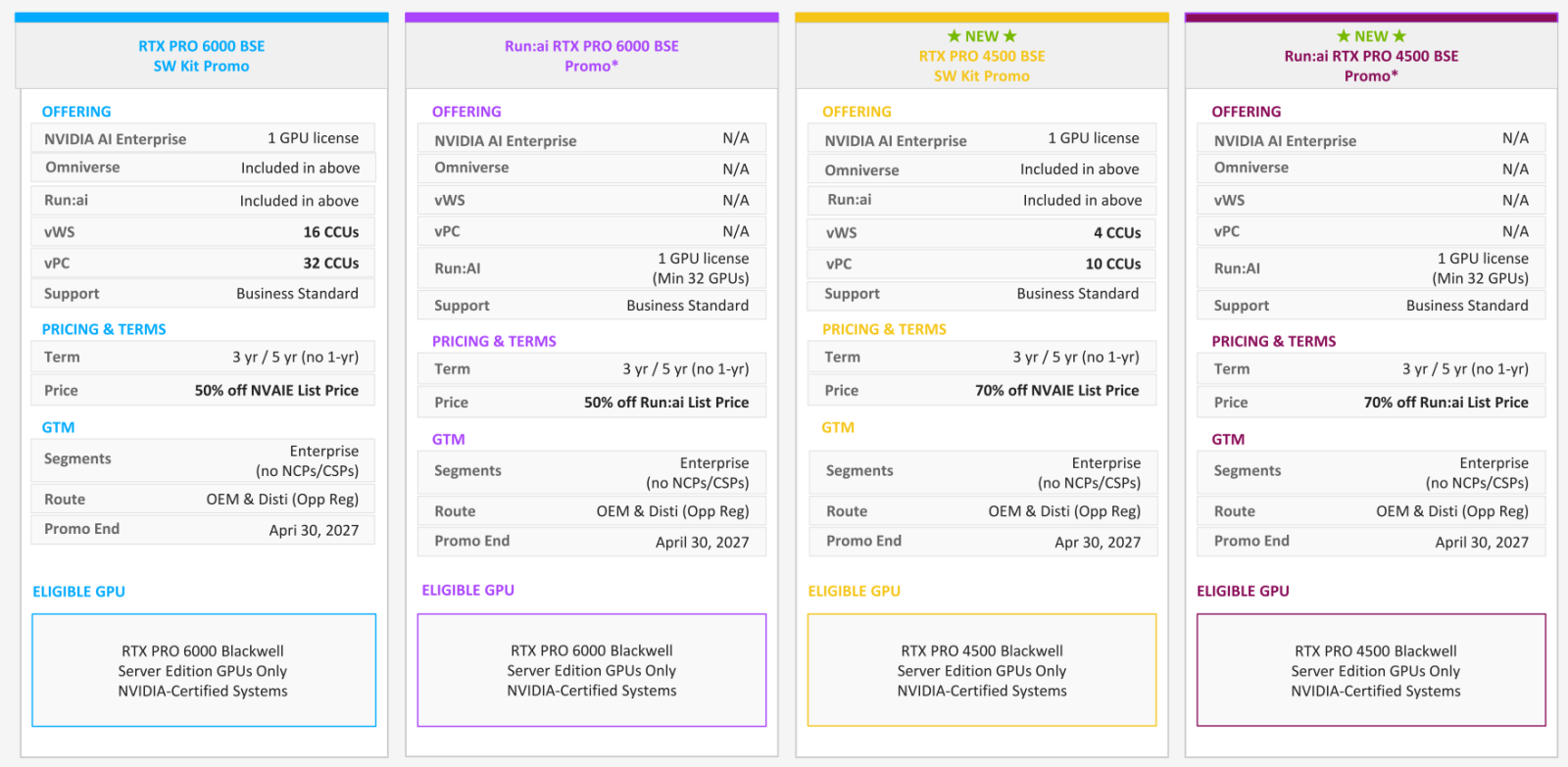
Figure 1. RTX PRO Server Software Kit Promotion
This promotion ends April 30, 2027.
Discounts on NVIDIA Enterprise software and support
The software bundle license includes the following products:
- NVIDIA AI Enterprise - Newly expanded and including Omniverse Enterprise and Run:ai Self-Hosted
- NVIDIA Run:ai (SaaS)
- NVIDIA RTX Virtual Workstation (vWS)
- NVIDIA Virtual PC (vPC)
- Business standard support (see Lenovo and NVIDIA section)
The following part numbers include the discount:
- NVIDIA RTX PRO 4500 Blackwell Server Edition Software Kit, per GPU, 3Years, 7S02006YWW
- NVIDIA RTX PRO 4500 Blackwell Server Edition Software Kit, per GPU, 5Years, 7S02006ZWW
- NVIDIA RTX PRO 6000 Blackwell Server Edition Software Kit (NVAIE, Run:ai, vGPU, Support), per GPU, 3Years, 7S020063WW
- NVIDIA RTX PRO 6000 Blackwell Server Edition Software Kit, per GPU, 5 Years, 7S020064WW
To obtain the discounted price, you will need to order the GPU at the same time as you order one of the above part numbers.
Discounts on NVIDIA Run:ai software and support
For customers who prefer to only use Run:ai with the RTX PRO Blackwell Server Edition GPUs, discounts are also offered on Run:ai either self-hosted or Software as a Service (SaaS):
- NVIDIA Run:ai (Self-hosted or SaaS)
- Business standard support (see Lenovo and NVIDIA section)
The following part numbers include the discount:
- NVIDIA Run:ai for RTX PRO 4500 Blackwell Server Edition, per GPU, Self-Hosted, 3Years, 7S020072WW
- NVIDIA Run:ai for RTX PRO 4500 Blackwell Server Edition, per GPU, Self-Hosted, 5Years, 7S020073WW
- NVIDIA Run:ai for RTX PRO 6000 Blackwell Server Edition, per GPU, Self-Hosted, 3 Years, 7S020065WW
- NVIDIA Run:ai for RTX PRO 6000 Blackwell Server Edition, per GPU, Self-Hosted, 5 Years, 7S020066WW
- NVIDIA Run:ai for RTX PRO 4500 Blackwell Server Edition, per GPU, SaaS, 3Years, 7S020070WW
- NVIDIA Run:ai for RTX PRO 4500 Blackwell Server Edition, per GPU, SaaS, 5Years, 7S020071WW
- NVIDIA Run:ai for RTX PRO 6000 Blackwell Server Edition, per GPU, SaaS, 3 Years, 7S020067WW
- NVIDIA Run:ai for RTX PRO 6000 Blackwell Server Edition, per GPU, SaaS, 5 Years, 7S020068WW
To obtain the discounted price, you will need to order the GPU at the same time as you order one of the above part numbers.
NVIDIA Enterprise
NVIDIA Enterprise licenses provide access to production-grade NVIDIA software stack designed to help organizations build, deploy and scale AI workloads with enterprise grade performance, support and efficiency.
As of May 2026, NVIDIA Enterprise Licenses include the following entitlements:
- NVIDIA AI Enterprise
- NVIDIA Omniverse Enterprise
- NVIDIA Run:ai (Self-hosted)
All NVIDIA Enterprise subscriptions include NVIDIA Business Standard Support and can be purchased as either a perpetual license, as an annual or multi-year subscription. NVIDIA Enterprise with perpetual licenses must be purchased in conjunction with five-year support services. A one-year support service is also available for renewals.
Discounted software promotion: Order NVIDIA Enterprise with either NVIDIA RTX PRO 4500 Blackwell Server Edition or NVIDIA RTX PRO 6000 Blackwell Server Edition and get the software at a discount. See the Discounted software with RTX PRO Server GPU bundle section
License included: A 5-year NVIDIA Enterprise subscription is included with H100 and H200 PCIe double-wide GPUs on Lenovo ThinkSystem servers. Customer can redeem the license thru this link: https://www.nvidia.com/en-us/data-center/activate-license/
Topics in this section:
NVIDIA AI Enterprise
NVIDIA AI Enterprise (NVAIE) is a production-grade, cloud-native software platform purpose-built to accelerate the development, training and deployment of AI, machine learning (ML), and generative AI models in enterprise environments.
The best companion for the Lenovo Hybrid AI 285 platform and AI nodes from the ThinkSystem family, NVAIE simplifies AI infrastructure by delivering over 50 frameworks, pre-trained models, and enterprise-grade support—enabling organizations to confidently scale from pilot to production, whether on-prem or hybrid.
The key capabilities of NVAIE offerings include the following:
- Full-Stack AI Platform – Includes frameworks like TensorFlow, PyTorch, RAPIDS, XGBoost, Triton Inference Server, and more.
- Generative AI Enablement – Provides pre-built pipelines for Large Language Models (LLMs), Retrieval-Augmented Generation (RAG), and fine-tuning.
- Enterprise-Grade Support – Backed by NVIDIA with 24/7 support, performance optimization, and validated infrastructure.
- Security & Governance – Supports secure, multi-tenant environments with integrated access control and policy enforcement.
- Hybrid-Cloud Ready – Deployable across VMware, Red Hat OpenShift, Kubernetes, or bare metal, with full container support.
NVIDIA Omniverse Enterprise
NVIDIA Omniverse Enterprise is a real-time collaboration and simulation platform that enables engineers, designers, and AI developers to create physically accurate digital twins, simulate complex systems, and streamline product development workflows—all in a shared 3D environment. It enables multi-disciplinary teams to collaborate simultaneously across design tools and geographies, while AI-enhanced simulation drives faster innovation cycles, better decision-making, and reduced time to market.
When deployed on Lenovo ThinkStation workstations and ThinkSystem servers with NVIDIA RTX GPUs, Omniverse accelerates workflows for industries ranging from manufacturing and AEC (architecture, engineering & construction) to automotive, energy, and telecom.
The key capabilities of NVIDIA Omniverse Enterprise include the following:
- USD-Based Collaboration – Uses Pixar’s Universal Scene Description (USD) to enable real-time, multi-tool collaboration across design pipelines.
- Real-Time Physically Accurate Simulation – Supports ray tracing, physics, materials, and environment rendering for true-to-reality simulation.
- AI-Enabled Digital Twins – Integrates with AI workflows to create intelligent, interactive environments for robotics, inspection, predictive maintenance.
- Connectors for Industry Tools – Native plugins for Autodesk, Revit, Rhino, SolidWorks, PTC Creo, Unreal Engine, Blender, and more.
- Multi-User Collaboration – Distributed teams can co-design and co-simulate from anywhere in the world.
- Enterprise Deployment Support – Includes scalability, security, licensing, and remote access via VDI and NVIDIA vGPU.
The following are example deployment scenarios for Omniverse Enterprise:
- Single-user simulation & design – ThinkStation PX or P16 mobile workstation
- Small team collaboration – ThinkSystem SR655 V3 (Nucleus Server) with centralized data access
- Large-scale digital twin deployment – OVX L40S (4-8 GPU) on SR675 V3 with NVIDIA Omniverse Nucleus + Enterprise Suite
Ordering information for NVIDIA Enterprise
The following YouTube video playlists provide additional information regarding software registration:
The following table lists NVIDIA Enterprise license part numbers and feature codes.
For more information, see the NVIDIA Enterprise Sizing Guide.
NVIDIA Run:ai
As AI adoption accelerates, many organizations encounter a new bottleneck: underutilized or fragmented GPU resources across teams and workloads. NVIDIA Run:ai resolves this by introducing an intelligent orchestration and scheduling platform purpose-built for AI infrastructure. It enables multi-tenant GPU sharing, workload prioritization, and centralized resource management, dramatically improving ROI on AI infrastructure.
When deployed on Lenovo ThinkSystem servers, Run:ai transforms traditional GPU clusters into fully virtualized AI infrastructure, capable of allocating GPUs dynamically based on policies, project needs, or user demand: on-prem, in hybrid environments, or across Kubernetes clusters.
The key capabilities of Run:ai include the following:
- Dynamic GPU Scheduling – Allocates GPU resources to users and projects in real time—full, fractional, or virtualized.
- Fair Share Quotas – Ensures teams get guaranteed GPU access without overprovisioning or idle capacity.
- Multi-Tenancy – Supports multiple departments or teams with isolated workloads, policies, and quotas.
- Kubernetes-Native Integration – Runs seamlessly on K8s, OpenShift, or any CNCF-compliant container environment.
- Visibility & Dashboards – Offers real-time metrics, cost tracking, and usage visualization for IT and leadership.
- AI Workload Prioritization – Automatically prioritizes high-value, production workloads over experimentation.
Discounted software promotion: Order Run:ai with either NVIDIA RTX PRO 4500 Blackwell Server Edition or NVIDIA RTX PRO 6000 Blackwell Server Edition and get the software at a discount. See the Discounted software with RTX PRO Server GPU bundle section.
NVIDIA vGPU
NVIDIA Virtual GPU (vGPU) technology enables the virtualization of physical GPUs so they can be shared among multiple virtual machines (VMs) or containers. Unlike traditional GPU passthrough, which assigns an entire GPU to a single user or workload, vGPU allows multiple users to access a fraction of the GPU’s power, enabling better resource efficiency and workload density.
When deployed on Lenovo ThinkSystem servers, vGPU provides a high-performance, scalable platform for powering virtual desktop infrastructure (VDI), simulation workloads, 3D rendering, and AI-powered design applications.
The key capabilities of NVIDIA Virtual GPU offerings include the following:
- GPU Partitioning – Allocates dedicated slices of GPU memory and compute cores per VM or container.
- Support for AI Workloads – Enables virtualized access to AI acceleration for model training and inference.
- Application Certification – Supports a broad ecosystem of ISVs including AutoDesk, Siemens, Adobe, and Dassault Systèmes.
- Security & Isolation – Keeps user data and workloads securely isolated, critical for regulated environments.
- Remote Work Enablement – Provides high-performance desktops to remote users with full GPU acceleration.
Topics in this section:
Choosing the Right NVIDIA vGPU Software License
NVIDIA vGPU software comes in three licensing tiers, each aligned to user profiles, workloads, and performance needs. Selecting the correct license ensures optimal performance and cost-efficiency.
Key recommendations:
- Use vApps if you are delivering apps to multiple users with shared OS instances.
- Choose vPC when individual, persistent desktops are needed with lightweight GPU acceleration.
- Deploy vWS for power users in industries like architecture, automotive, and M&E.
The following table shows the details of each recommendation, the target user, and ideal workloads for each license type.
Lenovo part numbers for vGPU
All tiers are licensed per Concurrent User (CCU) and can be centrally managed.
The following table lists the vGPU part numbers and feature codes.
Perpetual licenses: Perpetual licenses cannot be sold as standalone products, you must add a 5 years SUMS contract.
The following license types are offered:
- Perpetual license
A non-expiring, permanent software license that can be used on a perpetual basis without the need to renew. For each perpetual license, customers are also required to purchase a 5-year SUMS support contract. Without this contract, the perpetual license cannot be ordered.
- Annual subscription
A software license that is active for a fixed period as defined by the terms of the subscription license, typically yearly. The subscription includes Support, Upgrade and Maintenance (SUMS) for the duration of the license term.
- Concurrent User (CCU)
A method of counting licenses based on active user VMs. If the VM is active and the NVIDIA vGPU software is running, then this counts as one CCU. A vGPU CCU is independent of the connection to the VM.
The following table lists the ordering part numbers and feature codes.
NVIDIA Mission Control
NVIDIA Mission Control™ is an enterprise-grade operations software platform designed to deploy, manage, and operate large-scale AI infrastructure with consistency, resilience, and efficiency. Built for modern data centers and hybrid environments, Mission Control enables organizations to operationalize AI faster, reduce complexity, and maintain full visibility across compute, networking, and accelerated workloads.
Mission Control abstracts infrastructure complexity and delivers a centralized control plane for AI clusters, enabling IT and platform teams to focus on delivering AI outcomes, not managing infrastructure silos.
Key capabilities of NVIDIA Mission Control include:
- Unified AI Infrastructure Management
- Centralized orchestration of NVIDIA-accelerated AI clusters
- Lifecycle management for compute, networking, and system software
- Policy-driven operations across multi-node, multi-rack deployments
- Accelerated Deployment & Provisioning
- Rapid, repeatable deployment of AI-ready infrastructure
- Pre-validated configurations aligned with NVIDIA reference architectures
- Automated setup of system software, drivers, and dependencies
- Operational Visibility & Control
- Real-time monitoring of cluster health, utilization, and performance
- End-to-end observability across GPUs, CPUs, networking, and storage
- Integrated alerting and diagnostics for proactive operations
- Resilience & Reliability
- Built-in support for fault detection and remediation
- Consistent operations across environments to reduce configuration drift
- Designed for mission-critical AI workloads
- Enterprise-Grade Security & Governance
- Role-based access control (RBAC)
- Secure, policy-driven operations aligned with enterprise IT standards
- Designed to support regulated and sovereign AI environments
Ordering information for NVIDIA Mission Control
NVIDIA Mission Control is offered as a subscription model with the following part numbers:
Frequently Asked Questions (FAQ)
FAQ topics:
NVIDIA Enterprise FAQs
Q1: What is included in the NVIDIA AI Enterprise (NVAIE) suite?
A: NVAIE includes over 50+ GPU-accelerated frameworks and tools such as TensorFlow, PyTorch, RAPIDS, Triton Inference Server, NeMo (LLMs), Riva (ASR/NLP), and TAO Toolkit for transfer learning. It comes with enterprise support and deployment documentation.
Q2: Can I deploy NVIDIA AI Enterprise in a fully on-prem environment?
A: Yes. NVAIE is designed for on-prem, hybrid, or air-gapped deployments using VMware vSphere, bare metal, or Kubernetes (including Red Hat OpenShift).
Q3: What Lenovo systems include NVAIE licensing?
A: NVAIE is bundled with a 5-year license on qualifying Lenovo servers using the PCIe/NVL variants of H100, H200 or B200 GPUs
Q4: How is NVAIE licensed?
A: It’s licensed per GPU socket. Options include perpetual or subscription terms (1, 3, or 5 years), with EDU (for customers in education) and INC variants (for NVIDIA Inception program) available. Please check if your customer qualifies for these categories with your Lenovo representative prior to purchase.
Q5: What is the difference between NVAIE, NVIDIA AI Enterprise, and NVIDIA Enterprise?
A: These terms refer to the same software suite at different points in time—NVIDIA has updated the branding and packaging over the years. Here’s how the evolution works:
- NVAIE -- Earlier Lenovo and NVIDIA terminology for NVIDIA AI Enterprise, before the April 2023 licensing shift from CPU-socket to per‑GPU licensing.
- NVIDIA AI Enterprise (NVAIE) -- The official product name used from ~2021–2025 for NVIDIA’s full enterprise AI software stack (frameworks, NIMs, Triton, CUDA-X libraries, vGPU for compute, enterprise support).
- NVIDIA Enterprise (current name since Oct 27, 2025) - The new, unified license that includes the following, in one entitlement and at the same price as previous NVAIE:
- NVIDIA AI Enterprise
- NVIDIA Omniverse Enterprise
Q6: Can customers buy NVIDIA Enterprise standalone without Lenovo hardware?
A: Yes. Standalone licensing is available globally. Price varies per region; sellers must check Lenovo DCSC.
Run:ai FAQs
Q7: What problem does Run:ai solve?
A: Run:ai dynamically schedules GPU workloads across users, ensuring better utilization, multi-tenancy, and real-time quota enforcement. It prevents idle GPUs and infrastructure bottlenecks, especially in AI Centers of Excellence or multi-team environments.
Q8: Is Run:ai only for Kubernetes?
A: Yes, Run:ai is Kubernetes-native but can be layered on VMware environments running Tanzu or integrated with OpenShift. It works with Lenovo platforms that support containerized or virtualized workloads.
Q9: Is Run:ai included with any Lenovo system?
A: No, Run:ai is a standalone NVIDIA software license that must be selected separately (sold per GPU/year). Lenovo does offer bundle promotions with certain AI-ready servers.
Q10: What GPUs and Lenovo platforms are recommended for Run:ai?
A: Recommended platforms include SR675 V3, SR685, and SR650 V4. GPUs include L40S, H200, B200, and RTX 6000 Ada/Blackwell SE.
vGPU / VDI FAQs
Q11: What are the differences between vApps, vPC, and vWS licenses?
A:
- vApps – For application streaming via RDSH; ideal for delivering virtulized business applications to many users at scale.
- vPC – For full VDI with multimedia; supports rich graphics and video playback for everyday office productivity, multimedia and knowledge worker work
- vWS (RTX Virtual Workstation) – For high-end 3D rendering, CAD, CAE (L40s, A16); ideal for workstation level performances with GPU accelerators
Q12: Can vGPU be used for AI model training or inference?
A: Yes, especially when GPUs are virtualized with vWS. This enables AI/ML workloads in secure, centralized environments and is ideal for regulated industries.
Q13: What systems support vGPU deployments?
A: Lenovo ThinkSystem SR645, SR665, and ThinkStation P8 are optimized for vGPU use with L40S, A16, or A40 GPUs.
Omniverse Enterprise FAQs
Q14: What is Omniverse used for in an enterprise?
A: Omniverse enables real-time 3D collaboration, simulation, and digital twin development across industries like manufacturing, automotive, AEC, and telecom.
Q15: Is Omniverse GPU-intensive?
A: Yes. It requires powerful GPUs such as RTX PRO 6000 Blackwell Server Edition, RTX 6000 Ada, or L40S to support ray tracing, simulation physics, and real-time rendering.
Q16: What Lenovo systems are certified for Omniverse?
A: Lenovo ThinkStation P16, PX (workstations), SR655 V3 (Nucleus Server), and SR675 V3 (OVX nodes for 4- or 8-GPU configurations).
Sales FAQs
Q17: Can I bundle multiple NVIDIA software licenses with a Lenovo server quote?
A: Yes. You can configure quotes with combinations of NVAIE, Run:ai, vGPU, and Omniverse licenses. Ensure proper SKUs are included per GPU type and license duration.
Q18: Are education discounts available?
A: Yes. NVIDIA offers EDU and INC SKUs across all software products. Lenovo also supports academic pricing for servers in qualifying institutions.
Q19: Who provides support — Lenovo or NVIDIA?
A: NVIDIA provides the software support (8x5 and 24x7) through NVIDIA Enterprise Support. Lenovo handles hardware support and integration.
Comparison – Run:ai and NVAIE vs Alternatives
The following table provides a comparison of the options available to customers categorized based on the key capabilities. In this analysis, all alternative solutions are categorized in last column. This includes in-house solutions by leveraging customized licenses like Kubeflow and Databricks, and open source libraries.
Key Takeaways:
- NVAIE is ideal for organizations that want a secure, optimized, supported AI platform without piecing together tools.
- Run:ai offers enterprise-grade orchestration that’s purpose-built for AI teams—not generic DevOps.
- Open-source stacks are flexible but require deep technical knowledge, ongoing integration, and no official support.
- Competing tools like Paperspace, K8s-native schedulers, or Slurm often lack AI-focused features, creating operational friction
Seller training courses
The following sales training courses are offered for employees and partners (login required). Courses are listed in date order.
-
Partner Technical Webinar - AI Stories - Part 1
2026-09-04 | 60 minutes | Employees and Partners
DetailsPartner Technical Webinar - AI Stories - Part 1
In this 60 minute replay, John Encizo’s AI team joined us to share some AI Stories: from Requirements to Architecture. Part 1
Published: 2026-09-04
Length: 60 minutes
Course code: AUG2826Start the training:
Employee link: Grow@Lenovo
Partner link: Lenovo 360 Learning Center
-
Think AI Weekly: NVIDIA AI Software Use Cases
2026-08-13 | 23 minutes | Employees Only
DetailsThink AI Weekly: NVIDIA AI Software Use Cases
Please watch this session of Think AI Weekly as Farah Fallah Toosi, NVIDIA AI Software Product Manager talks to us about NVIDIA AI Software.
Published: 2026-08-13
Topics include:
-Understand key NVIDIA AI software
- NemoClaw
- Confidential Computing
- NVIDIA AI Enterprise (changes)
-Connect use cases to customer needs
-Position NVIDIA software value
Length: 23 minutes
Course code: DTAIW125Start the training:
Employee link: Grow@Lenovo
-
Think AI Weekly: NVIDIA Software Overview
2026-07-14 | 24 minutes | Employees Only
DetailsThink AI Weekly: NVIDIA Software Overview
Watch this Think AI Weekly video to see Farah Fallah Toosi introduce the suite of NVIDIA software available to sellers. Our second speaker, David Watts, covered Lenovo Press and the information it offers, and highlighted where to find training materials linked to product guides.
Published: 2026-07-14
Length: 24 minutes
Course code: DTAIW179Start the training:
Employee link: Grow@Lenovo
-
HPC VTT: Unlocking Hybrid HPC + AI_ Slinky Bridge for Unified GPU Workloads
2026-03-10 | 62 minutes | Employees Only
DetailsHPC VTT: Unlocking Hybrid HPC + AI_ Slinky Bridge for Unified GPU Workloads
View this session to hear from our speakers, Aurelien Ortiz, Software Architect
Published: 2026-03-10
HPC & AI, Lenovo and Nick Ihli, Sr Product Manager System Software – Slurm, SchedMD, as they explain how Slinky helps with unified GPU workloads. Topics include:
Why Slinky? Bridging HPC and Cloud-Native AI Workloads
How Slinky Bridge Works: Architecture, Components, and Flow
Deployment Requirements & How to Position Slinky
Length: 62 minutes
Course code: DVHPC231Start the training:
Employee link: Grow@Lenovo
-
Edge VTT - NVIDIA Robotics Platform
2026-01-08 | 67 minutes | Employees Only
DetailsEdge VTT - NVIDIA Robotics Platform
In this session we feature speakers from both NVIDIA and Lenovo. Attendees will learn about NVIDIA’s platform stack for Robotics and what Lenovo is doing in the field of robotics.
Published: 2026-01-08
During this session we will dive into NVIDIA’s three-computer stack for Physical AI. Our speaker will explore libraries and workflows to develop, train, simulate, deploy, operate, and optimize AI robot systems and software. This session will cover the basics of the technical platform, how to get started and case studies from some NVIDIA's ecosystem.
Objectives:
Discuss acceleration libraries
Describe simulation workflows
List foundational models for robotics
Tags: Artificial Intelligence (AI), Sales, Software Platforms, Technical Sales
Length: 67 minutes
Course code: DVEDG223Start the training:
Employee link: Grow@Lenovo
-
Lenovo Unlocks the Power of NIM: Overview, Industry Use Cases and Lenovo Services
2025-10-16 | 55 minutes | Employees and Partners
DetailsLenovo Unlocks the Power of NIM: Overview, Industry Use Cases and Lenovo Services
Join us for an insightful session with our Lenovo speakers, Farah Toos and Dinesh Tripathi where we’ll explore the transformative potential of NVIDIA Inference Microservices (NIM). This webinar will provide a comprehensive overview of NIMs, highlighting how it streamlines operations, enhances scalability, and drives innovation across industries.
Published: 2025-10-16
Discover real-world use cases in sectors such as healthcare, manufacturing, retail, and finance, and learn how Lenovo’s portfolio of services—including deployment, optimization, and lifecycle support—can help your customers maximize the value of their infrastructure investments.
Whether you're engaging with enterprise clients or mid-market opportunities, this session will equip you with the knowledge and tools to position Lenovo’s NIM solutions effectively and drive impactful conversations.
Key Takeaways:
- Understand the core capabilities and benefits of NIM
- Explore industry-specific applications and success stories
- Learn how Lenovo services complement and enhance NIM deployments
- Gain selling strategies and resources to support customer engagements
Tags: Artificial Intelligence (AI), NVIDIA,Services,Technical Sales, ThinkAgile, ThinkSystem
Length: 55 minutes
Course code: DVCLD228Start the training:
Employee link: Grow@Lenovo
Partner link: Lenovo 360 Learning Center
-
Partner Technical Webinar - NVIDIA Software
2025-07-21 | 60 minutes | Employees and Partners
DetailsPartner Technical Webinar - NVIDIA Software
In this 60-minute replay, Carlos Huescas, Lenovo, and Sandeep Brahmarouthu and Rob Magno of NVIDIA, presented the key software offerings of NVDIA AI Enterprise (NVAIE) and Run:ai, including a demo of Run:ai.
Published: 2025-07-21
Tags: Artificial Intelligence (AI)
Length: 60 minutes
Course code: JUL1825Start the training:
Employee link: Grow@Lenovo
Partner link: Lenovo 360 Learning Center
-
Partner Technical Webinar - AI Vertical Spotlight Pt 2
2025-07-08 | 60 minutes | Employees and Partners
DetailsPartner Technical Webinar - AI Vertical Spotlight Pt 2
In this 60-minute replay, we concluded the AI Vertical Spotlight (Pt 2) with our final two speakers. Peter Orban, AI Business Development Manager, discussed Financial and Banking, while Eric Skomra, Public Sector & Spaces AI Technologist, provided insights on State, Local, Education (SLED), and Smart Spaces.
Published: 2025-07-08
Tags: Artificial Intelligence (AI)
Length: 60 minutes
Course code: JUN2725Start the training:
Employee link: Grow@Lenovo
Partner link: Lenovo 360 Learning Center
-
AI VTT: NVIDIA Run:ai
2025-07-02 | 75 minutes | Employees Only
DetailsAI VTT: NVIDIA Run:ai
NVIDIA Run:ai is a GPU orchestration and optimization platform designed to help organizations maximize their GPU compute resources for AI workloads. It accelerates AI development, reduces costs, and improves AI development cycles by enabling dynamic allocation and scheduling of GPU resources, as well as workload submission and sharing. Essentially, it provides a centralized interface to manage AI compute infrastructure, making it easier for AI teams to access and utilize GPUs effectively.
Published: 2025-07-02
Join Carlos Huescas from Lenovo, Sandeep Brahmarouthu and Robert Magno from NVIDIA as they discuss NVIDIA Run:ai. Topics include:
•What is Run:ai and its capabilities?
•Customer segmentation for Run:ai
•How to order, part numbers and licensing
•Demo of Run:ai
Tags: Artificial Intelligence (AI), NVIDIA
Length: 75 minutes
Course code: DVAI218Start the training:
Employee link: Grow@Lenovo
-
VTT Edge: Understanding Visual AI Agents with NVIDIA June 2025
2025-06-16 | 60 minutes | Employees and Partners
DetailsVTT Edge: Understanding Visual AI Agents with NVIDIA June 2025
Join our guest speakers from NVIDIA as they discuss what’s behind the scenes of visual AI Agents for Smart Cities, Smart Spaces and Manufacturing. Explore the modular approach to building a workforce of AI Agents. Topics include:
Published: 2025-06-16
• Sensors which feed the AI Agents
• How AI agents improve safety and prevent accidents in Smart Spaces
• Demo: Modular development of AI Agents
Tags: Artificial Intelligence (AI), Technical Sales, NVIDIA
Length: 60 minutes
Course code: DVEDG221Start the training:
Employee link: Grow@Lenovo
Partner link: Lenovo 360 Learning Center
-
Lenovo Cloud Architecture VTT: Supercharge Your Enterprise AI with NVIDIA AI Enterprise on Lenovo Hybrid AI Platform
2025-04-17 | 75 minutes | Employees and Partners
DetailsLenovo Cloud Architecture VTT: Supercharge Your Enterprise AI with NVIDIA AI Enterprise on Lenovo Hybrid AI Platform
Join us for an in-depth webinar with Justin King, Principal Product Marketing Manager for Enterprise AI exploring the power of NVIDIA AI Enterprise, delivering Generative and Agentic AI outcomes deployed with Lenovo Hybrid AI platform environments.
Published: 2025-04-17
In today’s data-driven landscape, AI is evolving at high speed, with new techniques delivering more accurate responses. Enterprises are seeking not just an understanding but also how they can achieve AI-driven business outcomes.
With this, the demand for secure, scalable, and high-performing AI operations-and the skills to deliver them-is top of mind for many. Learn how NVIDIA AI Enterprise, a comprehensive software suite optimized for NVIDIA GPUs, provides the tools and frameworks, including NVIDIA NIM, NeMo, and Blueprints, to accelerate AI development and deployment while reducing risk-all within the control and security of your Lenovo customer’s hybrid AI environment.
Tags: Artificial Intelligence (AI), Cloud, Data Management, Nvidia, Technical Sales
Length: 75 minutes
Course code: DVCLD221Start the training:
Employee link: Grow@Lenovo
Partner link: Lenovo 360 Learning Center
-
AI VTT: GTC Update and The Lenovo LLM Sizing Guide
2025-03-12 | 86 minutes | Employees Only
DetailsAI VTT: GTC Update and The Lenovo LLM Sizing Guide
Please view this session that is two parts. Part one is Robert Daigle, Director, Global AI Solutions and Hande Sahin-Bahceci, AI Solutions Marketing Leader explaining the upcoming announcements for NVIDIA GTC. Part Two is Sachin Wani, AI Data Scientist explaining the Lenovo LLM Sizing Guide with these topics:
Published: 2025-03-12
• Minimum GPU requirements for fine-tuning/training and inference
• Gathering requirements for the customer's use case
• LLMs from a technical perspective
Tags: Artificial Intelligence (AI), Technical Sales
Length: 86 minutes
Course code: DVAI214Start the training:
Employee link: Grow@Lenovo
-
VTT AI: Components of the AI Stack and Where Lenovo Sits November 2024
2024-11-26 | 75 minutes | Employees Only
DetailsVTT AI: Components of the AI Stack and Where Lenovo Sits November 2024
Join Per Ljungstrom, Lenovo Principal TC EMEA, as he explores AI concepts where innovations meet simplified predefined solutions which deploy at scale. Topics for this session include:
Published: 2024-11-26
• Associating software with the ground level of hardware
• Attach NVIDIA AI Enterprise, Microsoft, Tiber AI Stacks and more
• AI at the Edge and the complete solution
• What to consider when talking AI Stack with your customer
Tags: Artificial Intelligence (AI), Cloud, Technical Sales, Technology solutions, ThinkEdge
Length: 75 minutes
Course code: DVAI210Start the training:
Employee link: Grow@Lenovo
-
VTT AI: NVIDIA OVX
2024-10-23 | 55 minutes | Employees and Partners
DetailsVTT AI: NVIDIA OVX
Please join this session as Steven Puzio, Global Sales Leader of NVIDIA Omniverse speaks to us about these topics:
Published: 2024-10-23
• OVX use cases
• Target customers
• OVX reference architectures
• Parts, pieces and technical details
Tags: Artificial Intelligence (AI), Nvidia
Length: 55 minutes
Course code: DVAI209Start the training:
Employee link: Grow@Lenovo
Partner link: Lenovo 360 Learning Center
-
Think AI Weekly: Ride the NVIDIA Wave for AI
2024-10-07 | 60 minutes | Employees Only
DetailsThink AI Weekly: Ride the NVIDIA Wave for AI
In this session, a panel including speakers from NVIDIA, Lenovo IDG and Lenovo ISG address the topics:
Published: 2024-10-07
•Leveraging AI workstations to start an AI journey
•Leading an ISG sale with NVIDIA AI Enterprise
•NVIDIA sales tools available for Lenovo sellers
•NVIDIA training on grow@lenovo and more
Tags: Artificial Intelligence (AI), Nvidia
Length: 60 minutes
Course code: DTAIW121Start the training:
Employee link: Grow@Lenovo
-
Lenovo VTT Cloud Architecture - Unlock Gen AI with VMware Private AI Foundation with NVIDIA
2024-07-16 | 60 minutes | Employees and Partners
DetailsLenovo VTT Cloud Architecture - Unlock Gen AI with VMware Private AI Foundation with NVIDIA
In today's rapidly evolving digital landscape, businesses are hungry for the transformative power of Artificial Intelligence (AI). They see AI as the key to streamlining operations and unlocking exciting new opportunities. However, widespread adoption has been hampered by concerns surrounding privacy, the complexity of implementation, and the hefty costs associated with deploying and managing AI solutions at an enterprise level.
Published: 2024-07-16
Join Chris Gully and Baker Hull, Solutions Architects from VMware by Broadcom, as they discuss how Lenovo, NVIDIA, and VMware By Broadcom are partnering to deliver a private, secure, scalable, and flexible AI infrastructure solution that helps enterprise customers build and deploy AI workloads within their own private cloud infrastructure, ensure the control of sensitive data and compliance with regulatory requirements, ultimately driving faster time to value and achieving their AI objectives.
Tags: Artificial Intelligence (AI), Cloud, Nvidia, ThinkAgile, VMware
Length: 60 minutes
Course code: DVCLD214Start the training:
Employee link: Grow@Lenovo
Partner link: Lenovo 360 Learning Center
-
Guidance for Selling NVIDIA Products at Lenovo for ISG
2024-07-01 | 25 minutes | Employees and Partners
DetailsGuidance for Selling NVIDIA Products at Lenovo for ISG
This course gives key talking points about the Lenovo and NVIDIA partnership in the Data Center. Details are included on where to find the products that are included in the partnership and what to do if NVIDIA products are needed that are not included in the partnership. Contact information is included if help is needed in choosing which product is best for your customer. At the end of this session sellers should be able to explain the Lenovo and NVIDIA partnership, describe the products Lenovo can sell through the partnership with NVIDIA, help a customer purchase other NVIDIA product, and get assistance with choosing NVIDIA products to fit customer needs.
Published: 2024-07-01
Tags: Artificial Intelligence (AI), Nvidia
Length: 25 minutes
Course code: DNVIS102Start the training:
Employee link: Grow@Lenovo
Partner link: Lenovo 360 Learning Center
1-10 of 17 courses.
Authors
Farah Toosi is a Software Product Manager for NVIDIA enterprise software in Lenovo’s Infrastructure Solutions Group. She specializes in AI/ML software infrastructure, GPU orchestration, and enterprise AI platform integrations. She has 8+ years of experience across software products and program management on several high tech companies
Carlos Huescas is the Worldwide Product Manager for NVIDIA software at Lenovo. He specializes in High Performance Computing and AI solutions. He has more than 15 years of experience as an IT architect and in product management positions across several high-tech companies.
Trademarks
Lenovo and the Lenovo logo are trademarks or registered trademarks of Lenovo in the United States, other countries, or both. A current list of Lenovo trademarks is available on the Web at https://www.lenovo.com/us/en/legal/copytrade/.
The following terms are trademarks of Lenovo in the United States, other countries, or both:
Lenovo®
ThinkStation®
ThinkSystem®
The following terms are trademarks of other companies:
Windows Server® and Windows® are trademarks of Microsoft Corporation in the United States, other countries, or both.
NVIDIA®, CUDA®, cuDNN, NVIDIA Omniverse®, and NVIDIA RTX® are trademarks of NVIDIA Corporation.
Other company, product, or service names may be trademarks or service marks of others.
Configure and Buy
Please select a locale
Full Change History
Changes in the May 28, 2026 update:
- Added the new NVIDIA Enterprise, a bundle of NVIDIA AI Enterprise and Omniverse Enterprise
- Added Discounted software with RTX PRO Server GPU bundle (promotion ends April 2027)
- Added NVIDIA Mission Control
- Removed NVIDIA AI Workbench
Changes in the January 20, 2026 update:
- Added the following NVIDIA Enterprise subscription and support services part numbers - NVIDIA AI Enterprise section
- NVIDIA Enterprise (NVIDIA AI Enterprise and NVIDIA Omniverse Enterprise) Subscription per GPU, 2 Years, 7S02005XWW
- NVIDIA Enterprise (NVIDIA AI Enterprise and NVIDIA Omniverse Enterprise) Subscription per GPU, 4 Years, 7S02005YWW
- NVIDIA Enterprise (NVIDIA AI Enterprise and NVIDIA Omniverse Enterprise) Subscription per GPU, EDU, 2 Years, 7S02005ZWW
- NVIDIA Enterprise (NVIDIA AI Enterprise and NVIDIA Omniverse Enterprise) Subscription per GPU, EDU, 4 Years, 7S020060WW
- Business Critical Support Services for NVIDIA Enterprise (NVIDIA AI Enterprise and Omniverse Enterprise) per GPU, 4 Years, 7S020061WW
- Business Critical Support Services for NVIDIA Enterprise (NVIDIA AI Enterprise and Omniverse Enterprise) per GPU, EDU, 4 Years, 7S020062WW
- NVIDIA RTX PRO 6000 Blackwell Server Edition Software Kit (NVAIE, Run:ai, vGPU, Support), per GPU, 3Years, 7S020063WW
- NVIDIA RTX PRO 6000 Blackwell Server Edition Software Kit, per GPU, 5 Years, 7S020064WW
- Added the following Run:ai part numbers - NVIDIA Run:ai section
- NVIDIA Run:ai for RTX PRO 6000 Blackwell Server Edition, per GPU, Self-Hosted, 3 Years, 7S020065WW
- NVIDIA Run:ai for RTX PRO 6000 Blackwell Server Edition, per GPU, Self-Hosted, 5 Years, 7S020066WW
- NVIDIA Run:ai for RTX PRO 6000 Blackwell Server Edition, per GPU, SaaS, 3 Years, 7S020067WW
- NVIDIA Run:ai for RTX PRO 6000 Blackwell Server Edition, per GPU, SaaS, 5 Years, 7S020068WW
Changes in the November 18, 2025 update:
- Added the following vGPU offerings - NVIDIA vGPU section:
- vAPPS Perpetual License 1CCU + 5 Years SUMS 1CCU, 7S02005TWW
- vWS Perpetual License 1CCU + 5 Years SUMS 1CCU, 7S02005VWW
- vPC Perpetual License 1CCU + 5 Years SUMS 1CCU, 7S02005UWW
- vWS EDU Perpetual License 1CCU + 5 Years EDU SUMS 1CCU, 7S02005WWW
First published: September 8, 2025
Course Detail
Employees Only Content
The content in this document with a is only visible to employees who are logged in. Logon using your Lenovo ITcode and password via Lenovo single-signon (SSO).
The author of the document has determined that this content is classified as Lenovo Internal and should not be normally be made available to people who are not employees or contractors. This includes partners, customers, and competitors. The reasons may vary and you should reach out to the authors of the document for clarification, if needed. Be cautious about sharing this content with others as it may contain sensitive information.
Any visitor to the Lenovo Press web site who is not logged on will not be able to see this employee-only content. This content is excluded from search engine indexes and will not appear in any search results.
For all users, including logged-in employees, this employee-only content does not appear in the PDF version of this document.
This functionality is cookie based. The web site will normally remember your login state between browser sessions, however, if you clear cookies at the end of a session or work in an Incognito/Private browser window, then you will need to log in each time.
If you have any questions about this feature of the Lenovo Press web, please email David Watts at dwatts@lenovo.com.


